
iExplorer is a powerful utility software designed to simplify the management of your iPhone, iPod, or iPad. Unlike the limitations imposed by Apple’s ecosystem, iExplorer provides seamless access to your iOS device’s data, allowing you to transfer files, manage media libraries, and even mount your device as a virtual drive on your Windows PC. This comprehensive guide delves into iExplorer’s features, advantages, drawbacks, and alternatives, providing a thorough overview of this popular iOS management tool.
Effortless File Transfer and Media Management
One of iExplorer’s core strengths lies in its ability to intelligently transfer files between your iOS device and your computer. This functionality extends beyond simple file copying, offering a sophisticated approach to managing your music, text messages, and other data.
Music Transfer and Playlist Management: iExplorer allows users to transfer individual music files or entire playlists from your iPhone to your computer or iTunes library with ease. The intuitive drag-and-drop interface simplifies the process, while the “Auto Transfer” feature enables bulk transfer of your entire music collection. This eliminates the need for manual selection and copying, saving significant time and effort. The ability to easily search for specific music files and transfer them directly to iTunes further streamlines the music management process.
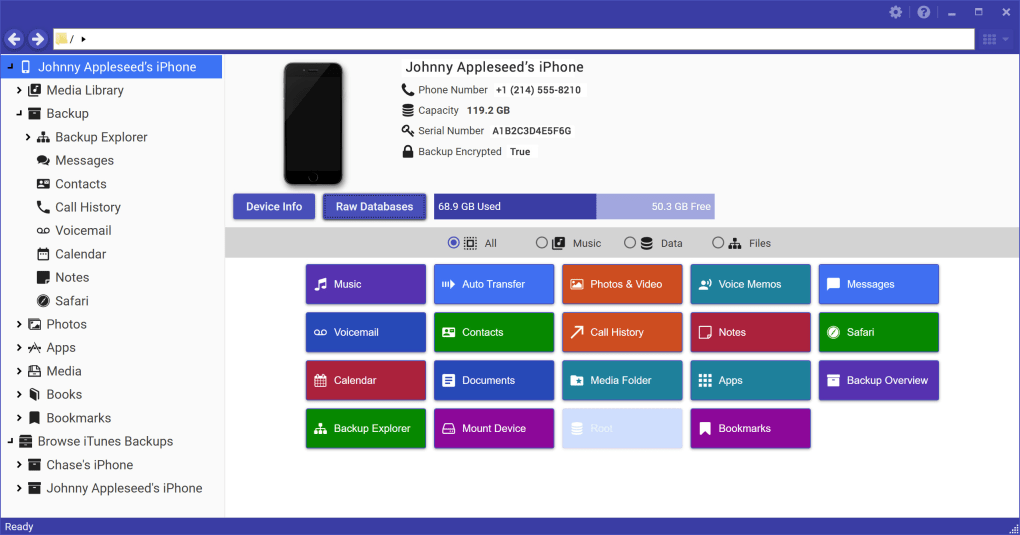
Text Message and Call History Management: iExplorer goes beyond music transfer, offering comprehensive management of your iPhone’s text message and call history. Users can effortlessly view, export, and archive their iMessage, SMS, and other messaging application histories, including images and attachments. This functionality is invaluable for preserving important conversations and retrieving lost data. Similarly, iExplorer allows users to export and save call logs, including voicemail messages, to their computer for easy access and archiving.
Contact, Calendar, and Note Management: iExplorer’s capabilities extend to other crucial data points within your iPhone’s ecosystem. Users can export their address book contacts, calendar events, reminders, and notes, providing a comprehensive backup of essential personal information. This function ensures data preservation and portability, allowing for easy restoration or transfer to another device.
Seamless Device Mounting and File Access
iExplorer’s functionality extends beyond mere file transfers; it offers a unique disk mounting feature, transforming your iOS device into a readily accessible USB flash drive. This feature allows you to access your iPhone’s photos and other files directly through Windows Explorer, eliminating the need for repeated file transfers.
Once your iPhone is connected to your PC and iExplorer is launched, navigating to the Device Overview and selecting “Mount as Disk” from the right-click menu instantly reveals your device’s file system. This enables you to browse and access files and folders within your iPhone’s file structure, just like any other external drive, without the need for jailbreaking. However, it is crucial to note that the successful use of this function requires iTunes to be installed on the computer.
This feature provides a significantly more streamlined approach to accessing and managing files on your iOS device, surpassing the limitations of Apple’s file management system and mirroring the convenience of accessing files on Android devices.
Comprehensive iOS Device Backup and Management
iExplorer serves as a robust backup solution for your iOS device, allowing for the complete backup of your device’s data to your computer. This comprehensive backup ensures data security and peace of mind, enabling users to restore their data in case of device loss, damage, or software issues.
The software’s user-friendly interface makes navigating and managing various aspects of your iPhone, iPod, or iPad incredibly straightforward. Despite its intuitive design, users should be aware that some minor drawbacks exist. Occasional crashes and intrusive pop-up ads have been reported, potentially disrupting the user experience. However, for many users, the benefits of streamlined file management and comprehensive backup capabilities outweigh these minor inconveniences.
iExplorer: Advantages and Disadvantages
Advantages:
- Easy File Transfer: iExplorer simplifies the transfer of various file types, including music, photos, videos, text messages, and more.
- iOS Device Mounting: The ability to mount your iPhone as a disk drive provides convenient file access directly through Windows Explorer.
- Comprehensive Backup: The software offers a complete backup solution for your iOS device, safeguarding your data.
- Intuitive Interface: iExplorer boasts a user-friendly interface, making navigation and management simple for users of all technical skill levels.
- Support for Multiple Data Types: It handles a wide range of data, including music, photos, videos, messages, contacts, calendar events, and notes.
Disadvantages:
- Pop-up Ads: The presence of frequent pop-up ads can be disruptive and annoying for some users.
- Occasional Crashes: The software is known to experience occasional crashes, potentially leading to data loss or workflow interruptions.
- iTunes Dependency (for Disk Mounting): The disk-mounting feature requires iTunes to be installed on the PC, potentially limiting its use for users who prefer not to use iTunes.
- Windows-Only: The software is currently only available for Windows operating systems, excluding Mac users.
Alternatives to iExplorer
While iExplorer offers a compelling solution for managing iOS devices, several alternatives exist, each with its own set of features and limitations. These alternatives cater to different needs and preferences, providing users with a range of options to choose from. Some notable alternatives include:
- iFunBox: A free file manager for iPhone and iPod Touch, offering basic file transfer and management capabilities. However, it lacks some of iExplorer’s advanced features like disk mounting.
- iPhone Explorer: Another free option that allows browsing and modifying the iOS device file tree, but with a more limited feature set compared to iExplorer.
- iPhoneBrowser: This free tool allows the use of an iPhone or iPod Touch as an external hard drive. Its primary focus is file access, with less emphasis on other management functions.
- AnyTrans: A commercial alternative that offers more advanced features, including syncing and data transfer across various devices. However, it comes with a price tag.
- Macgo Free iPhone Explorer: A free alternative with some of the capabilities of iExplorer. It offers a mix of features, but might not be as comprehensive.
- 3uTools: This free tool offers various functionalities, including data management and backup solutions for iOS devices, providing a multi-faceted approach to iOS management.
The choice of the best alternative will heavily depend on individual needs and preferences. While iExplorer stands out for its comprehensive feature set and user-friendly interface, users should consider the alternatives based on their specific requirements and budget.
Conclusion
iExplorer provides a powerful and generally user-friendly solution for managing your iPhone, iPod, or iPad on a Windows PC. Its ability to seamlessly transfer files, mount your device as a drive, and create comprehensive backups makes it a valuable tool for many iOS users. However, the presence of pop-up ads and occasional crashes are drawbacks to consider. Ultimately, the decision of whether or not to use iExplorer depends on weighing its benefits against its limitations and comparing it to available alternatives. For users prioritizing a balance of features, ease of use, and comprehensive data management, iExplorer remains a strong contender.
File Information
- License: “Trial version”
- Latest update: “May 24, 2023”
- Platform: “Windows”
- OS: “Windows 8”
- Language: “English”
- Downloads: “215.5K”
- Size: “553.06 KB”


