
In the vast and ever-evolving landscape of digital media, managing and manipulating images is a fundamental necessity for individuals and businesses alike. From preparing photographs for online portfolios to optimizing graphics for web deployment, the ability to quickly and efficiently convert, resize, and modify image files is paramount. This is where tools like Image Converter One step in, offering a streamlined solution to common image processing challenges. Developed by Ashongsoft, Image Converter One is a lightweight, free utility designed specifically for Windows users, providing a rapid and straightforward means to adapt photographs to various formats, sizes, and orientations.
At its core, Image Converter One is an indispensable asset for anyone dealing with digital images. It simplifies complex tasks that often require specialized knowledge or expensive software. Whether you’re a casual user looking to prepare photos for sharing with family, a blogger optimizing images for website performance, or a small business owner aiming to brand visual content, this application offers a suite of essential functionalities. Its design prioritizes ease of use and efficiency, ensuring that even users with minimal technical expertise can achieve professional-looking results without hassle.
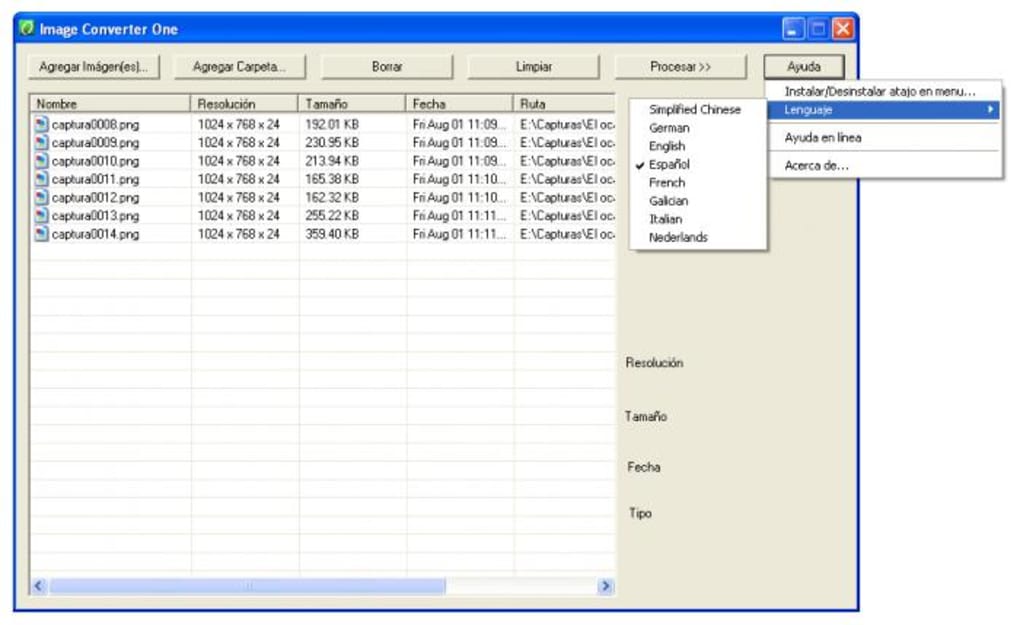
One of the standout features of Image Converter One is its capacity for batch processing. This means users aren’t limited to converting or modifying one image at a time; they can import an entire folder of photographs and apply the desired changes to all of them simultaneously. This functionality alone can save countless hours, transforming what could be a tedious, repetitive task into a quick, automated process. The program also boasts compatibility with a variety of image formats, ensuring flexibility regardless of the source or destination of your images. Users can easily choose from a list of available formats, making it simple to tailor images for specific platforms or purposes.
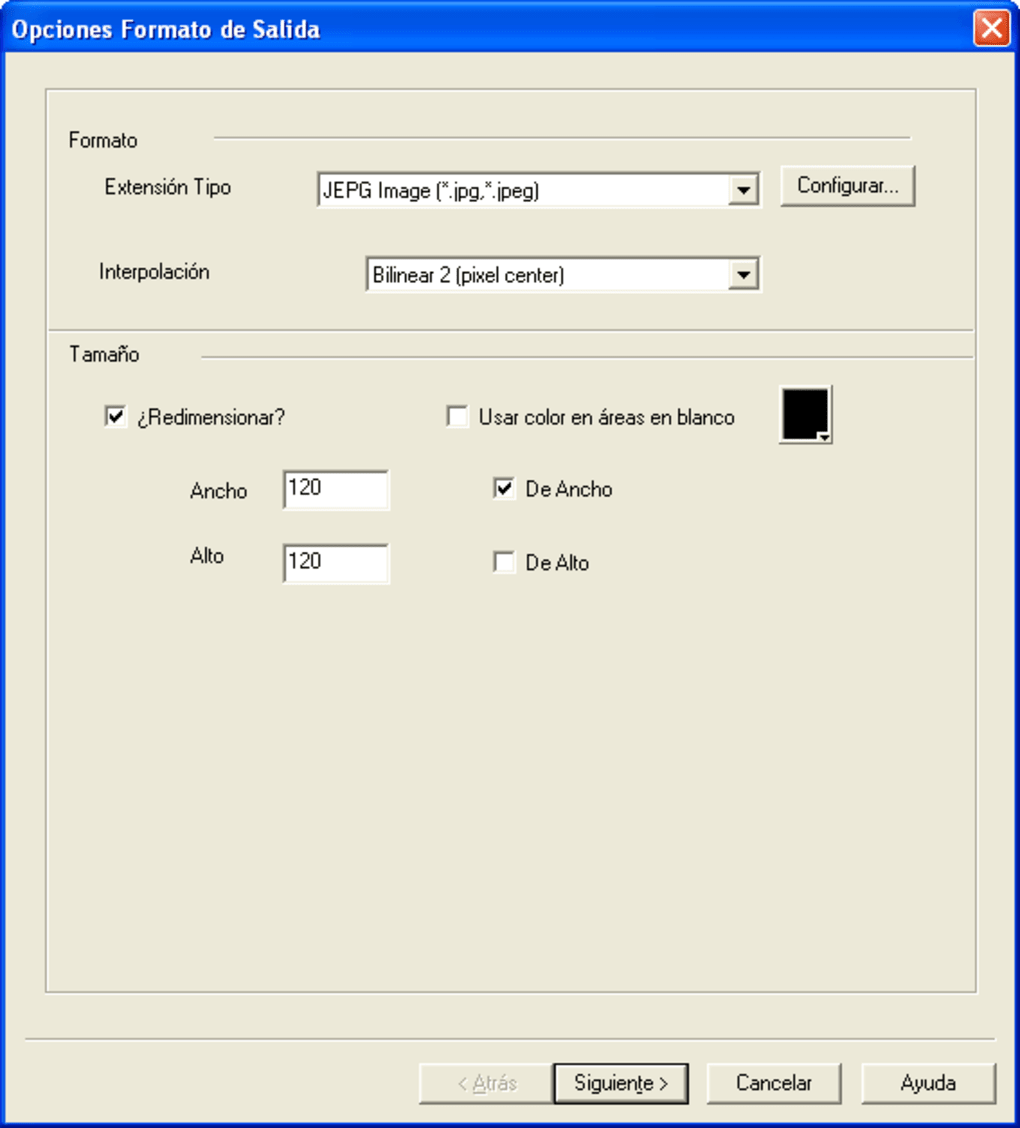
Beyond mere format conversion, Image Converter One empowers users with precise control over image dimensions. You can adjust the height or width of your images while crucially respecting their original proportions. This intelligent resizing prevents distortion, preserving the visual integrity of your photographs even as you adapt them to new specifications. This is particularly vital for web design, where specific image dimensions are often required to maintain layout consistency and load times, or for printing, where images must fit predefined paper sizes.
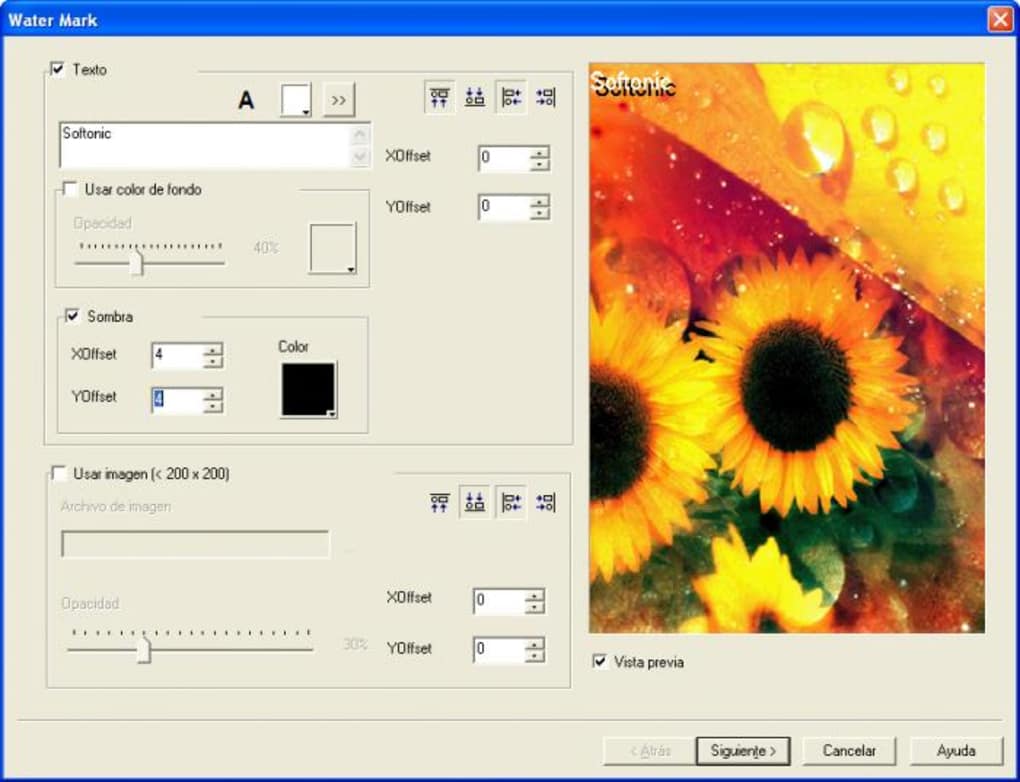
The utility further extends its capabilities with two additional, equally valuable functions. Firstly, it allows for the rotation of crooked or improperly oriented photographs, straightening them with a simple click. This is a common requirement, especially with photos taken quickly or from unusual angles. Secondly, Image Converter One includes a powerful, customizable watermarking feature. Users can choose to brand their images with either a personalized text overlay or a custom image watermark. This is an essential tool for copyright protection, branding, or simply adding identification to a collection of photos, giving creators a simple way to assert ownership and professionalism.
Despite its powerful features, Image Converter One remains remarkably user-friendly. The interface is intuitive, guiding users through a simple, step-by-step process: add images or a folder, select the desired operations (format, size, rotation, watermark), and execute the conversion. This straightforward approach removes the barrier to entry often associated with image editing software, making advanced capabilities accessible to everyone. First released in 2011, and despite its age, its core functionalities have stood the test of time, providing a stable and reliable solution for basic image transformation needs. Its lean footprint of just 924.88 KB means it’s incredibly light on system resources, installing quickly and running smoothly even on older Windows machines.
Why Image Converter One Stands Out in Image Utilities
In a crowded market of digital tools, Image Converter One carves out a significant niche for itself by focusing on essential functionalities with an emphasis on speed, simplicity, and accessibility. While many advanced image editors offer a myriad of features, they often come with steep learning curves, high price tags, and resource-intensive operations. Image Converter One, conversely, is built on the principle of efficiency, making it a standout choice for users who prioritize quick, no-fuss solutions for their everyday image conversion and manipulation needs. It aligns perfectly with the category of “Utilidades” or utilities, which are designed to perform specific tasks efficiently and reliably.
One of the primary reasons Image Converter One maintains its relevance, even years after its initial release, is its remarkable processing speed. User feedback consistently highlights its ability to handle “lotes de imágenes” (batches of images) swiftly. For anyone working with a large volume of photographs, whether for a website update, a presentation, or a photo album, the difference between converting images one by one and processing them in a batch can mean hours of saved time. This speed is not just about raw computational power; it’s also about the streamlined workflow that the application provides, minimizing clicks and cognitive load. The “Proceso rápido con lotes de imágenes” (fast batch processing) is frequently lauded in reviews, underscoring its practical utility in real-world scenarios.
Furthermore, its status as a “Gratuito” (free) program is a significant advantage. In an era where subscription models and costly licenses are becoming the norm for quality software, Image Converter One offers robust functionality without any financial barrier. This makes it an ideal choice for students, hobbyists, small businesses with limited budgets, or anyone who simply needs reliable image conversion without investing in a full-suite graphics editor. The fact that it delivers such performance and features at no cost is a testament to its value proposition. Users appreciate this, often citing it as a major “Pro,” as evidenced by comments like, “Por el momento no le encuentro, ni le encontrare contras.es un programa gratuito, trabaja bien.” (For now, I don’t find, nor will I find, cons. It’s a free program, it works well.)
The user-friendly interface is another critical factor contributing to its standing as a superior utility. The approach of “puedes añadir una imagen o una carpeta entera, y escoger entre la lista de formatos disponibles” (you can add an image or an entire folder, and choose from the list of available formats) encapsulates its straightforward design. There’s no need to navigate through complex menus or understand arcane settings. The process is clear and intuitive, making it accessible to a wide audience regardless of their technical proficiency. This simplicity is vital for a utility tool, as its purpose is to facilitate tasks, not complicate them.
While Image Converter One explicitly states its “Contras” (Cons) as “No incluye funciones de retoque de brillo o contraste” (Does not include brightness or contrast retouching functions), this limitation actually reinforces its identity as a focused utility. It doesn’t attempt to be a comprehensive photo editor; instead, it excels at its defined set of tasks. For users who require advanced editing features, they would typically turn to dedicated software like Adobe Photoshop or GIMP. Image Converter One fills the gap for those essential pre-processing steps – formatting, resizing, rotating, and watermarking – that often precede or complement more intensive creative work. Its strength lies in its specialization and execution of these core functions. This clear scope helps users understand exactly what the tool offers and why it’s a valuable addition to their digital toolkit.
Exploring the Broader Landscape of Multimedia and Photography Tools
Image Converter One, while a specialized utility, plays an integral role within the broader ecosystems of “Multimedia” and “Fotografía” tools. In today’s digital age, images are not static entities; they are dynamic assets that flow between various platforms, devices, and applications. From professional photographers sharing high-resolution RAW files to social media enthusiasts uploading quick snaps, the journey of an image often involves multiple transformations to suit different contexts. Image Converter One facilitates these transitions, acting as a crucial bridge in many digital workflows.
Within “Fotografía,” image conversion and resizing are often among the very first steps taken after a photo is captured or edited. High-resolution cameras produce large files that are unsuitable for immediate web upload or email attachments due to their size. Photographers frequently need to downscale images, change their format (e.g., from TIFF to JPEG for web, or from a proprietary camera format to a widely compatible one), or add watermarks for copyright. Image Converter One directly addresses these common needs, making it a foundational tool even for those who use sophisticated editing software. It handles the practical, utilitarian aspects of preparing images for dissemination, allowing photographers to focus on the creative aspects of their work.
Similarly, in the realm of “Multimedia,” images are components of larger projects, such as video productions, presentations, or interactive applications. For instance, when creating a video, still images might need to be resized to fit specific aspect ratios or converted to formats compatible with video editing software. For presentations, images must be optimized for display size and file size to ensure smooth transitions and quick loading. Image Converter One’s batch processing and precise resizing capabilities become invaluable here, ensuring consistency and efficiency across numerous visual elements within a multimedia project. The ability to add consistent watermarks also contributes to brand identity across various multimedia assets.
The application’s focus on basic yet crucial transformations means it complements, rather than competes with, more advanced graphics software. Think of it as a workshop’s essential utility knife; it might not carve intricate designs, but it’s indispensable for cutting, trimming, and shaping materials for the main project. For instance, a graphic designer might use Adobe Photoshop for intricate retouching and creative effects, but then turn to Image Converter One to batch-resize a collection of final images for a client’s website, ensuring they meet specific dimensions and file size requirements without having to open and re-save each one individually in Photoshop.
The “Apps alternativas” (alternative apps) section on PhanMemFree.org often features robust tools like Adobe Photoshop CC or Microsoft Visio, highlighting the diverse needs within photography and design. Image Converter One doesn’t aim to replace these titans; instead, it offers a specific set of services that are frequently needed even by users of such powerful tools. Its simplicity and dedicated functionality ensure that it remains a relevant choice for those particular tasks, without the overhead and complexity of a full-fledged creative suite. It bridges the gap between raw digital assets and their final application, making the entire process smoother and more efficient.
Compatibility, Accessibility, and the Digital Ecosystem
The longevity and continued utility of software often hinge on its compatibility, accessibility, and how well it integrates into the broader digital ecosystem. Image Converter One, despite being a product first introduced in 2011, showcases these qualities through its targeted platform support, multilingual capabilities, and lightweight design. These attributes have contributed to its broad appeal and sustained presence within the “Windows” software landscape, facilitating its adoption by a diverse global user base.
Primarily designed for “Windows” operating systems, Image Converter One ensures reliable performance and seamless integration with the most widely used personal computing environment. Specifically, the software is listed as compatible with “Windows 2000” and later versions, indicating a robust and backward-compatible architecture that has served users across multiple generations of Windows. This dedicated focus means that users can expect stability and optimal performance on their Windows machines, leveraging the inherent advantages of a native application rather than a web-based or cross-platform solution that might suffer from compatibility compromises. For the vast majority of PC users, this Windows-centric approach ensures a familiar and dependable experience.
Beyond its platform compatibility, Image Converter One excels in “Idiomas disponibles” (available languages), offering a truly global reach. The program supports “Alemán,” “Inglés,” “Español,” “Francés,” “Italiano,” “Neerlandés,” and “Chino,” among others. This multilingual support is a critical component of accessibility, allowing users from different linguistic backgrounds to navigate the application in their native tongue. This thoughtfulness in design significantly lowers the barrier to entry, making the powerful features of Image Converter One available to a wider international audience. The ability to switch languages directly from the “Menú Principal” on PhanMemFree.org further emphasizes this commitment to user convenience and global accessibility.
Another key aspect of its integration into the digital ecosystem is its incredibly small “Tamaño” (size) of only 924.88 KB. In an age where many applications demand gigabytes of storage and significant system resources, Image Converter One stands out as a remarkably lightweight solution. This minimal footprint offers several practical advantages:
- Quick Downloads: The small file size means the application can be downloaded and installed rapidly, even on slower internet connections.
- Resource Efficiency: It consumes minimal RAM and CPU, ensuring that it runs smoothly without bogging down the system, making it suitable for older computers or environments where resources are constrained.
- Portability: Its small size makes it easy to store on a USB drive or cloud storage, allowing users to carry their image conversion tool wherever they go.
The “Descargas 150.9K” (150.9K Downloads) figure underscores its historical popularity and widespread adoption, demonstrating its effectiveness and appeal to a large user base over time. While the “Descargas último mes 20” (20 downloads last month) might suggest a decrease in recent popularity, it’s essential to consider the software’s age. For a tool released in 2011, maintaining any consistent download activity speaks to its continued relevance for a specific niche of users who still find its core, stable functionality valuable. The positive “Opinión usuarios” (user opinions) further solidify its reputation. Reviewers frequently praise its speed, batch processing capabilities, custom watermarks, and ease of use, often noting that “es rápido al convertir imágenes, tiene mucha variedad de formatos, las marcas de agua son personalizables” (it’s fast at converting images, has a wide variety of formats, watermarks are customizable). Such feedback validates its design philosophy and practical utility.
In conclusion, Image Converter One is more than just a simple utility; it is a testament to effective software design that prioritizes core functionality, user experience, and accessibility. Its consistent performance on Windows, extensive language support, and minimal system requirements position it as a reliable and enduring tool within the ever-expanding digital landscape. For anyone seeking an efficient, free, and straightforward solution for image format conversion, resizing, rotation, and watermarking, Image Converter One remains a highly recommended option from PhanMemFree.org.


