
In the sprawling digital landscape of software applications, where feature creep often leads to bloated interfaces and sluggish performance, Image Eye emerges as a refreshing anomaly. It is a highly specialized image viewer, meticulously engineered for one singular, unwavering purpose: to display images with unmatched speed, clarity, and an absolute absence of extraneous distractions. Developed by Fmjsoft, Image Eye represents a deliberate rebellion against the prevailing trend of all-in-one solutions, instead offering a pure, unadulterated viewing experience that prioritizes the visual content above all else. This application isn’t about editing masterpieces or organizing vast libraries; it’s about seeing your images as quickly and as practically as possible, making it an indispensable tool for anyone who values efficiency and focus in their digital workflow.
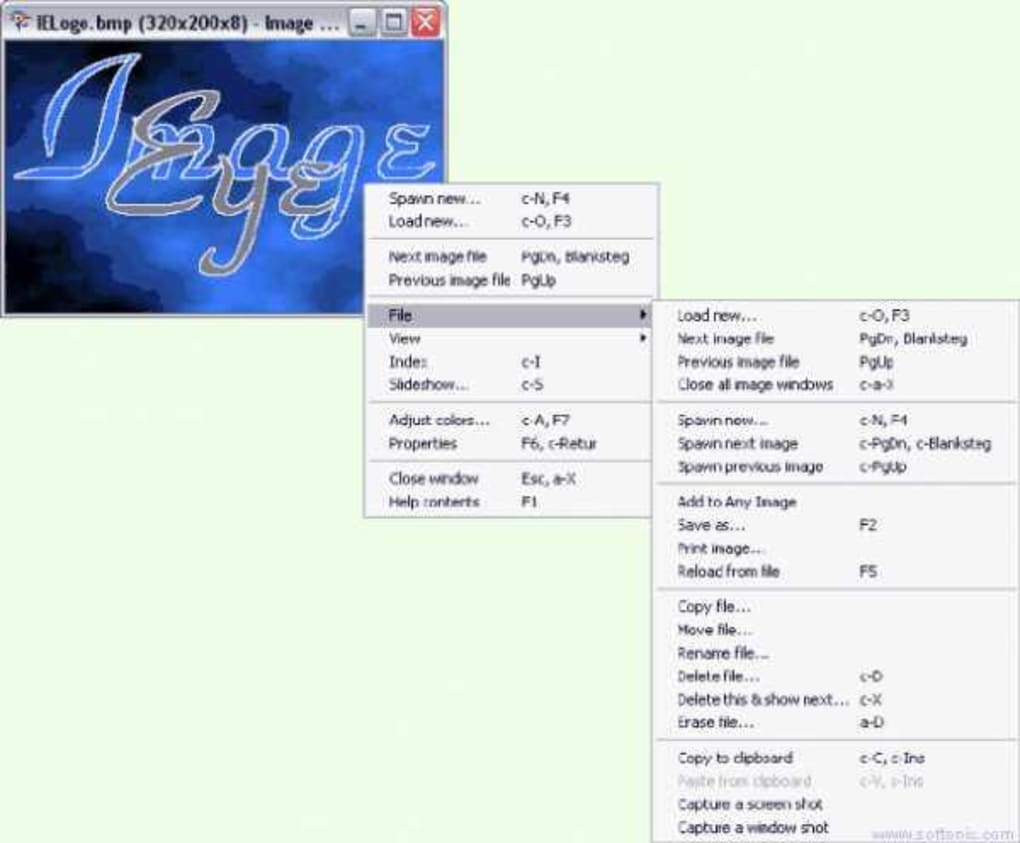
In an era where every piece of software seems to aspire to be a comprehensive suite, Image Eye maintains a steadfast commitment to its core function. It strips away the complex menus, cluttered toolbars, and superfluous features that often plague modern image applications, presenting users with a remarkably sparse yet profoundly powerful interface. This minimalist philosophy is not merely an aesthetic choice; it’s a functional design principle aimed at maximizing screen real estate for the image itself, thereby minimizing cognitive load and fostering a more direct, immersive interaction with visual content. For professionals and casual users alike who regularly navigate through hundreds or thousands of images—be it for selection, review, or simple enjoyment—Image Eye offers a fluid, lag-free experience that traditional, heavier software often struggles to provide. As we delve deeper, this article will explore the unique philosophy, advanced features, and compelling advantages that firmly establish Image Eye as a premier choice for dedicated image viewing.
The Philosophy of Pure Viewing: Embracing Uncompromising Minimalism
The foundational principle of Image Eye is an uncompromising dedication to minimalism. This isn’t just about a clean aesthetic; it’s a profound statement about user experience and software design. While many modern applications strive to offer a vast array of functionalities—from advanced editing tools and sophisticated organizational systems to cloud synchronization and social media integration—Image Eye consciously sheds every element deemed non-essential to the act of viewing an image. Its user interface (UI) is a radical departure from convention, deliberately devoid of traditional menus, obtrusive toolbars, or any other graphical clutter that might divert attention from the image itself.
This stark design choice is a deliberate and ingenious functional decision. By removing the layers of UI elements that typically surround an image, Image Eye maximizes the visible area, allowing the user to engage directly and intimately with their visual content. Imagine launching an application and seeing nothing but your photograph or graphic, unadorned by surrounding frames, button arrays, or drop-down lists that silently demand interaction. Image Eye achieves this serene focus by making virtually all of its rich functionality accessible through intelligent keyboard shortcuts and intuitive mouse gestures. For example, the option to make the window title bar disappear when it’s not needed creates an almost entirely boundless canvas for your pictures. This deliberate “sparseness” is, paradoxically, a source of immense power; it forces the user’s attention squarely onto the visual, cultivating an undistracted and deeply focused viewing environment.
This minimalist philosophy extends beyond the visual interface into the very operational design of the application. Image Eye makes it clear that it “does not attempt to be any half-baked semi-editor or file format converter.” This declaration is crucial to understanding its identity. It is not trying to compete with the robust editing suites or the versatile converters in the market. Instead, it defines its role with precision: to excel, unequivocally, at image viewing. This singular focus ensures that the application remains incredibly lightweight, astonishingly responsive, and perpetually stable. The absence of extraneous features means no unnecessary code, no complex dependencies, and no resource-intensive background processes that could introduce lag or instability. For users whose primary daily need is to rapidly browse, curate, or simply appreciate visual content, this commitment to single-purpose excellence translates directly into a faster, more fluid, and ultimately more enjoyable workflow. This intentional avoidance of feature creep is, perhaps, Image Eye’s greatest strength, allowing it to deliver an unparalleled experience within its defined domain.
Unpacking Image Eye’s Powerful and Understated Features
Beneath its seemingly spartan surface, Image Eye is fortified with a robust and intelligently engineered set of features. These capabilities are not about adding complexity but rather about meticulously enhancing the core viewing experience, ensuring that every function contributes to speed, quality, and user comfort.
Unrivaled Speed and Image Quality
One of Image Eye’s most frequently lauded attributes is its blistering speed. The application is built upon “small, very fast, highly tuned code, with MMX support.” For those unfamiliar, MMX (MultiMedia eXtensions) refers to a set of processor instructions developed by Intel specifically to accelerate common multimedia tasks, including the complex calculations involved in image processing. By leveraging such low-level hardware optimizations, Image Eye ensures that images load almost instantaneously, even high-resolution files, and transitions between them are remarkably seamless. This proactive and optimized performance significantly improves user workflow, particularly for professionals who need to sift through large datasets of images under tight deadlines.
Moreover, this optimized performance isn’t constrained by specific hardware or display configurations. Image Eye boasts an “optimized display in all video modes,” which guarantees “no compromises in image quality.” Whether you’re viewing highly detailed photographs on a professional-grade 4K monitor, examining technical diagrams on a standard LCD, or quickly browsing snapshots on a laptop, Image Eye renders every pixel with crystal-clear fidelity. This means what you see is a true, unblemished representation of your original file, entirely free from visual artifacts, blurring, or degradation often introduced by less sophisticated viewers. This simultaneous commitment to both lightning-fast speed and uncompromised image quality is a testament to Image Eye’s sophisticated engineering and a major boon for its users.
Comprehensive Format Support
Despite its minimalist UI, Image Eye is surprisingly versatile when it comes to file compatibility. It adeptly “supports all of the more common image file formats (JPG, JP2, BMP, GIF, PNG and many more).” This broad and inclusive support is a critical feature for any serious image viewer. It means that users can confidently open almost any image file they encounter without the hassle of needing external conversion tools or having to switch between different applications. This seamless compatibility aligns perfectly with Image Eye’s overarching goal of providing an uninterrupted and frustration-free viewing experience, allowing users to focus solely on the images themselves, regardless of their native format.
High-Quality Non-Destructive Image Adjustments
Image Eye extends its utility beyond mere passive viewing by incorporating essential image manipulation capabilities, but with a crucial and thoughtful distinction: all adjustments are entirely “non-destructive.” Users are empowered to “rotate, mirror, zoom, pan, and adjust contrast, brightness, sharpness, hue, saturation, gamma, and more.” The genius of this system lies in the fact that “Image adjustments can be saved non-destructively and automatically reapplied when you next open the image.” This means your original image file remains absolutely untouched and unaltered. Instead, the adjustments are stored separately, typically within metadata or a small “sidecar” file associated with the image. This allows users to experiment freely with various visual tweaks—perhaps brightening a dark photo or adjusting the hue for a specific aesthetic—without any fear of permanently modifying or corrupting the source file. This feature is invaluable for photographers, designers, and visual content creators who frequently need to quickly preview how an image might appear with certain modifications, compare different looks, or prepare images for specific contexts without committing to a permanent edit. It offers a powerful layer of flexibility and safety, preserving the integrity of the original data while providing immediate visual feedback.
Intelligent Preloading and Caching
To further refine the browsing experience, Image Eye incorporates “smart background preloading and caching of images.” This feature acts as an invisible assistant, anticipating your next move. As you view one image, the application intelligently preloads the subsequent images in the folder sequence into memory or a temporary cache. This proactive loading virtually eliminates any perceptible lag or delay when you navigate forward or backward, creating an incredibly smooth and continuous flow, especially crucial when sifting through vast directories of photographs. This predictive capability contributes significantly to the sensation of speed and responsiveness that defines Image Eye. Furthermore, its “index feature with fast image thumbnail creation (disk caching optional)” also contributes to this efficiency. Once thumbnails are generated and cached, they load instantly on subsequent visits, streamlining the process of quickly locating specific images within extensive collections and saving valuable time and system resources that would otherwise be spent regenerating previews.
Enhancing User Experience and Workflow Through Thoughtful Design
Image Eye’s design principles are not confined to its feature set; they profoundly influence the overall user experience and streamline workflow. Its emphasis on practical “tricks” and unique display options positions it as a highly adaptable tool, capable of meeting diverse viewing needs across various scenarios.
The Power of Hidden Controls and Intuitive Interaction
The intentional absence of visible menus and toolbars in Image Eye is brilliantly compensated by a suite of “handy and practical user interface ’tricks’.” These powerful shortcuts, often clever combinations of Ctrl, Alt, and other keys, provide rapid, direct control over the application’s functionalities. For instance, the simple yet incredibly efficient command of “hitting Ctrl-Alt-X to close all image windows” allows users to instantly clear their workspace, a boon for productivity. While there might be a minor initial learning curve to familiarize oneself with these keybindings, users quickly find that these shortcuts become second nature. This mastery of keyboard commands leads to an interaction model that is far faster and more efficient than constantly navigating through graphical menus, which can be particularly cumbersome when reviewing large volumes of images. This design philosophy also perfectly aligns with the principle of “nothing unnecessarily taking up space on your desktop,” ensuring that every precious pixel of screen real estate is dedicated exclusively to the visual content, thereby enhancing focus and reducing visual clutter.
Flexible Display Modes and Management
Image Eye offers a range of highly flexible display options, meticulously crafted to suit different user requirements and viewing contexts. For an utterly immersive experience that eliminates all operating system distractions, it provides a “full screen display when the window is maximized.” This mode is ideal for detailed examination or for simply appreciating the aesthetic quality of an image without any digital interference. Beyond this, Image Eye includes several unique options like “‘Run maximized’, ‘auto shrink’, ‘auto size’, ‘close all’.” These features grant users granular control over how image windows behave and adapt to their content.
- ‘Run maximized’: Ensures that the application always opens in a full-screen or maximized state, perfect for dedicated image review sessions.
- ‘Auto shrink’: Can automatically resize images to fit perfectly within the current window size, preventing scrolling for oversized images.
- ‘Auto size’: Conversely, might adjust the window to the exact dimensions of the image, eliminating unnecessary borders and ensuring the image is displayed at its native resolution whenever possible.
- ‘Close all’: As mentioned, a quick shortcut to instantly clear multiple open image windows.
These thoughtful options collectively demonstrate a deep consideration for various viewing preferences and workflows, from quick, casual browsing to meticulous, detailed examination, making Image Eye an incredibly versatile tool.
Index Feature with Fast Thumbnail Creation
For individuals managing extensive image collections, the “Index feature with fast image thumbnail creation (disk caching optional)” proves to be a significant asset. This functionality allows users to rapidly generate visual indexes of their image folders, presenting a clear overview that makes it incredibly easy to identify and jump to specific images within vast directories. The optional disk caching further enhances this feature; once thumbnails are generated and saved, they load instantaneously on subsequent visits, eliminating repetitive processing and saving valuable time and system resources. This feature cleverly bridges the gap between a simple viewer and a light organizational tool, providing essential navigation capabilities without venturing into the complexities of a full-fledged Digital Asset Management (DAM) system.
Simple Slide Show Scripting Language
Image Eye also includes a “simple slide show scripting language,” a feature that adds an unexpected layer of utility for presentations or sharing curated photo collections. This allows users to “roll your own presentations,” offering a level of customization rarely found in basic image viewers. Instead of being confined to predefined transitions and generic sequences, users can script their slideshows, precisely controlling timing, order, and even basic visual effects. This makes Image Eye a surprisingly capable and flexible tool for creating quick, custom visual narratives, perfect for showcasing work to clients, sharing memories with family, or preparing instructional content, all without the need for dedicated, often expensive, presentation software. It powerfully exemplifies the application’s core philosophy: provide simple, elegant tools that yield powerful visual output.
Image Eye in Context: A Niche of Uncompromised Viewing
In today’s saturated digital ecosystem, where powerful image editors and comprehensive media managers abound, Image Eye deliberately carves out a very distinct and refined niche. Its fundamental value proposition is not about accumulating the most features, but about achieving unparalleled perfection in the most basic, yet often overlooked, function: viewing images.
Contrasting with Feature-Rich Alternatives
Consider the mainstream alternatives available. Applications like Adobe Photoshop or even free, robust editors such as PhotoScape are veritable Swiss Army knives, laden with layers, filters, advanced adjustments, batch processing capabilities, and more. While these tools are indispensable for image creation and extensive modification, they often come with significant overhead: slow launch times, substantial resource consumption, and interfaces fundamentally designed for complex manipulation rather than swift, unhindered viewing. Even popular, lightweight viewers like IrfanView, while fast and versatile, tend to offer more menus and options, sometimes blurring the lines into light editing or conversion, thus deviating from the ‘pure’ viewing experience that Image Eye champion.
Image Eye stands in stark contrast to these multi-faceted solutions. It explicitly “does not attempt to be any half-baked semi-editor or file format converter.” This declaration is the bedrock of its identity. It has no aspirations to compete with Photoshop’s intricate editing prowess or a dedicated file converter’s expansive format handling. Instead, its ambition is to be the absolute best at its singular, defined task: displaying images. This unwavering focus enables it to remain extraordinarily lean, impeccably stable, and astonishingly fast—qualities that often diminish as software applications incrementally accumulate more features, leading to bloat and reduced performance. Image Eye epitomizes the principle of “master of one” rather than “jack of all trades,” delivering a superior experience within its chosen domain.
The Ideal User Profile
Who, then, stands to benefit most from Image Eye’s unique approach? Its design makes it particularly appealing to several distinct user profiles:
- Photographers and Designers: These professionals often need to quickly review large batches of images, make rapid selections of potential candidates, or present visual concepts to clients without the distraction of complex editing tools. The non-destructive adjustments are particularly invaluable here, allowing for quick previews of edits without altering the source files.
- Casual Users: Anyone who simply wants to browse their personal photo collections—be it family albums, travel snapshots, or digital art—without being confronted by complicated interfaces, frustratingly slow loading times, or unnecessary prompts. Image Eye makes image viewing a simple, joyful, and effortless activity.
- Professionals Requiring Speed: Fields such as forensics, media analysis, medical imaging review, or any profession where rapid image assessment and navigation are critical will find Image Eye’s speed and efficiency to be a significant advantage. It allows for quick processing of visual information, leading to enhanced productivity.
- Minimalists and Efficiency Enthusiasts: Individuals who appreciate clean design, value tools that excel at one specific job, and seek to optimize their digital workspace will find Image Eye perfectly aligns with their philosophy. The efficiency gained through its speed and minimalist design can dramatically improve workflow and reduce digital fatigue.
For these users, the tangible benefits of Image Eye’s lightning-fast speed and uncluttered design translate directly into improved workflow efficiency and a notable reduction in frustration. The quick, intuitive keyboard shortcuts become a natural extension of their thought processes, enabling seamless and fluid navigation through vast amounts of visual content.
Technical Details and Availability
Image Eye, developed by Fmjsoft, is a freeware application, making its advanced capabilities accessible to everyone without cost. It is exclusively available for Windows operating systems, with robust compatibility extending from Windows 7 through to the latest iterations. Its remarkably small footprint—a mere 1.68 MB download—and minimal system requirements mean that it is incredibly lightweight and can run smoothly and efficiently even on older or less powerful machines, ensuring broad accessibility. The application undergoes continuous maintenance and refinement, with its latest update on July 11, 2023, reflecting Fmjsoft’s commitment to ongoing support and improvement. While its primary language is English, Image Eye is also localized into numerous other languages, further broadening its accessibility and appeal to a global user base. The consistent download numbers reported on platforms like PhanMemFree (2.6K cumulative downloads, with 17 in the last month) underscore its steady user base and continued relevance within the utility software landscape. PhanMemFree.org ensures its availability to users worldwide, maintaining its status as a reliable and accessible solution.
Conclusion
Image Eye stands as a compelling testament to the power of focused design and the enduring appeal of simplicity. It represents a deliberate and highly successful return to the fundamental purpose of an image viewer: to simply, effectively, and beautifully present images to the user. Its rigorous commitment to minimalism, seamlessly combined with highly optimized code, intelligent features like non-destructive adjustments and smart background preloading, and an intuitive, shortcut-driven interface, sets it apart in a crowded market. Image Eye is not just another option; it is a specialized tool that profoundly understands its boundaries and meticulously perfects its craft within them.
For those who prioritize speed, clarity, and an uncluttered viewing experience above all else, Image Eye is not merely an alternative; it is often the definitive solution. It eloquently demonstrates that, in the realm of digital tools, sometimes less truly is more. In a world increasingly saturated with digital distractions and feature-heavy applications, Image Eye offers a focused, supremely efficient, and pure way to engage with your visual content. It provides an uncompromised viewing experience, making it an indispensable utility for anyone who values productivity, visual fidelity, and a refreshing sense of digital clarity.
File Information
- License: “Free”
- Latest update: “July 11, 2023”
- Platform: “Windows”
- OS: “Windows 7”
- Language: “English”
- Downloads: “2.6K”
- Size: “1.68 MB”


