
In the vast and ever-evolving landscape of digital media, the ability to transform static elements into engaging motion pictures has always held a particular fascination. From early flipbooks to sophisticated animation software, the desire to breathe life into still images drives innovation. ImageToAVI stands as a testament to this enduring need, a specialized utility designed to bridge the gap between individual photographs or graphical assets and the universally recognized AVI video format. As a free Windows software falling under the broader category of video software and more specifically, converters, ImageToAVI carved out its niche by offering a straightforward solution for a common creative requirement.
First introduced to the digital public in 2011, ImageToAVI quickly gained traction among users seeking a simple, no-frills method to compile image sequences into a playable video file. Its initial impact, reflected in a notable 39,671 downloads shortly after its release, underscored the demand for such a tool. Even years later, the software continued to see activity, registering dozens of downloads weekly, demonstrating its sustained relevance, particularly in regions like Brazil, the United States, and France where its utility resonated with a broad audience.
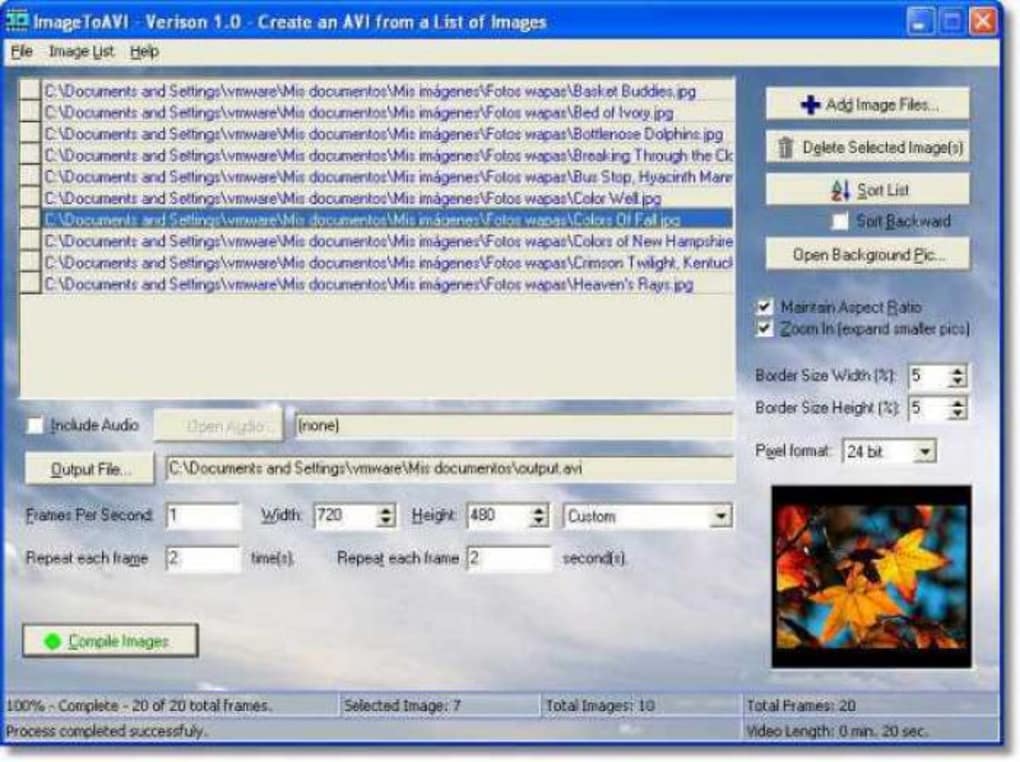
At its core, ImageToAVI is designed for simplicity. It eschews complex editing timelines and advanced video manipulation features in favor of a direct conversion process: take a series of images, specify their order and display duration, and output an AVI file. This focused approach made it an accessible tool for beginners and a quick solution for those with straightforward video creation needs. Its minimal system requirements and diminutive file size, clocking in at around 1.95 MB, ensured that it was a lightweight addition to any Windows system, requiring significantly less storage space than the average video editing suite.
The software’s compatibility with older operating systems, specifically Windows 98 and prior versions, alongside Windows ME (as noted in later listings), points to its origins in an era where software often needed to be lean and compatible across a wider range of hardware. While its primary language interface is English, the demand for such a utility was global, leading to listings and references in numerous other languages, facilitating its discovery and download by a diverse international user base. Over the years, the software saw minor updates, with version 1.3.0.0 being the most commonly cited iteration, developed by aswsoftware.
However, as with many legacy tools, ImageToAVI also faced limitations that became more apparent with the rapid advancements in video technology. A user review from 2018, succinctly asking “Why NO HD???!!!pls add…”, highlights a critical drawback: the absence of high-definition output. In a world increasingly dominated by crisp, high-resolution visuals, a tool limited to standard definition output, while perfectly adequate for its time, eventually found itself outpaced by modern expectations and the capabilities of newer software. Despite this, ImageToAVI remains a historical artifact in the digital toolkit, a functional reminder of the foundational technologies that underpin today’s sophisticated multimedia experiences.
Multimedia: The Digital Canvas
The concept of “multimedia” itself is vast, encompassing a diverse array of digital content formats and the tools used to create, edit, view, and interact with them. It refers to the use of multiple forms of media—text, audio, images, animation, and video—to convey information or entertainment. In the context of software, the Multimedia category on platforms like PhanMemFree.org is a bustling hub, reflecting the centrality of media in our digital lives. This category is not merely about consumption but also heavily about creation and conversion, where ImageToAVI finds its logical home.
Within the Multimedia umbrella, you’ll find subcategories that delineate specific functions:
- Audio: Tools for recording, editing, and playing sound.
- Burning: Software for writing data to optical discs (CDs, DVDs, Blu-rays).
- Graphic & Design: Applications for creating and manipulating visual elements, from simple images to complex digital art.
- Movies & TV: Players and managers for cinematic content.
- Music & Radio: Software for streaming, playing, and managing musical content.
- Photography: Tools for photo editing, organization, and manipulation.
- Streaming Videos: Platforms and clients for online video consumption.
- Video: The broad category that includes players, editors, and converters.
ImageToAVI’s position squarely within the “Video” subcategory, and more specifically “Converters,” is key to understanding its purpose. Video converters are indispensable tools in the digital workflow, serving to transform video or image data from one format to another. This necessity arises from the proliferation of different media formats, each optimized for specific purposes, platforms, or devices. A user might need to convert a video to a smaller file size for email, change its aspect ratio for a specific social media platform, or, as in the case of ImageToAVI, turn a collection of still images into a moving picture sequence.
The utility of a tool like ImageToAVI, even with its historical limitations, highlights a fundamental aspect of digital media production: the ability to repurpose and reformat content. A photographer might want to compile a series of portraits into a slideshow, an artist might create a stop-motion animation from individual frames, or a presenter might build an engaging visual sequence for a business report. In each scenario, the goal is to imbue static images with the narrative power of motion, and ImageToAVI provided a direct path to achieve this using the widely compatible AVI format.
Video Conversion: Bridging Formats
Video conversion is more than just changing a file extension; it involves re-encoding the digital data to conform to the specifications of a new format. This process can involve alterations to codecs (the algorithms for encoding and decoding video data), resolution, frame rate, bitrate, and even audio tracks. For ImageToAVI, the conversion process is a bit simpler: it takes a sequence of individual image files (e.g., JPG, PNG, BMP) and stitches them together, assigning a display duration to each, to form a continuous video stream.
The AVI (Audio Video Interleave) format, developed by Microsoft, was a pioneering multimedia container format. It allowed for simultaneous playback of audio and video streams, becoming a standard for desktop video playback and editing in the early days of digital video. Its widespread compatibility, especially across Windows systems, made it an excellent choice for a utility like ImageToAVI, ensuring that the output videos would be playable on virtually any Windows PC without additional codecs.
However, AVI also has its drawbacks. It’s an older format, generally less efficient in terms of compression compared to newer formats like MP4 or MKV, meaning AVI files can be larger for comparable quality. Furthermore, AVI doesn’t natively support some modern video features and often requires specific codecs to be installed for playback if the video stream within the AVI container uses less common compression methods. For ImageToAVI, its typical output would likely have used older, widely available codecs, contributing to its broad compatibility but also limiting its ability to achieve high compression rates or support high-definition resolutions.
The user’s lament about “no HD” output speaks volumes about the evolution of video conversion needs. As display technologies advanced, and screens moved from standard definition (SD) to high definition (HD) and beyond (Full HD, 4K), the demand for tools that could produce videos at these higher resolutions became paramount. While ImageToAVI was a marvel for its time, its design likely predates the widespread adoption of HD as a consumer standard, focusing instead on creating functional, universally playable videos from images within the technical constraints of its era. Modern video converters offer a plethora of output formats, resolution options, and advanced encoding settings, making them far more versatile for today’s content creators. Yet, ImageToAVI’s legacy lies in its straightforward fulfillment of a core conversion need, paving the way for more sophisticated tools.
Utilities & Tools: Enhancing Your Digital Workflow
Beyond the specialized domain of multimedia, there exists a broad category of software known as “Utilities & Tools.” This classification on platforms like PhanMemFree.org serves as a catch-all for applications designed to maintain, enhance, and optimize the functionality of a computer system or to assist with general computing tasks that don’t fit neatly into other specific categories. While ImageToAVI is primarily a multimedia converter, its functional simplicity and problem-solving nature also align closely with the ethos of a utility tool.
The “Utilities & Tools” category is incredibly diverse, encompassing applications that range from essential system maintenance to niche task automation. Some common subcategories include:
- Bar Code Scanning: Software for reading and generating barcodes.
- Clocks & Alarms: Simple time-keeping and reminder applications.
- Data Recovery: Programs designed to retrieve lost or deleted files.
- File Compression: Tools like WinZip or 7-Zip for reducing file sizes and archiving.
- File Managers: Alternatives or enhancements to operating system file explorers.
- Keyboards: Customization and utility tools for keyboard input.
- Measurement: Software for digital measurements and calculations.
- Printer & Fax: Tools for managing printing and faxing functionalities.
- Screen Capture: Applications for taking screenshots or recording screen activity.
ImageToAVI, in its straightforward mission to convert images to video, embodies the spirit of a utility tool: it solves a specific problem efficiently. It doesn’t aim to be a comprehensive creative suite but rather a single-purpose application that performs its designated task reliably. This focus on utility over extensive features made it valuable to users who needed a quick solution without the overhead of learning complex software. Its small footprint and free license further cemented its position as a practical utility.
In a broader sense, such single-purpose tools contribute significantly to productivity by allowing users to complete specific tasks without unnecessary complexity. Imagine a scenario where a user needs to quickly create a visual sequence for an internal presentation or a personal project. Instead of opening a heavy video editor that takes time to load and navigate, a lightweight utility like ImageToAVI could accomplish the task in minutes, directly translating to enhanced digital workflow efficiency.
Data Recovery and Management: Preserving Your Creations
While ImageToAVI doesn’t directly fall into the “Data Recovery” subcategory, the overarching theme of “Utilities & Tools” often includes applications focused on data preservation and management. This connection becomes relevant when considering the content that ImageToAVI processes: images, which are often precious digital assets. The creation of a video from these images can be seen as an act of transforming and preserving them in a new, dynamic format, making their presentation more engaging or their sharing more convenient.
In the digital age, managing and safeguarding one’s data is paramount. This includes not only raw files but also the creative output derived from them. When a user converts a series of images into an AVI video using ImageToAVI, they are, in a way, creating a new, consolidated asset. This new video file then becomes subject to the same data management considerations as any other important digital document. Users would need to consider:
- Backup strategies: Ensuring the original images and the newly created AVI video are backed up to prevent loss.
- Storage solutions: Deciding whether to store them locally, on external drives, or in cloud storage.
- Organization: Naming and structuring directories to easily locate the videos.
Furthermore, if the original images were somehow corrupted or lost, a data recovery utility might be employed to retrieve them, highlighting the symbiotic relationship between various tools in a user’s digital toolkit. Even if ImageToAVI itself doesn’t perform recovery, its role in creating a derivative work emphasizes the importance of the larger ecosystem of utilities that support and protect digital content. The goal of many utility programs, including those that manage files or facilitate conversion, is ultimately to empower users to manage their digital lives more effectively and to safeguard their valuable information, whether that information is a cherished photograph or a newly rendered video.
Security & Privacy: Navigating the Software Landscape
In the contemporary digital world, the twin concerns of “Security & Privacy” are non-negotiable, particularly when it comes to downloading and installing software. For any application listed on a platform like PhanMemFree.org, its security status is a crucial piece of information for users. While ImageToAVI is a free, single-purpose application from an independent developer, understanding the security implications, especially for older software, is vital.
The “Security & Privacy” category itself is extensive, covering a multitude of protective measures and tools:
- Access Control: Software that manages who can access specific resources or data.
- Ad Blockers: Tools to prevent unwanted advertisements from appearing online.
- Anti-Spam & Anti-Spy: Applications to filter unwanted emails and detect/remove spyware.
- Antivirus: Essential software to detect, prevent, and remove malicious software like viruses and malware.
- Encryption: Tools for encoding data to prevent unauthorized access.
- Firewalls: Software or hardware that monitors and controls incoming and outgoing network traffic.
- Keyloggers: (Often malicious, but some legitimate monitoring tools exist) Software that records keystrokes.
- Password Management: Tools for securely storing and generating strong passwords.
- VPN (Virtual Private Network): Services that create a secure, encrypted connection over a less secure network.
When a software listing mentions “Security Status” and provides a “Free Download” option, it implies that the distribution platform, such as PhanMemFree.org, has performed some level of vetting. For ImageToAVI, given its age (updated 2011, though listed with a 2025 date for the listing itself), security considerations become particularly relevant. Older software, even if benign at the time of release, can become vulnerable over time as new security threats emerge and operating systems evolve.
The typical process for reputable download sites involves scanning executable files for viruses and malware before making them available to the public. The “Security Status” label provides a quick assurance that, at the time of scanning, the software was deemed clean. However, users are always advised to exercise caution:
- Antivirus Protection: Always run your own up-to-date antivirus software on your system.
- Reputable Sources: Download from trusted platforms like PhanMemFree.org, which strive to ensure software integrity.
- Permissions: Be mindful of the permissions requested by any software during installation.
- Developer Trust: While ‘aswsoftware’ is the developer for ImageToAVI, for less known developers, a quick online search can provide additional context or user reviews regarding their other software.
For a tool like ImageToAVI, which performs a specific, non-network-intensive task, the inherent security risks are generally low compared to complex applications that require extensive system access or connect to external servers. It’s not an internet browser, an email client, or a system utility that deeply integrates with the OS in a way that typically exposes more vulnerabilities. Its function is localized and contained. However, the greatest risk often lies not in the legitimate software itself, but in malicious actors disguising malware as popular or useful tools. This is why trusted download portals play a critical role in filtering out dangerous imposters, making the “Security Status” a foundational element of their service to the user community.
The concern for privacy, while less direct for a conversion utility, also relates to the overall digital environment. When a user downloads and installs software, they are implicitly trusting the developer and the distribution platform. This trust extends to the assurance that the software will not secretly collect personal data, track user activity, or install unwanted components. For simple, free tools, this trust is often built on transparency and a history of clean, functional releases. ImageToAVI, by all indications, adhered to this principle, focusing solely on its designated conversion task without venturing into data collection or intrusive behaviors.
In conclusion, ImageToAVI represents a useful, albeit dated, solution for a specific media conversion need. Its simplicity, small footprint, and free nature made it accessible and popular during its active period. While modern software has surpassed its capabilities in terms of resolution and feature sets, its existence highlights the enduring need for tools that bridge different media formats. It stands as a prime example of a focused utility within the broader “Multimedia” category, serving to enhance digital workflows, and its distribution through platforms like PhanMemFree.org underscores the importance of reliable “Security & Privacy” practices in the continually expanding software ecosystem.
File Information
- License: “Free”
- Latest update: “June 18, 2025”
- Platform: “Windows”
- OS: “Windows ME”
- Language: “English”
- Downloads: “14.4K”
- Size: “1.95 MB”


