
ImDisk Toolkit is a powerful utility for Windows that allows users to create and manage virtual disks residing entirely within the system’s RAM. This offers several advantages, including significantly faster access speeds compared to traditional hard drives or even SSDs, the ability to create temporary storage spaces for specific tasks, and the convenience of easily mounting and unmounting these virtual drives as needed. This detailed guide will explore the functionalities, benefits, drawbacks, and practical applications of ImDisk Toolkit.
Understanding ImDisk Toolkit and its Capabilities
ImDisk Toolkit provides a user-friendly graphical interface (GUI) for managing virtual disks. Unlike many command-line tools, its intuitive design simplifies the process of creating, configuring, and manipulating virtual disk images. The core functionality revolves around leveraging system RAM to create these virtual drives, which are essentially temporary storage locations existing only while the system is running. Once the system is shut down or the virtual disk is unmounted, all data stored within it is lost unless explicitly saved to a persistent storage medium.
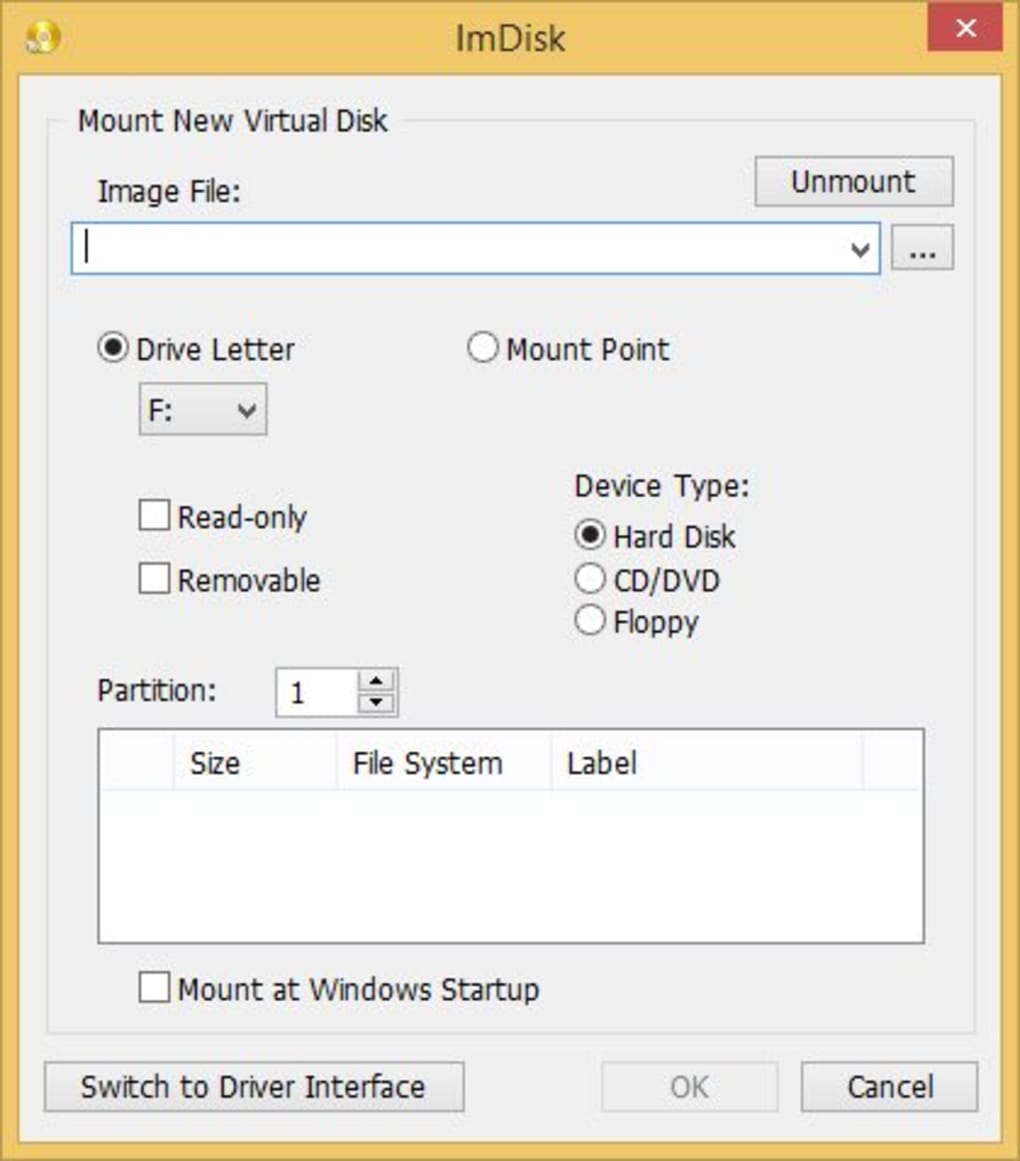
The key features and capabilities of ImDisk Toolkit include:
-
Rapid Virtual Disk Creation: ImDisk Toolkit streamlines the process of creating virtual disks. Users specify the desired size and drive letter, and the virtual disk is almost instantaneously available for use. This speed is a significant advantage compared to creating physical or even virtual hard disk images using other methods.
-
Dynamic Size Adjustment: The size of a virtual disk is not fixed at creation. ImDisk Toolkit permits dynamic resizing, allowing users to easily expand or contract the disk space as required. This flexibility eliminates the need to pre-allocate unnecessarily large amounts of RAM or recreate the virtual disk entirely when storage needs change.
-
Versatile Mounting and Unmounting: The GUI provides simple options for mounting and unmounting virtual disks. This means users can quickly make a virtual disk available or remove it from the system without complicated commands or procedures. This makes it convenient for tasks needing temporary storage that are then no longer required.
-
Image File Handling: ImDisk Toolkit facilitates the creation of virtual disks from existing image files (like ISO files or custom disk images). This capability is useful for testing operating systems, running applications from isolated environments, or accessing data from disk images without needing to burn them to physical media.
- RAM-Based Storage: The primary advantage of ImDisk Toolkit is its reliance on RAM for storage. This translates to significantly faster read and write speeds, making it ideal for applications that benefit from rapid data access, such as caching frequently accessed files or running memory-intensive software.
Pros and Cons of Using ImDisk Toolkit
As with any software tool, ImDisk Toolkit presents a mix of advantages and disadvantages. Understanding these aspects helps users determine whether it’s the right tool for their needs.
Advantages:
- Speed: The most significant benefit is the speed offered by using RAM-based storage. This results in dramatically faster data access compared to traditional storage solutions.
- Ease of Use: The GUI simplifies the often complex process of virtual disk management, making it accessible to users with varying technical skill levels.
- Flexibility: The ability to dynamically resize virtual disks provides adaptability to changing storage needs.
- Portability (with Limitations): While the virtual disks themselves are not persistent, the image files they can be created from or saved to are portable.
- Temporary Storage Solution: ImDisk Toolkit is well-suited for temporary storage, eliminating the need for persistent storage of data that is only required for short periods. This is beneficial for testing, temporary file operations, or specific application requirements.
Disadvantages:
- Volatility: The RAM-based nature of the virtual disks means data is lost upon unmounting or system shutdown. This limitation requires users to plan for data persistence if it is needed.
- Limited Capacity: The maximum size of a virtual disk is constrained by the amount of available RAM. Using large virtual disks can impact system performance by reducing the amount of RAM available to the operating system and other applications.
- Not a File Manager: ImDisk Toolkit is solely focused on virtual disk management. It does not offer file management features like browsing, copying, or deleting files within the virtual disk. Standard file explorer or other tools must be used for such tasks.
- Potential for Errors: Incorrect configuration or improper use can lead to system instability. Caution and understanding of the software’s functionality are crucial.
- Learning Curve (for advanced features): While the basic operations are intuitive, utilizing more advanced features may require a bit of learning.
Practical Applications of ImDisk Toolkit
ImDisk Toolkit’s versatility makes it suitable for a variety of use cases:
-
Caching Frequently Accessed Data: Storing frequently accessed files on a RAM-based virtual disk can dramatically improve application performance. This is particularly beneficial for databases, video editing software, or other applications that deal with large files.
-
Testing and Development: Creating virtual disks allows developers to test software or operating systems in isolated environments without impacting the main system. This provides a safe space for experimentation and prevents accidental changes to the primary system.
-
Temporary Storage for Large Files: ImDisk Toolkit is helpful for handling large files that are only needed temporarily. This avoids cluttering the main storage drives while enabling faster processing during the time the large files are needed.
-
Running Applications from ISO Images: Instead of burning ISO images to physical media, users can mount them as virtual disks using ImDisk Toolkit for quicker testing or access to the application’s files.
-
Data Recovery (with caution): While not its primary function, ImDisk Toolkit could potentially be used in data recovery scenarios where a drive image is mounted for inspection or data retrieval, although more specialized recovery tools are typically recommended.
Alternatives to ImDisk Toolkit
While ImDisk Toolkit is a robust solution, several alternative tools offer similar functionality with potentially different strengths and weaknesses. These include other RAM-based virtual disk solutions, as well as tools offering more general virtualization capabilities. The choice of tool often depends on specific needs and preferences. Some alternatives to consider might be:
- Other RAM Disk Software: Numerous other RAM disk applications exist, offering varying levels of functionality and features. Comparing the features and ease of use of different options is important before making a decision.
- Virtual Machine Software: While not directly a RAM disk solution, virtual machine software (like VirtualBox or VMware) provides a much broader virtualization capability, enabling the creation of entire virtual machines with virtual hard drives. This is more resource-intensive but offers greater isolation and flexibility.
Conclusion
ImDisk Toolkit offers a valuable tool for managing virtual disks in RAM, providing significant speed improvements for specific tasks. Its intuitive GUI simplifies the process of creating, configuring, and using virtual disks. However, it’s essential to understand the limitations of RAM-based storage, such as data volatility, and to choose the application wisely based on specific needs and system resources. By understanding its strengths and weaknesses, users can effectively leverage ImDisk Toolkit to enhance their workflow and improve application performance. Careful consideration of alternative tools and a cautious approach to using ImDisk Toolkit’s functionality are recommended for optimal results and to avoid potential problems.
File Information
- License: “Free”
- Latest update: “May 24, 2023”
- Platform: “Windows”
- OS: “Windows 8”
- Language: “English”
- Downloads: “1.6K”
- Size: “521.60 KB”


