Immunet Protect is a free, cloud-based antivirus program designed to provide an additional layer of security for your Windows system. Unlike traditional antivirus solutions that rely solely on pre-defined virus signatures, Immunet Protect leverages the power of a collaborative community to identify and neutralize emerging threats in real time. This innovative approach makes it a lightweight yet effective option for bolstering your existing security measures. This review will delve into the features, benefits, drawbacks, and overall user experience of Immunet Protect.
Immunet Protect’s Core Functionality: Community-Driven Protection
Immunet Protect operates on a fundamentally different principle compared to many established antivirus programs. Instead of relying on a constantly updated, but ultimately finite, database of known malware signatures, Immunet utilizes a peer-to-peer network of users. When a user encounters a new piece of malware, the information is immediately shared with the entire Immunet community. This collective intelligence instantly expands the protection offered to every other Immunet Protect user, providing real-time defense against even the newest threats. This collaborative approach ensures that the system is always adapting and evolving to counter emerging cyber threats, offering proactive protection not achievable through traditional methods.
To participate in this community-powered defense system, users need to create a free account on the Immunet website. After installation, registering your computer with your account links your security directly to the wider Immunet network. This registration process is simple and straightforward, ensuring a smooth integration into the collaborative security system.
Features and Capabilities of Immunet Protect
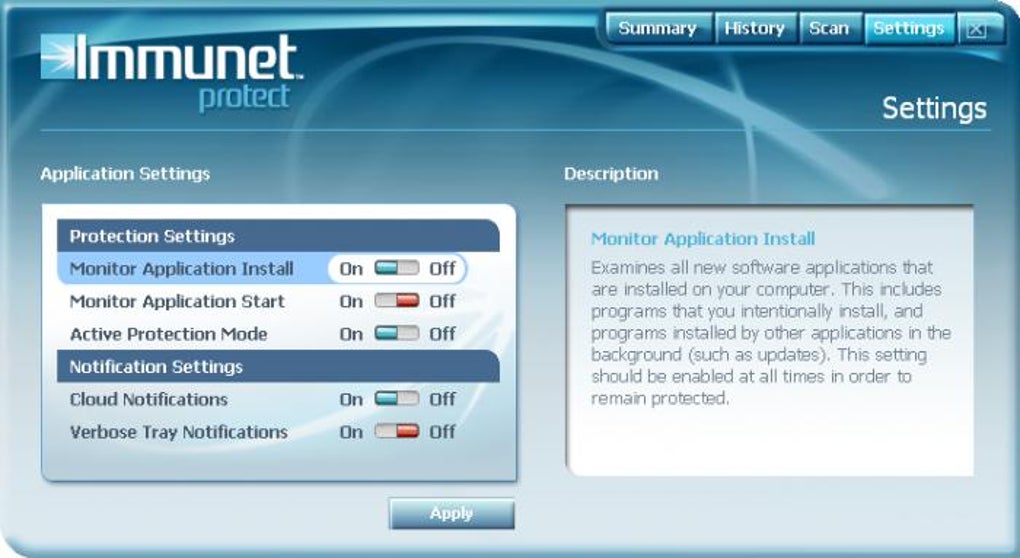
While Immunet Protect may lack some of the extensive feature sets found in more comprehensive antivirus suites, its core functionality is designed for efficiency and effectiveness. Its simplicity allows for a lightweight footprint on system resources, making it suitable for users with less powerful machines or those who prefer a less intrusive security solution.
The program’s primary function is real-time protection against malware. This includes scanning files, applications, and processes, as well as detecting malicious behavior. This real-time scanning operates quietly in the background, without significantly impacting system performance. The lightweight design is achieved by offloading the majority of the processing to the cloud, a key characteristic of its cloud-based approach.
Beyond real-time protection, Immunet Protect offers some additional features controllable through the program’s settings menu:
-
Installation and Launch Protection: This crucial feature prevents unauthorized installation or execution of applications, offering an added layer of protection against potentially harmful software. This safeguard can be particularly effective in preventing drive-by downloads or other stealthy infection attempts.
-
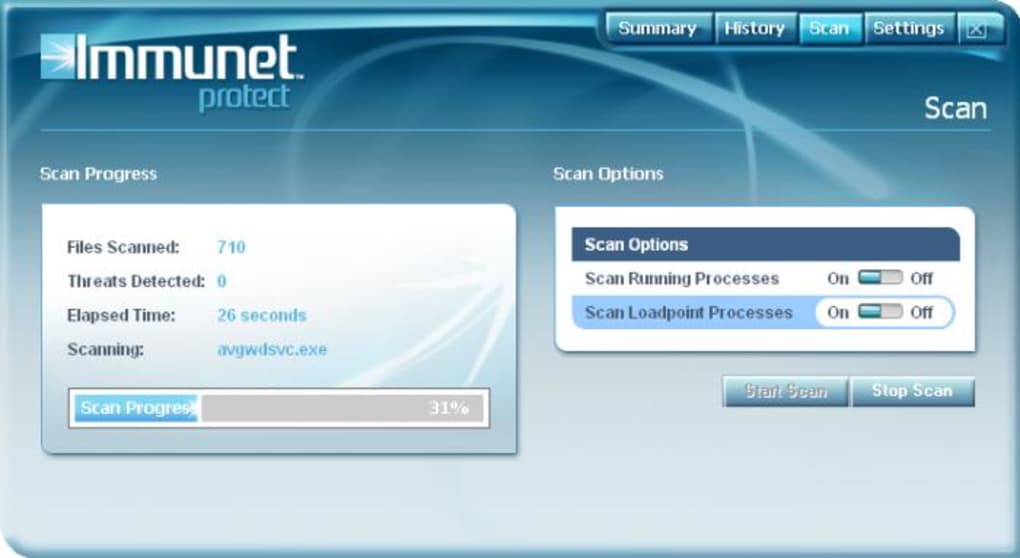
Single Scan Mode: Although Immunet doesn’t provide multiple scanning options like a full system scan, quick scan, or custom scan, its real-time protection effectively acts as a constant scan, mitigating the need for frequent manual scans.
While lacking integration with Windows Explorer (meaning you can’t right-click and scan individual files directly), its streamlined approach keeps the interface clean and easy to navigate.
Advantages and Disadvantages of Immunet Protect
Like any software, Immunet Protect presents both advantages and disadvantages that users should consider before adopting it as part of their security strategy.
Pros:
- Lightweight and Fast: Immunet Protect’s design prioritizes minimal system resource consumption, making it a suitable choice for systems with limited processing power or RAM. Its speed contributes to a seamless user experience, avoiding any noticeable performance slowdown.
-
Community-Driven Updates: The real-time update system powered by the Immunet community ensures rapid response to emerging threats. This collaborative approach grants immediate protection against newly discovered malware, offering a level of proactive defense unmatched by solely signature-based systems.
-
Free to Use: Immunet Protect is entirely free to download and use, making it an accessible option for users seeking enhanced security without incurring any costs.
-
Compatibility: The design allows it to function alongside other antivirus programs, making it a viable supplementary security measure rather than a replacement for a primary antivirus.
Cons:
-
Limited Scan Modes: The lack of multiple scan options (e.g., full system scan, quick scan) might be inconvenient for users who prefer granular control over the scanning process. However, the program’s focus is on real-time protection, making manual scans less critical.
-
No Windows Explorer Integration: The absence of integration with Windows Explorer means users cannot right-click on files or folders to initiate a scan. This is a minor inconvenience but might be a drawback for users accustomed to such integration in their existing antivirus software.
-
Dependence on Cloud Connectivity: The program’s reliance on cloud connectivity for its core functionality means that users with limited or unreliable internet access might experience reduced effectiveness. A stable internet connection is crucial for real-time updates and threat detection.
-
Potential Privacy Concerns: The collaborative nature of the software involves sharing threat information with the Immunet community. While Immunet emphasizes data anonymization, users concerned about privacy might need to carefully review the program’s privacy policy.
Immunet Protect in the Context of Other Antivirus Solutions
Immunet Protect is not intended to replace a comprehensive antivirus suite; rather, it serves as a valuable supplementary security layer. Its unique community-driven approach offers a real-time protective advantage, complementing the signature-based detection of traditional antivirus programs. Users can effectively utilize Immunet Protect alongside their primary antivirus software to create a robust, multi-layered security strategy. This approach enhances overall system protection by providing an additional line of defense against emerging threats.
User Reviews and Overall Impression
User reviews generally reflect the lightweight and fast performance of Immunet Protect, highlighting its efficiency in terms of system resource usage. Positive feedback often emphasizes its usefulness as a supplementary antivirus, adding an extra layer of protection to systems already equipped with established antivirus solutions. However, some users express disappointment with the limited scanning options and the lack of Windows Explorer integration.
In conclusion, Immunet Protect offers a unique approach to antivirus protection by harnessing the power of community collaboration. Its lightweight design, rapid updates, and free availability make it a compelling option, particularly as a supplemental security tool. While it lacks some features found in more comprehensive antivirus suites, its innovative approach to real-time threat detection makes it a valuable asset in a multi-layered security strategy. Users should carefully weigh its advantages and disadvantages in the context of their specific needs and existing security infrastructure before deciding whether to incorporate Immunet Protect into their security setup.
File Information
- License: “Free”
- Latest update: “May 23, 2023”
- Platform: “Windows”
- OS: “Windows 7”
- Language: “English”
- Downloads: “82.8K”
- Size: “3.01 MB”