
imo beta is a beta version of the popular IMO Messenger app, offering users a sneak peek at upcoming features and functionalities before their official release. This comprehensive review will explore the app’s strengths and weaknesses, comparing it to similar applications and examining its place within the crowded instant messaging market.
Early Access to Innovative Features: The Core Value Proposition
The primary appeal of imo beta lies in its provision of early access to new features. Unlike the stable release of IMO Messenger, the beta version allows users to experience upcoming updates, providing valuable feedback to the developers and influencing the direction of the app’s evolution. This “first-look” access is a significant draw for tech-savvy users who appreciate being at the forefront of innovation and contributing to the improvement of their favorite applications.
A prime example of this early access advantage was the introduction of cross-platform communication with Steam users. This functionality first emerged within imo beta, allowing gamers to seamlessly connect with their Steam contacts alongside their other communication platforms, such as Facebook Messenger, Google Talk, and Skype, all within a single unified interface. This capability, once tested and refined within the beta environment, was subsequently integrated into the main IMO Messenger application, demonstrating the iterative development process that imo beta facilitates.
The benefit extends beyond specific features. The beta testing process allows IMO to identify and rectify bugs and performance issues before they impact the broader user base. By releasing features to beta testers, the developers gain valuable insights into user experience, allowing for optimizations and refinements before a general release. This proactive approach ensures a smoother, more stable experience for all users upon the official launch of new functionalities.
Beyond Beta Features: Core Messaging Functionality and Capabilities
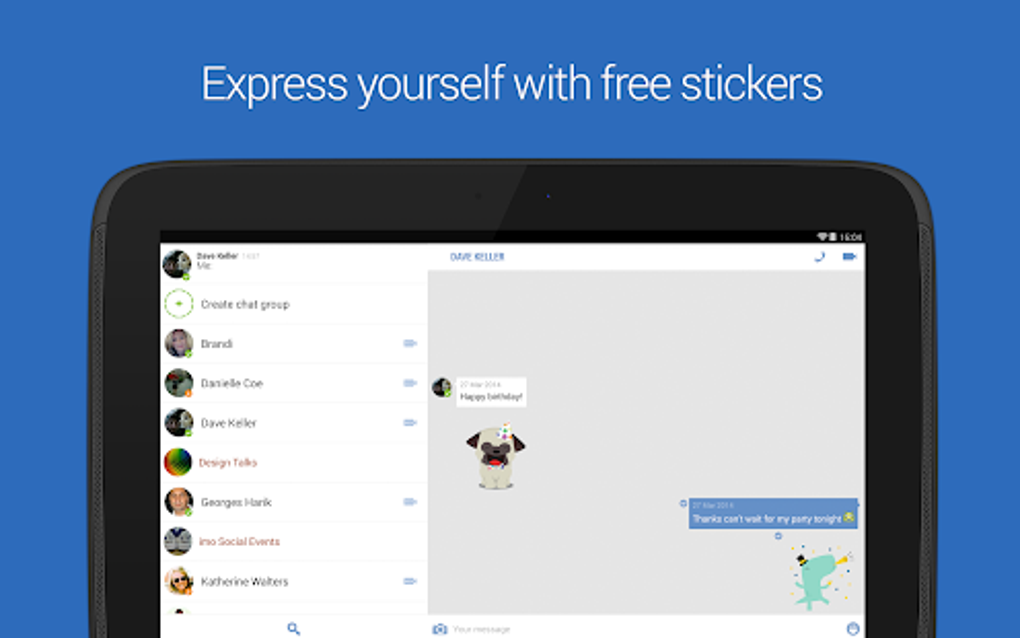
While the early access to new features is a central selling point, imo beta doesn’t neglect the fundamental features expected from a modern messaging application. The app offers a robust suite of tools for communication, including:
- Cross-platform Messaging: As previously mentioned, imo beta excels in its ability to consolidate communication across multiple platforms. This means users can interact with contacts regardless of whether they use Facebook Messenger, Google Talk, Skype, or other supported services. This eliminates the need to juggle multiple applications for communication, streamlining the overall messaging experience. The app clearly indicates the platform each contact is using, ensuring transparency and context within the conversations.
-
Multimedia File Sharing: The app seamlessly supports the sharing of multimedia files, such as images, videos, and audio files. This allows for a richer and more dynamic communication experience beyond simple text-based exchanges. The speed and reliability of this file transfer depend, of course, on the user’s internet connection.
-
Voice and Video Calling: imo beta facilitates high-quality voice and video calls, allowing for real-time communication with contacts. The app’s performance in this area is consistently praised for its clarity and lack of significant lag, ensuring a seamless and enjoyable calling experience even over less-than-ideal network connections. The app supports 2G, 3G, 4G, and Wi-Fi connections, ensuring accessibility in a wide range of network environments. Whether it’s a private voice call or a group video conference, the audio quality remains consistently clear, maximizing the effectiveness of communication.
-
Conference Calls: Expanding on the voice and video calling capabilities, imo beta also allows for conference calls, enabling group discussions with multiple participants simultaneously. This feature greatly enhances collaboration and communication amongst larger groups.
-
Contact Synchronization: The app automatically syncs with the user’s phone’s contact list, making it easier to identify which contacts have IMO accounts and simplifying the process of adding new contacts to the app. This intuitive feature enhances the user-friendliness of the application, reducing the manual effort required for contact management.
User Interface and Customization: Simplicity vs. Flexibility
imo beta adopts a minimalist approach to its user interface. The interface is straightforward and uncluttered, prioritizing ease of use and navigation. While this simplicity is appreciated by many, it may prove limiting for users accustomed to highly customizable messaging apps. The app lacks extensive customization options, meaning users have less control over the look and feel of the application compared to other options in the market.
This trade-off between simplicity and customization is a key consideration for potential users. The streamlined interface ensures a clean and efficient user experience, but at the cost of personalization options. This minimalist approach likely prioritizes functionality and performance over aesthetic customization.
Security and Privacy: A Focus on Secure Communication
imo beta, like its stable counterpart, places a significant emphasis on security and privacy. The app facilitates encrypted messaging and file transfers, ensuring the confidentiality of communications. This security is crucial, especially for users exchanging sensitive information. While specific encryption details are not explicitly detailed, the focus on secure communication positions the app favorably among users prioritizing privacy.
Comparison with Competitors: Standing Out in a Crowded Market
imo beta competes with numerous other messaging applications, including established players like Telegram and its beta version, WhatsApp, and Skype. While it offers comparable core functionalities, its distinct advantage lies in its early access to new features and its cross-platform communication capabilities.
Telegram and its beta version offer similar functionality to imo beta, including cross-platform messaging and multimedia file sharing. However, imo beta might lack some of the more advanced features and customization options found in Telegram. This includes user-generated stickers and extensive theme options. However, imo beta’s focus on security and its position as a testing ground for new features distinguish it from competitors.

WhatsApp, while a dominant player, primarily focuses on individual and group chats within its ecosystem. While it offers end-to-end encryption, it lacks the direct cross-platform messaging capabilities that make imo beta unique.
Skype, while supporting video calls and messaging, doesn’t offer the same level of cross-platform integration as imo beta. Its interface can feel more cluttered and less intuitive compared to imo beta’s minimalist design.
Strengths and Weaknesses: A Balanced Perspective
Strengths:
- Early Access to New Features: This is imo beta’s most significant advantage, allowing users to try out upcoming features before the wider release.
- Cross-Platform Compatibility: Communicate seamlessly with contacts across various platforms.
- High-Quality Voice and Video Calls: Clear and lag-free communication, even on weaker networks.
- Simple and Intuitive Interface: The minimalist design prioritizes ease of use.
- Secure Communication: Encrypted messaging and file transfers protect user privacy.
- Free to Use: Access all core features without any subscription fees.
Weaknesses:
- Limited Customization: The minimalist design sacrifices customization options.
- Lacks User-Generated Content: Absence of user-created stickers or emoticons.
- Focus on Core Functionality: Lacks some of the advanced features found in other messaging apps.
Conclusion: A Solid Choice for Beta Testers and Pragmatic Users
imo beta presents a compelling proposition for users seeking early access to innovative features within a secure and reliable messaging environment. Its strength lies in its cross-platform capabilities and its commitment to providing a streamlined user experience. While it may lack some of the customization options and advanced features offered by competitors like Telegram, its focus on core functionality, high-quality communication, and commitment to security make it a valuable tool for many users. Those prioritizing early access and a clean, efficient interface will find imo beta a strong contender in the ever-evolving world of instant messaging. The app serves as a valuable bridge between users on various platforms and provides a stable, secure way to communicate, even over less-than-ideal network connections. Its simplicity is a strength for those valuing efficiency over extensive customization. For users comfortable with a more limited feature set in exchange for early access and streamlined functionality, imo beta remains a worthwhile option.

File Information
- License: “Free”
- Latest update: “July 21, 2025”
- Platform: “Android”
- OS: “Android 13.0”
- Language: “English”
- Downloads: “484.2K”
- Download Options: “Google Play”


