
InfinityBench is a free utility developed by InfinitySoftware for PCs. This lightweight benchmarking tool provides a straightforward way to assess the performance capabilities of your computer’s central processing unit (CPU) and graphics processing unit (GPU). By subjecting your system to a series of intensive tasks, InfinityBench generates scores that reflect your hardware’s prowess. Unlike some benchmarking tools that focus solely on either the CPU or GPU, InfinityBench offers a holistic approach, evaluating both components within a single application. It further enhances its utility by including an integrated internet speed test, providing a comprehensive view of your system’s performance profile.
User Interface and Functionality
InfinityBench boasts a clean and intuitive user interface, making it accessible to users of all technical skill levels. Upon launch, the program displays basic system information, including details about your CPU, RAM, motherboard, and GPU. This preliminary information provides a valuable context for the subsequent benchmark tests.
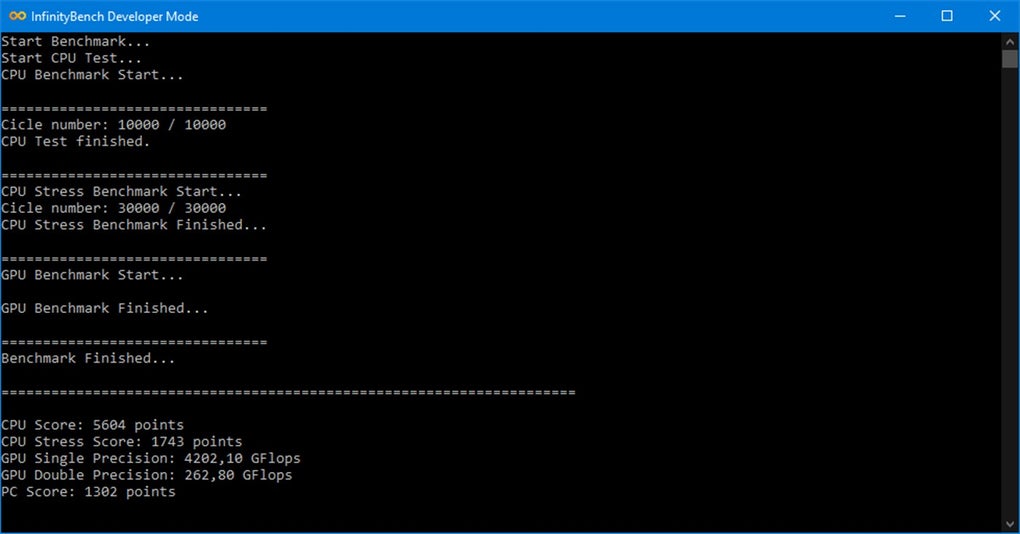
To initiate a benchmark, users select their specific GPU model from a dropdown menu. A prominent icon then triggers the testing process. Upon completion, InfinityBench presents a comprehensive report detailing various scores for both the CPU and GPU. The report includes a total average score, the elapsed time for the tests, and a letter grade assigned based on the overall performance. This grading system simplifies the interpretation of results, allowing users to quickly understand their system’s relative performance.
Following the benchmark, InfinityBench prompts users to submit their scores to an online CPU chart. This feature allows for comparison against other user-submitted results, providing a broader perspective on system performance within a wider pool of hardware configurations. This comparative element is particularly useful for users interested in gauging their system’s performance against similar hardware setups and identifying potential bottlenecks.
Furthermore, the application provides access to advanced options through a “Dev” menu. This menu allows users to test their internet connection speed using the Ookla speed test service, providing valuable insight into network performance. Additionally, users can choose between single-core and multi-core CPU tests, enabling more granular analysis of CPU performance. Single-core tests assess the performance of a single processor core, while multi-core tests leverage multiple cores for improved processing power and parallelization. This feature accommodates users interested in determining the effectiveness of their system’s ability to handle parallel tasks and processes.
Strengths and Weaknesses of InfinityBench
InfinityBench presents several key strengths that contribute to its appeal as a benchmarking tool. Its lightweight nature ensures minimal impact on system resources during both installation and operation. The intuitive interface simplifies the benchmarking process, making it accessible to users regardless of their technical expertise. The ability to test both CPU and GPU performance within a single application streamlines the process, eliminating the need for multiple tools. The inclusion of single-core and multi-core CPU tests caters to diverse needs, allowing users to focus on specific performance aspects. Finally, the built-in internet speed test provides a comprehensive assessment of system connectivity.
Despite its advantages, InfinityBench has limitations that should be considered. Currently, once a test has begun, it cannot be interrupted. This inflexibility can be a significant drawback, particularly for lengthy tests that may be unintentionally initiated or for users who require the ability to prematurely terminate processes due to time constraints or other interruptions. Additionally, the absence of an export option for test result data hinders the ability to save or share detailed performance reports. The lack of data export could be inconvenient for users who wish to document their system’s progress over time, compare results across different benchmarks, or share performance metrics with others.

Comparison with Alternative Benchmarking Tools
InfinityBench competes with a range of benchmarking tools, each with its own strengths and weaknesses. Popular alternatives include Cinebench and 3DMark, which are widely regarded for their comprehensive and accurate results. Cinebench focuses primarily on CPU performance, while 3DMark specializes in GPU performance. While these tools offer in-depth analysis of their respective components, InfinityBench offers a unique advantage by combining both CPU and GPU testing into a single application. This unified approach provides a convenient and time-efficient method for assessing overall system performance.
Other tools, such as NZXT CAM, offer broader system monitoring capabilities beyond just benchmarking, providing insights into temperatures, fan speeds, and voltage levels. These tools may be preferable for users who need a comprehensive overview of their hardware’s health and performance beyond raw benchmark scores. However, for users primarily interested in a quick and easy benchmark of their CPU and GPU, InfinityBench offers a streamlined and efficient solution.
Tools focusing specifically on internet speed testing, like NetSpeedMonitor, may provide more detailed analysis than InfinityBench’s integrated speed test. These tools offer more granular metrics and often provide historical data and graphs for visualizing network performance trends. However, if users’ primary need is a simple assessment of their internet speed within a broader system performance evaluation, InfinityBench’s integrated tool provides sufficient functionality.
Conclusion: Is InfinityBench Worth Using?
InfinityBench provides a fast and simple method for evaluating the performance of your CPU and GPU. Its lightweight design, user-friendly interface, and combined CPU/GPU testing make it an attractive option for users seeking a quick and easy performance assessment. The inclusion of single-core and multi-core CPU tests, as well as an integrated internet speed test, further enhances its versatility.
However, the inability to stop tests once they have begun and the lack of an export option for test results represent significant limitations. These shortcomings may deter users who require precise control over testing parameters or who need the flexibility to save and share detailed reports.
In summary, InfinityBench is a commendable benchmarking tool, particularly for users who prioritize simplicity and speed. Its strength lies in its ease of use and ability to test both CPU and GPU performance efficiently. While certain improvements, such as the ability to interrupt tests and export data, are warranted, InfinityBench remains a valuable asset for users seeking a convenient and comprehensive system performance overview. If these limitations are not deal-breakers, InfinityBench is a worthy addition to any user’s toolkit.
File Information
- License: “Free”
- Version: “1.0”
- Latest update: “January 24, 2023”
- Platform: “Windows”
- OS: “Windows 10”
- Language: “English”
- Downloads: “5.7K”


