
Infix PDF Editor presents itself as a user-friendly solution for editing PDF documents, promising a familiar word processor-like interface for straightforward modifications. This review delves into its features, performance, strengths, weaknesses, and overall value proposition, helping you determine if it’s the right PDF editing tool for your needs.
Intuitive Interface and Editing Capabilities
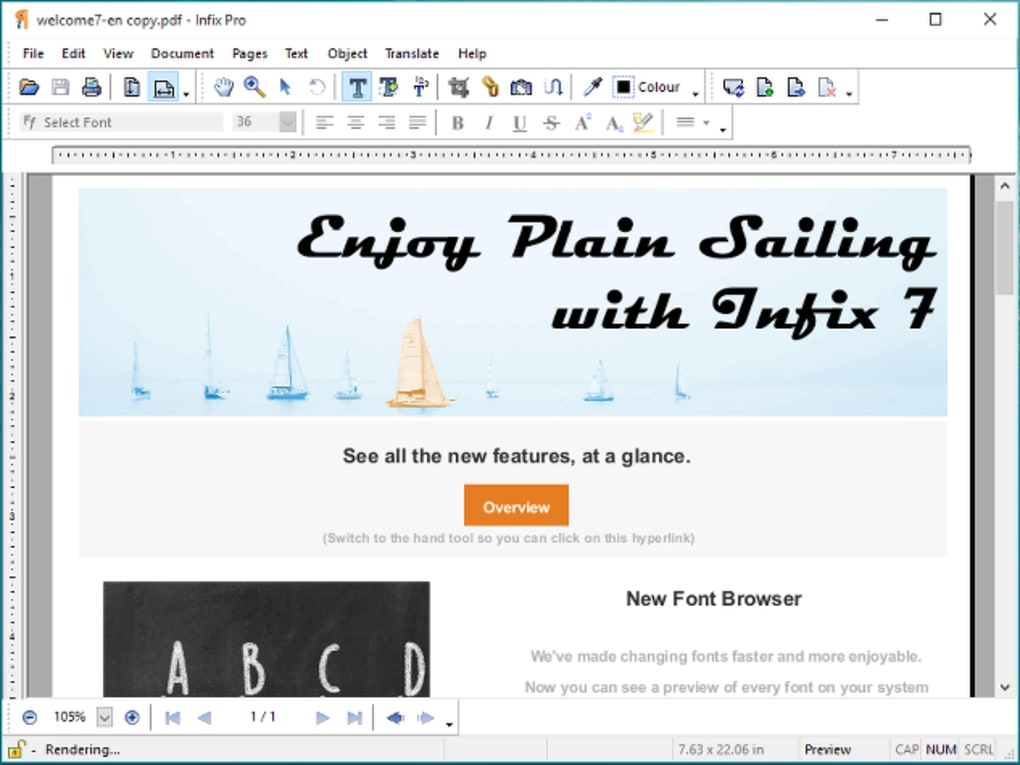
Infix PDF Editor’s primary selling point is its accessibility. The developers tout its resemblance to a standard word processor, aiming to minimize the learning curve often associated with PDF editing software. This claim holds significant weight, particularly for users unfamiliar with dedicated PDF editors or those seeking a quick and easy solution for minor adjustments. The interface is designed to be intuitive, allowing users to navigate and manipulate text and images within the PDF with relative ease. This ease of use extends to basic editing functions like text selection, deletion, insertion, font changes, color adjustments, and size modifications. These operations are executed using familiar keyboard shortcuts and mouse actions, making the transition from traditional word processing seamless.
The software boasts features typically found in professional publishing applications, such as text hyphenation and justification. These tools allow for precise control over text formatting, ensuring that edited documents maintain a professional and polished appearance. Fine-tuning letter, word, and line spacing further enhances the precision of edits, enabling users to achieve a level of control that often surpasses simpler PDF editing tools. The ability to resize, reposition, and manipulate images within the PDF mirrors the capabilities of more advanced publishing software, making it versatile for a range of editing tasks. For users accustomed to the precision and control offered by applications like Adobe InDesign or Quark Express, Infix offers a surprisingly capable alternative, albeit with a simpler interface and arguably a smaller feature set.
Limitations and Missing Features
While Infix PDF Editor excels in its ease of use and text editing capabilities, it’s not without limitations. One significant drawback is its inability to edit secure PDF documents. This restriction severely limits its applicability for users working with sensitive or protected documents, a common need in many professional settings. The software’s inability to directly share documents from within the application is another noteworthy limitation. Users are forced to rely on external sharing methods, adding an extra step to the workflow. The trial version also presents a significant hurdle for potential users. The restriction on saving documents in the trial version effectively prevents thorough testing of the software’s capabilities before committing to a purchase. This limitation hinders potential users from fully evaluating the software’s functionality and might dissuade users from considering the paid version.
Furthermore, Infix PDF Editor’s current Windows-only availability restricts its user base. The lack of support for other operating systems like macOS or Linux significantly reduces its market reach. While the software may work flawlessly on a 64-bit Windows architecture, users with older 32-bit systems are excluded, highlighting a potential compatibility issue for some users. Finally, while the software’s core editing features are robust, the absence of advanced functionalities, like form filling, digital signature support, or sophisticated annotation tools found in competing software, limits its appeal to users needing those functionalities.
Performance and Reliability
Infix PDF Editor has generally been described as fast and reliable in user reviews. The application typically handles large PDF files efficiently, making the editing process reasonably quick and responsive, even for extensive documents. This positive aspect underscores its user-friendliness, as lag or slow response times could severely hinder the user experience. However, user feedback concerning the trial version’s tendency to crash after ignoring the purchase prompt suggests potential instability issues. This indicates that the software’s stability might require further refinement, especially within its licensing mechanism.
Comparison to Alternative PDF Editors
Compared to other PDF editing solutions available in the market, Infix PDF Editor occupies a niche. It stands out due to its user-friendly approach and emphasis on text editing within a familiar word processor-style environment. However, compared to industry giants such as Adobe Acrobat Pro, Infix lacks the extensive feature set and advanced capabilities that professionals often require. On the other hand, compared to free, basic PDF editors, Infix offers enhanced text editing capabilities and more refined control over document formatting. Therefore, its ideal user is likely someone who needs more than the bare minimum capabilities of a free editor but doesn’t require the comprehensive, and often costly, feature set of a professional-grade PDF editor.
Free and open-source alternatives offer comparable basic editing features, but Infix distinguishes itself with more sophisticated text formatting options and a cleaner interface. However, these free options often lack the same level of reliability and performance optimization as a paid application like Infix.
Target Audience and Value Proposition
Infix PDF Editor’s target audience is relatively specific. It best serves individuals and small businesses requiring a straightforward and user-friendly tool for occasional PDF editing tasks, particularly those involving text manipulation. Its strengths lie in its ease of use, intuitive interface, and capable text editing tools. Its weakness is its lack of advanced features and limitations on secure PDF editing. For these users, the software likely provides good value. However, for users needing advanced features or frequent, intensive PDF editing, the software may not justify its price point, especially when compared to more comprehensive alternatives.
The value proposition of Infix PDF Editor hinges on its simplicity and ease of use, making it ideal for those who want a quick and efficient solution for simple editing needs. The software’s streamlined interface and familiar word processor-style controls lower the barrier to entry for users unfamiliar with specialized PDF editing software. This simplicity is a strong selling point for casual users and those who prioritize speed and ease of use over advanced functionalities. The focus on text editing capabilities makes it particularly well-suited for tasks involving minor text corrections, revisions, or formatting adjustments in PDF documents.
However, the limitations outlined above significantly impact its value for other user groups. The absence of features like secure PDF editing, form filling, and advanced annotation tools restricts its utility in various professional contexts. The reliance on external sharing mechanisms and the limitations of the trial version also detract from the overall user experience.
Conclusion
Infix PDF Editor provides a straightforward and user-friendly solution for basic PDF editing, particularly for those comfortable with word processing software. Its intuitive interface and reliable performance make it an appealing choice for users who prioritize ease of use and efficient text editing. However, its limitations regarding secure document handling, limited functionality, and platform exclusivity restrict its overall appeal and make it less suitable for users needing advanced features or those working with sensitive documents. Ultimately, potential users need to carefully weigh their specific needs and requirements against the software’s capabilities and limitations before making a purchase decision. Its target audience is clearly defined, and for the right user, it offers a convenient and effective solution.
File Information
- License: “Trial version”
- Version: “5.14”
- Latest update: “September 22, 2021”
- Platform: “Windows”
- OS: “Windows 8”
- Language: “English”
- Downloads: “38.4K”
- Size: “26.77 MB”


