
Inkodo is a free, multi-purpose productivity application designed to function as a comprehensive digital notepad. Beyond its basic note-taking capabilities, Inkodo offers a wealth of features for creating, editing, and sharing various forms of digital content. Whether you need to jot down quick notes, sketch ideas, or construct detailed multimedia presentations, Inkodo provides a user-friendly interface and a robust set of tools to facilitate your workflow. Its versatility extends to the ability to save your creations in multiple image formats, allowing for seamless sharing across various platforms, making it an indispensable tool for students, professionals, and anyone seeking a streamlined way to manage their digital content.
Inkodo’s Core Functionality: Beyond the Basics
At its heart, Inkodo functions as a digital notepad, allowing users to write and draw freely. However, its capabilities extend far beyond this simple function. Imagine a versatile tool that seamlessly integrates the functionality of a notepad, sketchpad, and presentation software all within a single, easily accessible application. That’s Inkodo in a nutshell. The application provides a canvas upon which users can unleash their creativity, expressing ideas visually or through written text.
The application’s ease of use is a significant advantage. The intuitive interface ensures a smooth and efficient user experience, regardless of technical expertise. The learning curve is minimal, allowing users to quickly grasp the core functions and begin creating content almost immediately. This accessibility is further enhanced by the application’s intuitive navigation and clearly labelled tools.
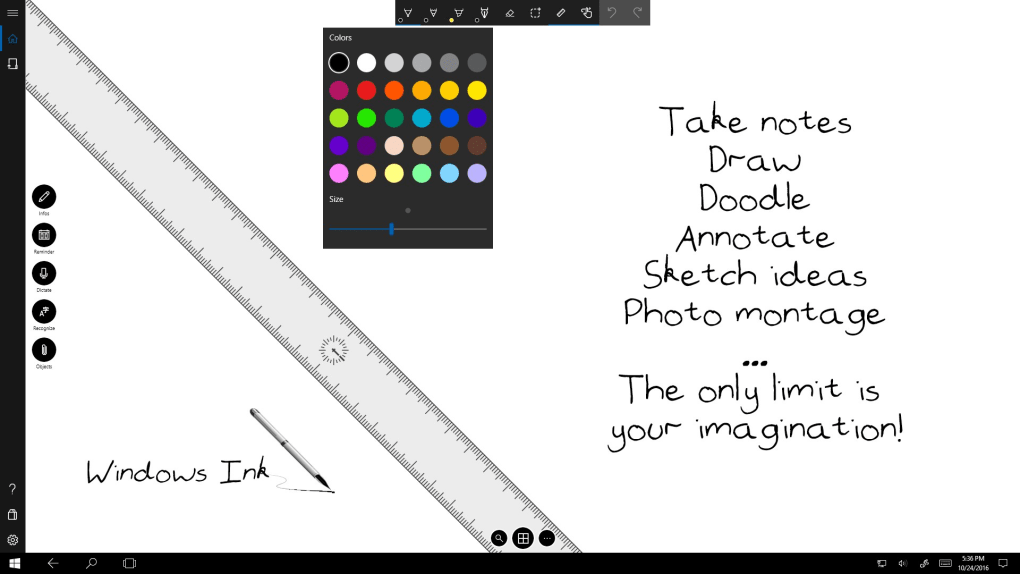
Inkodo facilitates the creation of detailed notes, allowing for handwritten annotations and typed text within the same document. This feature is particularly useful for students who want to combine their lecture notes with sketches or diagrams. Professionals can also benefit from this integration, combining textual reports with visual representations of data or project outlines. The ability to seamlessly integrate text and visuals enhances the clarity and overall impact of any document.
Inkodo’s drawing capabilities extend beyond simple sketching. The application supports various brush sizes, colors, and styles, offering a broad range of creative options. This allows users to create detailed illustrations, flowcharts, or even simple animations, depending on their needs and imagination. The flexibility of the application’s drawing tools allows users to achieve a level of artistic expression that’s comparable to working with traditional media, but with the added advantage of digital editing capabilities.
Advanced Features: Enhancing Productivity and Creativity
Inkodo’s functionality goes beyond simple note-taking and drawing. It offers several advanced features designed to enhance both productivity and creativity. One noteworthy feature is its support for various image formats, enabling users to seamlessly incorporate images, videos, and other multimedia elements into their creations. This feature elevates Inkodo from a simple notepad to a powerful multimedia presentation tool.
The ability to import and embed multimedia is significant for users who need to create visually rich documents. For example, students might include images to illustrate concepts, while professionals could integrate charts or graphs to visually represent data. This multimedia integration significantly enhances the impact and effectiveness of any presentation or report.
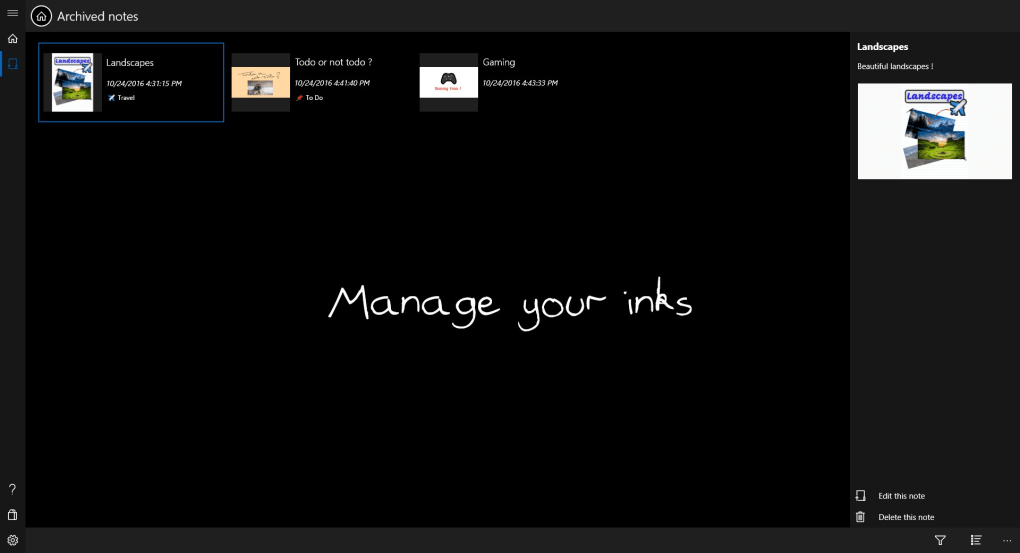
Furthermore, Inkodo offers the flexibility to save creations in various image formats, including PNG and JPEG. This makes it easy to share work on different social media platforms, increasing collaboration opportunities and expanding the reach of the user’s creations. The ability to export documents in widely-used image formats increases accessibility and facilitates easy sharing with colleagues, classmates, or a wider audience.
Another key feature is the ability to export created content in a variety of formats. Users aren’t confined to solely using the application for viewing their work. The versatility offered by these export options ensures that Inkodo’s functionality extends beyond simple creation and into the realms of communication and collaboration. This facilitates efficient workflow and simplifies the process of sharing completed projects.
Inkodo’s Strengths and Weaknesses: A Balanced Perspective
While Inkodo offers a compelling suite of features, a balanced review requires acknowledging both its strengths and weaknesses. The application’s intuitive interface and ease of use are undoubtedly significant strengths. The application’s minimal learning curve is a major advantage, making it accessible to a broad range of users. This ease of use, combined with the powerful features, significantly enhances productivity and reduces the time needed to create and share content.
The multi-purpose nature of Inkodo, its ability to function as a notepad, sketchpad, and presentation tool simultaneously, also contributes to its appeal. The integration of text and visual elements allows for the creation of engaging and informative documents, catering to a wide range of needs and applications. This unique combination of features enhances the overall efficiency of the user’s workflow.
However, some users have reported that page turning can be slow, particularly when working with large or complex documents. This minor performance issue might become noticeable for users who regularly work with extensive projects. While not a significant drawback for casual users, this is something to consider for those who frequently use the application for large-scale projects. The developers may wish to address this concern in future updates to enhance the overall user experience.
Inkodo in Comparison to Alternative Applications
Compared to other note-taking and drawing applications, Inkodo stands out due to its unique combination of features. While several other applications offer similar functionality, Inkodo distinguishes itself through its integration of text, drawing, and multimedia capabilities within a single, easily accessible interface. This integrated approach simplifies the workflow and eliminates the need to switch between multiple applications.
Compared to simpler note-taking applications, Inkodo offers a significantly richer set of features. While some users might prefer the minimalist approach of a simple notepad, those needing more versatility would find Inkodo a much more suitable option. The additional functionality comes without sacrificing user-friendliness.
When contrasted with more complex presentation software, Inkodo offers a more streamlined approach. While it might not possess all the sophisticated features of professional presentation tools, its ease of use and its ability to combine text, drawing, and multimedia capabilities make it an attractive alternative for users who value simplicity and efficiency.
Conclusion: A Powerful Tool for Everyday Use
In conclusion, Inkodo is a versatile and user-friendly digital notepad that transcends its basic functionality. Its integration of text, drawing, and multimedia capabilities makes it a powerful tool for a variety of tasks, ranging from quick note-taking to the creation of elaborate multimedia presentations. While some minor performance issues exist, its strengths significantly outweigh its weaknesses. The intuitive interface, coupled with the wide range of features, makes Inkodo an excellent choice for students, professionals, and anyone looking for an efficient and versatile digital productivity tool. Its accessibility and user-friendly design contribute to a positive overall experience, making it a worthwhile addition to anyone’s digital toolkit. The seamless sharing capabilities through various image formats further enhance its usability, ensuring the application remains a relevant and effective tool in the increasingly digital world.
File Information
- License: “Free”
- Version: “1.1.49.0”
- Latest update: “November 24, 2021”
- Platform: “Windows”
- OS: “Windows 10”
- Language: “English”
- Downloads: “56.2K”


