
Ins Tools - Ins Follower Export Tool is a Google Chrome extension designed to facilitate the export of Instagram follower data. While seemingly simple in its core function, understanding its capabilities, limitations, and ethical considerations is crucial before utilizing this tool. This guide aims to provide a comprehensive overview of the Ins Tools - Ins Follower Export Tool, addressing its features, usage, potential risks, and alternatives.
Understanding the Functionality of Ins Tools - Ins Follower Export Tool
Ins Tools - Ins Follower Export Tool, as its name suggests, serves as a bridge between your Instagram account and your local computer, allowing you to download a list of your followers. This list typically contains usernames, and potentially other data depending on the tool’s specific features and the level of access granted. The precise data included might vary depending on Instagram’s API limitations and any updates to the extension itself. It is important to note that this tool does not download any photos or other content from your followers’ profiles; it focuses solely on user account information.
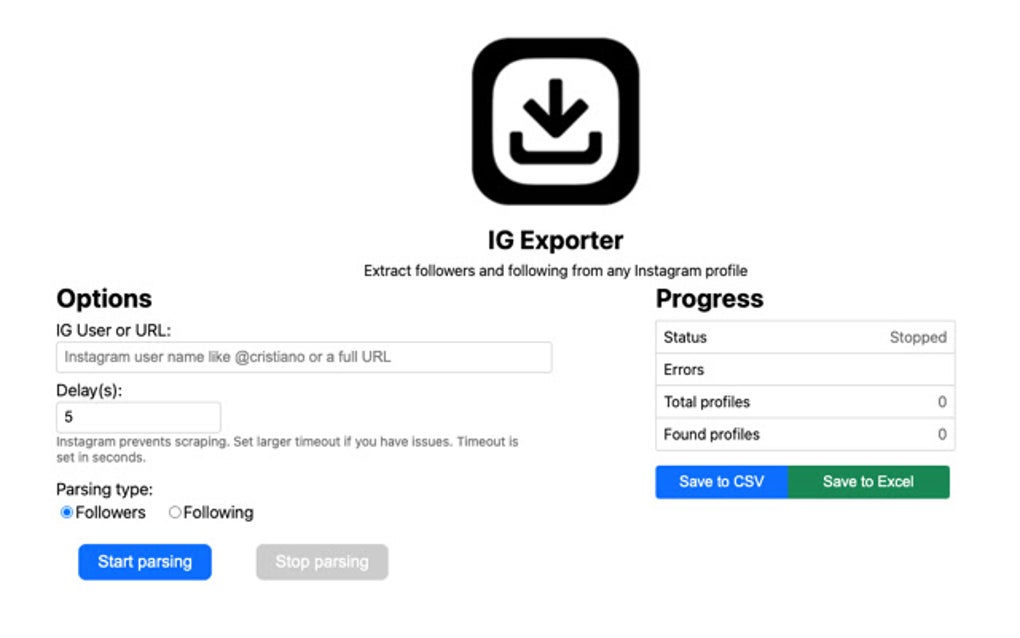
The process generally involves installing the extension from the Chrome Web Store, granting it the necessary permissions to access your Instagram account (which is a key area of concern regarding privacy), and then initiating the export process. The exported data is usually presented in a readily exportable format such as a CSV file, facilitating easy import into spreadsheets or other data management tools.
This functionality can be useful for various purposes, including:
- Audience Analysis: Businesses and influencers can analyze their follower base to understand demographics, engagement patterns, and identify potential key influencers within their network. This data can be used to tailor content strategy and marketing campaigns.
- Account Management: Identifying inactive or bot accounts to improve account hygiene and overall engagement.
- Research and Collaboration: For researchers, this tool might aid in gathering data for studies related to social media usage or influencer marketing.
However, it’s essential to understand the inherent limitations. The tool is reliant on Instagram’s API and its functionality might be affected by any changes made to the platform’s policies or its underlying infrastructure. Instagram frequently updates its API, which could lead to compatibility issues or the tool becoming obsolete.
Installation and Usage of the Ins Tools - Ins Follower Export Tool
Installing the Ins Tools - Ins Follower Export Tool is relatively straightforward. The process typically involves these steps:
- Access the Chrome Web Store: Open the Chrome Web Store within your Google Chrome browser.
- Search for the Extension: Search for “Ins Tools - Ins Follower Export Tool” and locate the official listing. Be cautious of similar-sounding extensions; verify the developer’s legitimacy.
- Install the Extension: Click the “Add to Chrome” button.
- Grant Permissions: The extension will request access to your Instagram account. Review these permissions carefully before granting them. Only proceed if you trust the developer and fully understand the implications of granting access.
- Login to Instagram: You might be required to log in to your Instagram account through the extension.
- Initiate Export: Once logged in, the extension’s interface will guide you through the export process, usually involving a simple button click.
- Download the File: The exported data will usually be downloaded as a file (typically CSV) to your computer.
Important Considerations:
- Permission Scope: Pay close attention to the permissions requested by the extension. Excessive permissions are a red flag. Only grant access if you are completely comfortable with the data the extension can potentially access.
- Data Security: Ensure the developer of the extension has a good reputation and utilizes appropriate security measures to protect user data during transmission and storage.
- Terms of Service: Review Instagram’s terms of service to understand if using such an export tool violates their regulations. Using such tools against Instagram’s terms could lead to account suspension or termination.
Ethical and Legal Considerations
The use of tools like Ins Tools - Ins Follower Export Tool raises several ethical and legal questions:
- Privacy: Accessing and exporting follower data implies access to personal information. This raises concerns about user privacy and data protection. It’s crucial to ensure the tool adheres to all relevant data privacy regulations (like GDPR or CCPA, depending on your location and the location of your followers).
- Terms of Service: Instagram has specific terms of service that govern the use of its platform and data. It is vital to ensure the tool’s usage is compliant with these terms to avoid potential legal issues or account penalties.
- Data misuse: The exported data could potentially be misused if not handled responsibly. It’s crucial to use the data ethically and responsibly, avoiding practices that could lead to harassment, stalking, or other harmful activities.
- Copyright: The data downloaded might contain copyrighted content (especially if it’s indirectly linked to a user’s posted images or descriptions). Make sure you are not infringing on any copyrights when using this data.
- Jurisdictional Differences: Laws concerning data scraping and the use of such tools differ across jurisdictions. What is permissible in one country might be illegal in another. Always make sure to comply with all local and international laws.
Alternatives and Safer Practices
Instead of relying on third-party extensions, consider the following safer alternatives for accessing information about your Instagram audience:
- Instagram Insights: If you have a business account, Instagram Insights provides a substantial amount of data on your followers, including demographics, engagement metrics, and reach. This built-in tool is a far safer and more reliable option.
- Third-Party Analytics Platforms: Many reputable third-party social media analytics platforms (such as Sprout Social, Hootsuite, or Buffer) offer more comprehensive data analytics than the Ins Tools - Ins Follower Export Tool. They provide a higher level of security and comply with Instagram’s API terms. These platforms often offer more robust data analysis capabilities and features.
- Manual Data Collection (limited): For small accounts, manually reviewing follower profiles (though time-consuming) offers a degree of control and avoids the risks associated with third-party extensions.
Conclusion
While Ins Tools - Ins Follower Export Tool might offer a seemingly straightforward way to export Instagram follower data, its use necessitates a thorough understanding of its limitations, potential risks, and ethical implications. Always prioritize safe and responsible practices when handling personal data, and consider the alternatives described above before opting for third-party extensions. Prioritize secure and officially supported methods for audience analysis, respecting user privacy and adhering to all applicable legal and ethical guidelines. Remember, the potential for account suspension or legal issues outweighs the convenience of using potentially risky tools.
File Information
- License: “Free”
- Version: “1.5.2”
- Latest update: “August 9, 2025”
- Platform: “chrome”
- Language: “English”
- Downloads: “230”


