
InsomniaX is a free Mac utility designed to prevent your MacBook from sleeping, even when the lid is closed. This allows you to continue using certain functions, primarily playing audio through external speakers, without interruption. While offering a convenient solution for specific needs, it’s crucial to understand its limitations and potential drawbacks before utilizing it. This article delves into the features, functionality, user experiences, and potential risks associated with InsomniaX.
App Functionality and Features
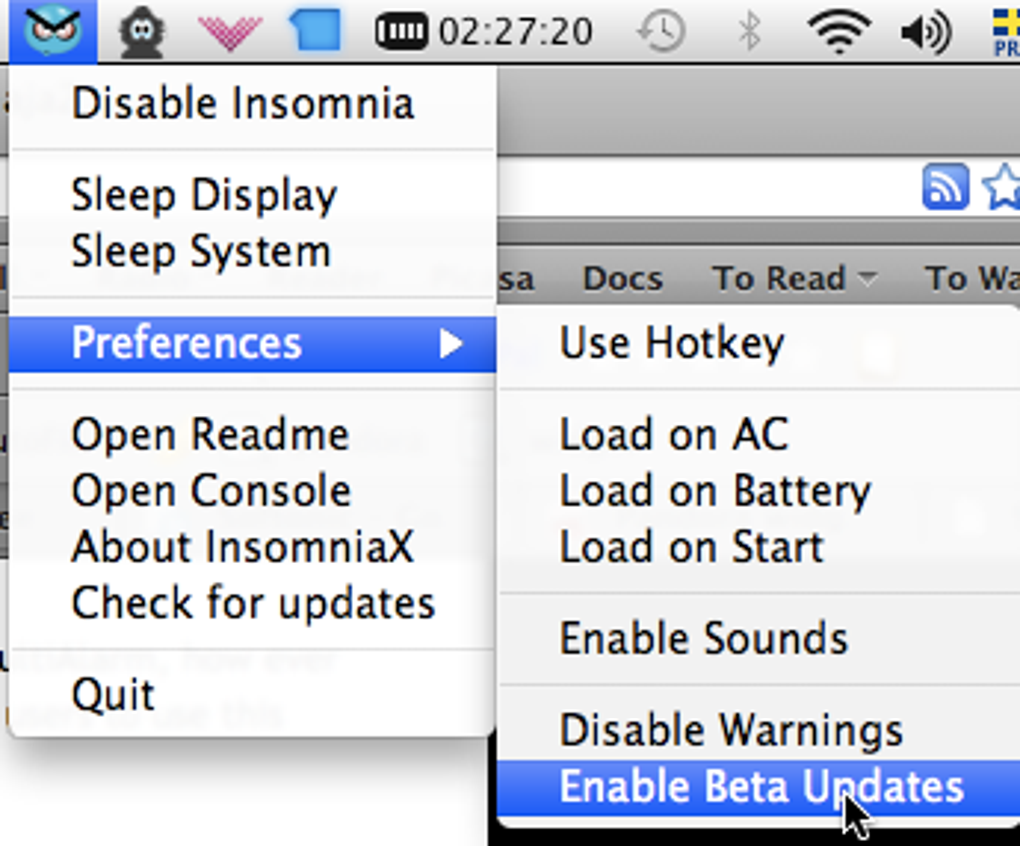
InsomniaX operates by overriding the default sleep settings on macOS. Once installed, a discreet InsomniaX icon appears in your menu bar, providing easy access to its functionalities. The program requires your system password for activation and deactivation, adding a layer of security to prevent accidental or unauthorized use.
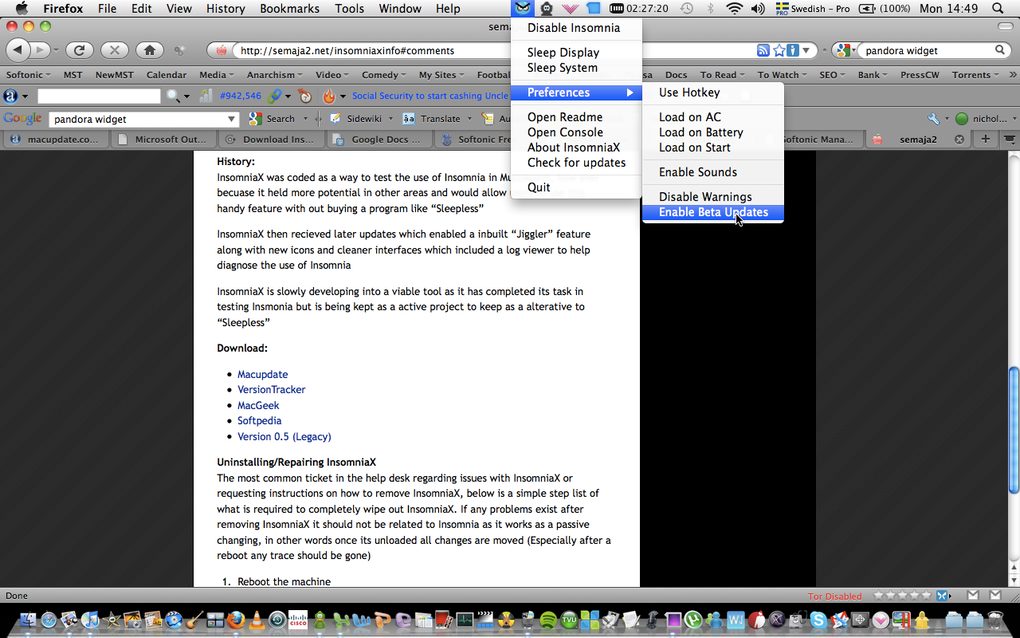
The core function is preventing the system from going to sleep, maintaining the system’s active state even when the lid is closed. This is particularly useful for tasks such as playing music or podcasts through external speakers when the laptop is not in use in the traditional sense. The utility achieves this by manipulating the power management settings within the operating system.
Beyond its primary sleep prevention function, InsomniaX also offers granular control over sleep settings. Users can independently manage display sleep and system sleep. This allows for scenarios where the screen might be powered down to conserve battery while the system continues running background processes or playing audio. The ability to manually initiate sleep for either the display or the entire system provides additional flexibility and refined control.
InsomniaX maintains a detailed log of its activities, allowing users to track its operational history. This log provides valuable information for troubleshooting potential issues and understanding the program’s impact on the system’s power management. Furthermore, configurable preferences allow users to customize its behavior, such as automatically launching upon connecting to mains power. This feature enhances convenience and aligns the utility with user preferences and typical usage patterns.
Potential Risks and Considerations
While InsomniaX offers significant convenience, it’s imperative to use it responsibly. Running a Mac with the lid closed for extended periods can lead to several potential issues. The most significant risk is overheating. Without the proper airflow provided by an open lid, the internal components of the MacBook can overheat, potentially causing system instability, performance degradation, or even permanent damage.
The heat generated by the internal components is naturally dissipated through the vents located in the bottom and sides of the MacBook. When the lid is closed, these vents are obstructed, trapping heat inside and increasing the internal temperature. This can lead to thermal throttling, where the CPU and GPU reduce their clock speeds to prevent overheating, resulting in noticeable performance slowdowns. Prolonged operation under such conditions can damage the components and significantly shorten the lifespan of the device.
Therefore, it’s crucial to avoid prolonged use of InsomniaX with the lid closed. If the application is necessary, it’s recommended to use it only for short durations and to monitor the system’s temperature closely. Using a cooling pad underneath the MacBook can help mitigate the risk of overheating, but it cannot eliminate it entirely.
Beyond the risk of overheating, it’s worth noting that closing the lid can inadvertently trigger other unintentional actions or conflicts with system processes. Although InsomniaX aims to circumvent these issues, there’s always a possibility of unexpected behaviors depending on other applications running concurrently.
User Reviews and Experiences
User reviews highlight both the benefits and drawbacks of InsomniaX. Many users praise its effectiveness in preventing sleep and enabling continuous music playback, particularly for those with malfunctioning sleep switches or a need for consistent background audio. One user noted that it was essential for using their MacBook after a water spill damaged the sleep switch, illustrating its value in specific circumstances.
However, negative reviews frequently mention difficulties in locating the menu bar icon, indicating a potential usability issue. Others experienced issues with the app’s functionality, highlighting the occasional incompatibility with different macOS versions or the need for troubleshooting steps to get the application running correctly. The lack of a readily available, clearly marked menu bar icon was cited as a major source of frustration for some users. This points to a potential improvement area for the developers in terms of user interface design and overall usability.
InsomniaX for Business Use
While primarily aimed at personal use, InsomniaX could potentially find applications in certain business scenarios. For instance, businesses might utilize it for playing background music in a retail store or office using a MacBook as a dedicated audio player. However, given the risk of overheating, this application should be approached cautiously. If deployed in a business context, it’s imperative to prioritize adequate ventilation and cooling to mitigate the risk of hardware damage. Continuous monitoring of the system’s temperature is strongly recommended in any business application of InsomniaX to ensure the long-term health and stability of the device.
InsomniaX on Mac: System Requirements and Compatibility
InsomniaX is designed to be compatible with various macOS versions, although its performance and functionality may vary depending on the specific operating system. The developer’s notes indicate that it has undergone updates to enhance compatibility with newer macOS versions, suggesting a commitment to providing ongoing support and improvements. Information on exact system requirements is not explicitly detailed, but its successful operation on a range of older macOS versions suggests a reasonably low hardware threshold. However, users should always check the latest version information before downloading and installing the software to confirm its compatibility with their specific macOS version.
Conclusion
InsomniaX offers a simple solution for users who need to keep their Mac awake, even when the lid is closed. Its ease of use and effective sleep prevention are appreciated by many. However, users must remain aware of the potential risks associated with prolonged use with the lid closed, especially the risk of overheating. Responsible usage, short operational durations, and adequate ventilation are crucial for mitigating these risks. Before employing InsomniaX, carefully weigh the benefits against the potential drawbacks, ensuring it aligns with your specific needs and operational practices. While helpful in certain contexts, understanding its limitations and potential risks are key to avoiding potential damage to your hardware.
File Information
- License: “Free”
- Latest update: “July 10, 2023”
- Platform: “Mac”
- OS: “Mac OS X”
- Language: “English”
- Downloads: “131.3K”
- Size: “1.08 MB”


