
Instagram Downloader is a Google Chrome extension designed to simplify the process of downloading photos, videos, and Reels from Instagram. This review delves into its features, functionality, user experience, and overall value, providing a detailed assessment of this popular tool.
Effortless Content Downloading: Core Functionality
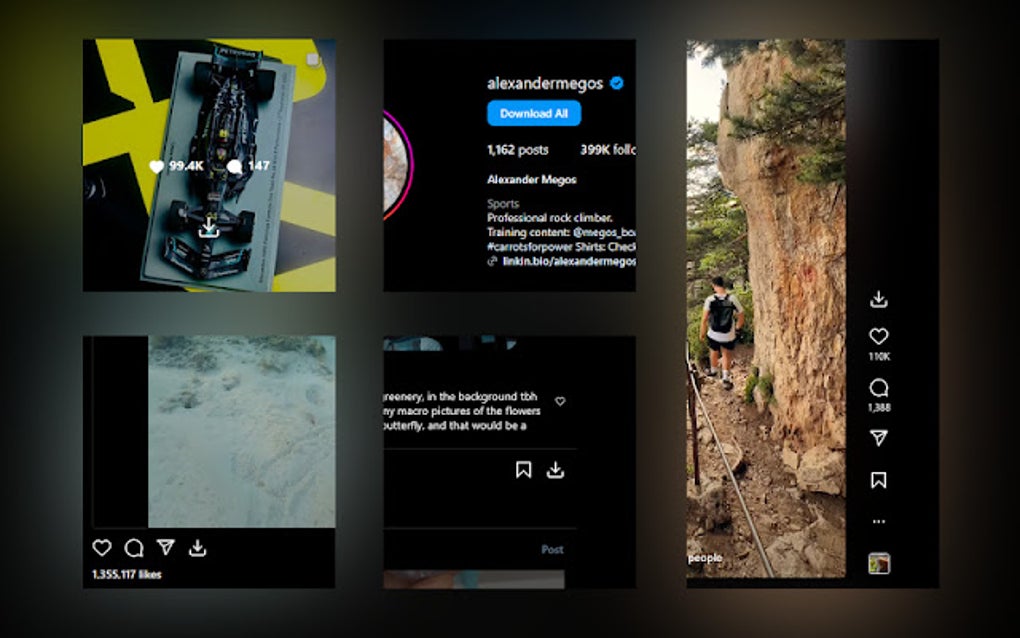
At its heart, Instagram Downloader provides a straightforward solution for saving Instagram content. After installation, a dedicated download button appears directly on each post, Reel, and Story. This eliminates the need for complex workarounds or third-party apps. Users simply click the button to initiate the download, making the process remarkably user-friendly, even for those unfamiliar with such tools. The extension’s intuitive design allows for seamless integration with the Instagram platform, maintaining a clean and unobtrusive user interface.
This ease of use extends beyond individual downloads. Instagram Downloader offers a “Download All” feature, particularly useful for bulk saving posts from a specific account. This function significantly streamlines the process of archiving large amounts of content, saving users considerable time and effort. The ability to download multiple items simultaneously enhances the tool’s efficiency and practicality, catering to users with diverse downloading needs.
The extension also incorporates a customizable hotkey for even faster downloads. This feature caters to users who prioritize speed and efficiency, allowing for instant saving of content without navigating through menus or interfaces. The assigned shortcut key enables rapid downloads, making the extension even more appealing to power users.
Furthermore, Instagram Downloader automatically organizes downloaded files into clearly defined folders, categorized by the Instagram account from which they originated. This organizational feature prevents the clutter of unsorted files and simplifies the process of locating specific content later. The thoughtful structuring of downloaded files enhances the overall user experience, allowing for efficient management of the saved Instagram material.
A crucial aspect of using the extension is the necessity to reload Instagram tabs after installation or any updates. This step is essential to ensure that the extension’s features function correctly and that the download buttons appear as intended. This requirement, while slightly inconvenient, is a minor drawback considering the extension’s overall functionality and user-friendliness.
Features and Functionality: A Deeper Dive
Beyond the basic download functionality, Instagram Downloader offers several features that enhance its usability and appeal. The “Download All” feature, as previously mentioned, is a significant advantage for users needing to save multiple items at once. This bulk download capacity significantly enhances efficiency and reduces the time spent manually downloading individual files.
The inclusion of a customizable hotkey adds a layer of speed and convenience. This feature allows for immediate downloads with a simple keystroke, speeding up the process considerably. This is particularly beneficial for users frequently downloading Instagram content. The hotkey’s customization allows users to adapt the function to their individual preferences and workflow, maximizing personal efficiency.
The automatic folder organization is a key differentiator. This feature significantly improves the management of downloaded files. Instead of a jumbled collection, users find their downloads neatly sorted by Instagram account, allowing easy identification and retrieval of specific content. This organized approach enhances the overall usability and practical value of the extension.
The extension is designed to be compatible with various types of Instagram content. It efficiently handles photos, videos, and Reels, providing a comprehensive solution for downloading a wide range of Instagram media. This broad compatibility makes the tool incredibly versatile, catering to a wide spectrum of user needs and preferences related to Instagram content downloading.
The extension’s clean and unobtrusive interface ensures it doesn’t interfere with the standard Instagram experience. The focus remains firmly on providing a smooth and efficient download function, without cluttering the Instagram interface with superfluous elements. This design prioritizes a minimalist approach, ensuring users can concentrate on browsing and downloading content without distraction.
User Experience and Interface Design
The user experience with Instagram Downloader is largely positive. The seamless integration with the Instagram platform and the straightforward download process contributes to a smooth and intuitive workflow. The addition of a download button directly on each post simplifies the steps involved, requiring minimal user interaction. This simplicity is a major strength, making the extension accessible to a wide range of users, regardless of their technical expertise.
The “Download All” feature enhances the overall user experience, especially for users needing to save numerous items. This functionality allows for batch downloads, streamlining the process considerably. The bulk download option reduces the time and effort involved in manually downloading individual posts.
The hotkey feature further refines the user experience by providing an alternative, faster download method. This additional option allows for rapid downloading, particularly beneficial for frequent users. The hotkey feature caters to users who prioritize speed and efficiency in their workflows.
The automatic folder organization simplifies the management of downloaded files. This is a significant improvement over manually organizing downloads, which can be time-consuming and cumbersome. This organizational aspect enhances the overall user experience, making the downloaded content easily accessible and manageable.
The overall design of the extension is clean and uncluttered. The interface is minimal and unobtrusive, allowing the focus to remain on the Instagram content itself. This minimalist approach ensures a smooth and efficient user experience without distracting elements.
While the requirement to reload Instagram tabs after installation or updates is a minor inconvenience, it doesn’t significantly detract from the overall positive user experience. This step is necessary to ensure proper functionality, and the positive aspects of the extension outweigh this minor drawback.
Security and Privacy Considerations
While the extension itself appears secure, it’s crucial to understand the potential security and privacy risks associated with using any third-party tool that interacts with a social media platform. It is recommended to download the extension only from trusted sources, such as the official Chrome Web Store, to minimize the risk of malware or malicious code.
Always exercise caution when granting permissions to third-party extensions. Review the permissions requested by Instagram Downloader before installation to ensure you’re comfortable with the access it requires. By understanding the permissions involved, you can make informed decisions regarding the extension’s access to your data.
While Instagram Downloader’s primary function is downloading content, it’s important to be aware of Instagram’s terms of service and copyright laws. Downloading content that you do not own or have permission to download can lead to legal issues. Respecting copyright and intellectual property rights is crucial when using this or any other content download tool.
Be mindful of the information you download. Avoid downloading personal information or sensitive data from Instagram accounts you don’t own or have permission to access. Protecting your privacy and the privacy of others is crucial when using online tools.
Conclusion: A Valuable Addition for Instagram Users
Instagram Downloader offers a convenient and efficient solution for downloading Instagram content. Its intuitive interface, streamlined download process, bulk download capability, customizable hotkey, and automatic folder organization contribute to a highly positive user experience. While minor drawbacks exist, such as the need to reload Instagram tabs after installation or updates, the overall benefits significantly outweigh these minor inconveniences. The extension’s value lies in its ability to simplify a task that can otherwise be tedious and time-consuming. For users who frequently download Instagram content, Instagram Downloader is a valuable and time-saving addition to their Chrome browser. However, users should always prioritize security and privacy and use the extension responsibly, respecting copyright laws and Instagram’s terms of service.
File Information
- License: “Free”
- Version: “2.0.0”
- Latest update: “December 27, 2024”
- Platform: “chrome”
- Downloads: “3.3K”


