
In the vast and ever-evolving landscape of software development and distribution, the final hurdle for any application is often its installation process. A seamless, professional, and reliable installation experience is paramount to user satisfaction, reflecting positively on the software itself and its creators. This is where tools like Install Wizard Creator come into play. Designed for Windows, Install Wizard Creator stands out as a focused and free program dedicated to simplifying the creation of installation packages. It caters specifically to developers, independent software vendors (ISVs), and hobbyists who need a straightforward method to bundle their applications into user-friendly installers without navigating the complexities of more enterprise-grade solutions.
At its core, Install Wizard Creator is categorized under development software, specifically within the subcategory of installers. Its primary function is to transform a collection of application files, resources, and configurations into a self-contained executable that guides users through the installation process. This includes steps such as selecting installation directories, accepting license agreements, creating shortcuts, and registering necessary components. For many, the idea of creating an installer might conjure images of intricate scripting or steep learning curves, but Install Wizard Creator aims to dismantle these barriers, offering an intuitive pathway to professional software deployment.
The importance of a well-crafted installer cannot be overstated. It is often the first interaction a user has with a piece of software. A clunky, confusing, or error-prone installation can deter users, regardless of how brilliant the underlying application might be. Conversely, a smooth and efficient setup process instills confidence and sets a positive tone for the entire user experience. Install Wizard Creator, with its emphasis on ease of use, addresses this critical need, enabling developers to present their work polished and ready for public consumption or internal distribution.
This article delves into the specifics of Install Wizard Creator, exploring its features, technical specifications, user experience, and its position within the broader ecosystem of installer creation tools. We will also examine why a tool like this, despite being around for some time, continues to hold relevance for a particular segment of the development community. Furthermore, we will compare it with various alternatives, providing a comprehensive overview for anyone looking to streamline their software deployment process.
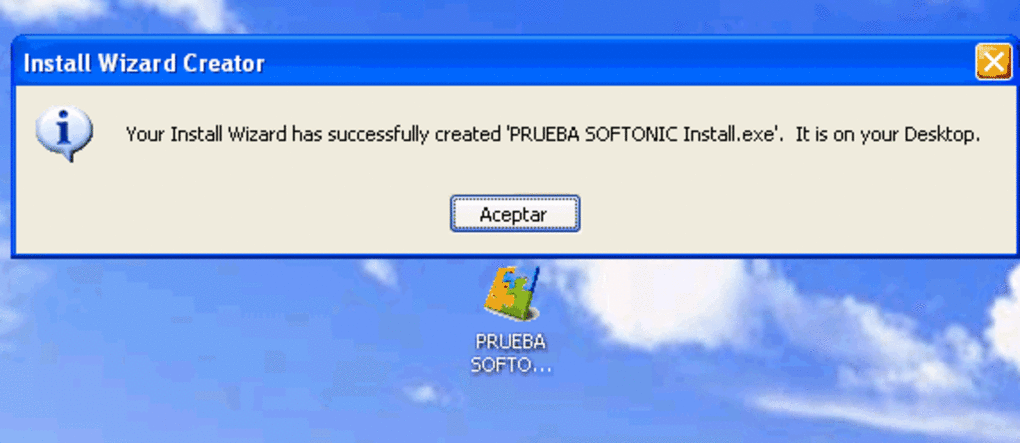
The Essence of Easy-to-Use Installer Creation
The phrase “easy-to-use install creator” perfectly encapsulates the philosophy behind Install Wizard Creator. In an era where development tools can often be overwhelmingly feature-rich and complex, there remains a significant demand for applications that prioritize simplicity and efficiency. Install Wizard Creator fulfills this niche by offering a clear, guided approach to building installers, making it accessible even to those with limited experience in deployment scripting or advanced software packaging.
Why Simplicity Matters in Software Deployment
For many independent developers, small businesses, or educational institutions, the resources available for software deployment are often limited. They may not have dedicated build engineers or the budget for high-end, commercial installer suites that come with steep learning curves and ongoing maintenance. In such scenarios, a tool like Install Wizard Creator becomes invaluable. Its simplicity means:
- Reduced Learning Curve: Users can quickly grasp how to use the tool, significantly cutting down on the time and effort required to produce a functional installer. This allows developers to focus more on their core product rather than the intricacies of its distribution.
- Faster Development Cycles: The ability to rapidly create and iterate on installers means that software updates can be rolled out more frequently and efficiently. This agility is crucial in today’s fast-paced development environment.
- Lower Barrier to Entry: Hobbyists and emerging developers, who might otherwise be intimidated by complex deployment tools, can easily package their applications, fostering innovation and broader software availability.
- Fewer Errors: Simpler interfaces and fewer options often lead to fewer opportunities for misconfiguration or errors in the installer script, resulting in more reliable installations for end-users.
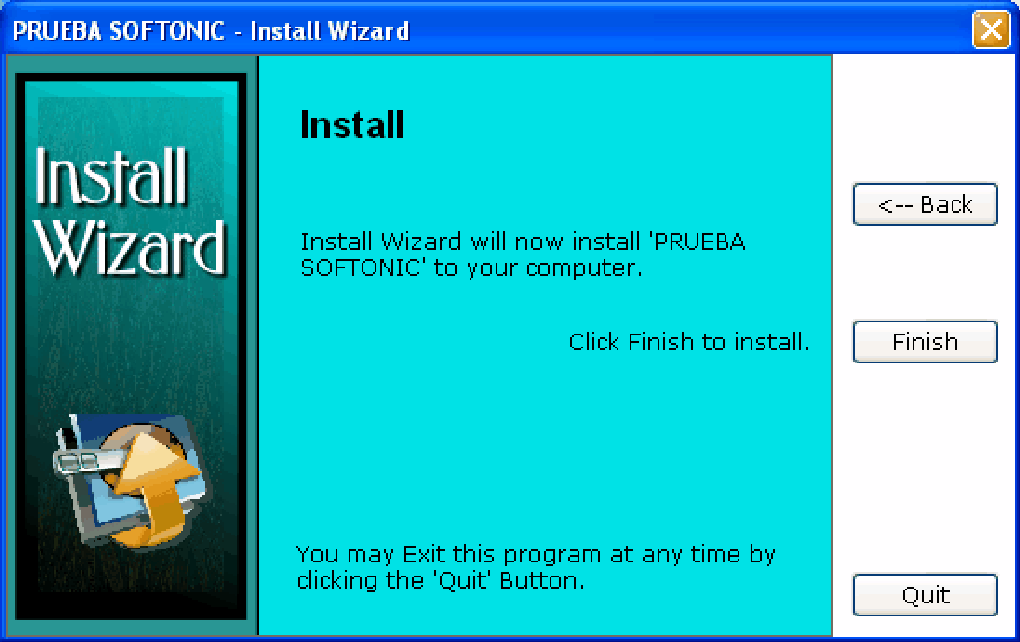
Target Audience: Who Benefits Most?
Install Wizard Creator’s design makes it particularly appealing to several distinct user groups:
- Independent Software Vendors (ISVs): Small and medium-sized ISVs often need to distribute their commercial or freeware applications professionally but without the overhead of enterprise solutions. Install Wizard Creator provides a cost-effective and straightforward way to achieve this.
- Freeware and Shareware Developers: Authors of free or trial software often operate on tight budgets and need quick, no-fuss methods to package their creations for public download. The “free” aspect of Install Wizard Creator aligns perfectly with this model.
- Hobbyist Programmers: For those who code for personal projects or small communities, creating a professional installer adds a layer of credibility and ease of use for their testers or fellow enthusiasts.
- Educators and Students: In academic settings, where the focus is on learning programming concepts, an easy installer creator can be a valuable tool for packaging student projects without diverting too much attention to complex deployment mechanisms.
- Internal Tools Distribution: Companies needing to distribute custom internal applications or utilities to their employees can use Install Wizard Creator to ensure consistent and reliable installations across their network.
Core Functionalities for Effortless Setup
While Install Wizard Creator prioritizes simplicity, it still delivers the essential functionalities expected from a basic installer creation tool. These typically include:
- File Inclusion: The ability to select and package all necessary application files, DLLs, and data files into the installer.
- Shortcut Creation: Automatically creating desktop icons, start menu entries, and quick launch shortcuts for the installed application.
- License Agreement Display: Presenting an End-User License Agreement (EULA) that users must accept before proceeding with the installation. This is critical for legal compliance and defining terms of use.
- Directory Selection: Allowing users to choose the installation path, offering flexibility beyond a default location.
- Uninstaller Generation: Crucially, a good installer also creates an uninstaller, enabling users to remove the software cleanly from their system. This is a hallmark of professional software.
- Basic Customization: Options to customize the installer’s visual appearance, such as the title, welcome message, and finish message, to align with the application’s branding.
By focusing on these core capabilities, Install Wizard Creator empowers users to quickly generate functional and presentable installers, bridging the gap between a compiled application and a user-ready product.
Deep Dive into Install Wizard Creator’s Specifications and Features
Understanding the technical specifications and detailed features of Install Wizard Creator provides insights into its capabilities, limitations, and suitability for various projects. While the provided information is concise, we can extrapolate and elaborate on what these details signify for potential users.
System Compatibility and Lightweight Design
According to the app specifications, Install Wizard Creator is designed for Windows and is compatible with “Windows 95 and prior versions,” with a listed OS compatibility of “Windows 2003.” This indicates a tool designed for legacy Windows environments, but also one that is likely to function seamlessly on newer versions of Windows due to its relatively simple requirements. Its primary language is English, making it accessible to a wide international audience.
A crucial detail is its size: “531.87 KB.” This is an exceptionally small footprint for a software development tool.
- Implications of small size:
- Minimal System Resources: It consumes very little RAM and CPU, making it suitable for older computers or systems with limited resources.
- Fast Download and Installation: The program itself downloads and installs almost instantly, allowing users to get started without delay.
- Portability: Its small size might even suggest it could be run from a USB drive, offering flexibility for developers on the go.
- Focus on Core Functionality: Such a small size typically means the application is highly optimized and focused, avoiding bloatware or unnecessary features, which aligns with its “easy-to-use” premise.
The fact that it is “not that heavy software that doesn’t need as much storage space than most programs in the section Development software” reinforces this idea. In a world of multi-gigabyte IDEs and development suites, Install Wizard Creator is a refreshing alternative for those who need a specific task done efficiently without burdening their system.
The listed version is “2.0,” with the latest update on “June 30, 2011.” While this indicates that the software hasn’t seen recent updates, its continued availability and past popularity (22,205 installations since 2011, with 16 installations in a recent week on PhanMemFree) suggest that its core functionality remains relevant and stable for its intended use cases, particularly for maintaining compatibility with older software or systems where modern installer frameworks might be overkill. Its popularity in countries like India, Indonesia, and the Philippines further highlights its appeal in regions where access to free, lightweight, and effective tools is highly valued.
Key Features for a Professional Installer (Elaborated)
While the reference content doesn’t list specific features beyond its general description, an “easy-to-use install creator” typically includes:
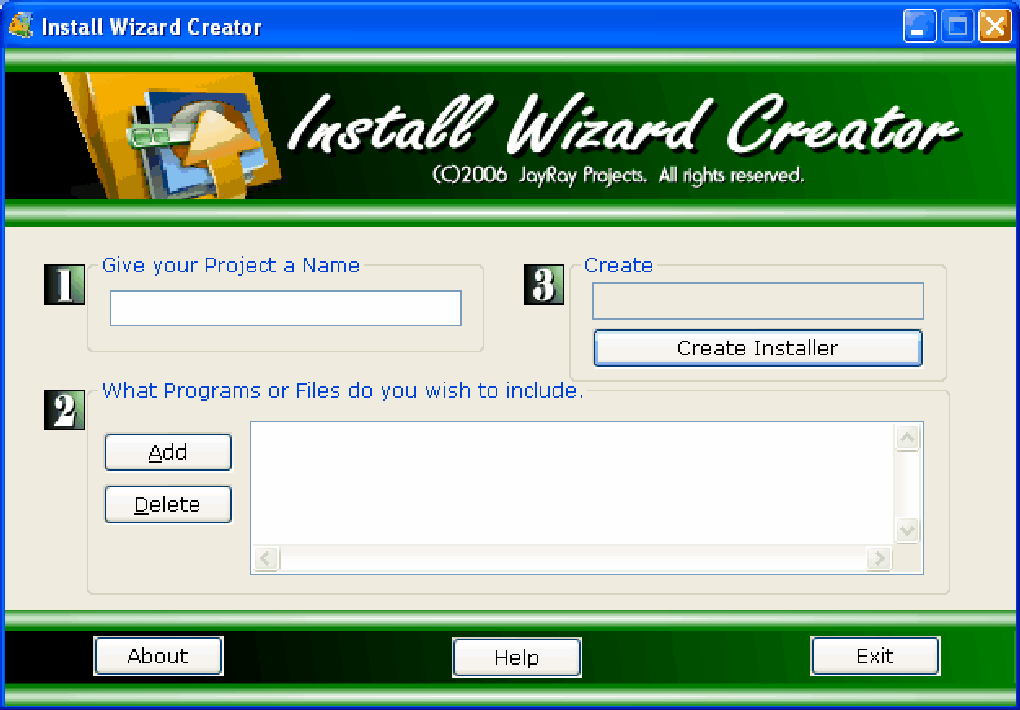
- Wizard-Driven Interface: The most prominent “wizard” aspect is a step-by-step guide through the installer creation process. This guides the user through defining project details, selecting files, configuring installation options, and generating the installer.
- Basic File Management:
- File Selection: Users can add individual files or entire folders to be included in the installer.
- Destination Paths: Ability to specify default installation directories and allow users to override them.
- Overwrite Rules: Options to control whether existing files should be overwritten during installation.
- Shortcut Management:
- Desktop Shortcuts: Create icons on the user’s desktop.
- Start Menu Entries: Add program groups and shortcuts to the Windows Start Menu.
- Quick Launch (older Windows versions): Potentially create shortcuts in the Quick Launch bar.
- License Agreement Integration: A text editor or file import feature to include an EULA, presented to the user during installation.
- Uninstaller Creation: Automatically generates an uninstallation program that can be accessed via the Windows “Add or Remove Programs” (or “Programs and Features”) control panel. This ensures a clean removal of the application.
- Basic Branding/Customization:
- Titles and Headers: Customize the title bar and header text of the installer windows.
- Welcome/Finish Messages: Personalize the introductory and concluding screens.
- Icon Selection: Potentially allows specifying an icon for the installer executable itself.
- Registry Entries (Basic): For more advanced applications, the ability to add simple registry keys (e.g., for application settings or file associations) might be present, though often limited in simpler tools to maintain ease of use.
- Output Options: Typically, the tool outputs a single executable (.exe) file that contains all the necessary components for installation.
These features, while not exhaustive compared to high-end solutions, provide a solid foundation for creating functional and professional-looking installers that meet the needs of many independent projects.
Understanding the Download and Deployment Process
The download figures—15.4K total downloads and 41 downloads last month on PhanMemFree—suggest a consistent, albeit niche, interest in Install Wizard Creator. These statistics, combined with its popularity in certain countries, underscore the demand for free, efficient, and straightforward installer solutions. The process from discovering the tool on PhanMemFree.org to using it is designed to be minimal friction: a small download, quick installation of the creator tool itself, and then the guided process of building a new installer. This rapid deployment of the creator tool mirrors the rapid deployment of the software it is designed to package, creating an ecosystem of efficiency.
Navigating the Landscape of Installer Solutions: Install Wizard Creator and Its Alternatives
The world of software deployment is diverse, ranging from simple scripting to complex enterprise-level solutions. Install Wizard Creator occupies a specific segment within this ecosystem, characterized by its focus on ease of use and free availability. To fully appreciate its value, it’s essential to compare it with some of its prominent alternatives.
A Look at the Competitive Market
Installer creation tools vary widely in their features, complexity, pricing, and target audience. On one end, you have highly sophisticated commercial products designed for large organizations with complex deployment needs (e.g., extensive customization, database integration, virtual machine deployment). On the other, you have open-source or free tools that prioritize flexibility and community support but might require more technical proficiency (e.g., scripting). Install Wizard Creator sits comfortably in the free, easy-to-use category, appealing to those who need a quick and reliable solution without a deep dive into advanced configurations.
Comparing Install Wizard Creator with Other Tools
Let’s examine some of the alternatives mentioned in the PhanMemFree.org listing and how they stack up against Install Wizard Creator:
-
InstallShield Professional (Trial version):
- Comparison: InstallShield is arguably the industry standard for Windows installer creation. It’s an incredibly powerful, feature-rich, and complex commercial product. It supports advanced features like MSI package creation, database installations, web deployments, cloud integration, and sophisticated system requirements checks.
- Against Install Wizard Creator: InstallShield is for large enterprises or professional developers with complex requirements and budget. It has a steep learning curve and a high cost. Install Wizard Creator is the complete opposite: free, simple, and for basic needs. If you need robust features and enterprise-grade deployment, InstallShield is superior. If you need quick, simple, and free, Install Wizard Creator wins.
-
Install Creator (Free):
- Comparison: This tool also aims for ease of use with a visual interface, similar to Install Wizard Creator. It focuses on building customized installers efficiently.
- Against Install Wizard Creator: These two are quite similar in their target audience and approach. The choice between them might come down to personal preference for their respective user interfaces or specific minor features. Install Creator also emphasizes “visual interface,” suggesting a wizard-driven or graphical design experience.
-
Bytessence Install Maker (Free):
- Comparison: Another free option that promises to create installers in “a few clicks.” This reiterates the demand for quick and easy solutions.
- Against Install Wizard Creator: Like Install Creator, Bytessence Install Maker is in direct competition with Install Wizard Creator, targeting the same segment of users who prioritize simplicity and cost-effectiveness. The subtle differences would lie in their exact feature sets, UI design, and perhaps the level of community support or documentation.
-
Setup Generator (Free):
- Comparison: Described as “A simple but complete installer,” Setup Generator also fits the mold of a user-friendly, free tool. Its higher rating (4.1) on PhanMemFree.org compared to Install Wizard Creator’s unrated status suggests it might offer a slightly more polished or feature-rich experience within the ‘simple’ category.
- Against Install Wizard Creator: Again, it’s a direct competitor. Users might explore both to see which interface or feature set resonates better with their workflow. “Complete” in its description might imply a broader set of basic features than Install Wizard Creator.
-
Nullsoft Scriptable Install System (NSIS) (Free):
- Comparison: NSIS is a powerful, open-source script-based installer system. It offers immense flexibility and customization, allowing developers to create highly tailored installers through scripting. It’s widely used and has a large community.
- Against Install Wizard Creator: NSIS is free and powerful, but it requires scripting knowledge. While it offers unparalleled control, it is not easy-to-use in the click-and-go sense. It has a steeper learning curve than Install Wizard Creator. If you need high customization and are comfortable with scripting, NSIS is excellent. If you want a GUI and minimal fuss, Install Wizard Creator is preferable.
-
Inno Setup (Free):
- Comparison: Another highly popular free installer system, Inno Setup combines aspects of scripting with a relatively straightforward configuration process. It’s known for its robust features, including support for uninstallation, modifiable UI, cryptographic signing, and more. It often sits between wizard-based tools and pure scripting solutions like NSIS.
- Against Install Wizard Creator: Inno Setup offers more power and flexibility than Install Wizard Creator, often through a hybrid script-and-wizard approach. It is still free and highly recommended for those who want more control but aren’t afraid of configuration files. For absolute beginners or those who want the quickest, most basic installer, Install Wizard Creator might still be simpler, but Inno Setup provides significantly more capability for a modest increase in complexity.
Choosing the Right Installer for Your Project
The choice between Install Wizard Creator and its alternatives boils down to several factors:
- Complexity of Your Application: For simple applications with basic file copying and shortcut creation, Install Wizard Creator is often sufficient. For applications requiring registry modifications, services installation, database setup, or complex prerequisites, more advanced tools like Inno Setup or InstallShield would be necessary.
- Budget: Install Wizard Creator (and NSIS, Inno Setup, Bytessence Install Maker, Setup Generator) are free, making them ideal for individuals and small teams with no budget for deployment tools. Commercial tools like InstallShield come with a cost.
- Technical Skill Level: If you prefer a purely graphical, wizard-driven experience with no scripting, Install Wizard Creator is a strong contender. If you’re comfortable with scripting and want more control, NSIS or Inno Setup offer greater power.
- Customization Needs: If basic branding and standard installation dialogues are enough, Install Wizard Creator fits. If you need highly customized UI, conditional installations, or multi-language support, look towards the more powerful free or commercial options.
- Operating System Compatibility: Install Wizard Creator is for Windows. If you need cross-platform installers, you’d need to look at other solutions (though often distinct tools for each OS).
In essence, Install Wizard Creator serves as an excellent entry-level tool for Windows applications, perfectly balancing simplicity with the fundamental requirements of software distribution. It’s a testament to the idea that effective tools don’t always need to be the most complex or expensive ones.
User Experience, Community Insights, and Future Prospects
While the raw data from PhanMemFree.org gives us usage statistics, delving into the hypothetical user experience and the role of such tools in the broader development community helps solidify Install Wizard Creator’s position.
Understanding User Needs and Feedback
The “user reviews about Install Wizard Creator” section on PhanMemFree.org currently shows “Be the first to leave your opinion!” This indicates a lack of public reviews on that specific platform, but it doesn’t diminish the tool’s utility. For a tool last updated in 2011, its continued download numbers suggest that it still fulfills a consistent, albeit perhaps quiet, need.
What kind of feedback would a user typically give for a tool like Install Wizard Creator?
- Positives:
- “It just works!” – The most common praise for simple tools is that they effectively accomplish their stated purpose without fuss.
- “Quick and easy” – Users would appreciate the minimal time investment to create an installer.
- “Free and lightweight” – The cost and system resource efficiency would be highly valued.
- “Great for small projects” – Acknowledging its niche and effectiveness for basic distribution.
- Negatives/Suggestions for Improvement (if any):
- “Lacks advanced features” – Users needing more complex options might find it limiting (e.g., no digital signing, no prerequisites checks, no custom actions).
- “Outdated UI” – The interface might not align with modern design aesthetics, given its last update date.
- “Limited customization” – Developers wanting to heavily brand their installers might find the options restrictive.
- “No recent updates/support” – A common concern for older free software.
Despite any potential lack of advanced features or modern aesthetics, the enduring appeal of Install Wizard Creator lies in its sheer utility for a specific segment of developers who value straightforward functionality above all else. It’s a prime example of a tool that does one thing and does it well, within its defined scope.
The Enduring Appeal of Specialized Tools
In a software ecosystem often dominated by integrated development environments (IDEs) that attempt to do everything, specialized tools like Install Wizard Creator retain their importance. They offer:
- Focus: They concentrate on a single task, often leading to a more streamlined and efficient workflow for that specific task.
- Resource Efficiency: As seen with Install Wizard Creator’s minuscule size, specialized tools often consume fewer system resources.
- Accessibility: Their narrower scope often translates to simpler interfaces and easier learning curves, making them accessible to a wider range of users, including those who are not full-time developers.
- Portability: Some lightweight tools can be easily carried on portable storage, allowing developers to work on different machines.
Install Wizard Creator embodies these advantages, demonstrating that even older, minimally updated software can remain a relevant and valuable asset if it effectively meets a persistent need. Its popularity in specific regions further underscores the global demand for accessible and free software solutions.
Conclusion: The Lasting Value of Install Wizard Creator
Install Wizard Creator for Windows, a product of jayray-projects, represents a practical and accessible solution for software deployment. Its enduring presence on platforms like PhanMemFree.org, coupled with its consistent download figures, speaks volumes about its utility and reliability. As a free, lightweight, and easy-to-use program, it effectively serves independent developers, hobbyists, and small businesses who need a no-fuss method to package their applications into professional-looking installers.
While it may not boast the extensive feature sets of commercial giants like InstallShield or the scripting power of open-source tools like NSIS or Inno Setup, its strength lies precisely in its simplicity. It lowers the barrier to entry for professional software distribution, ensuring that valuable applications can reach their users with a seamless installation experience. For projects where robust customization or complex system integrations are not primary concerns, Install Wizard Creator remains an excellent choice, embodying the principle that sometimes, less is indeed more. It’s a reminder that fundamental tools, when well-executed and freely available, can hold significant and lasting value in the dynamic world of software development.
File Information
- License: “Free”
- Version: “2.0”
- Latest update: “June 30, 2011”
- Platform: “Windows”
- OS: “Windows 2003”
- Language: “English”
- Downloads: “15.5K”
- Size: “531.87 KB”


