
Instant Eyedropper is a lightweight and user-friendly color picker designed to streamline the color selection process for web developers, graphic designers, and anyone working with digital visuals. Its intuitive drag-and-drop interface eliminates the multi-step process traditionally involved in obtaining color codes, significantly improving workflow efficiency. This article delves into the features, benefits, and potential limitations of Instant Eyedropper, comparing it to alternative color picker tools and exploring its overall effectiveness as a time-saving solution.
Effortless Color Code Acquisition
The core functionality of Instant Eyedropper revolves around its ability to instantly identify and copy the HTML color code of any pixel on the screen. Unlike traditional methods that require taking screenshots, opening image editors, and manually selecting colors, Instant Eyedropper simplifies this process to a single, intuitive action. Users simply grab the program’s icon, located discreetly in the system tray, and drag it over the desired color on their screen. Upon releasing the mouse button, a small window displays the color code, which is simultaneously copied to the clipboard, ready for immediate pasting into any application or document. This streamlined process dramatically reduces the time spent on color selection, allowing users to focus on their creative work rather than tedious technical tasks.
This efficiency is particularly valuable for web developers who frequently need to match colors or create color palettes for websites. Graphic designers also benefit greatly from this rapid color selection, as they often need to pick specific colors from images or existing designs. The program’s ease of use ensures minimal disruption to the user’s workflow, making it a seamless integration into their daily routine.

Supported Color Code Formats
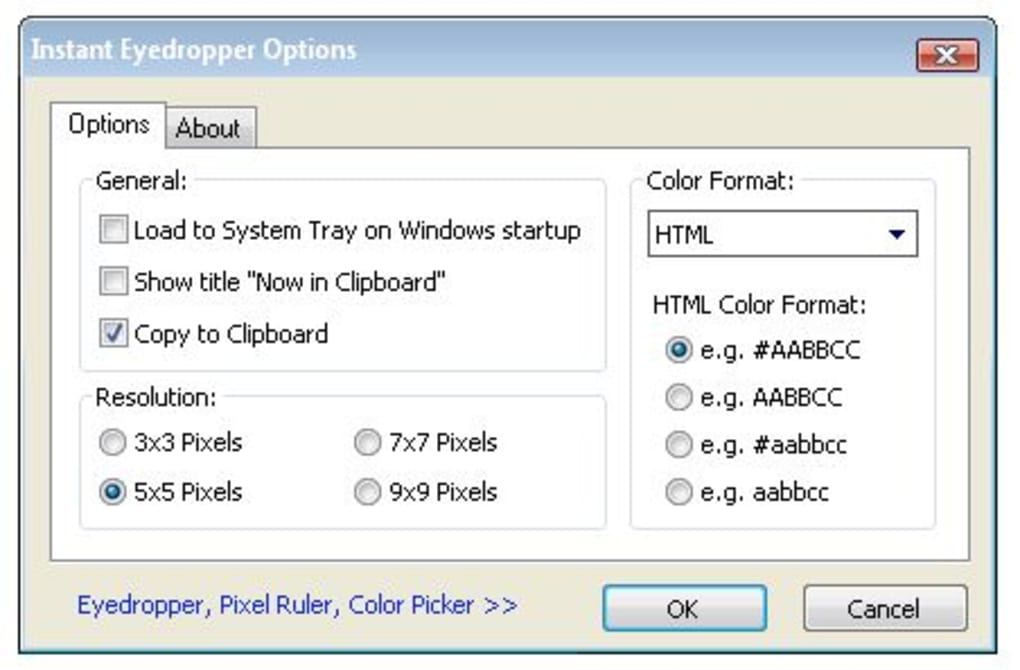
Instant Eyedropper supports a variety of color code formats, ensuring compatibility with diverse applications and coding languages. It provides color codes in the following formats:
-
HTML: The standard color code format used in web development, represented by a hexadecimal value (#RRGGBB). This is the most common format and is directly usable in most web development environments.
-
Hex: A more general hexadecimal representation of the color, similar to the HTML format. This allows flexibility for use in various contexts beyond web development.
-
Delphi Hex: A specific hexadecimal format used in the Delphi programming language.
-
VB Hex: A hexadecimal format tailored for use within Visual Basic applications.
-
RGB: This format represents the color using three values indicating the intensity of red, green, and blue components (e.g., RGB(255, 0, 0) for red). This representation is widely used in image editing and graphics programming.
-
HSB (HSV): An alternative color model that uses hue, saturation, and brightness values. This model is often preferred by artists and designers as it represents colors in a more intuitive way.
This broad support for various color code formats makes Instant Eyedropper a versatile tool suitable for a wide range of applications and user preferences. The ability to select the desired output format directly eliminates the need for manual conversions, further enhancing the efficiency of the color selection process.
Limitations and Considerations
While Instant Eyedropper excels at its core functionality—rapid color code acquisition—it does have certain limitations. A significant drawback is its lack of a color palette or history feature. Many competing color picker tools offer the ability to save frequently used colors for later access. This feature enhances workflow by preventing users from having to repeatedly pick the same colors. Instant Eyedropper’s omission of this functionality means that users cannot easily retrieve previously selected colors, which might lead to repeated color picking, partially negating some of its time-saving advantages.
Another point to consider is the program’s age. Last updated in 2008, it may not be fully compatible with the latest operating systems or incorporate the latest advancements in color picking technology. While it remains functional, newer alternatives might offer improvements in performance, interface, and feature sets. Users should carefully consider their needs and weigh the benefits of Instant Eyedropper against the features offered by more modern color pickers.
Comparison with Alternative Color Picker Tools
Numerous alternative color picker tools are available, each with its own strengths and weaknesses. Some popular alternatives include:
-
Eyedropper: A simple and effective color picker that shares a similar core functionality with Instant Eyedropper. However, it might offer additional features like color palette storage or advanced color manipulation tools.
-
Just Color Picker: This tool provides more comprehensive color information, often including color variations and different color models, offering a more detailed analysis of the selected color.
-
ColorPic: ColorPic is a more feature-rich option that combines color picking with additional features like image editing and screen magnification.
-
CPick: A more versatile tool with advanced features, potentially including color adjustment options, history functionality, and more sophisticated color model support.
-
Pixeur: This tool focuses on a smooth user experience and often includes a history of previously selected colors, allowing users to quickly access them again.
- ColorMania: A dedicated color picker intended for graphical artists and web designers, often containing highly customized color selection options.
The best choice of color picker ultimately depends on individual needs and preferences. If the primary requirement is simply fast and straightforward color code acquisition, Instant Eyedropper might suffice. However, if additional features like color palette storage, advanced color manipulation, or a more modern interface are desired, exploring alternative tools is recommended.
Conclusion: A Valuable Tool for Specific Needs
Instant Eyedropper remains a valuable tool for users who prioritize speed and simplicity in color selection. Its straightforward interface and rapid color code retrieval make it a time-saver for tasks requiring frequent color picking. However, the absence of a color palette or history feature, and its older design, might make it less suitable for users requiring more advanced functionalities or a modern user experience.
Users should carefully assess their needs and compare Instant Eyedropper’s features against those offered by alternative color picker tools. While perfectly adequate for its specific purpose, it’s crucial to consider whether its limited feature set outweighs its simplicity and speed for the individual user’s workflow. If the primary need is quick and efficient color code grabbing without the need for extensive color management, Instant Eyedropper could still be a highly effective solution. However, for more demanding color manipulation tasks or a more integrated workflow experience, more feature-rich alternatives might prove to be a better investment of time and effort.
File Information
- License: “Free”
- Version: “1.75”
- Latest update: “January 24, 2008”
- Platform: “Windows”
- OS: “Windows 2003”
- Language: “English”
- Downloads: “20.9K”
- Size: “430.77 KB”


