
IO Auto Clicker is a free utility tool designed to automate repetitive clicking and keyboard input tasks. This versatile program finds application in various scenarios, from streamlining tedious data entry processes to enhancing gaming experiences. While offering significant advantages in terms of efficiency, users should be mindful of the potential limitations and risks associated with its use, particularly in online games and applications with strict anti-cheat measures.
Streamlining Repetitive Tasks: Productivity and Gaming Applications
The core functionality of IO Auto Clicker revolves around automating repetitive actions. This translates into significant time savings and increased efficiency across a broad spectrum of tasks. For individuals engaged in data entry, the program can dramatically accelerate the process of filling out online forms, managing logbook entries, and performing rapid data cross-checking. The ability to record and replay sequences of clicks and keystrokes eliminates the need for manual repetition, freeing up valuable time and reducing the risk of human error.
The benefits extend beyond data entry. Gamers, in particular, can leverage IO Auto Clicker to gain a significant advantage in certain games. By automating rapid, continuous clicks, players can execute actions such as rapidly attacking opponents in action games, or triggering abilities at a much faster rate than is humanly possible. This can be particularly useful in games with repetitive, time-sensitive actions, such as clicking to attack enemies or gathering resources. However, it’s crucial to remember that using auto-clickers in competitive online games often violates terms of service and can result in account bans. Therefore, careful consideration of the game’s rules and policies is essential before employing IO Auto Clicker or similar tools.
Beyond gaming and data entry, IO Auto Clicker can be applied to a variety of other tasks requiring repetitive actions. Examples include:
-
Clicking through advertisements or surveys: For tasks that require repetitive clicking on multiple web elements, IO Auto Clicker can automate this process.
-
Automating social media interactions: While potentially against the terms of service for various platforms, IO Auto Clicker could theoretically be used to automate liking posts, following accounts, or other repetitive interactions. However, using this program for such purposes comes with inherent risks, including account suspension or permanent bans.
-
Testing and debugging software: In the context of software development, IO Auto Clicker can be utilized to simulate user interactions, aiding in the testing and debugging of applications.
-
Generating repetitive patterns or designs: The program’s ability to record and repeat actions could potentially be employed to create simple repeating patterns in digital art or design software.
In essence, the program’s versatility allows for adaptation to a wide range of tasks characterized by repetitive actions, thereby enhancing productivity and freeing up cognitive resources for more complex activities.
Feature Set and User Interface
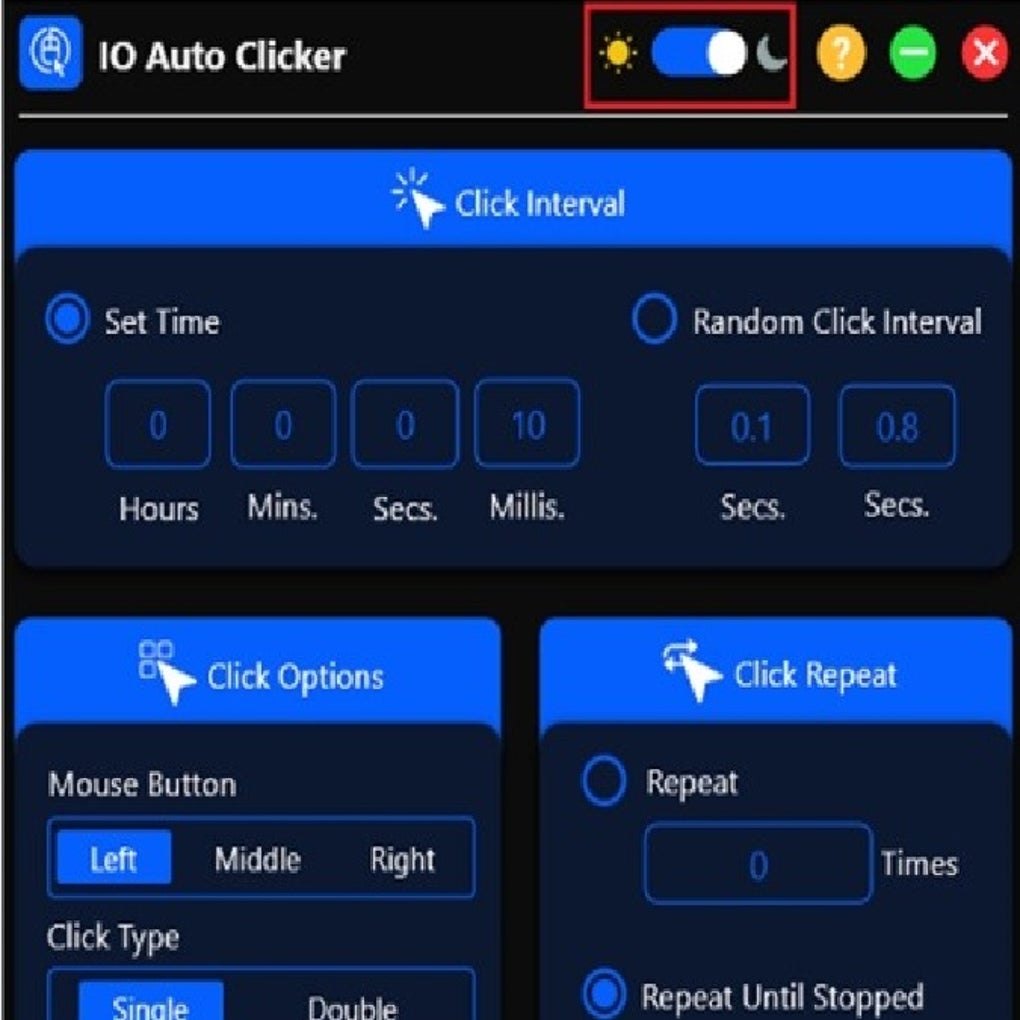
IO Auto Clicker boasts a comprehensive suite of features designed to enhance both ease of use and functionality. Key features include:
-
Click Interval: This feature allows users to precisely control the time interval between successive clicks, thereby customizing the speed of automated actions. This is particularly important in gaming contexts, where precise timing is often crucial.
-
Click Type: The program offers various click types, including single clicks, double clicks, and right-clicks. This flexibility enables the automation of a wider variety of tasks.
-
Click Repeat: This feature allows users to specify the number of times a particular click sequence should be repeated, ensuring that a task is completed without interruption.
-
Target Point: The program provides a means to specify the exact coordinates on the screen where clicks should occur. This ensures precision and eliminates the need for manual aiming.
-
Hotkey Selection: Users can assign specific hotkeys to start, stop, or pause the automated click sequence, providing a convenient means of controlling the program’s operation.
-
Fast Mouse Clicking: This capability enables the automation of exceptionally fast clicks, which is particularly advantageous in gaming contexts.
-
Record and Playback: The program’s ability to record a sequence of clicks and keystrokes and then replay it autonomously is a key feature that simplifies the automation process.
-
Numbered Clicks: This feature allows for the creation of click sequences that incorporate a numbered progression, useful for automating tasks where sequential order is important.
-
Dark Mode: The addition of a dark mode improves usability and reduces eye strain, particularly during extended periods of use in low-light environments.
While the exact user interface may vary depending on the version, generally, IO Auto Clicker presents a straightforward interface that is intuitive to navigate. This ease of use contributes to its accessibility for both novice and experienced users.
Compatibility and Device Support
IO Auto Clicker exhibits broad compatibility across multiple operating systems and devices, including Windows PCs, Macs, iPhones, Android phones, and Chromebooks. This cross-platform compatibility expands the program’s accessibility and extends its utility to a wider range of users and scenarios. The ability to run on multiple devices allows users to automate tasks consistently across their different platforms, improving workflow efficiency.
Risks and Limitations
Despite its numerous advantages, it’s vital to acknowledge the potential risks and limitations associated with using IO Auto Clicker:
-
Account Bans: In online competitive games, the use of auto-clickers is almost universally prohibited and will likely result in a permanent account ban. Game developers actively employ anti-cheat mechanisms to detect and penalize such practices. Therefore, using IO Auto Clicker in this context carries considerable risk and should be avoided.
-
Software Compatibility: While IO Auto Clicker enjoys widespread compatibility, there may be instances where it doesn’t function correctly with specific software or applications. This incompatibility can stem from various factors, including software updates and changes in the application’s user interface.
-
Potential for Abuse: The potential for misuse exists, with applications such as click fraud or automation of malicious activities. Users are responsible for their actions and the ethical use of this software.
-
Security Concerns: While IO Auto Clicker itself is generally considered safe, downloading from unofficial sources could expose users to malware or other security threats. It’s crucial to download the software only from trusted and reputable sources, like the official website or established software download platforms.
-
Over-Reliance: Over-reliance on automation can lead to a decline in manual skills and an increased dependence on technology. A balanced approach, combining automation with manual input, is often more effective and avoids potential problems.
Conclusion
IO Auto Clicker presents a powerful tool for automating repetitive tasks and improving efficiency across a variety of applications. Its ease of use, extensive feature set, and broad compatibility make it an attractive option for both personal and professional use. However, users must exercise caution and be mindful of potential risks associated with its use, particularly in the context of online games and applications with strict terms of service. By understanding the program’s limitations and employing it responsibly, users can harness its power to streamline workflows and enhance productivity. Always prioritize responsible and ethical usage to prevent potential negative consequences.
File Information
- License: “Free”
- Version: “2.1”
- Latest update: “January 2, 2025”
- Platform: “Windows”
- OS: “Windows 11”
- Language: “English”
- Downloads: “6.3K”
- Size: “57.74 MB”


