
iOS 16 stands as a monumental leap forward for iPhone users, a free upgrade that redefines the relationship between individuals and their most personal device. This isn’t just another incremental update; it’s a profound reimagining of core functionalities, injecting fresh personalization features, higher intelligence, and smoother communication pathways. From the moment you pick up your iPhone, iOS 16 promises an ultimate experience yet to be fully encountered, with enhancements touching nearly every essential corner and function of the device, including key applications like FaceTime and Safari.
Throughout its journey from public beta to general release, iOS 16 captivated users with its ambitious scope. The public beta stage, where members of the Apple Beta Software Program actively participate in test-driving prerelease versions, was crucial. This collaborative approach allowed Apple to refine features and address issues before the widespread rollout, ensuring a robust and polished final product. The philosophy behind iOS 16 appears to be centered on empowering users, granting them greater control over their digital environment, enhancing security, and streamlining everyday interactions. It’s an operating system that learns from and adapts to its users, pushing the boundaries of what a smartphone can truly be.
Significant iOS Enhancements: Personalization, Communication, and Security Reimagined
At the heart of iOS 16’s appeal are the transformative enhancements that touch upon the most frequently used aspects of the iPhone. These upgrades are not merely cosmetic; they fundamentally alter how users interact with their devices, offering a blend of aesthetic customization, practical utility, and robust security.
A Reimagined Lock Screen: Your Personal Canvas
Perhaps the most visually striking and immediately noticeable change in iOS 16 is the reimagined Lock Screen. Gone are the days of a static, utilitarian display. The new Lock Screen transforms into a vibrant, dynamic, and deeply personal canvas, allowing users to express themselves while gaining instant access to crucial information.
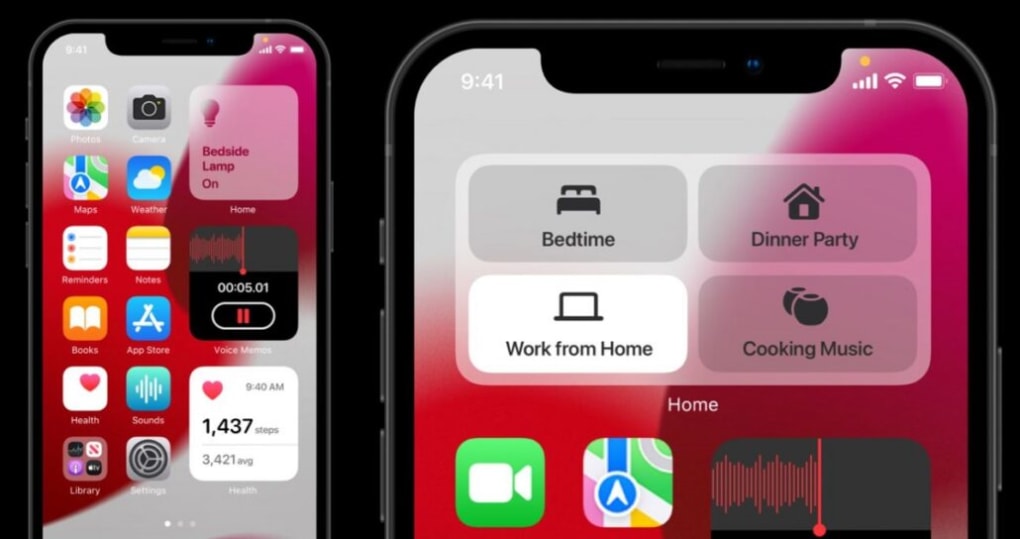
Users can now display their most loved photos, moving beyond a simple wallpaper to integrate their memories directly into their daily experience. But the customization doesn’t stop there. iOS 16 introduces the ability to customize font styles and colors for the time and date, enabling users to match their Lock Screen to their personal aesthetic or selected photo. This level of granular control over typography provides a subtle yet significant impact on the overall look and feel.
Beyond aesthetics, the Lock Screen gains immense functionality through a powerful set of widgets. These widgets provide glanceable information, allowing users to quickly grasp important details without unlocking their device or opening specific applications. At a glance, you can instantly know the current weather conditions, upcoming calendar events, the date, time zones relevant to your contacts or travel, active alarms, your device’s battery level, and so much more from your favorite third-party applications. This intelligent integration of widgets transforms the Lock Screen from a mere gateway into a dynamic information hub, streamlining access to daily essentials and enhancing productivity.
Focus Mode: Smarter Notifications for a Distraction-Free Life
Another state-of-the-art addition to the iPhone toolset in iOS 16 is the enhanced Focus function. Building upon its introduction in previous versions, Focus in iOS 16 becomes even more intelligent and integrated, authorizing users to receive notifications only from certain people or apps they specified. This granular control over notifications is a game-changer for digital well-being and productivity.
The power of Focus truly shines in its ability to be linked directly to your Lock Screen. You can create different Lock Screens tailored to various Focus modes – for example, a “Work” Focus might display widgets relevant to your calendar and tasks, while a “Personal” Focus might prioritize family photos and social app notifications. When you activate a specific Focus mode, your Lock Screen automatically transforms to reflect that context, minimizing distractions and presenting only the most relevant information.
The Focus and Lock Screen features, working in tandem, grant you the power to choose precisely how you want to use your device at particular moments. Whether you need to concentrate on work, enjoy a family dinner, or get a good night’s sleep, iOS 16 provides the tools to curate your digital environment, ensuring your iPhone serves you rather than distracts you. This thoughtful integration underscores Apple’s commitment to creating a more mindful and productive user experience.
Messages: Editing, Unsending, and Beyond
Communication takes a significant leap forward in iOS 16, particularly within the Messages app. One of the most compelling and highly anticipated developments it gives to users is the ability to edit or unsend a message you just sent. We’ve all been there – a typo, a missed word, or sending a message to the wrong person. Previously, such mistakes were permanent, often leading to awkward follow-ups or misunderstandings. With iOS 16, users have a brief window to rectify these errors, bringing a much-needed layer of flexibility and forgiveness to digital conversations. This feature is not just about correcting mistakes; it’s about fostering clearer, more confident communication.
Beyond editing and unsending, iOS 16 also introduces the ability to mark a message as unread, allowing users to revisit it later without losing track, and SharePlay integration, bringing shared experiences like watching movies or listening to music directly into Messages. These additions collectively enhance the communication experience, making it more fluid, efficient, and enjoyable.
Passkeys: The Future of Online Security
In an era where online data security is a paramount concern, iOS 16 introduces Passkeys, a groundbreaking technology designed to provide a safer and more convenient method of signing into various websites and applications. Passkeys are a new, industry-standard approach to authentication that replaces traditional passwords with unique digital credentials.
Unlike passwords, Passkeys are phishing-resistant and immune to data breaches because they are never stored on a server and cannot be guessed or stolen. They leverage the device’s biometrics – Face ID or Touch ID – for a secure, one-touch login experience. This not only significantly boosts security but also simplifies the login process, eliminating the need to remember complex passwords or rely on potentially vulnerable password managers. Passkeys are synced across all your Apple devices via iCloud Keychain, making the experience seamless and consistent. This latest upgrade positions Apple at the forefront of passwordless authentication, offering a glimpse into a more secure and user-friendly online future.
Apple Pay Later: Financial Flexibility at Your Fingertips
Recognizing evolving consumer spending habits, iOS 16 enhances Apple Pay by introducing the Apple Pay Later option for any of your purchases made through the service. This innovative feature provides users with increased financial flexibility without hidden costs or predatory terms.
With Apple Pay Later, you will be able to split the cost of goods into four equal payments spread over six weeks. Crucially, this service comes without any interest or additional fees applied, making it a transparent and accessible option for managing purchases. Integrated directly into the Apple Wallet and Apple Pay experience, it’s easy to use and provides a clear overview of upcoming payments. This move by Apple competes with existing “Buy Now, Pay Later” services, offering a secure and convenient alternative directly within the iPhone’s ecosystem, further cementing Apple Pay as a comprehensive digital payment solution.
iOS 16.5 Updates and Siri’s Evolution: Enhanced Functionality and Sports Integration
The journey of iOS 16 didn’t stop with its initial release. Subsequent updates, such as iOS 16.5, brought further refinements and exciting new features, demonstrating Apple’s continuous commitment to evolving the user experience. These updates often focused on specific areas, enhancing existing capabilities and introducing highly requested functionalities.
Enhanced Siri Screen Recording Commands
With the iOS 16.5 update, Siri has become even more powerful and versatile, integrating new screen recording commands that significantly streamline the process. Now, users can conveniently start or stop a screen recording using the virtual assistant. This hands-free capability allows for easier and more efficient screen capturing, whether for demonstrating a feature, recording a bug, or simply capturing a moment on your screen. This welcomed addition to the iOS 16.5 update removes friction from an already useful feature, making it accessible with a simple voice command and improving overall user productivity and convenience.
Dedicated Sports Tab in Apple News App
Catering to the immense global interest in sports, iOS 16.5 introduces a dedicated Sports tab within the Apple News app. This highly-requested feature addresses the needs of sports enthusiasts, providing a centralized and organized hub for all their sports news and updates.
The new tab allows users to stay updated with the latest sports news, scores, highlights, and events from their favorite teams and leagues in a more organized and accessible manner. Users can customize their feed to follow specific teams, sports, and even individual athletes, ensuring they receive the most relevant content. This enhanced integration and dedicated space significantly improve the user experience for sports fans who rely on Apple News for their daily dose of sports updates, transforming the app into a comprehensive sports information portal.
Quad-Box Picture-in-Picture for Sports Streaming
One of the most innovative and anticipated features hinted at within the iOS 16.5 update, particularly for the avid sports viewer, is the new quad-box picture-in-picture capability for the TV app. Apple has been actively working on this feature, specifically designed for streaming multiple sporting events simultaneously.
Code found within the iOS 16.5 update suggests that this feature will offer a comparable experience to other leading streaming TV services that allow multi-event viewing. It will enable users to watch multiple live sports events at the same time, splitting the screen into several windows. This innovative addition will bring Apple’s TV app up to par with, and in some ways surpass, competing services, significantly enhancing the overall sports streaming experience for users who want to keep an eye on several games at once without switching between apps. It speaks to a growing trend in media consumption, where users demand more control and simultaneous access to live content.
The Journey from Beta to Public Release and Seamless Performance
The development and release of iOS 16 followed Apple’s standard meticulous process, starting with developer betas, moving to public betas, and culminating in a general public release. This iterative approach is crucial for identifying and rectifying bugs, gathering user feedback, and optimizing performance across a vast array of hardware.
Release Timeline and Additional Beta Updates
The iOS 16.5 update, like many point releases, underwent a period of beta testing before its official launch. It was expected to be released to the general public sometime in May, following a series of public beta releases. As Apple continues its rigorous beta testing ahead of the general release, the company simultaneously rolls out other new betas for developers across its ecosystem. This includes iPadOS 16.5 beta 2, watchOS 9.5 beta 2, tvOS 16.5 beta 2, and macOS Ventura 13.4 beta 2. This synchronized beta release strategy ensures that features and improvements are consistent and harmonious across all Apple devices, aiming to improve the overall experience and maintain the tightly integrated ecosystem that users have come to expect. This continuous development cycle underscores Apple’s commitment to ongoing innovation and refinement.
More Seamless iPhone Performance
Beyond the headline features, iOS 16 truly delivers a remarkable software upgrade specifically for iPhone gadgets through numerous under-the-hood optimizations. From its simple personalization tweaks to its internal performance changes, it provides momentous progress and additions that aim to provide the best iOS experience overall.
Users can expect improvements in responsiveness, app launch times, and overall system fluidity. Battery life optimizations are also a perennial focus for Apple, and iOS 16 includes advancements designed to maximize endurance without compromising performance. Furthermore, privacy and security, which are core tenets of the iOS platform, receive continued enhancements, fortifying the device against evolving threats and giving users greater transparency and control over their data. The entire operating system feels more cohesive and efficient, making every interaction smoother and more intuitive.
Even in its beta form, the promise of these brand-new features and functions made this notable update heavily anticipated. The feedback loop from beta testers allows Apple to fine-tune these aspects, ensuring that the final public release offers a truly seamless and optimized experience.
Beyond the Core: Deeper Dive into iOS 16’s Impact
iOS 16 represents more than just a collection of new features; it signifies a strategic shift in Apple’s approach to the user experience. By empowering users with unprecedented personalization options, particularly on the Lock Screen, Apple acknowledges and caters to the desire for devices that truly reflect individual style and needs. The integration of advanced intelligence in features like Focus, Messages, and Siri streamlines daily tasks, reducing cognitive load and enhancing productivity.
The focus on security through Passkeys highlights a proactive stance against the growing threat of cyberattacks, aiming to simplify and strengthen online authentication for everyone. Similarly, the introduction of Apple Pay Later demonstrates an understanding of modern financial trends and a willingness to provide flexible, user-friendly solutions within the secure Apple ecosystem.
The continuous updates, such as those seen in iOS 16.5, further solidify this commitment. Features like enhanced Siri commands, dedicated sports tabs, and multi-stream viewing capabilities showcase Apple’s responsiveness to specific user demands and evolving digital consumption patterns. This iterative development ensures that iOS remains at the cutting edge, adapting to new technologies and user expectations. The overarching goal is to create an iPhone experience that is not only powerful and secure but also deeply personal, intuitive, and seamlessly integrated into the user’s life.
In conclusion, iOS 16 is a testament to Apple’s ongoing pursuit of excellence in mobile operating systems. It delivers a comprehensive suite of enhancements that range from profound shifts in core functionalities to subtle yet impactful quality-of-life improvements. With its focus on personalization, intelligence, and robust security, iOS 16 ensures that the iPhone remains a leading device, offering an unmatched user experience. PhanMemFree is proud to cover such innovative developments, helping users explore and maximize the potential of their Apple devices. For more details on this remarkable software upgrade and others, you can always visit Phanmemfree.org.
File Information
- License: “Free”
- Version: “16.5-beta”
- Latest update: “July 11, 2023”
- Platform: “iPhone”
- OS: “iOS 12.1.2”
- Language: “English”
- Downloads: “324.1K”


