IP Blocker Firewall software provides a powerful tool for managing network access and enhancing online security. Whether you need to restrict access from specific IP addresses, enhance privacy by masking your own IP, or simply improve network performance by filtering unwanted traffic, an IP blocker firewall can offer significant benefits. This comprehensive guide delves into the features, functionalities, and considerations surrounding IP blocker firewall software, focusing on its capabilities and limitations.
Core Features and Functionalities
IP Blocker Firewalls offer a range of features designed to control network traffic at the IP address level. This granular control allows users to customize their network security and privacy settings with a high degree of precision. Key functionalities typically include:
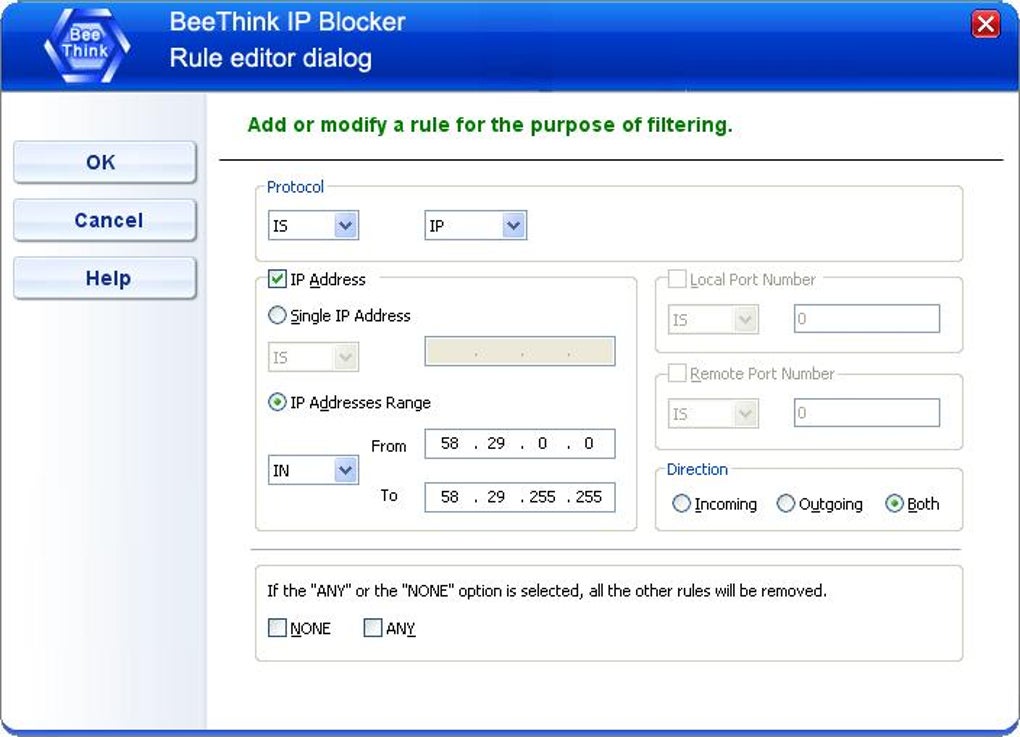
1. IP Address Blocking: The fundamental function of any IP blocker firewall is its ability to block specific IP addresses or ranges of IP addresses. This is crucial for preventing unwanted connections from known malicious sources, blocking access from specific countries or regions, or preventing bot activity. The software often allows users to create both blacklists (IP addresses to block) and whitelists (IP addresses to allow), providing a flexible approach to network access control. Many programs also support importing and exporting IP address lists in various formats, such as the widely used .htaccess format for Apache web servers, simplifying the management of large lists.
2. Real-time Network Monitoring: Effective IP blocking requires real-time monitoring of network activity. A robust IP Blocker Firewall will continuously monitor incoming and outgoing connections, identifying and blocking attempts to access the network from blocked IP addresses. This monitoring functionality often includes detailed logs that record blocked connections, providing valuable insights into network traffic patterns and potential security threats. These logs can help identify persistent attempts to breach security and assist in refining the blacklist or whitelist.

3. Protocol and Port Filtering: Beyond simply blocking IP addresses, advanced IP Blocker Firewalls allow users to filter network traffic based on protocols (e.g., TCP, UDP) and ports. This level of granularity allows for more precise control over network access. For instance, a user might block all incoming connections on a specific port commonly used for malicious activity, while allowing other ports to remain open. This targeted approach minimizes disruption to legitimate network activity while enhancing security. This capability is especially valuable for organizations managing multiple services or applications that use distinct ports.
4. Firewall Protection: Many IP Blocker Firewalls incorporate built-in firewall functionality, combining IP address blocking with broader network protection. These integrated firewalls can examine network traffic based on various criteria beyond IP addresses, such as applications, processes, and user activity. The firewall rules can be configured to block or allow traffic based on these criteria, offering a layered security approach. This combined functionality simplifies network security management, reducing the need for multiple separate security applications.
5. IP Address Lookup: The ability to quickly look up the geographical location or other details associated with an IP address is a valuable feature. This helps users understand the source of network traffic, identify potential threats, and refine their security policies accordingly. This feature is particularly useful for investigating suspicious activity or determining the origin of network intrusions.
Advanced Features and Capabilities
Beyond the core features, many advanced IP Blocker Firewalls offer additional capabilities designed to enhance security and improve usability:
1. Exception Rules: Sophisticated IP Blocker Firewalls allow the creation of exception rules, permitting specific IP addresses or ranges to bypass the blocking rules. This is useful for allowing access to trusted sources or specific services that might otherwise be blocked by the firewall’s general rules. These exceptions can be temporary or permanent, providing flexibility in managing network access control.
2. Running as a Windows Service: Some IP Blocker Firewalls can be configured to run as a Windows service, ensuring continuous protection even after the user logs off. This persistent operation provides ongoing network protection without requiring user intervention or manual restarting. This is crucial for maintaining security and preventing unauthorized access when the system is unattended.
3. 64-bit Operating System Support: Modern IP Blocker Firewalls typically support 64-bit operating systems, ensuring compatibility with the latest versions of Windows and other operating systems. This compatibility eliminates potential issues related to operating system architecture, maximizing the software’s effectiveness across various systems.
4. Integration with Other Security Software: Some IP Blocker Firewalls can integrate with other security software, providing a more comprehensive security solution. This integration might involve sharing threat information or coordinating security actions to enhance overall system protection. This collaborative approach allows for more effective threat detection and response.
5. Customizable Logging and Reporting: Detailed logging and customizable reporting features enable administrators to track network activity and analyze security events. This information can assist in identifying potential security vulnerabilities, evaluating the effectiveness of security policies, and optimizing network performance. Comprehensive logging is essential for security auditing and compliance purposes.
Advantages and Disadvantages of Using an IP Blocker Firewall
While IP Blocker Firewalls offer significant security benefits, they also have certain limitations. Understanding both the advantages and disadvantages is essential for making informed decisions about their use.
Advantages:
- Enhanced Security: The primary advantage is improved network security by blocking access from malicious IP addresses or unwanted sources.
- Improved Privacy: By masking your own IP address, an IP blocker can enhance your online privacy.
- Increased Network Performance: Blocking unwanted traffic can improve network speed and reduce bandwidth consumption.
- Granular Control: IP Blocker Firewalls provide granular control over network access, allowing for precise customization of security policies.
- Real-time Protection: Real-time monitoring and blocking capabilities provide immediate protection against network threats.
Disadvantages:
- Potential for False Positives: Blocking based solely on IP addresses can inadvertently block legitimate traffic, leading to false positives.
- Complexity: Configuring advanced firewall rules can be complex for users without technical expertise.
- Website Compatibility Issues: Some websites may detect and block IP Blocker Firewalls, preventing access to their content.
- Limited Effectiveness Against Sophisticated Threats: IP Blocker Firewalls may not be effective against highly sophisticated threats that employ advanced techniques to circumvent blocking mechanisms.
- Resource Consumption: While many modern IP Blocker Firewalls are lightweight, they still consume some system resources.
Choosing the Right IP Blocker Firewall
Selecting the right IP Blocker Firewall depends on individual needs and technical expertise. Consider these factors:
- Operating System Compatibility: Ensure the software is compatible with your operating system.
- Feature Set: Evaluate the features offered and choose a solution that meets your specific security and privacy requirements.
- Ease of Use: Consider the user interface and the level of technical expertise required to configure and manage the software.
- Performance Impact: Choose a lightweight solution to minimize its impact on system performance.
- Reputation and Reviews: Read reviews and check the reputation of the software developer before making a purchase.
IP Blocker Firewalls are valuable tools for managing network access and enhancing online security, offering granular control over network traffic and improved privacy. However, it’s crucial to understand their limitations and choose a solution that aligns with individual needs and technical expertise. Remember that an IP blocker is only one layer of a comprehensive security strategy; combining it with other security measures, such as strong passwords, regular software updates, and a robust antivirus solution, provides the most effective online protection.
File Information
- License: “Trial version”
- Latest update: “July 4, 2025”
- Platform: “Windows”
- OS: “Windows 8.1”
- Language: “English”
- Downloads: “24.9K”
- Size: “2.24 MB”