
IP Messenger is a free, open-source instant messaging application designed for communication within a local area network (LAN). Unlike cloud-based messaging services, IP Messenger operates without a central server, relying instead on direct peer-to-peer communication using TCP/IP and UDP protocols. This serverless architecture offers several advantages, including enhanced privacy, speed, and reliability within a contained network environment. This comprehensive review explores IP Messenger’s features, functionalities, advantages, and disadvantages, providing a detailed analysis for potential users.
Core Features and Functionality
IP Messenger provides a streamlined and efficient approach to internal communication. Its core functionality centers around instant messaging, file transfer, and image sharing within a LAN. The application’s user interface is intentionally minimalist, prioritizing ease of use and rapid message exchange over extensive customization options. This simplicity is a key differentiator from more feature-rich, but potentially resource-intensive, messaging platforms like Slack or Microsoft Teams.
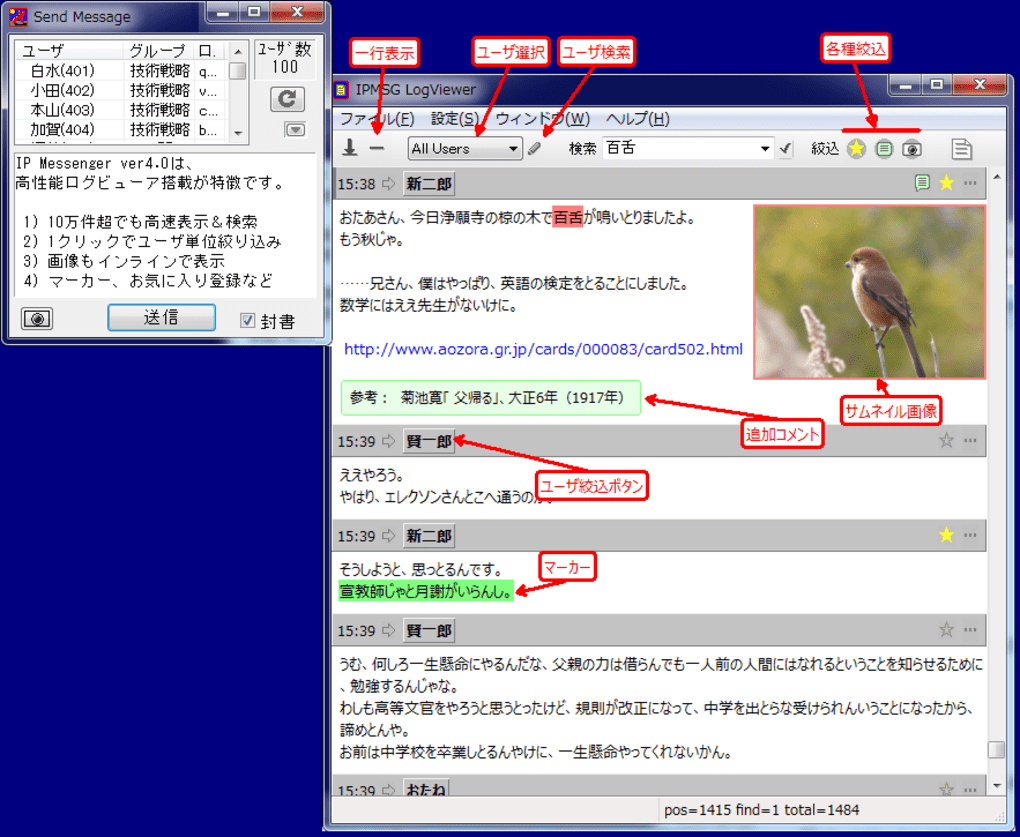
At its heart, IP Messenger facilitates real-time text-based communication between users on the same LAN. Upon installation and launch, the application automatically detects other IP Messenger instances on the network and adds them to the user’s contact list, eliminating the need for manual contact addition. Sending messages involves selecting a contact from the list and typing the message in a designated input area. Messages are delivered almost instantaneously, offering a speed advantage over internet-dependent alternatives, especially in environments with limited or unreliable internet connectivity.
Beyond simple text messaging, IP Messenger offers robust file transfer capabilities. Users can effortlessly share files and folders with contacts. This functionality is particularly useful for collaborative projects or quick information exchange within a workgroup or team. The speed of these file transfers is significantly enhanced by the direct connection between peers within the LAN, negating the latency often associated with cloud-based file sharing services.
Furthermore, IP Messenger allows for the embedding of images within messages. This feature enables visually richer communication, particularly helpful for sharing quick visual updates or diagrams. The integration of this image-sharing capability within the messaging interface ensures a seamless and integrated communication experience.
A less common, yet noteworthy feature is IP Messenger’s desktop capture functionality. This allows users to capture a snapshot of their screen and instantly share it with others, proving useful for troubleshooting technical issues, sharing visual information, or providing quick demonstrations. This feature again benefits from the low latency of the LAN connection, resulting in fast and efficient sharing of visual information.
Ease of Use and Setup
One of IP Messenger’s most significant strengths is its ease of use. Installation is straightforward, and the application requires minimal configuration. After installation, the program automatically scans the LAN for other IP Messenger instances, adding them to the user’s contact list. The intuitive interface requires minimal learning curve, making it accessible to users of all technical skill levels. The absence of complex settings and options contributes to this accessibility, allowing users to focus on communication rather than software configuration. The application’s low resource footprint further enhances the overall user experience, ensuring smooth operation even on less powerful machines.
Security Considerations
While IP Messenger’s serverless architecture enhances privacy by eliminating reliance on a third-party server, the application’s security features are relatively basic. While it offers encryption for individual messages (using the “Seal” option), it does not possess advanced features like end-to-end encryption found in some modern messaging platforms. Therefore, it’s crucial to understand that data transmitted through IP Messenger might be vulnerable in certain network configurations, especially if the LAN itself is not adequately secured. This necessitates careful consideration of the security implications, especially when handling sensitive information. The absence of robust authentication mechanisms also poses a potential risk if the LAN is not already segmented with appropriate access controls.
Advantages and Disadvantages
Advantages:
- Speed and Efficiency: The serverless architecture allows for near-instantaneous message delivery and fast file transfers within the LAN.
- Ease of Use: The minimalist interface and straightforward setup make the application incredibly user-friendly.
- Lightweight: IP Messenger has a low resource footprint, ensuring smooth operation on various devices.
- Privacy: The serverless nature enhances privacy compared to cloud-based alternatives.
- Cost-Effective: The application is completely free to use.
- Offline Functionality: IP Messenger functions without requiring a constant internet connection.
Disadvantages:
- Limited Features: Compared to modern messaging platforms, IP Messenger lacks advanced features like group chats, rich media support beyond simple images, and robust search functionalities.
- Outdated Interface: The user interface appears dated and could benefit from a modernization update.
- LAN-Restricted: The application is limited to communication within a single LAN; it cannot be used for communication across different networks.
- Basic Security: While message encryption is available, the application lacks advanced security features found in contemporary messaging solutions.
- No Centralized History: Conversation history is stored locally on each machine, lacking centralized access and management.
Managing IP Messenger History
Maintaining a record of chat logs can be essential for many users, especially in professional environments. IP Messenger allows for the logging of chat conversations. This functionality requires users to navigate to the application’s settings and enable logging. Once enabled, a log file is created which can be viewed within the application’s settings menu. This log file contains a record of all messages sent and received, along with timestamps. This logging feature provides an easily accessible and readily available record of all the past conversations.
IP Messenger as an Internal Communication Solution
For organizations or teams working within a shared LAN environment, IP Messenger offers a compelling alternative to more complex and resource-intensive messaging platforms. Its speed, simplicity, and serverless architecture make it well-suited for quick communication and file sharing within a limited network. The absence of reliance on an external server removes potential points of failure and ensures resilience within the local network.
Conclusion
IP Messenger remains a viable and effective solution for quick, efficient communication within a local area network. Its simplicity and speed provide clear advantages in specific use cases. However, potential users must be aware of its limitations concerning features, security, and its restricted scope to LAN environments. While it might not be a suitable replacement for comprehensive cloud-based solutions, IP Messenger occupies a unique niche, providing a reliable and lightweight option for specific communication needs within a LAN environment. The decision to adopt IP Messenger should be based on a careful evaluation of the specific needs and priorities of the intended users, weighing the advantages of its speed and simplicity against the limitations in functionality and advanced features.
File Information
- License: “Free”
- Latest update: “April 1, 2025”
- Platform: “Windows”
- OS: “Windows 8”
- Language: “English”
- Downloads: “347.8K”
- Size: “4.37 MB”


