
IP-Tools, a veteran in the network utility software arena, provides a suite of tools for monitoring network activity and managing TCP/IP configurations. While no longer actively updated, its enduring legacy remains relevant for users seeking a robust, albeit older, solution for basic network diagnostics and administration. This article delves into its features, capabilities, and limitations, providing a comprehensive assessment of its strengths and weaknesses in the current technological landscape.
Core Functionality and Features
At its heart, IP-Tools is a collection of interconnected utilities designed to simplify network administration and troubleshooting. Its core strengths lie in its ability to provide a centralized interface for accessing various network diagnostic tools, thereby eliminating the need for multiple individual applications. Key features include:
-
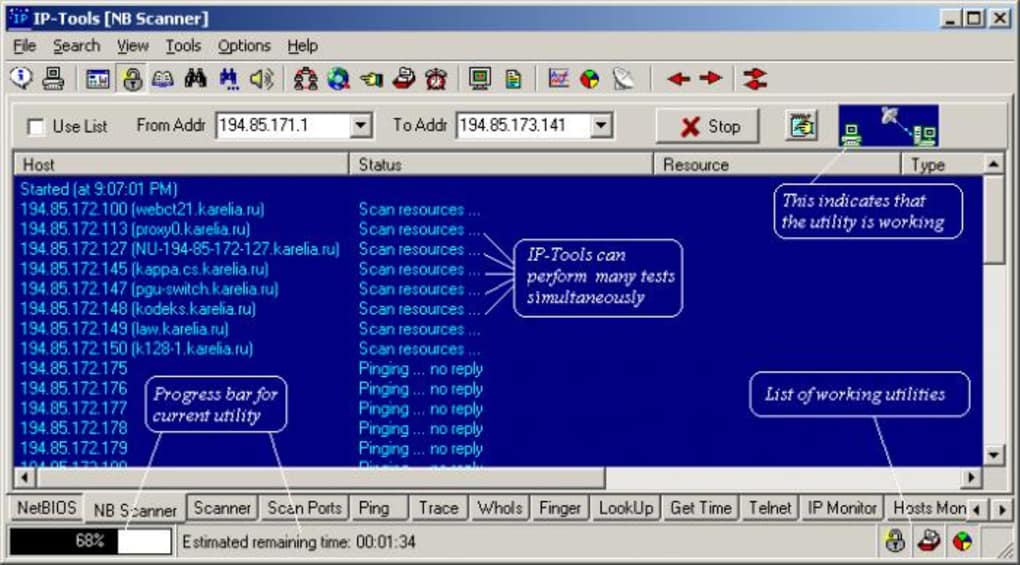
Network Monitoring: The program offers robust capabilities for monitoring network activity. This includes tracking data flow, identifying connected nodes, and observing key network parameters. While the exact level of detail is not specified in the available documentation, the description emphasizes its suitability for advanced users and network administrators, suggesting capabilities beyond basic ping or traceroute functions. This monitoring function, a highlight of the software, allows for real-time observation of network traffic, potentially assisting in identifying bottlenecks or unusual activity.
-
Multi-Device Monitoring: IP-Tools excels in its ability to simultaneously monitor multiple devices. This capability is invaluable for network administrators managing larger networks, allowing for a comprehensive overview of the network’s health and performance. The ability to monitor multiple devices concurrently streamlines the diagnostic process, improving efficiency and reducing the time spent isolating network issues.
-
Intuitive Interface (relatively): Despite being described as having a “dated” interface, the software’s design prioritizes ease of use. The intuitive nature of the interface is stressed as a key feature, making navigation and access to various tools straightforward, even for users lacking extensive technical expertise. The “one-click” data retrieval capability further enhances usability, minimizing the steps required to obtain crucial network information.
-
Range of IP Address Support: The software allows users to obtain information from single hosts, ranges of IP addresses, or custom lists of hosts and IP addresses. This flexibility is highly useful in managing larger, more complex networks where targeting specific devices or segments is necessary. The ability to specify IP address ranges allows for efficient scanning and monitoring of entire network segments, streamlining the administration process.
Limitations and Considerations
While IP-Tools offers a compelling collection of utilities, several limitations must be acknowledged:
-
Outdated Interface: The program’s interface is explicitly described as “dated.” This suggests a visual design that may feel outdated compared to modern software applications. This might impact the user experience, especially for those accustomed to more visually appealing and modern interfaces. The dated interface doesn’t necessarily impede functionality, but it may detract from the overall user experience.
-
Limited Operating System Support: The software’s support for only older versions of Windows is a significant drawback. The lack of support for current Windows versions, and the absence of support for macOS, Linux, or other operating systems, severely restricts its usability for many modern users. This limitation renders it incompatible with the majority of contemporary computing environments.
-
Lack of Updates: The crucial point that the program is no longer being updated is a critical limitation. This signifies that the software is not receiving bug fixes, performance improvements, or new features. Security vulnerabilities may exist without being addressed, increasing the risk of exploitation. Using outdated software exposes systems to security risks and potential compatibility problems.
-
Steeper Learning Curve (despite claims): While the software is described as having an intuitive interface, the overall functionality might require some time to learn, especially for beginners. The integrated nature of multiple utilities could lead to a less streamlined user experience for basic tasks. The breadth of its features may require a period of familiarization before users can efficiently leverage its full potential.
-
Limited Information: The original content offers limited specifics regarding the exact capabilities of each utility within IP-Tools. The lack of detailed documentation or feature specifications makes it difficult to fully understand the program’s scope and capabilities. Further research would be required to assess its full potential.
Comparison with Alternatives
Several alternative network monitoring and utility software packages offer comparable, and often superior, functionality with contemporary interfaces and ongoing support. These alternatives frequently incorporate the core features of IP-Tools but add modern benefits, including:
-
Advanced IP Scanner: A free and popular network scanning utility that offers similar functionality to IP-Tools’s network discovery capabilities, often with a more user-friendly interface and updated features.
-
Angry IP Scanner: Another fast and user-friendly network scanner providing quick and efficient IP address discovery and basic network information. It often includes enhanced features absent in older software like IP-Tools.
-
mRemoteNG: This powerful tool manages numerous remote connections, significantly expanding functionality beyond the basic network monitoring capabilities of IP-Tools.
-
PuTTY: A widely used and highly respected SSH and Telnet client provides secure remote connections, an essential capability often lacking in older network utility suites.
- Wireshark: A much more advanced network protocol analyzer, Wireshark provides in-depth analysis capabilities far surpassing the likely capabilities of the older IP-Tools.
These alternatives provide not just comparable but often vastly improved functionality, interface design, and security updates compared to IP-Tools. The lack of updates and the dated design of IP-Tools make these alternatives a significantly more appealing and secure option for modern users.
Verdict and Recommendations
IP-Tools, while possessing some useful features for basic network monitoring and TCP/IP management, suffers from significant limitations due to its outdated nature and lack of ongoing development. The dated interface, limited operating system support, absence of updates, and inherent security risks associated with outdated software make it unsuitable for use in modern environments. Unless users have a specific, compelling reason tied to legacy systems or a need for functionality no longer present in modern alternatives, switching to a more contemporary network utility suite is strongly recommended.
The availability of numerous free and commercial alternatives offering superior functionality, security, and user experience makes IP-Tools largely obsolete for most users. Users seeking reliable, updated, and secure network monitoring tools should explore the numerous alternatives outlined above, choosing the solution that best fits their specific needs and technical expertise. While IP-Tools might hold some nostalgic value for long-time users familiar with older network administration practices, its shortcomings outweigh its strengths in the current computing landscape.
File Information
- License: “Trial version”
- Version: “2.54”
- Latest update: “November 5, 2018”
- Platform: “Windows”
- OS: “Windows 2000”
- Language: “English”
- Downloads: “26.1K”
- Size: “1.56 MB”


