
IP Unblock Free VPN is a free Chrome extension designed to bypass geographical restrictions and enhance online privacy. This review will delve into its features, performance, security implications, and compare it to alternative VPN solutions. While offering a seemingly straightforward solution to accessing blocked content and improving security, a nuanced understanding of its limitations and potential risks is crucial for informed usage.
Functionality and Features: Unblocking Websites and Enhancing Privacy
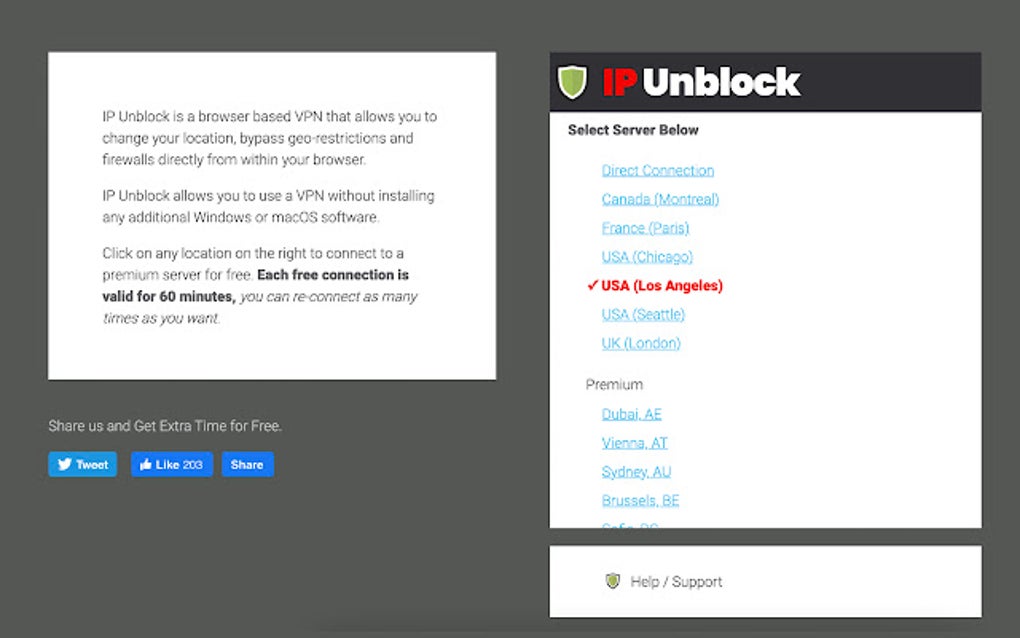
At its core, IP Unblock Free VPN functions as a browser-based VPN, masking your IP address and enabling you to connect to servers in various locations worldwide. This capability allows users to circumvent geo-restrictions imposed by websites and streaming services, effectively unblocking content unavailable in their region. The extension boasts over a hundred VPN servers across multiple countries, including prominent locations such as Chicago, Los Angeles, Seattle (USA); Paris (France); Montreal (Canada); and London (UK). This extensive server network contributes to its ability to unlock access to a broad spectrum of websites, including popular platforms like Roblox, Facebook, YouTube, Twitter, VK, Reddit, and Netflix.
The service utilizes OpenVPN, a widely recognized and trusted protocol for establishing secure, encrypted connections. This protocol is known for its robust security features, offering encryption strength comparable to military-grade security. OpenVPN’s encryption helps protect user data from interception during transmission, safeguarding sensitive information like browsing history, login credentials, and personal communications. The implementation of OpenVPN is a key selling point, suggesting a commitment to user privacy and security.
Beyond simply unblocking websites, IP Unblock Free VPN offers an added layer of protection when connecting to public Wi-Fi networks, cellular data networks, or other public locations. These networks are often vulnerable to eavesdropping and data breaches, and the VPN’s encryption helps to mitigate these risks. By masking your IP address, the extension makes it significantly more difficult for malicious actors to track your online activity and steal your personal data.
However, the extension’s functionality isn’t without its shortcomings. Users have reported instances of unexpected disconnections, requiring a system reboot to re-establish the VPN connection. This unreliability is a significant drawback, particularly for users who rely on consistent and stable VPN access. The unpredictable nature of these disconnections raises concerns about the overall dependability of the service.
Security and Privacy Considerations: A Balanced Perspective
The use of OpenVPN is a positive indicator of the extension’s commitment to security. OpenVPN’s strong encryption capabilities provide a considerable degree of protection against data interception and unauthorized access. However, it’s crucial to acknowledge that no VPN service is foolproof. While IP Unblock Free VPN masks your IP address and encrypts your internet traffic, it doesn’t guarantee absolute anonymity. The provider’s privacy policy and logging practices should be carefully examined to determine the extent to which your activity is monitored and stored.
Moreover, the free nature of the service raises questions about its revenue model and potential for monetization. Free VPN services often rely on advertising or other means to generate revenue, which could compromise user privacy. While the extension’s description mentions no session, speed, or bandwidth limitations, it’s essential to understand that the provider may still collect data for analytical purposes or target advertising. Users should carefully review the terms of service and privacy policy to ascertain the extent of data collection and its potential implications for user privacy.
Another significant factor to consider is the potential for vulnerabilities within the extension itself. While the use of OpenVPN is a step in the right direction, the extension’s code could potentially contain security flaws that malicious actors could exploit. Regular security audits and updates are crucial to mitigating these risks. The lack of transparency about the security practices employed by the developers raises concerns about the long-term security and reliability of the extension.
Performance and User Experience: Speed and Reliability

IP Unblock Free VPN’s performance is a mixed bag. While the extension generally performs its core function of unblocking websites, the reported instances of unexpected disconnections significantly detract from the user experience. The need for a system reboot to reconnect introduces significant inconvenience and disruption. The frequency and cause of these disconnections should be investigated and addressed to improve the stability and reliability of the service.
Furthermore, the speed of the connection can fluctuate depending on the selected server and network conditions. While the extension claims unlimited and unrestricted usage, the actual speed may vary, potentially affecting streaming quality or download speeds. The performance can also be affected by the number of users connected to a specific server, leading to congestion and slower speeds during peak usage periods.
The user interface appears relatively straightforward and user-friendly, making it accessible to individuals with limited technical expertise. The simple one-click connection functionality enhances ease of use. However, the lack of advanced settings or customization options may limit its appeal to more technically savvy users who require more granular control over VPN settings.
Comparison with Alternative VPN Solutions: Paid vs. Free
IP Unblock Free VPN competes with a plethora of other VPN services, both free and paid. Paid VPN services, like NordVPN and Browsec VPN (mentioned in the original description), often offer superior performance, enhanced security features, a broader server network, and better customer support. The reliability and consistency of these paid services typically outweigh the cost.
The choice between a free and paid VPN depends largely on individual needs and priorities. While free VPNs offer an attractive price point, they often compromise on security, privacy, and performance. The potential for data collection, slower speeds, and unreliable connections are common drawbacks. Paid VPNs, on the other hand, typically prioritize user privacy and security, investing in robust infrastructure and security measures. They usually offer faster speeds, more server options, and better customer support.
For users who prioritize security and reliability, the investment in a reputable paid VPN service is generally recommended. While IP Unblock Free VPN may suffice for occasional use or basic unblocking needs, it may not be suitable for users who require a consistently reliable and secure VPN connection for sensitive online activities.
Conclusion: Weighing the Pros and Cons
IP Unblock Free VPN offers a simple and convenient solution for unblocking websites and enhancing online privacy on a basic level. Its use of OpenVPN provides a degree of security, and its extensive server network allows access to content from various regions. However, its significant drawback lies in the reported instability and unexpected disconnections, which significantly impact its reliability and usability. The lack of transparency regarding data collection practices also raises concerns about user privacy.

While the extension might be suitable for casual users with limited needs, individuals requiring a reliable, high-performance, and privacy-focused VPN solution should consider investing in a reputable paid VPN service. The potential risks associated with free VPNs, including data collection, security vulnerabilities, and inconsistent performance, outweigh the benefits for users who value security and a consistent online experience. Ultimately, the choice between a free and paid VPN depends on the individual’s specific needs and priorities, with security and reliability being paramount considerations.
File Information
- License: “Free”
- Version: “2.1.16”
- Latest update: “July 11, 2023”
- Platform: “Windows”
- OS: “Windows 11”
- Language: “English”
- Downloads: “51.4K”


