
The desire to experience the sleek interface and user-friendly features of iOS on an Android device has led to the development of numerous iPhone launcher applications. These apps aim to replicate the iOS experience, offering a visually similar interface and, in some cases, similar functionalities. However, the effectiveness and quality of these launchers vary considerably. This review explores the world of iPhone launchers for Android, focusing on their capabilities, limitations, and overall user experience. We will also examine some available alternatives in the event your chosen launcher is unavailable.
Understanding iPhone Launchers for Android
iPhone launchers for Android are applications designed to fundamentally alter the look and feel of your Android phone’s home screen and app interface. They achieve this by overlaying a custom interface on top of the existing Android operating system. This usually involves mimicking the iOS home screen layout, including the iconic app grid, dock, and control center. Some advanced launchers even try to replicate specific iOS features like widgets, notification management, and even gestures.
The appeal of these launchers is multifaceted. Many Android users appreciate the clean aesthetics and intuitive navigation of iOS. Switching to an iPhone launcher allows them to enjoy a similar experience without switching operating systems entirely. Others might simply desire a change of pace, seeking a fresh visual perspective on their familiar Android device.
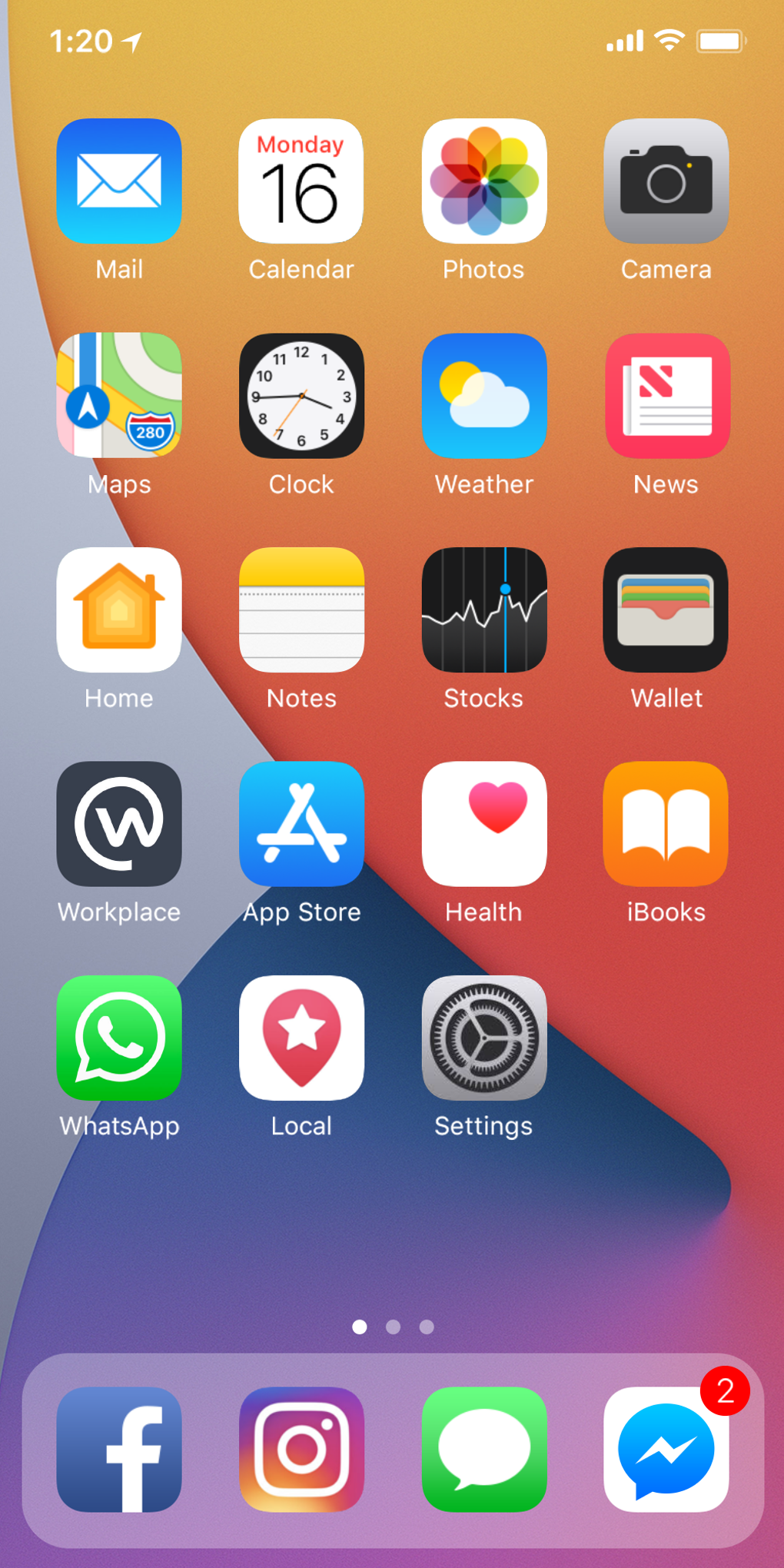
However, it’s crucial to understand the limitations. An iPhone launcher, no matter how sophisticated, cannot perfectly emulate the iOS experience. Underlying Android system functions remain distinct, and some iOS-specific features might be impossible to fully replicate due to fundamental differences in the two operating systems. This means that while the visual appearance might be convincingly similar, certain functionalities could still feel distinctly Android.
Features and Functionalities of iPhone Launchers
A successful iPhone launcher needs to convincingly mimic the core iOS experience. This involves several key features:
- Home Screen Layout: The most fundamental aspect is the recreation of the iOS home screen grid. This involves the precise arrangement of app icons, the inclusion of a dock at the bottom for frequently used apps, and potentially the ability to create folders for organization. High-quality launchers pay meticulous attention to the spacing, icon sizes, and overall visual consistency to achieve a genuine iOS aesthetic.
-
Control Center Replication: iOS’s Control Center, accessed by swiping down from the top of the screen, provides quick access to settings and toggles. A good iPhone launcher should attempt to emulate this functionality, offering a similar swipe-down gesture to reveal a customized control center with quick access to Wi-Fi, Bluetooth, brightness, and other crucial settings. The degree of functionality varies across launchers; some might offer a limited set of toggles while others provide a more comprehensive control center.
-
Widget Support: iOS widgets provide at-a-glance information and quick actions. The ability to integrate and display widgets seamlessly is crucial for a complete iOS-like experience. Not all launchers support widgets, and those that do might have limitations in terms of customization and widget variety.
-
Customization Options: A successful iPhone launcher needs to cater to individual preferences. Customization options are key, allowing users to personalize various aspects of the interface, such as icon packs, themes, wallpaper, and the arrangement of widgets and app icons. A robust set of customization options can significantly enhance the user experience, allowing for a highly personalized iOS-like environment.
-
Gesture Support: iOS is known for its intuitive gesture controls. Advanced iPhone launchers might try to incorporate some of these gestures, enabling navigation and app interaction through swipes, taps, and other gestures. However, the extent to which gestures are replicated can vary significantly.
Choosing the Right iPhone Launcher: Considerations and Alternatives
Selecting the appropriate iPhone launcher depends heavily on individual preferences and expectations. Factors to consider include:
- Level of iOS Replication: Some launchers focus solely on replicating the visual aspects, while others attempt to integrate more of the underlying iOS functionality. Consider how important a complete, functional emulation is to you.
-
Customization Options: The degree of customization offered varies widely. If personalization is paramount, ensure the chosen launcher offers a sufficient range of options.
-
Performance: Some launchers can impact device performance, especially on lower-end Android phones. Read user reviews and check performance benchmarks before installing.
-
App Compatibility: While most iPhone launchers should function with most standard Android apps, some may exhibit compatibility issues with certain apps or widgets.
Given that the original iPhone Launcher mentioned in the prompt is no longer available, exploring alternative options is essential. Searching Phanmemfree.org (or a similar app store) for “iOS launcher,” “iPhone launcher,” or “iOS theme” will reveal a range of alternatives. Carefully review user ratings and comments before selecting an alternative. Pay attention to the features offered, the level of customization, and the overall user experience described by other users.
Potential Drawbacks of iPhone Launchers
Despite the appeal, iPhone launchers aren’t without potential drawbacks:
-
Inconsistent Experience: Due to the limitations of emulating one operating system within another, certain aspects of the iOS experience might feel slightly off or inconsistent. This is unavoidable, as fundamental differences between Android and iOS architecture cannot be entirely bridged.
-
Performance Issues: Some iPhone launchers, particularly those with extensive features and animations, can impact device performance, leading to lag or battery drain. This is especially true for devices with limited processing power or memory.
-
Security Concerns: Downloading launchers from unofficial sources can pose security risks. Always download from reputable app stores like Google Play Store or Phanmemfree.org to minimize these risks. Check the app’s permissions carefully before installation. An app with excessive permissions should raise a red flag.
-
Limited Functionality: While some launchers strive for complete iOS emulation, many fall short in replicating the full range of iOS features. Certain advanced functionalities might be unavailable or poorly implemented.
Conclusion: The Pursuit of the Perfect iOS Experience on Android
The quest for an authentic iOS experience on an Android device is a continuous one. iPhone launchers provide a viable path for achieving a visually similar interface and incorporating some iOS functionalities. However, it’s essential to approach them with realistic expectations. A perfect recreation is unlikely due to the underlying differences between the two operating systems.
Ultimately, the ideal iPhone launcher is subjective. Consider your priorities, carefully review user feedback on alternative options, and choose a launcher that balances your desired level of iOS emulation with performance and stability. Remember to always prioritize security and download from trusted sources. With careful consideration and research, you can find an iPhone launcher that enhances your Android experience without sacrificing performance or security.
File Information
- License: “Free”
- Latest update: “April 8, 2025”
- Platform: “Android”
- OS: “Android 13.0”
- Language: “English”
- Downloads: “4.3K”
- Size: “14.21 MB”
- Download Options: “APK, Google Play”
- Filename: “com.launcher.ios.iphonex_2.8.apk”


