
IP Switcher is a Windows utility designed to simplify the management of static IP address profiles. This tool allows users to quickly apply fixed IP addresses and/or proxy settings to network adapters, streamlining network configuration and offering enhanced control over network connectivity. Its straightforward approach and reliance on standard Windows commands differentiate it from more complex network management tools, providing a lightweight yet effective solution for managing multiple network configurations.
Understanding the Functionality of IP Switcher
IP Switcher excels in its simplicity. Unlike many sophisticated network profile managers that introduce complexity and potential instability, IP Switcher operates by utilizing the standard Windows netsh command. This approach minimizes the risk of conflicts and ensures compatibility with various Windows versions. The core functionality revolves around creating, saving, and applying pre-configured static IP address profiles. Each profile contains the necessary network settings, including the IP address, subnet mask, default gateway, and DNS server addresses. Optionally, proxy server settings can also be included within these profiles.
The profiles themselves are stored as individual JSON (JavaScript Object Notation) text files. This choice facilitates easy transferability between computers. Users can readily copy their configuration files to other machines and seamlessly apply their preferred network settings without the need for complex reconfigurations. This portability is particularly valuable for users who frequently switch between different networks or require consistent network settings across multiple devices.
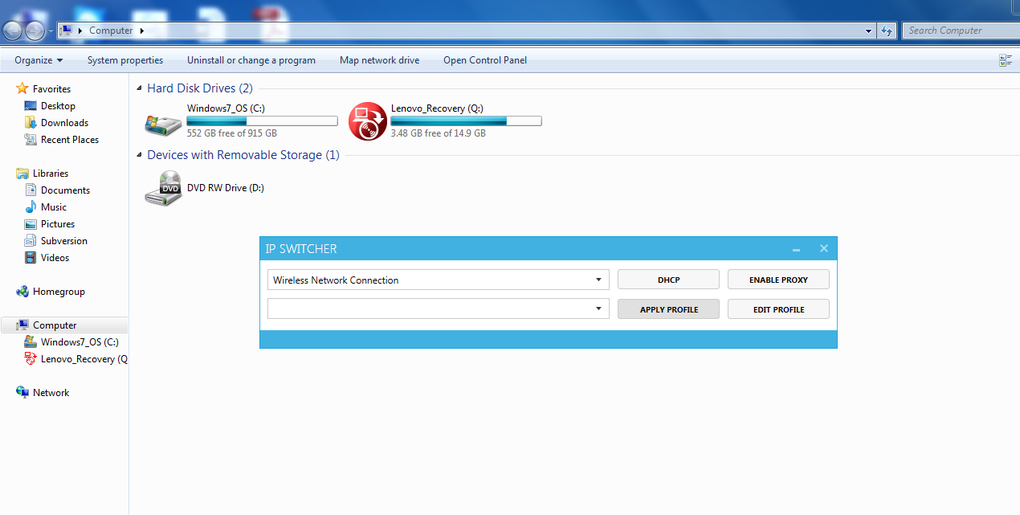
The program’s interface, although not explicitly detailed in the provided source material, is likely intuitive and user-friendly. It is designed to allow users to easily create new profiles, edit existing ones, and quickly switch between various configured network settings. The underlying power of the netsh command ensures that the changes are applied reliably and efficiently. This eliminates the need for manual configuration through the Windows control panel, saving considerable time and effort.
Advantages of Using IP Switcher
Several key advantages make IP Switcher an attractive option for users seeking enhanced control over their network configurations:
-
Simplicity and Ease of Use: The program’s design prioritizes simplicity, making it accessible to users of all technical skill levels. The use of standard Windows commands ensures reliability and minimizes the chances of system conflicts.
-
Portability and Transferability: The JSON-based profile storage enables easy transfer of network configurations between different computers. This feature is especially useful for users with multiple devices or those who frequently change networks.
-
Speed and Efficiency: Applying a new network profile using IP Switcher is a quick process. The program leverages the built-in Windows
netshfunctionality, ensuring rapid application of network settings without requiring a system restart (unless explicitly required by the network configuration). -
Reduced Complexity: Unlike some feature-rich network management tools, IP Switcher avoids unnecessary complexity. This reduces the likelihood of conflicts and makes the program more stable and reliable. This streamlined approach minimizes the potential for errors and simplifies troubleshooting.
-
Enhanced Control: IP Switcher empowers users with more precise control over their network settings. Users can define multiple profiles tailored to different network environments, swiftly switching between them as needed. This level of granularity provides flexibility for users with varying network requirements.
-
Management of Proxy Settings: The inclusion of proxy settings within the profiles is a valuable feature for users needing to route their internet traffic through a proxy server. This is beneficial for security, privacy, or accessing region-locked content.
Comparison with Alternative Network Management Tools
While numerous network management tools exist, IP Switcher differentiates itself through its minimalist approach. Competitive tools often include advanced features that can add complexity and potential stability issues. IP Switcher prioritizes core functionality – managing static IP addresses – without sacrificing reliability.
For example, some advanced tools might incorporate features like VPN integration, dynamic DNS updates, or sophisticated network monitoring capabilities. While these are valuable features in specific contexts, they are absent from IP Switcher. This focus on core functionality is intentional, aiming for a lightweight, stable, and readily accessible tool for managing static IP addresses.
Choosing between IP Switcher and a more feature-rich alternative depends on the user’s needs. If the primary requirement is simple, reliable management of static IP addresses and proxy settings, then IP Switcher offers a compelling solution. Users requiring more advanced features, such as VPN integration or detailed network monitoring, may find a more comprehensive network management tool more suitable.
Limitations of IP Switcher
While IP Switcher presents several advantages, it also has limitations:
- Limited Functionality: As a focused tool, IP Switcher lacks the advanced features present in more comprehensive network management utilities. It primarily handles static IP address and proxy configuration, excluding advanced features like VPN management or dynamic DNS updates.
-
Manual Profile Creation: While the JSON format simplifies profile management, users still need to manually create and edit configuration files. A graphical interface might enhance ease of use for less technically inclined users.
-
Dependence on
netsh: The program’s reliance on the Windowsnetshcommand means it is inherently tied to the Windows operating system and may not function on other platforms. -
No Automatic Updates: The provided information suggests that the last update for IP Switcher was in August 2015. This lack of recent updates raises concerns about security vulnerabilities and compatibility with newer operating systems.
Despite these limitations, IP Switcher remains a valuable tool for users with straightforward requirements for static IP address management. Its simplicity, portability, and reliability make it a compelling option for those who prioritize ease of use and stability. For users requiring more advanced functionality, however, a more feature-rich network management tool might be a better choice. Users should carefully weigh the pros and cons before selecting the tool most appropriate for their individual needs and technical skills.
File Information
- License: “Free”
- Version: “1”
- Latest update: “August 13, 2015”
- Platform: “Windows”
- OS: “Windows 8”
- Language: “English”
- Downloads: “3.6K”
- Size: “619.16 KB”


