
iRotate is a lightweight, free utility designed for Windows operating systems, providing a convenient way to rotate your screen directly from your taskbar. This simple yet effective tool eliminates the need to navigate through multiple system settings to change your screen orientation. With a single click, users can seamlessly switch between landscape and portrait modes, catering to various needs and preferences. Its ease of use and minimal system footprint make iRotate an ideal choice for users seeking a quick and efficient solution for screen rotation. This detailed review will explore iRotate’s functionality, features, system requirements, and user experience, providing a comprehensive overview of this valuable tool.
Functionality and Features
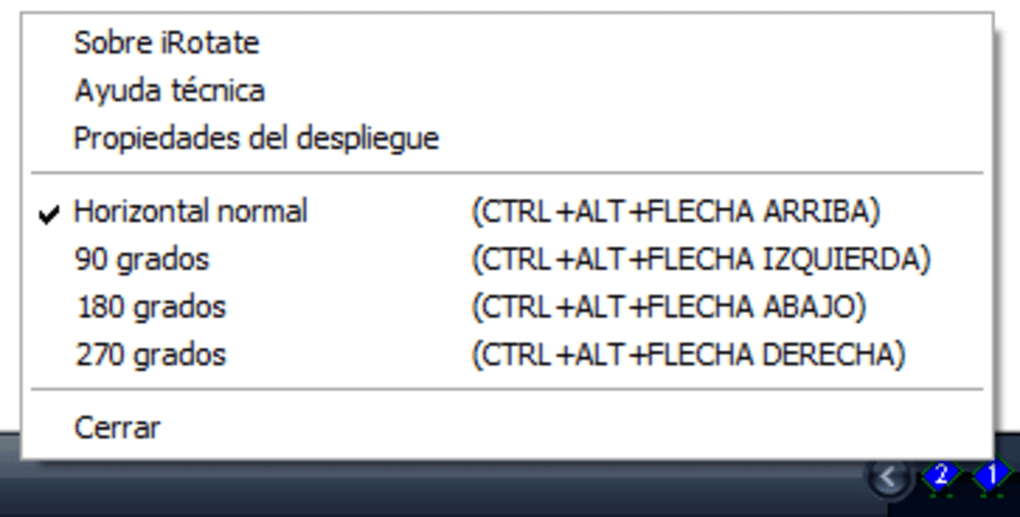
At its core, iRotate’s functionality revolves around providing a streamlined method for rotating the desktop display. The program’s primary function is to add a simple, easily accessible icon to the Windows taskbar. A single click on this icon will rotate the screen 90 degrees clockwise. Subsequent clicks continue this rotation, cycling through all four orientations (0°, 90°, 180°, and 270°). This intuitive design eliminates the need for complex menus or multiple button presses, making it incredibly user-friendly.
Unlike more extensive screen management tools, iRotate focuses solely on rotation, avoiding unnecessary features that could bloat the program or complicate its operation. This minimalist approach contributes to its speed and efficiency. The program operates silently in the background, requiring minimal system resources and having a negligible impact on overall performance. This makes iRotate suitable for even older or less powerful computers.
While lacking advanced features, iRotate’s simplicity is its strength. It directly addresses the need for quick and easy screen rotation without any extraneous functionality. This focused approach ensures reliability and makes it a perfect choice for users who value efficiency and ease of use above all else.
System Requirements and Compatibility
iRotate boasts impressive compatibility, supporting a wide range of Windows operating systems. While its initial release targeted older Windows versions, including Windows 98, subsequent updates have extended its compatibility to newer systems. The program’s minimal system requirements ensure that it runs smoothly on a broad spectrum of hardware. Its small size minimizes disk space usage, making it ideal for systems with limited storage capacity. This broad compatibility and low system footprint are key factors contributing to iRotate’s enduring popularity.
The lightweight nature of iRotate means it won’t overload system resources, which is a considerable advantage for older machines or those running multiple applications concurrently. This ensures that users can benefit from quick and easy screen rotation without compromising overall system performance. The seamless integration with the Windows taskbar further enhances usability, providing a readily accessible tool without cluttering the desktop with additional windows or icons.
User Experience and Interface
iRotate’s user experience is defined by its simplicity. The lack of a complex interface ensures that even novice users can easily grasp its functionality. The single taskbar icon acts as both the program’s interface and its primary control mechanism. There are no confusing menus or settings to navigate, resulting in a straightforward and intuitive user experience. This minimalist approach reduces the learning curve to practically zero, making iRotate accessible to a vast range of users regardless of their technical proficiency.
The immediate visual feedback provided by the screen rotation itself serves as confirmation of the successful execution of the command. The absence of any confirmation dialogs or prompts further streamlines the process, ensuring that screen rotation is completed swiftly and without interruption. This eliminates unnecessary steps and keeps the user experience streamlined and focused on the core functionality.
The program’s quiet operation in the background is another significant factor contributing to a positive user experience. There are no distracting notifications or pop-up messages to disrupt workflow. iRotate remains unobtrusive, performing its function without drawing attention to itself, ensuring that users can concentrate on their tasks without any unnecessary interruptions.
Alternatives and Comparisons
While iRotate excels in its simplicity and ease of use, several alternative applications offer more extensive screen management capabilities. However, these often come with increased complexity and system resource demands. Some alternative solutions provide features beyond simple rotation, such as screen resolution adjustments, multiple monitor support, or advanced display settings. These additional features can be beneficial for users with specific requirements, but they might also introduce a steeper learning curve and potentially impact system performance.
The choice between iRotate and a more comprehensive screen management tool depends largely on individual needs and preferences. For users who prioritize ease of use and require only basic screen rotation functionality, iRotate is the ideal choice. Its straightforward interface and minimal system footprint provide a superior user experience for those who seek a quick and hassle-free solution. However, users needing more advanced features or comprehensive control over their display settings should explore alternative applications offering more advanced capabilities.
In comparison to other screen rotation utilities, iRotate stands out due to its minimal size and its focus solely on its core function: rotation. This laser focus on a single task allows for optimized performance and unparalleled ease of use. It’s a program perfectly suited to users who don’t need advanced features but appreciate a quick, reliable solution for changing screen orientation.
This deliberate lack of complexity is a key differentiator. While other software may offer a more comprehensive suite of features, the simplicity of iRotate is its strength. It’s a targeted solution addressing a single need with exceptional efficiency. For users needing only a simple, reliable method for screen rotation, iRotate remains a compelling and effective choice.
File Information
- License: “Free”
- Latest update: “June 12, 2024”
- Platform: “Windows”
- OS: “Windows XP”
- Language: “English”
- Downloads: “23.1K”
- Size: “113.69 KB”


