
IsItUp is a robust network monitoring application designed to provide continuous oversight of multiple network devices, offering peace of mind to network administrators and IT professionals. Its comprehensive features extend beyond simple status checks, delivering detailed performance statistics and advanced troubleshooting capabilities. Whether you manage a small office network or a slightly larger infrastructure, IsItUp empowers you to proactively identify and address potential network issues, minimizing downtime and maximizing efficiency. This in-depth review will explore its key features, benefits, and how it compares to other solutions on the market.
Core Functionality: Monitoring and Alerting
At its heart, IsItUp provides real-time monitoring of the health and performance of network devices. It achieves this through continuous “pinging” of specified TCP/IP devices at user-defined intervals. This means IsItUp actively probes the network devices to confirm their responsiveness. Any deviation from expected behavior – a device becoming unreachable or responding slowly – triggers alerts, ensuring immediate notification of potential problems.
The alert system is highly customizable. Users can choose to receive notifications via email or pager, allowing them to stay informed even when away from their primary workstation. This proactive approach is crucial for preventing minor issues from escalating into major outages, saving valuable time and resources. The application doesn’t just detect issues; it provides timely warnings, giving administrators ample opportunity to intervene before the impact on users becomes significant.
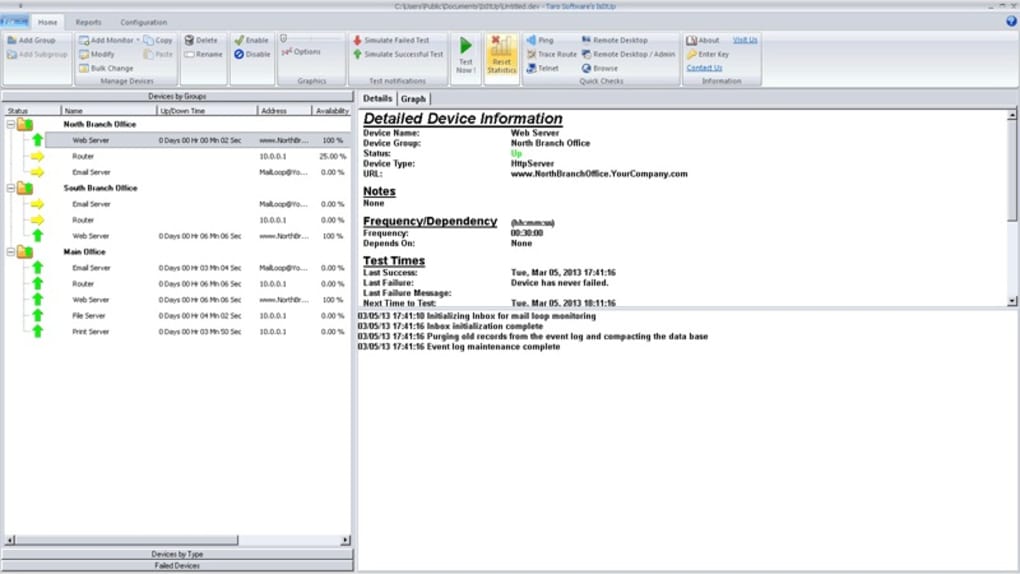
Beyond simple up/down status, IsItUp captures detailed performance metrics for each monitored device. This includes crucial data such as:
- Uptime: Provides a clear picture of the device’s overall availability.
- Maximum Response Time: Highlights peak latency periods, which can pinpoint performance bottlenecks.
- Minimum Response Time: Indicates the best-case response times, providing a baseline for comparison.
- Standard Deviation: Measures the variability in response times, helping to identify patterns of instability.
- Traceroute Tracking: This is a standout feature. IsItUp tracks the last successful and failed Traceroute results. This powerful diagnostic tool identifies the precise location of network failures within the path to the destination device. Instead of only knowing that a device is down, IsItUp provides a detailed breakdown of where the connectivity issue is occurring, speeding up troubleshooting significantly. This allows administrators to pinpoint problems within their internal network, or with external connections to internet service providers.
The combination of real-time monitoring, customizable alerts, and detailed performance statistics provides a holistic view of network health, enabling proactive management and rapid response to potential problems.
User Interface and Accessibility: Web and Windows Compatibility
One of IsItUp’s key strengths lies in its accessibility. The application boasts both a web-based user interface and a dedicated Windows client, providing flexibility for monitoring from any location with an internet connection. This means network administrators are not confined to their office or desktop to check network status. Whether they’re working remotely, on the move, or simply need a quick update, they can access the crucial information they need at any time.
The dual interface approach caters to various user preferences and scenarios. The Windows client might be preferred for more in-depth analysis and configuration, while the web interface offers a quick and convenient way to check the overall status of the network from anywhere. This adaptability is especially valuable for businesses with distributed teams or those requiring 24/7 network monitoring.
The user interfaces are designed with simplicity and ease of use in mind. Navigating the application, configuring monitoring settings, and interpreting data should be intuitive, even for users with limited technical experience. While detailed features are available for advanced users, the core functionality remains accessible to a broader audience. This ease of use contributes to the application’s overall effectiveness, making network monitoring a less daunting task.
Installation and Deployment: Quick Setup and Easy Configuration
IsItUp emphasizes a straightforward setup and configuration process. The installation is designed to be quick and trouble-free, with minimal steps required. The intuitive interface simplifies the configuration process, allowing administrators to quickly add and configure the devices they wish to monitor. This reduces the administrative overhead associated with deploying and managing network monitoring solutions.
The ability to be up and running in under two minutes, as claimed by the developer, speaks to the application’s streamlined design. This ease of deployment makes IsItUp a particularly attractive option for small to medium-sized businesses that may lack dedicated IT staff or require a quick and efficient solution. The time saved during installation and configuration translates to immediate value, as administrators can begin monitoring their network and receive critical alerts without prolonged delays.
Comparison with Alternatives and Market Positioning
IsItUp occupies a specific niche in the network monitoring market. While larger, enterprise-grade solutions offer more extensive features and scalability, they often come with a higher price tag and increased complexity. IsItUp provides a compelling alternative for organizations with smaller networks or those seeking a cost-effective yet powerful solution. Its ease of use, combined with its comprehensive monitoring and alerting features, makes it a strong competitor in this space.
Some alternative solutions might offer more advanced features, such as integrated dashboards for visualizing network data or advanced reporting capabilities. However, IsItUp compensates for these with its user-friendly interface, straightforward implementation, and cost-effectiveness. The decision of whether to choose IsItUp versus other solutions often comes down to the specific needs and resources of the organization. For small to medium-sized businesses or those with simpler network infrastructures, IsItUp’s balance of functionality and ease of use makes it a highly competitive option.
The provided text mentions free upgrades and support, a significant advantage in the software market. This commitment to ongoing improvement and customer assistance reinforces the application’s value proposition, ensuring users benefit from continuous enhancements and readily available assistance should any issues arise. This long-term support is crucial for maintaining a positive user experience and building trust with the customer base. Free upgrades help maintain the relevance of the software over time, keeping it aligned with evolving network technologies.
File Information
- License: “Trial version”
- Latest update: “July 3, 2015”
- Platform: “Windows”
- OS: “Windows 2000”
- Language: “English”
- Downloads: “6.2K”
- Size: “14.33 MB”


