
ISODisk is a free Windows utility designed to mount ISO images as virtual drives. This allows users to access the contents of ISO files – which often contain software installations, backups, or game data – without needing to burn them to physical discs. This review will delve into its functionality, pros and cons, and compare it to alternative solutions available on the market.
Functionality and Features
ISODisk distinguishes itself through its simplicity and efficiency in mounting ISO files. Its primary function is straightforward: mounting ISO image files as virtual drives accessible within the Windows file explorer. Users can easily browse and access the contents of these virtual drives just as they would with physical media. A significant advantage ISODisk offers is the ability to mount up to 20 ISO files concurrently. This allows for convenient access to multiple ISO images without the need to unmount and remount repeatedly. This parallel mounting capability is particularly useful for users working with numerous ISO files simultaneously, such as software developers, system administrators, or gamers managing multiple game installations.
Beyond its core mounting capabilities, ISODisk also includes a built-in tool for creating ISO images from physical CDs. This added functionality streamlines the process of creating backups or digital copies of CD-based content. However, it’s crucial to note a limitation: ISODisk cannot create ISO images from folders on the user’s hard drive. This limitation might restrict its usefulness for users who need to create ISO images from collections of files and folders without relying on physical CDs.
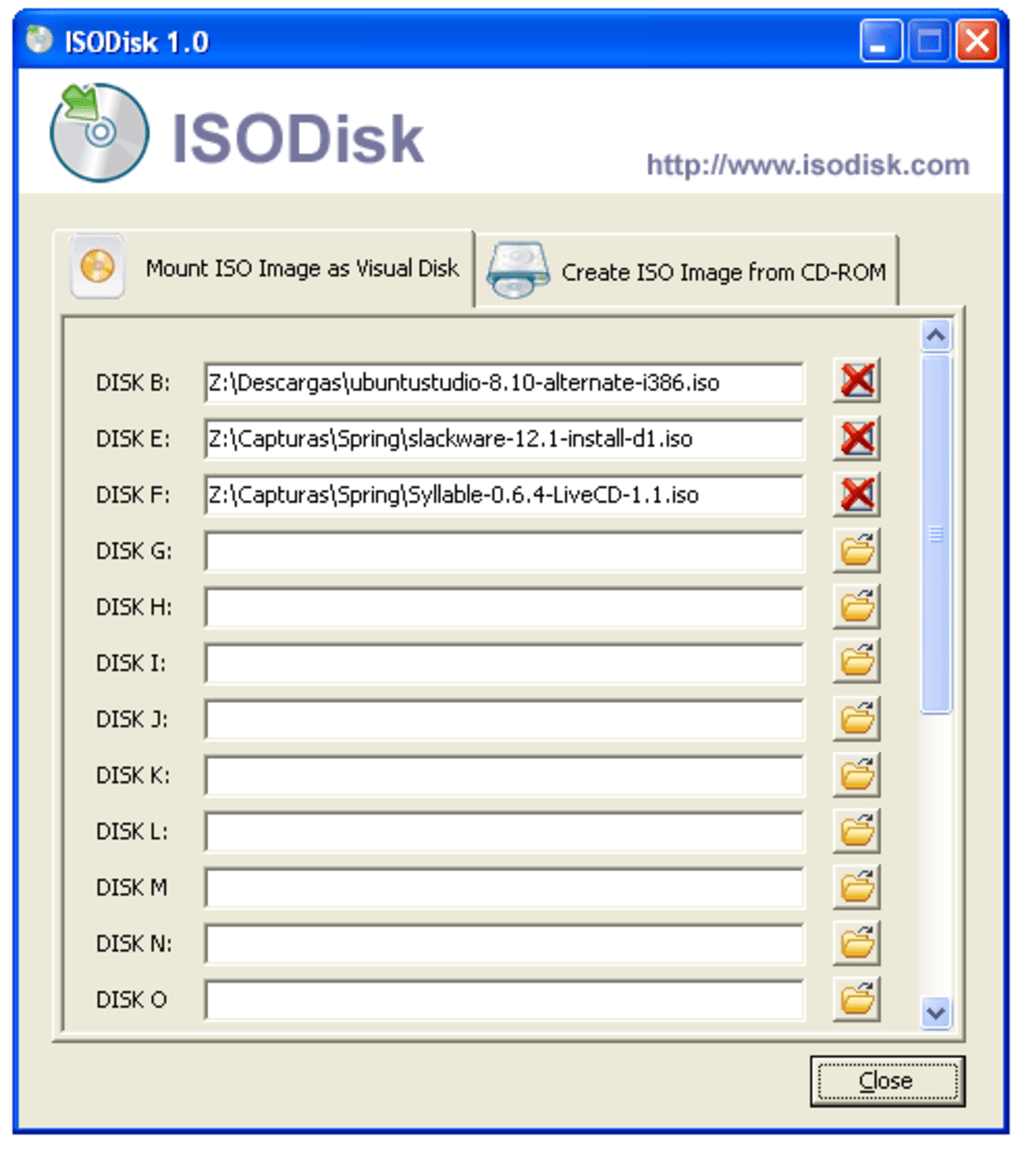
The user interface is relatively intuitive and straightforward. Users will find navigating the program and mounting or unmounting ISO images a simple process, even with limited technical expertise. The application’s small size and minimal system resource consumption ensure smooth operation without impacting system performance, even on older or less powerful machines.
Advantages of Using ISODisk
Several key advantages make ISODisk a compelling choice for users needing to work with ISO files:
- Multiple Simultaneous Mounts: The capacity to mount up to 20 ISO files concurrently is a significant advantage, especially when compared to many alternative applications that limit the number of simultaneous mounts or require unmounting one ISO before mounting another. This feature greatly enhances workflow efficiency, particularly for users managing several ISO files simultaneously.
-
CD to ISO Creation: The inclusion of a CD-to-ISO image creation tool is a valuable addition, enhancing the software’s overall utility. This simplifies the process of creating backups of physical CD contents. This feature eliminates the need for users to rely on separate software for this task, streamlining their workflow.
-
Ease of Use: The user-friendly interface ensures ease of use, even for users with limited technical expertise. The intuitive design minimizes the learning curve, enabling users to quickly mount and manage ISO files.
-
Lightweight and Efficient: ISODisk is a lightweight application that doesn’t consume excessive system resources. This ensures that system performance remains unaffected, even when multiple ISO images are mounted simultaneously. This feature makes it suitable for users with older hardware or those running resource-intensive applications.
-
Free Software: ISODisk is freely available, eliminating any software licensing costs. This makes it an accessible option for users of all budgets. This affordability makes it a cost-effective solution compared to paid alternatives that offer similar functionality.
Limitations and Disadvantages
While ISODisk offers several advantages, it’s essential to acknowledge its limitations:
- Limited Input Formats: ISODisk exclusively supports ISO files. It lacks the versatility of some competitors that can handle a broader range of disc image formats such as BIN/CUE, IMG, MDS/MDF, and others. This limitation reduces its utility for users working with diverse image file formats.
-
No Folder-to-ISO Creation: ISODisk’s inability to create ISO images from local folders restricts its functionality for users who need to archive file collections as ISO images without a physical CD. This significantly limits its use in situations where creating ISO images directly from files is necessary.
-
Limited Features: ISODisk focuses primarily on basic ISO mounting and CD-to-ISO conversion. It lacks advanced features such as creating bootable ISO images, editing ISO content, or managing disc image metadata, which are available in some competing applications. This simplicity can be beneficial for some users but limits its functionality for power users.
-
Potential for Instability (Anecdotal): While generally stable, some user reviews mention occasional instability or compatibility issues with specific ISO files or Windows versions. Although these issues are not widespread, potential users should be aware of this possibility. Regular updates from the developer might mitigate such problems over time.
Alternatives to ISODisk
Several alternative applications offer similar or enhanced functionality compared to ISODisk. These alternatives often provide support for a wider range of disc image formats, additional features, and improved stability:
-
MagicDisc: A popular and free alternative that offers similar mounting capabilities along with the ability to create various disc image formats, including ISO.
-
Virtual CloneDrive: Another free and versatile option, known for its stability and support for multiple image formats.
-
DAEMON Tools Lite: A widely used, free (with limited functionality, a paid version offers more features) application offering extensive disc image mounting and management features, including support for various formats and virtual drive creation.
-
PowerISO: A powerful, paid application, but it’s a feature-rich option that supports a wide variety of disc image formats and offers extensive editing and creation capabilities.
The best alternative will depend on the user’s specific needs and priorities. If the user requires support for multiple disc image formats or advanced features, a paid application such as PowerISO might be preferable. However, for users solely focused on mounting ISO files and occasional CD-to-ISO conversions, MagicDisc or Virtual CloneDrive could be sufficient free alternatives.
Conclusion
ISODisk provides a simple and effective solution for mounting ISO files in Windows, especially for users who need to handle a large number of images simultaneously. Its ease of use and free availability are attractive features. However, its limited file format support, lack of folder-to-ISO conversion, and occasional stability issues are limitations to consider. Potential users should weigh the advantages against the disadvantages and compare it with alternative applications based on their specific requirements and technical expertise to make an informed decision. For simple ISO mounting needs, ISODisk might be suitable. However, for users requiring more versatile functionality, a more feature-rich alternative might be a more appropriate choice.
File Information
- License: “Free”
- Version: “1.1”
- Latest update: “August 6, 2021”
- Platform: “Windows”
- OS: “Windows 2003”
- Language: “English”
- Downloads: “34.6K”
- Size: “538.83 KB”


