
iSumsoft Windows Password Refixer is a software program designed to help users regain access to their Windows computers when they’ve forgotten their password. This review will delve into its functionality, strengths, weaknesses, and user experiences to provide a comprehensive assessment of its effectiveness and overall value. While it offers a potential solution to a frustrating problem, it’s crucial to understand its limitations and alternatives before making a purchase decision.
How iSumsoft Windows Password Refixer Works
The iSumsoft Windows Password Refixer operates by creating a new user profile on your locked computer, bypassing the forgotten password. This differs from some password-cracking tools that attempt to brute-force or decipher the existing password. Instead, this program provides a workaround, allowing you to access your system and potentially recover your lost password through other means.
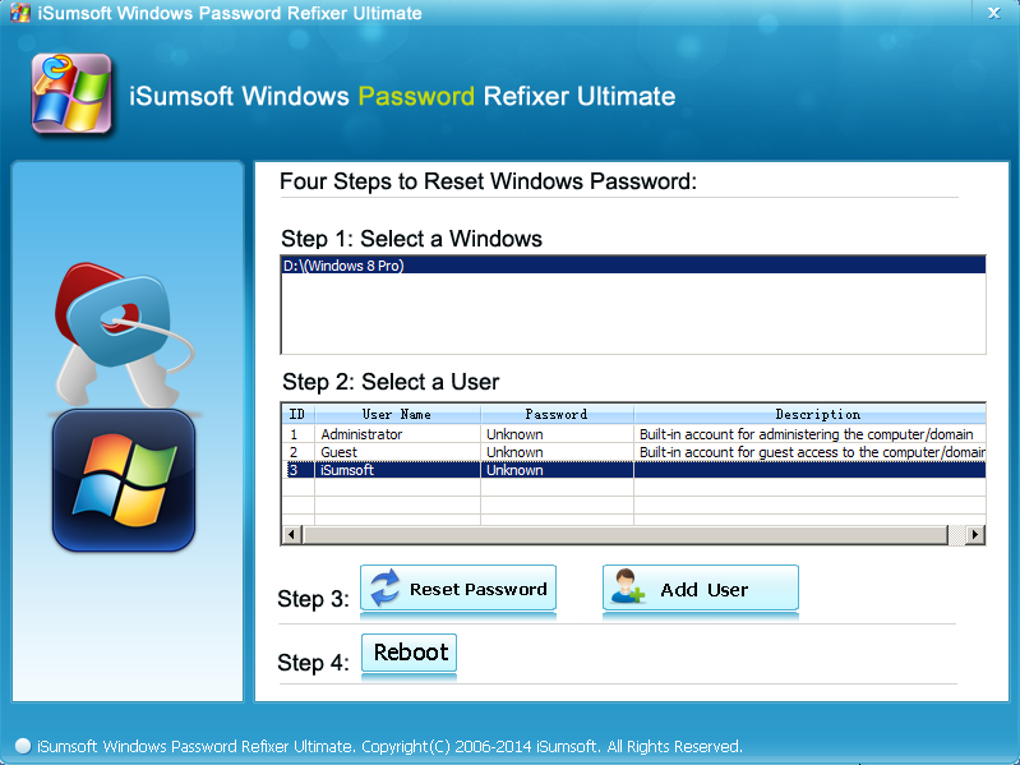
The process involves these key steps:
-
Download and Installation: You must download and install the iSumsoft Windows Password Refixer onto a different, accessible computer.
-
Bootable Media Creation: The software is then used to create a bootable USB drive or CD/DVD. This bootable media contains the necessary files to run the password reset utility on the locked computer.
-
Booting from Bootable Media: Insert the bootable media into your locked computer and boot from it (this typically requires changing the boot order in your computer’s BIOS settings).
-
Password Reset: The iSumsoft software will then launch, guiding you through the process of creating a new administrator account. This new account will allow you to access your computer. Crucially, this process does not remove or reset your old password; it simply creates a new access point.
-
Accessing Your Data: While you can access your computer with the new account, you won’t directly access files and folders associated with your old, locked profile. To retrieve data from your old profile, you will need to navigate and copy those files.
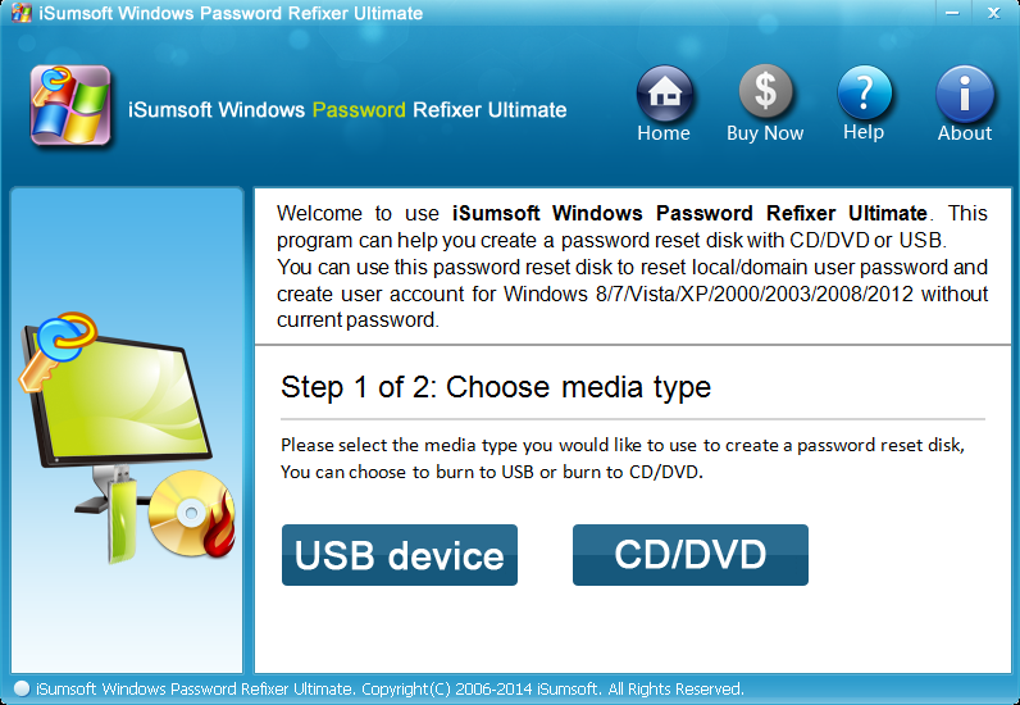
The software supports a range of Windows operating systems, including Windows XP, Vista, 7, 8, 8.1, and various Windows Server versions (2000, 2003, 2008, and 2012). Notably, it’s explicitly not compatible with Windows 10, a significant limitation in today’s computing landscape.
System Requirements and Compatibility
Before using iSumsoft Windows Password Refixer, it’s essential to check if your system meets the software’s requirements. While the specific requirements aren’t extensively detailed on the product page, it’s implied that a working, accessible computer is needed to create the bootable media. The software itself requires a minimum amount of system resources, ensuring that it can run on older machines. The exact requirements, however, should be confirmed prior to download and use.
Pros and Cons of iSumsoft Windows Password Refixer
Like any software, iSumsoft Windows Password Refixer has its advantages and disadvantages.
Pros:
-
Ease of Use: The software boasts an intuitive interface designed for ease of use, guiding users through the process step-by-step. Even users with limited technical skills should find the process relatively straightforward.
-
Quick Process: The password reset process is advertised as taking less than 5 minutes, though this may vary depending on system configuration and other factors. The speed is a major advantage for users seeking quick access to their computer.
-
New Administrator Account Creation: A key feature is the ability to create a new administrator account, bypassing the locked profile entirely. This is a useful alternative to attempting to recover the old password.
-
Offline Operation: The software works offline, meaning you don’t need an internet connection on your locked computer during the reset process. This eliminates potential network connectivity issues that might complicate matters.
-
Lightweight Software: The software is relatively lightweight, ensuring that the bootable media doesn’t take up excessive storage space.
Cons:
-
Incompatibility with Windows 10: The most significant drawback is its lack of support for Windows 10, the most prevalent Windows operating system. This severely limits its applicability for many users.
-
Cost: While it’s advertised as a trial version, unlocking its full functionality often requires payment. The cost-effectiveness should be carefully weighed against other solutions.
-
No Password Removal from Old Profile: The software does not remove the password from the original profile. It only provides access through a newly created account.
-
Mixed User Reviews: Online user reviews exhibit a wide range of experiences, with some reporting success while others express dissatisfaction and allege that the software did not work as advertised.
-
Potential for Data Loss (though not inherent to the software): While the software itself doesn’t inherently cause data loss, the process of creating a new user profile and dealing with a locked-out original profile could inadvertently lead to data loss if not handled carefully. Backups are always recommended.
-
Lack of Technical Support Response (reported by some users): Some user accounts describe difficulties in obtaining effective technical support, which is a significant concern for a paid software application.
Alternatives to iSumsoft Windows Password Refixer
Several alternative methods and software exist for recovering access to a Windows computer with a forgotten password. These options offer various approaches and may be more suitable depending on your specific situation:
-
Windows Password Reset Disk: If you had created a password reset disk during the initial Windows setup, this can often be used to reset the password.
-
Microsoft Account Reset: If your computer is linked to a Microsoft account, you can potentially use the account recovery options to regain access.
-
Third-Party Password Recovery Tools: Various third-party tools, besides iSumsoft, claim to recover or reset Windows passwords. However, it’s crucial to research and choose reputable software carefully.
User Reviews and Feedback
User reviews provide valuable insights into real-world experiences with iSumsoft Windows Password Refixer. These reviews are mixed, with some praising its ease of use and effectiveness, while others report failures and poor customer support. The discrepancies suggest inconsistencies in the software’s performance or potential compatibility issues with different systems. Reading user reviews before purchasing is strongly recommended.
Many negative reviews cite the software’s failure to work as advertised, even after purchasing the full version. Others highlight slow or unresponsive customer support, hindering their attempts to resolve issues. This variability in user experience casts doubt on the reliability of the software.
Conclusion
iSumsoft Windows Password Refixer offers a potential solution for regaining access to Windows computers with forgotten passwords, particularly for older operating systems. Its intuitive interface and relatively quick process are appealing features. However, the significant limitation of incompatibility with Windows 10, mixed user reviews regarding its effectiveness, and reports of poor customer support raise significant concerns. Before investing in iSumsoft Windows Password Refixer, carefully weigh the pros and cons, explore alternative solutions, and thoroughly research user reviews to assess its potential value for your specific situation. Considering the prevalence of Windows 10, the lack of compatibility is a serious drawback that significantly diminishes its overall utility for most modern users. Exploring other options might prove to be a more reliable and cost-effective solution.
File Information
- License: “Trial version”
- Version: “2.0.1”
- Latest update: “July 21, 2020”
- Platform: “Windows”
- OS: “Windows 2000”
- Language: “English”
- Downloads: “57.2K”
- Size: “29.24 MB”


