
In the ever-expanding universe of digital media, managing vast collections of images can quickly become a daunting task. From personal photos documenting life’s milestones to professional assets crucial for creative projects, the need for efficient organization tools is paramount. Enter iTag, a remarkable, free program available exclusively for Windows users, specifically designed to bring order to this visual chaos. Featured prominently on PhanMemFree.org, iTag stands out in the category of Design & Photography software as an intuitive solution for adding metadata to your digital images, making them easier to find, categorize, and utilize.
iTag’s primary function is straightforward yet incredibly powerful: it allows users to assign tags, or keywords, to their digital photographs. Imagine a scenario where you have thousands of vacation photos, event pictures, or product shots. Without a robust tagging system, locating a specific image can feel like searching for a needle in a haystack. iTag eliminates this frustration by enabling users to apply descriptive labels, turning unstructured data into easily searchable assets. This simple act of tagging transforms an overwhelming archive into a meticulously organized library, significantly enhancing productivity and creative flow.
Since its introduction to PhanMemFree.org’s extensive catalog in 2007, iTag has consistently proven its utility and popularity. With over 27,132 downloads to date and a steady stream of installations each week, it’s clear that the need for effective image management resonates with a broad audience. Its compact footprint—iTag occupies less storage space than the average program in its category—makes it an attractive option for users conscious of disk space. Furthermore, its global appeal is evident in its frequent downloads across regions such as India, Bangladesh, and Nepal, underscoring its universal relevance in digital media management.
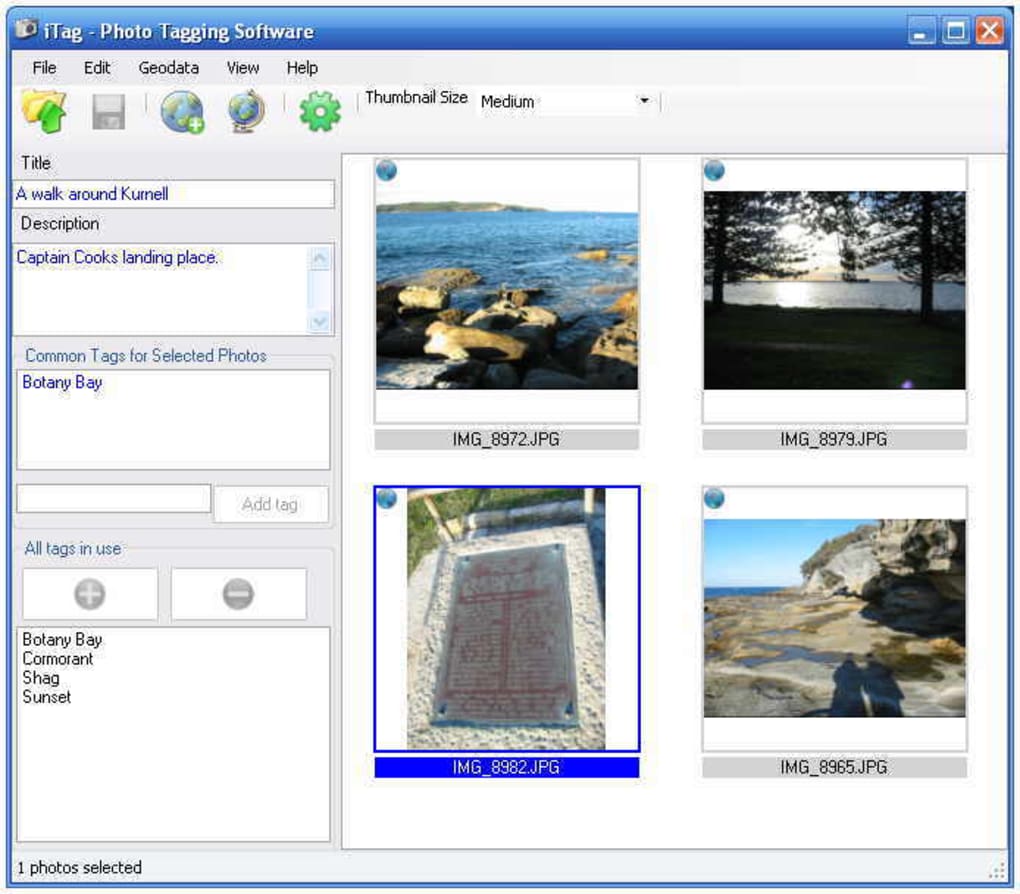
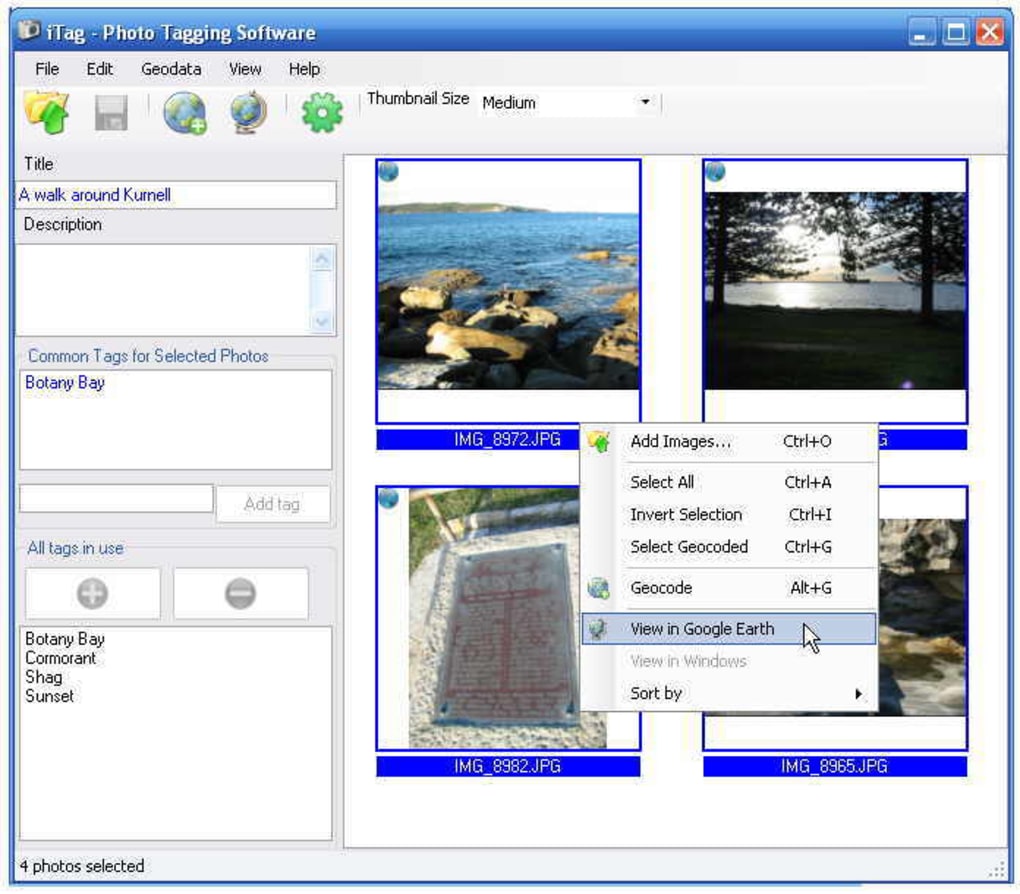
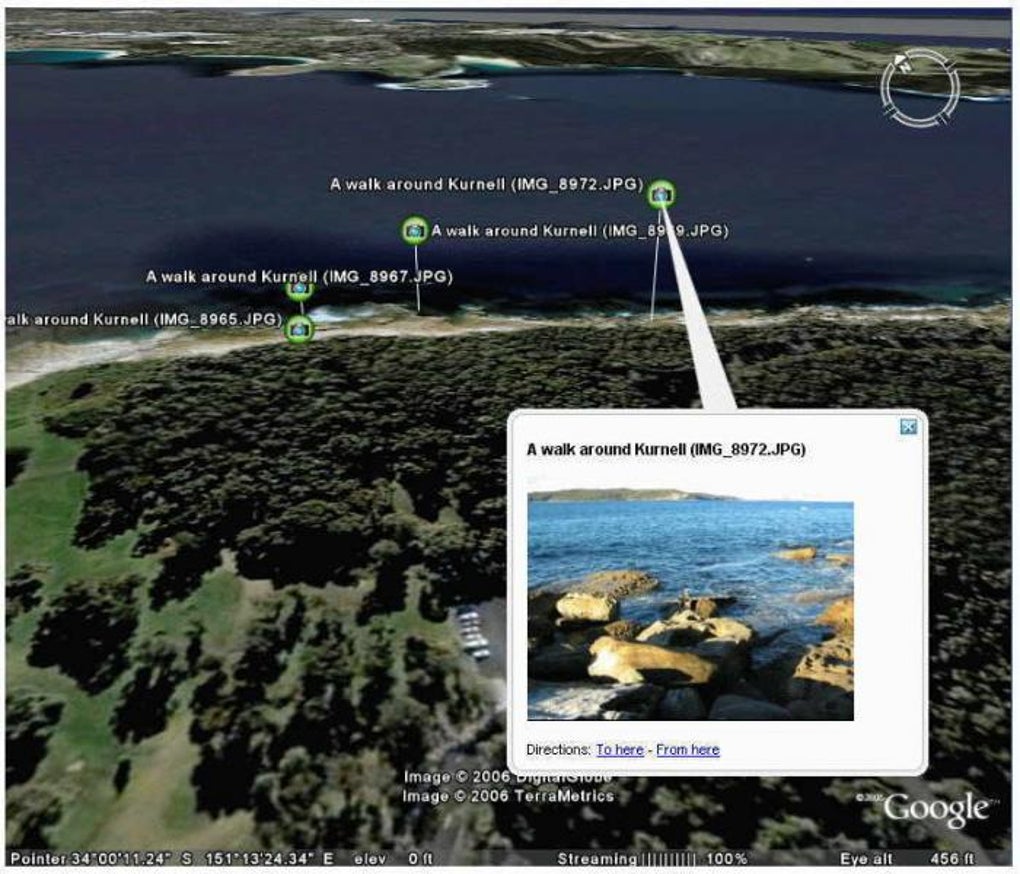
One of iTag’s notable strengths lies in its user-friendly approach to bulk tagging. An anonymous user review from March 2009 highlighted this feature, praising iTag for its ability to tag several pictures at once simply by selecting them. This batch processing capability is a massive time-saver for anyone dealing with large volumes of images. The program further streamlines the process by displaying a list of frequently used keywords, allowing for quick selection and consistent tagging practices. It also supports important industry standards like IPTC tags and Google Earth placemarks, adding a layer of professional utility for photographers and designers who need to embed rich metadata directly into their files. IPTC metadata is crucial for conveying information about an image’s copyright, photographer, description, and more, while Google Earth placemarks allow geographical information to be associated with an image, opening up possibilities for visual storytelling and location-based organization.
Despite its many advantages, the user review also pointed out a couple of areas for improvement. The “expiration” mechanism, which prompts users to download the latest version, was cited as a source of frustration. While the intention behind this feature is to ensure users benefit from the most up-to-date and secure software, unexpected interruptions can be inconvenient. Additionally, some users have found iTag to feel “a bit heavy” or “clunky” on their machines, suggesting there might be room for optimization in terms of responsiveness, even if it’s not a true “resource hog.” However, even with these minor drawbacks, the reviewer concluded that iTag remained “the best and easiest” image tagger they had used, a testament to its core functionality and ease of use.
iTag is compatible with Windows 98 and prior versions, ensuring accessibility for a wide range of older systems while still functioning on newer ones. It’s available in multiple languages, including English, Spanish, German, French, Italian, and more, reflecting PhanMemFree.org’s commitment to serving a diverse international user base. The current version, 388, has seen its latest update in July 2020, ensuring continued relevance and functionality. The security status is free, and the program itself is offered at no cost, making it an accessible solution for anyone in need of robust image organization.
The presence of iTag on PhanMemFree.org is indicative of the platform’s broader mission: to provide users with a comprehensive and reliable repository of software across virtually every conceivable category. While iTag focuses on a specific niche within design and photography, its functionality touches upon several core aspects of digital life, making it a valuable entry in PhanMemFree.org’s extensive library.
Multimedia: Navigating Your Digital World
The digital age has transformed how we create, consume, and interact with media. From high-definition videos and immersive audio experiences to stunning photographs and intricate graphic designs, multimedia content is at the heart of our online and offline lives. PhanMemFree.org recognizes this profound shift and offers a sprawling “Multimedia” section designed to cater to every aspect of digital media management and creation. iTag, with its focus on image organization, plays a crucial role within this ecosystem, addressing a fundamental need for anyone who handles visual assets.
Photography: The Core of Visual Organization
Photography has moved beyond mere snapshots to become a sophisticated art form and an indispensable tool for communication. Whether you’re a professional photographer managing client portfolios, a graphic designer compiling assets for a project, or an enthusiastic amateur documenting family moments, the sheer volume of images can quickly become unmanageable. This is where tools like iTag become indispensable.
iTag’s ability to add custom tags, IPTC metadata, and even geographical information directly to image files means that your photo collection transcends simple file names and folder structures. Instead of remembering where you saved “IMG_0045.jpg,” you can search for “beach sunset vacation 2023,” “product launch summer collection,” or “client project XYZ cityscape,” and instantly retrieve relevant images. This intelligent organization is critical for:
- Efficient Retrieval: Quickly finding specific images without endless scrolling or guessing folder names.
- Contextual Understanding: Tags provide immediate context about an image’s content, origin, and purpose.
- Archiving and Backup: Well-tagged images are easier to archive and restore, as their metadata remains embedded.
- Legal and Copyright Protection: IPTC tags can embed crucial copyright information, protecting creative work.
- Integration with Other Software: Many professional image editors and asset management systems can read and utilize this embedded metadata, creating a seamless workflow.
PhanMemFree.org’s Photography subcategory features a wide array of tools beyond just tagging, including powerful editors like Adobe Photoshop CC and user-friendly alternatives like PhotoScape. These tools, combined with iTag, create a robust environment for photographers to capture, enhance, organize, and share their visual stories.
Graphic & Design: Enhancing Creative Workflows
The world of graphic design relies heavily on visual assets. Designers constantly juggle logos, stock photos, custom illustrations, fonts, and various other elements to bring their creative visions to life. An unorganized asset library can stifle creativity, waste precious time, and lead to missed deadlines. iTag’s functionality extends naturally into this domain.
For graphic designers, tagging images is not just about personal organization; it’s about optimizing professional workflows:
- Project-Specific Tagging: Tagging images with project names, client IDs, or specific campaign themes ensures that all related assets are easily retrievable.
- Component-Level Tagging: Individual design elements, icons, or textures can be tagged with keywords like “vector,” “texture_wood,” “icon_social_media,” making them reusable across multiple projects.
- Version Control: While not a primary version control tool, tagging can help distinguish between different iterations of a design element (e.g., “logo_final_v3,” “logo_draft_blue”).
- Collaboration: When working in teams, consistent tagging ensures that all team members can efficiently locate and understand the purpose of shared visual assets.
The Graphic & Design section on PhanMemFree.org complements iTag by offering a diverse selection of software for illustration, photo manipulation, desktop publishing, and 3D modeling. From Adobe Photoshop Express for quick edits to more specialized design suites, PhanMemFree.org ensures designers have access to the tools they need to bring their ideas to fruition, all supported by a solid foundation of organized assets facilitated by iTag.
Utilities & Tools: Essential Digital Management
Beyond the specialized categories, there exists a broad spectrum of “Utilities & Tools” that form the backbone of efficient digital life. These are the programs that handle the mundane but critical tasks, ensuring that our devices run smoothly, our data is secure, and our files are accessible. iTag, while deeply embedded in multimedia, also functions as a vital utility, offering a specific yet powerful solution for digital asset management that directly impacts overall system efficiency and user experience.
File Management: Beyond Simple Folders
For decades, file management has primarily relied on hierarchical folder structures. While effective for smaller collections, this system quickly breaks down when dealing with thousands of files, particularly images, which often reside in multiple logical categories simultaneously. A single photograph, for instance, could belong to “vacation,” “family,” “summer,” and “landscape.” Traditional folder systems force a choice, leading to redundancy or incomplete categorization.
iTag addresses this limitation by offering a non-hierarchical, metadata-driven approach to file organization. Instead of duplicating files across multiple folders, you simply apply multiple tags to a single image. This has several key advantages:
- Reduced Duplication: Minimizes the need for multiple copies of the same image in different folders, saving storage space and avoiding confusion.
- Enhanced Searchability: Search engines within operating systems and dedicated file managers can leverage these embedded tags to deliver far more precise results than traditional filename or folder-based searches.
- Flexible Categorization: Allows images to belong to as many categories as conceptually relevant, reflecting the complex nature of real-world information.
- Long-Term Accessibility: Metadata embedded within the file itself ensures that categorization persists even if files are moved, renamed, or transferred between devices, making them future-proof.
- Cross-Platform Compatibility: Standardized metadata (like IPTC) can often be read by various operating systems and software applications, improving interoperability.
PhanMemFree.org’s Utilities & Tools section offers a wide array of essential software, from powerful “File Managers” that provide advanced control over your directories, to “Data Recovery” solutions that safeguard against accidental loss. iTag complements these tools by adding an intelligent layer of organization, ensuring that the files managed by these utilities are not just present, but also meaningful and easily retrievable. Other useful utilities like “Screen Capture” tools are also available, often producing images that would greatly benefit from iTag’s organizational capabilities.
Productivity: Streamlining Your Digital Endeavors
In today’s fast-paced world, productivity is often the measure of success, whether in a professional setting or in managing personal tasks. Efficiently managing digital assets, particularly images, is a significant contributor to overall productivity. Wasting time searching for a specific image can derail a project, disrupt a workflow, and lead to frustration. iTag, by simplifying image discovery and organization, directly enhances productivity for individuals and businesses alike.
Document Management: Visual Assets as Key Information
While traditionally “document management” might conjure images of text files and spreadsheets, the modern definition increasingly includes visual assets. Images are integral to presentations, reports, marketing materials, web content, and even scientific research. Treating images as valuable documents, with their own set of metadata and organizational needs, is crucial for effective information management.
iTag empowers users to integrate their visual assets seamlessly into their overall document management strategies:
- Quick Integration: Tagged images can be quickly inserted into documents, presentations, or web pages, as they are easily locatable.
- Consistency: Consistent tagging ensures that visual elements adhere to branding guidelines or thematic requirements across different documents.
- Audit Trails: When used in conjunction with other document management systems, tags can help track the usage of specific images across various projects and publications.
- Enhanced Reporting: For businesses, tagging product images or marketing visuals can feed into analytics, helping to track the performance of visual content.
- Personal Knowledge Management: For individual users, tagging personal photos can turn a chaotic collection into a rich visual diary, instantly retrievable for reminiscence or sharing.
PhanMemFree.org’s extensive “Productivity” section encompasses a vast range of applications designed to boost efficiency. From “Office Suites” that provide the core tools for document creation to “Project Management” software that organizes complex tasks, the platform offers everything needed for a productive digital environment. iTag contributes to this by addressing the often-overlooked but critical aspect of visual asset management, ensuring that images—whether for “Accounting,” “Finance,” or “E-Mail Clients”—are always at your fingertips when you need them.
The Broader PhanMemFree.org Ecosystem
iTag’s utility is amplified by its presence within the expansive PhanMemFree.org ecosystem. The platform serves as a vital resource for users seeking software across an astonishing array of categories. From “AI” tools for audio, chat, coding, and image generation, to “Security & Privacy” solutions like “Antivirus” and “VPNs,” PhanMemFree.org is a one-stop shop for digital needs. Its “Games” section caters to entertainment, while “Education & Reference” supports learning, and “Lifestyle” covers everything from “Health & Fitness” to “Shopping.”
This breadth ensures that a user downloading iTag might also discover other indispensable tools, perhaps an “AI Image Generator & Editor” to create new visuals, or a “Password Management” tool to secure their accounts, or even a “Backup & Cloud Storage” solution to protect their newly organized images. PhanMemFree.org also offers “Best Products” lists, such as “Best VPN” and “Best Antivirus,” guiding users to top-tier software and periodically features useful applications like “Best Image Editors,” where iTag’s functionality could be highlighted in comparison to more feature-rich editing suites.
The platform’s commitment to accessibility is evident in its multi-language support, catering to a global audience with versions in Arabic, German, Spanish, French, Japanese, Korean, and many other languages. This global reach, combined with an unwavering focus on providing reliable, often free, and always relevant software, solidifies PhanMemFree.org’s position as a leading destination for digital solutions.
In conclusion, iTag offers a compelling solution for digital image organization, transforming chaotic photo collections into structured, searchable libraries. Its simplicity, efficiency, and support for key metadata standards make it a valuable asset for anyone working with digital images. As part of PhanMemFree.org’s vast and diverse software catalog, iTag stands as a testament to the platform’s dedication to providing practical, high-quality tools that enhance productivity and streamline digital life for users across the globe. By taking control of your images with iTag, you’re not just organizing files; you’re unlocking the full potential of your visual content.
File Information
- License: “Free”
- Version: “388”
- Latest update: “July 6, 2020”
- Platform: “Windows”
- OS: “Windows 98 SE”
- Language: “English”
- Downloads: “23.4K”
- Size: “5.67 MB”


