
In today’s fast-paced digital world, the ability to capture, record, and edit screen content has become an indispensable skill for professionals, educators, gamers, and everyday users alike. Whether you’re creating tutorials, documenting software bugs, recording online meetings, streaming gameplay, or simply saving a memorable online moment, a reliable screen recorder is paramount. Enter iTop Screen Recorder – a robust, multifunctional application designed specifically for Windows users, offering a comprehensive suite of tools that go far beyond basic screen capture. From its intuitive interface to its advanced editing capabilities and AI-powered audio enhancements, iTop Screen Recorder positions itself as a top-tier solution for anyone seeking efficiency and quality in their screen recording endeavors.
Developed by iTop VPN, iTop Screen Recorder was crafted to meet the diverse needs of PC users who require on-the-fly video and audio capture. It’s an application that integrates seamlessly into the Windows environment, providing a streamlined workflow from recording to editing and sharing. Unlike many competitors that offer fragmented tools, iTop Screen Recorder prides itself on its all-in-one approach, ensuring that users can achieve professional-grade results without juggling multiple programs. This detailed exploration will delve into what makes iTop Screen Recorder a standout choice, examining its features, usability, and the sheer value it brings to your digital toolkit.
Why iTop Screen Recorder Stands Out: Unmatched Versatility and Accessibility
iTop Screen Recorder is more than just a simple capture tool; it’s a versatile powerhouse that adapts to a multitude of recording scenarios. Its design philosophy centers around empowering users with flexibility and robust functionality, all accessible through an interface that recalls the simplicity of built-in operating system video editors.
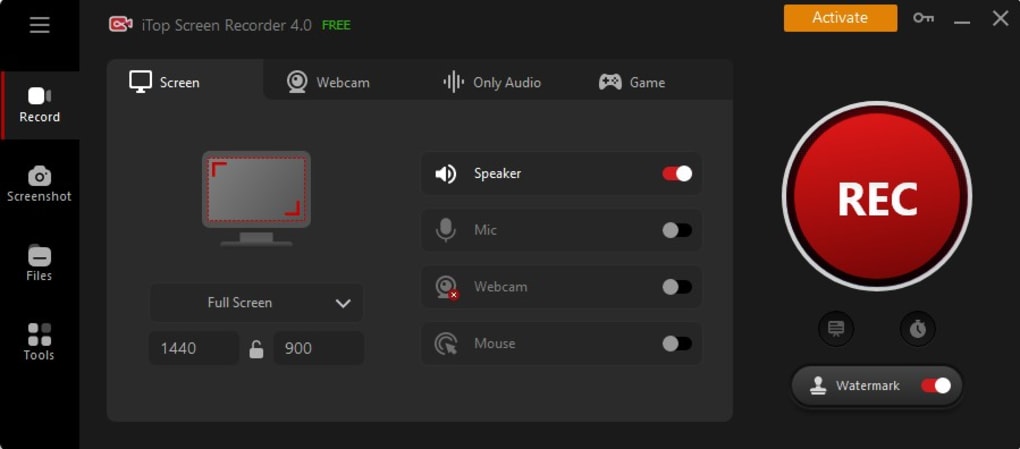
One of the most appealing aspects of iTop Screen Recorder is its accessibility. A free version is available, allowing users to experience its core functionalities, albeit with certain limitations. Specifically, the free version imposes a two-minute maximum time allowance for videos. While this might be restrictive for longer projects, it’s perfect for creating short, impactful clips that can be circulated quickly. For those requiring unlimited recording time and advanced features without watermarks, the paid (Pro) version unlocks the full potential of the software, offering a truly unconstrained recording and editing experience.
Upon installation, users are greeted with a self-explanatory interface that immediately prompts them to select from three primary capture modes: screen, audio, or game. This direct approach simplifies the initial setup, allowing users to dive straight into their desired recording task. Complementing these modes are four easily identifiable buttons that enable or disable critical components: the computer’s internal audio speaker, mouse tracking, the microphone, and the webcam. This granular control ensures that every recording is tailored precisely to the user’s requirements, whether it’s a silent screen capture, a voice-over tutorial, or a live commentary gaming session.
Beyond these quick controls, iTop Screen Recorder offers a deeper level of customization through its settings menu. Here, advanced preferences can be adjusted, including audio bitrates for crystal-clear sound and video codecs to optimize file size and quality. This level of detail caters to both novice users who prefer default settings and experienced content creators who need fine-tuned control over their output.
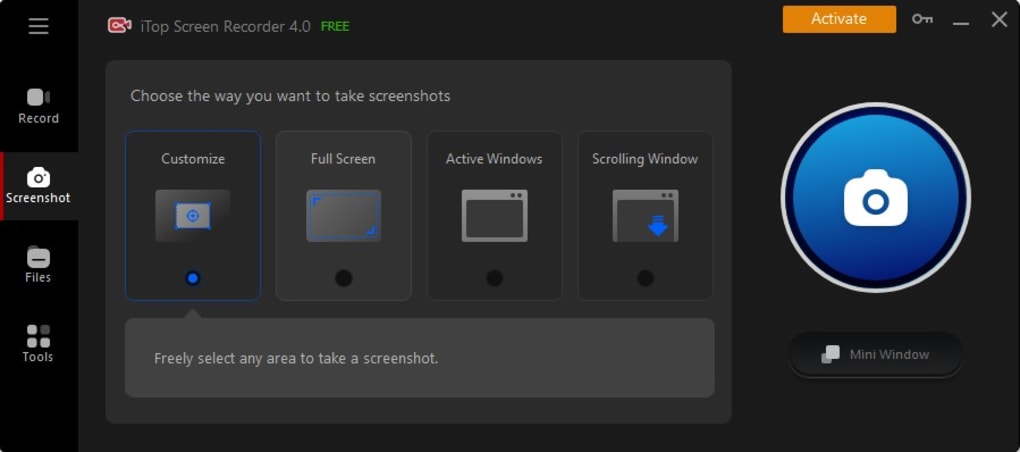
The versatility extends to the recording output itself. iTop Screen Recorder allows users to capture any activity on their computer’s desktop, including high-resolution videos with stunning 4K imaging at an impressive 120 frames per second. This makes it an ideal tool for capturing high-fidelity gameplay, detailed software demonstrations, or visually rich presentations. Users are given the freedom to capture the full screen, a specific window, or a custom-selected area of their choice, providing precision for any task. Furthermore, the option to record with or without audio from your computer’s mic or speaker simultaneously means you can create comprehensive video content without needing separate audio recording tools. For personal branding or professional presentations, iTop Screen Recorder can record a webcam overlay directly onto your videos, and it’s fully equipped to record both 2D and 3D games, ensuring no gaming moment goes uncaptured. The paid version further enhances this by offering the option to include or exclude watermarks, providing a clean, professional finish to all your recordings.
Elevating Your Content: The Power of the Built-in Video Editor and AI Tools
What truly sets iTop Screen Recorder apart from many competitors is its integrated, feature-rich video editor. This isn’t just a basic trimmer; it’s a comprehensive suite of tools designed to transform raw recordings into polished, professional-grade videos, all within the same application. The built-in editor eliminates the need for separate video editing software, streamlining your workflow and saving invaluable time.
With this powerful editor, users can quickly process clips, trim unwanted segments, and make precise cuts. The ability to change video speeds allows for dramatic effect, speeding up mundane sections or slowing down critical moments for emphasis. Beyond basic manipulation, the editor empowers users to add audio tracks, integrate text overlays for annotations or titles, and apply custom watermarks for branding. Recent updates have further enhanced the editor’s capabilities, newly supporting the addition of stickers to make videos more engaging and subtitles (.srt, .ass, .stl, etc.) to improve accessibility and reach a wider audience. The optimized video editing algorithm ensures faster exporting, while improved editing precision allows for adjustments down to the millisecond, granting unparalleled control over your final product. This makes iTop Screen Recorder an invaluable asset for creating professional meeting recordings, engaging tutorials, or compelling marketing content, ensuring everyone stays on the same page with clean, professional output.
Beyond traditional editing, iTop Screen Recorder introduces innovative features tailored for modern content creation, particularly through its dedicated webcam recording mode. This functionality is a game-changer for educators, trainers, and anyone creating solo presentations or lectures. Imagine delivering a virtual lecture with your face clearly visible, or creating a training video where you can explain complex concepts directly to your audience. iTop Screen Recorder makes these tasks effortless. To make your videos extra slick and professional, the auto-scroll Teleprompter function allows you to read a script seamlessly as you record, ensuring smooth delivery without memorization worries.
Taking control of your shot and framing is made simple with robust webcam customization options. Users can easily flip and rotate the webcam feed, adjust its position and size, and even modify the overlay shape to fit the aesthetic of their video. A significant privacy and customization feature is the ability to blur, remove, or replace your background, perfect for maintaining privacy or creating a professional backdrop regardless of your physical environment.

Audio quality is just as crucial as video, and iTop Screen Recorder doesn’t disappoint in this regard. Its advanced audio functions allow users to record streaming audio and music directly from their PC or any website for offline listening. This is incredibly useful for saving podcasts, online radio shows, or even converting YouTube videos to audio files. For content creators, it’s an ideal tool for recording your voice for songs, podcasts, video voiceovers, or audiobooks, offering crisp, clear sound capture.
But iTop Screen Recorder pushes the boundaries even further by integrating AI tools directly into its audio recording and editing suite. These AI features can be implemented in real-time to modify your audio recordings, opening up creative possibilities. For those looking to perfect their pitch or add a unique touch, the voice changer features over ten diverse filters. Imagine affecting robotic or minions-like tones using your own voice – the creative applications are endless. Furthermore, the built-in editor offers powerful noise reduction capabilities, allowing you to clean up your recordings and improve overall audio quality, ensuring your message is heard loud and clear without distracting background interference. This combination of comprehensive editing, advanced webcam controls, and AI-powered audio enhancements truly positions iTop Screen Recorder as a holistic solution for high-quality content creation.
Seamless Integration, Robust Performance, and User Experience
A powerful screen recorder is only as good as its integration with your system and its overall user experience. iTop Screen Recorder excels in these areas, providing a smooth, efficient, and user-friendly environment for Windows users.
First and foremost, it’s essential to ensure your PC meets the minimum system specifications to download and install the application seamlessly. iTop Screen Recorder is exclusively available for PCs running Windows and requires Windows 7 or later to be installed on your computer. The minimum system requirements are quite modest, making it accessible to a wide range of devices:
- Processor: Minimum 1 GHz or faster processor.
- Memory: Minimum 2 GB available RAM.
- Available Hard Disk Space: 1,000 MB free.
- Display: Minimum 1024*768 PPI screen resolution.
These specifications mean that most modern Windows machines, even older ones, should be capable of running iTop Screen Recorder effectively. For users upgrading to the Pro version, a valid license code, typically provided with purchase and accessible online, is required to activate the full range of features.
Once installed, iTop Screen Recorder demonstrates excellent integration with the Windows operating system and a wide range of common digital formats and platforms. The application opens with a prompt from the Quick Launcher, a thoughtful feature that directs you to common applications from which you would typically record videos or audio, such as YouTube and Twitch. This intelligent integration minimizes setup time and gets you recording faster, especially for common tasks like streaming or content creation.
Furthermore, iTop Screen Recorder simplifies the post-recording process by allowing you to share your videos directly to a similar grouping of popular platforms right from within the app. This direct-sharing capability is a huge time-saver, enabling you to post your video or recording immediately after editing, without the hassle of manually uploading files to different services. This seamless workflow, from capture to edit to share, is a cornerstone of iTop Screen Recorder’s design, highlighting its commitment to user convenience.
The user interface of iTop Screen Recorder is another strong point. It’s designed to be self-explanatory and intuitive, mirroring the simplicity often found in video editors pre-installed with Mac or PC operating systems. This familiarity reduces the learning curve, allowing even first-time users to navigate its features with ease. The clear layout, logical grouping of controls, and straightforward prompts contribute to a positive user experience, ensuring that the focus remains on content creation rather than struggling with software.
Performance-wise, iTop Screen Recorder is optimized for efficiency. The enhanced mouse click effects during recording add a professional touch to tutorials and demonstrations, making it clear where user interaction occurs. The developers have also focused on improving the underlying algorithms for video editing, resulting in faster exporting times. This means less waiting and more creating, which is crucial for professionals and content creators working on tight deadlines. The ability to edit videos with millisecond precision further underscores the software’s commitment to high-quality output and user control. Moreover, continuous optimization of the interface ensures easier operations with each update, and the commitment to fixing all known bugs reinforces its reliability. This dedication to robust performance and a smooth user experience positions iTop Screen Recorder as a reliable and efficient tool for all your screen recording and video editing needs.
The PhanMemFree Verdict: Your Go-To Screen Recorder for Every Need
In a market saturated with screen recording options, iTop Screen Recorder carves out a significant niche for itself by offering an unparalleled blend of versatility, powerful built-in features, and user-friendly design. It’s an application that addresses the core needs of screen capture while simultaneously elevating the entire content creation process through its integrated editing and innovative AI tools.
While it is exclusively available for Windows users, this focus has allowed iTop Screen Recorder to integrate exceptionally well within the Windows ecosystem. Its ability to capture video from various sources – be it your entire screen, a designated window, an active game, or your webcam – ensures that no recording scenario is left unaddressed. The flexibility to record full screen or just a specific part, with or without audio, further solidifies its position as a highly adaptable tool.
The most compelling aspect, perhaps, is the inclusion of a robust, built-in video editor. This is where iTop Screen Recorder truly shines, transforming it from a mere capture device into a comprehensive content creation studio. The capacity to jump directly into editing your capture – trimming, cutting, adjusting speed, adding text, watermarks, stickers, and subtitles – without exporting to another program, significantly streamlines workflow. The editor’s intuitive design, coupled with its ability to quickly navigate you to some of the most captured platforms for direct sharing, makes it an incredibly efficient tool for today’s fast-paced digital landscape.
Furthermore, the advanced audio and webcam functionalities, including the auto-scroll Teleprompter, customizable webcam overlays with background removal, and AI-powered voice changer and noise reduction, elevate the quality and creativity of your content. These features are not just gimmicks; they are practical tools that enhance presentations, tutorials, and personal projects, making them more engaging and professional.
It’s true that the free version of iTop Screen Recorder does pose limitations, particularly the two-minute video length restriction. However, this serves as an excellent gateway to experience the software’s capabilities. For serious users, the paid version fills in these gaps, allowing you to push the boundaries of quick screen capture and efficient sharing without any constraints, including the removal of watermarks.
Whether you are a professional needing to document software processes, an educator creating engaging lectures, a gamer live-streaming or compiling highlights, a business user conducting virtual meetings, or simply someone exploring their creativity through video, iTop Screen Recorder offers a multitude of useful functions that are sure to meet and exceed your needs. Its commitment to quality, ease of use, and continuous feature enhancement makes it a top choice for anyone looking for a reliable, all-in-one screen recording and editing solution on Windows. PhanMemFree highly recommends iTop Screen Recorder as your go-to application for capturing and refining your digital experiences.
File Information
- License: “Free”
- Latest update: “April 10, 2025”
- Platform: “Windows”
- OS: “Windows 7”
- Language: “English”
- Downloads: “82.7K”
- Size: “142.33 MB”


