
iWhere iPhone Location Changer is a Windows and Mac application designed to simulate GPS locations on iPhones and iPads, offering a range of functionalities for users engaging in location-based games, managing their online privacy, or exploring social media interactions from different virtual locations. This detailed guide explores its features, benefits, and potential applications across various scenarios.
Understanding iWhere iPhone Location Changer’s Functionality
iWhere iPhone Location Changer is not a mere GPS spoofer; it’s a versatile tool catering to various needs. Its core function is to alter your iPhone’s reported location without requiring jailbreaking or rooting, a significant advantage for users concerned about device security and warranty implications. This seemingly simple act unlocks a surprisingly diverse set of possibilities, extending far beyond casual gaming.
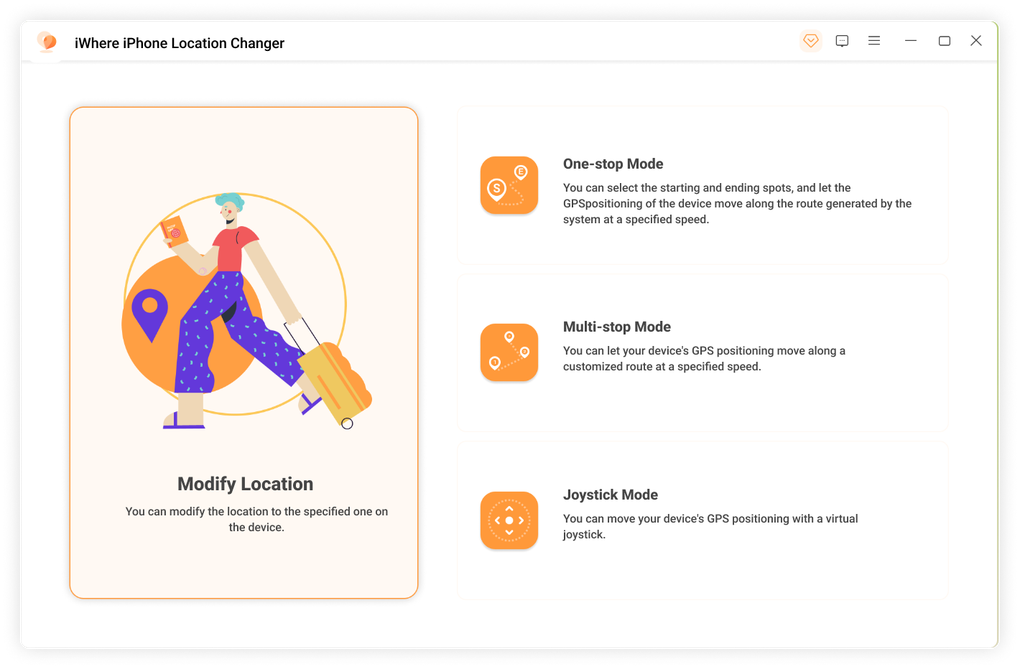
The app offers four distinct GPS mocking modes, allowing users to fine-tune their simulated location with precision:
-
Route Mode: This mode allows the user to meticulously plan their simulated journey, defining multiple stops and adjusting the speed of travel to mimic walking, cycling, or driving. This granular control is invaluable for location-based games that track movement speed and time, ensuring a realistic gaming experience. The ability to input multiple stops enhances the realism even further, simulating a natural path instead of a teleport from point A to point B.
-
Multi-Stop Mode: An extension of the Route Mode, this focuses specifically on defining multiple stops along a virtual route. It provides excellent control for users who want to simulate visiting various locations in sequence without the need for continuous manual adjustments. This is particularly useful for games that reward players for checking into different virtual locations or for users wishing to create realistic profiles across multiple location-based social media platforms.
-
Joystick Mode: This mode offers a more dynamic and less structured approach to location simulation. A virtual joystick allows for free-roaming exploration within the virtual environment. This is especially helpful in augmented reality (AR) games that require fluid movement and interaction with the virtual world. The joystick provides intuitive control, mirroring the natural movement of a character within a game.

- GPX Import/Export Mode: This feature adds another layer of customization. GPX (GPS Exchange Format) files allow users to import and export predefined routes. This is particularly beneficial for users who already have pre-planned routes or frequently utilize specific paths. The ability to save and reuse these routes saves significant time and effort, streamlining the location simulation process.
These modes, combined with adjustable speed settings, allow for the seamless simulation of movement across a wide spectrum of scenarios, enhancing the overall user experience. The precision and flexibility offered go beyond the capabilities of simpler spoofing tools, making iWhere iPhone Location Changer a powerful and sophisticated tool.
iWhere iPhone Location Changer: Applications Beyond Gaming
While prominently featured as a tool for enhancing location-based games like Pokémon Go and Monster Hunter, iWhere’s applications extend significantly beyond the gaming realm. Its ability to modify location data provides a versatile tool for diverse needs:
For Business
Businesses can leverage iWhere iPhone Location Changer for various purposes, including:
-
Testing Location-Based Services: Businesses developing location-based apps or services can utilize iWhere to simulate different geographic locations, testing the app’s functionality and performance in various scenarios. This allows for thorough testing before deployment, minimizing potential issues and ensuring a smoother user experience.
-
Market Research: By simulating locations across various regions, businesses can gain insights into how users interact with their services or products in different geographic areas. This information helps optimize marketing strategies and product development based on regional preferences and user behavior.
-
Remote Employee Monitoring (with consent): In specific, pre-agreed situations and with explicit employee consent, companies may use the tool to monitor employee location in relation to task completion (e.g., field technicians) or verify their location for security purposes. Note: This usage requires explicit consent, transparency, and strict adherence to data privacy regulations.
Articles and Social Media Presence Management
iWhere iPhone Location Changer can be employed to strategically manage an online presence in relation to location-based platforms:
-
Targeted Content Delivery: Users can change their virtual location to access location-specific content, enabling research for articles on local events, news, or social trends.
-
Social Media Engagement: Users can present themselves as being in different locations, facilitating communication and engagement within different online communities. This can be beneficial for expanding network reach and engaging with diverse perspectives. However, using this feature requires honesty and transparency. Misrepresenting one’s location on social media may have ethical and social consequences.
Privacy and Security Considerations
The capacity to alter one’s perceived location raises critical privacy concerns. While iWhere iPhone Location Changer itself does not inherently pose a security threat, its misuse could lead to various problems:
-
Privacy Violation: Sharing altered location data without the consent of others can infringe on their privacy. It is crucial to always respect the privacy of individuals and use location-spoofing tools responsibly.
-
Account Security: Using this type of application might, in certain instances, violate the terms of service of various platforms. Users must understand these terms before using such apps.
-
Legal Issues: Location spoofing can lead to legal repercussions in some cases, particularly when used for fraudulent activities. It is imperative to understand the legal implications in the user’s jurisdiction before employing this application.
iWhere iPhone Location Changer: Technical Specifications and Availability
iWhere iPhone Location Changer is available for both Windows and Mac operating systems. Its current version is 6.0.2, last updated on July 15, 2024. The application supports multiple languages, including English, French, German, Japanese, Portuguese, and Spanish, ensuring accessibility to a global user base. The software is relatively lightweight, with a size of approximately 2.01 MB.
The application is a paid software, requiring a purchase for access to its full functionality. The pricing details are not specified in the provided information but can likely be found on the developer’s website or the platforms where it is sold.
User Reviews and Community Feedback
At the time of writing this guide, user reviews for iWhere iPhone Location Changer were limited. This section will be updated as more user feedback becomes available. However, the functionality outlined in the application description suggests a tool with the potential for positive user experience, provided it is used responsibly and ethically.
Conclusion
iWhere iPhone Location Changer presents a sophisticated tool with various applications extending beyond casual gaming. Its versatile mocking modes, combined with features like GPX file import/export and adjustable speed settings, provide a level of control and flexibility not found in simpler location-spoofing applications. However, it’s essential to acknowledge the ethical and legal implications associated with altering location data. Users must utilize this application responsibly, respecting privacy and adhering to the terms of service of any platforms or services they use in conjunction with this software. Understanding the potential consequences and using this tool with care are paramount to ensuring a positive and ethical experience.
File Information
- License: “Full”
- Version: “6.0.2”
- Latest update: “July 15, 2024”
- Platform: “Windows”
- OS: “Windows 11”
- Language: “English”
- Downloads: “2.6K”
- Size: “2.01 MB”


