
J2TEAM Cookies is a Google Chrome extension designed to simplify the process of exporting and importing browser cookies. Developed by JUNO_OKYO, this tool provides a convenient way to share online accounts between different devices or users without compromising password security. This comprehensive guide will delve into the features, functionality, security aspects, and potential applications of J2TEAM Cookies.
Understanding the Functionality of J2TEAM Cookies
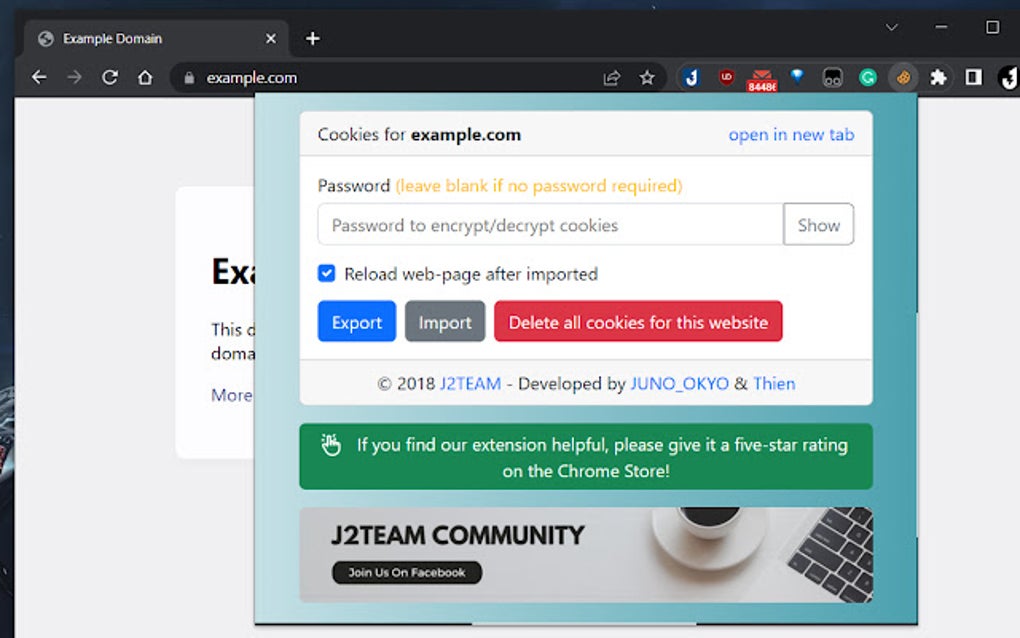
At its core, J2TEAM Cookies serves as a robust cookie management tool. Instead of manually copying and pasting cookies, a process that can be time-consuming, error-prone, and potentially insecure, this extension streamlines the entire procedure. Its primary function revolves around two key actions: exporting and importing cookies.
Exporting Cookies: The export function allows users to create a secure backup of their cookies from a specific website or across multiple sites. This backup is typically saved as a file on the user’s local machine, providing a convenient way to restore cookies later. The extension includes features designed to enhance the security of this exported data, such as encryption options discussed further below. This is particularly beneficial for users who switch between devices frequently, needing to maintain consistent login sessions across different computers, laptops, or mobile devices.
Importing Cookies: Conversely, the import function allows users to load previously saved cookie files back into their Chrome browser. This eliminates the need to re-enter login credentials for each website, significantly improving efficiency and convenience. The automated refresh feature implemented in J2TEAM Cookies ensures that imported cookies are immediately recognized and applied by the browser, eliminating the necessity of manually refreshing web pages. This is a significant time-saver compared to traditional methods.
The simplicity of this import/export functionality makes J2TEAM Cookies accessible to both technically savvy and less experienced users. The intuitive interface and streamlined process ensure that users can efficiently manage their cookie data without needing advanced technical knowledge.
Security Features and Considerations
While J2TEAM Cookies offers a convenient way to manage cookies, security remains a paramount concern. The developers have integrated several security features to protect sensitive user data.
Password Protection: A crucial feature is the ability to encrypt the exported cookie file with a password. This password-protected encryption prevents unauthorized access to the cookies, ensuring that only individuals with the correct password can restore the cookies. This added layer of security mitigates the risk of unauthorized access to accounts and personal information associated with the cookies.
Data Encryption: The encryption algorithm used by J2TEAM Cookies is critical to its security. While the specific algorithm isn’t explicitly detailed in the readily available information, the very presence of a password-protected encryption feature demonstrates a commitment to data protection. Users should ensure they select a strong, unique password that meets recommended security standards (length, complexity, etc.) to maximize the effectiveness of this protection.
Safeguarding Against Phishing: Users should exercise caution when using J2TEAM Cookies, particularly when importing cookie files from untrusted sources. Malicious actors might attempt to distribute files that appear legitimate but contain harmful code or malware designed to steal sensitive information. It is imperative to only import cookies from sources you completely trust to avoid becoming a victim of phishing or other malicious attacks. Always verify the authenticity of the cookie file before importing.
Regular Updates: Staying updated with the latest version of J2TEAM Cookies is crucial for maintaining security. Regular updates often include security patches that address vulnerabilities and enhance the overall security posture of the extension. Enabling automatic updates within the Chrome browser is recommended to ensure you are always running the most secure version.
Practical Applications and Use Cases
J2TEAM Cookies finds application in various scenarios, catering to a wide range of users with different needs. The versatility of the extension makes it a valuable tool for several common use cases:
Multi-Device Synchronization: Individuals who use multiple devices (computers, laptops, tablets, smartphones) can employ J2TEAM Cookies to effortlessly synchronize their online accounts. Exporting cookies from one device and importing them to another simplifies the process of maintaining consistent login sessions across all platforms. This eliminates the repeated login procedures, improving overall productivity and user experience.
Account Sharing (with Caution): The extension can facilitate account sharing, but this should be done with extreme caution. Sharing cookies with others essentially grants them access to the associated accounts. This should only be done with trusted individuals, and the risks associated with shared accounts should be carefully weighed. The password protection feature can help mitigate these risks, but complete trust in the other party remains crucial.
Backup and Recovery: J2TEAM Cookies provides a valuable mechanism for creating backups of your cookies. This allows for quick recovery in case of accidental deletion, browser corruption, or other unforeseen issues. Having a regularly updated backup of your cookies safeguards against potential data loss and minimizes disruption.
J2TEAM Cookies and Privacy Concerns
While J2TEAM Cookies doesn’t directly collect or transmit user data, it’s crucial to understand the implications of managing cookies. Cookies often store sensitive information, and improper handling can lead to privacy violations. Users must exercise caution when exporting and importing cookies, ensuring that they are only managing cookies from trusted websites and sources. Avoid sharing cookies with untrusted parties. Remember that cookies can contain personally identifiable information (PII), and improper sharing can expose this sensitive data to unauthorized individuals.
Comparison with Alternative Cookie Management Tools
Several alternative cookie management tools and browser extensions exist. Some might offer similar functionality, while others might focus on specific aspects of cookie management. When choosing a cookie management tool, factors to consider include the ease of use, security features, the specific functions offered (like automatic deletion or granular control), and user reviews. It’s advisable to research different options before settling on one to find the best fit for your needs and security preferences. Many similar extensions might not offer the same level of encryption or the user-friendly interface that makes J2TEAM Cookies stand out.
Conclusion: A Valuable Tool for Efficient Cookie Management
J2TEAM Cookies stands as a reliable and user-friendly solution for managing browser cookies. Its simple interface and powerful functionality make it accessible to both novice and expert users. However, it’s essential to prioritize security when using the extension. Remember to utilize password protection, only import cookies from trusted sources, and stay updated with the latest version to maintain a robust security posture. By understanding and implementing the security features effectively, users can leverage J2TEAM Cookies to enhance their online experience without compromising their privacy and security. Always prioritize security best practices and critical thinking when dealing with any tool that manages sensitive online data.
File Information
- License: “Free”
- Version: “1.0.4”
- Latest update: “December 14, 2023”
- Platform: “chrome”
- Downloads: “895”


