
JaxCore is an open-source, freeware application designed for Windows users seeking a straightforward and efficient way to personalize their computing experience. It provides a modular approach to desktop customization, offering a wide array of widgets and tools organized into easily navigable categories. This allows users to tailor their desktops to their specific needs and preferences without the complexity often associated with similar applications. This detailed guide explores the functionality, features, and benefits of JaxCore, providing a comprehensive overview for both novice and experienced users.
Understanding JaxCore’s Modular Design
The core strength of JaxCore lies in its modular design. Instead of presenting a monolithic suite of features, it offers a collection of independently installable widgets or “modules.” This approach allows users to select only the tools they need, avoiding bloatware and streamlining the overall experience. Each module focuses on a specific aspect of customization, such as system monitoring, media controls, or clock displays. This modularity ensures that JaxCore remains lightweight and efficient, minimizing resource consumption and maximizing performance. The user interface is designed to be intuitive and straightforward, making it simple to browse, install, and manage these modules. New modules are frequently added by developers, ensuring that JaxCore remains a dynamic and evolving platform for PC customization.
The Benefits of the Modular Approach
The modularity of JaxCore offers several key advantages over traditional, all-in-one customization suites:
-
Reduced Resource Consumption: By installing only the necessary modules, users can significantly reduce the amount of system memory and processing power consumed by the application. This is particularly beneficial for users with less powerful computers.
-
Improved Performance: A lighter application leads to improved overall system performance, with faster boot times and smoother multitasking.
-
Enhanced Flexibility and Customization: Users have complete control over which tools are installed and used, allowing for a highly personalized desktop experience tailored to their individual preferences and workflows.
-
Ease of Use: The organized and intuitive interface makes it simple to navigate and manage the various modules, even for users with limited technical expertise.
- Regular Updates and Expansion: The modular design facilitates the regular addition of new features and modules through updates, ensuring that JaxCore remains up-to-date and relevant.
JaxCore’s Key Features and Functionality
JaxCore offers a wide range of customization options, catering to diverse user preferences. Some of its key features include:
-
Extensive Widget Library: The application boasts a diverse library of widgets covering various aspects of PC customization. These widgets provide quick access to system information, media controls, clocks, calendars, and much more.
-
User-Friendly Interface: The intuitive interface makes navigating and managing the widgets simple and straightforward. Users can easily install, uninstall, configure, and customize each widget to suit their needs.
-
Customizable Settings: Each widget comes with detailed settings, allowing users to finely tune their appearance, functionality, and behavior. This granular level of control enables users to create a truly unique and personalized desktop environment.
-
Floating Windows: JaxCore supports floating windows for certain widgets, providing a visually appealing and easily accessible way to interact with system controls. These floating windows can be repositioned and resized, allowing users to place them strategically on their screen for optimal usability.
-
System Monitoring: Several modules are dedicated to system monitoring, providing real-time information about CPU usage, memory usage, disk space, and other key metrics. This allows users to keep track of their system’s performance and identify potential bottlenecks.
-
Media Controls: Widgets are available for controlling media playback, allowing users to adjust volume, skip tracks, and pause or play music or videos directly from their desktop.
-
Clocks and Calendars: Customizable clocks and calendars provide easy access to time and date information, with options for various display formats and styles.
Installing and Using JaxCore
Installing JaxCore is a straightforward process. The application is typically downloaded as an installer file from the official website or a reputable software repository. The installation process is typically straightforward and involves following a series of on-screen prompts. Once installed, JaxCore can be launched from the desktop or start menu.
The user interface is designed for ease of use. Users can browse through the available modules, select the ones they wish to install, and then configure their settings as needed. The intuitive drag-and-drop functionality allows for easy repositioning of widgets on the desktop, ensuring a personalized layout.
Managing JaxCore Modules
JaxCore provides a simple system for managing installed modules. Users can easily enable or disable modules as needed, uninstall modules they no longer require, and update modules to access the latest features and bug fixes. This ensures that JaxCore remains a lean and efficient application, consuming only the necessary system resources. The update process is typically handled automatically through the application itself, ensuring that users always have access to the latest version.
JaxCore Compared to Other Customization Tools

JaxCore distinguishes itself from other PC customization tools through its modular design and focus on user-friendliness. While some applications offer a vast array of features, they can often be overwhelming for novice users and resource-intensive. JaxCore provides a balanced approach, offering a wide range of customization options without sacrificing performance or ease of use. Its open-source nature also ensures transparency and community support, fostering continuous improvement and development. Compared to proprietary solutions, JaxCore’s freeware status makes it an accessible option for users on a budget.
Alternatives and Considerations
While JaxCore provides a compelling solution for PC customization, alternative applications exist. Rainmeter, for example, is another popular option known for its extensive skinning capabilities and vibrant community. However, Rainmeter might have a steeper learning curve than JaxCore. Other options include desktop customization tools bundled with operating systems, offering limited but convenient functionalities. The choice between JaxCore and other applications will depend on individual needs and preferences, taking into account the level of customization required, the user’s technical skills, and the desired level of system resource usage.
JaxCore’s Future and Community Support
As an open-source project, JaxCore benefits from the contributions of a dedicated community of developers and users. This collaborative environment ensures ongoing development and improvements, with regular updates introducing new features, bug fixes, and performance enhancements. The open-source nature also fosters transparency and allows users to contribute to the project’s growth and evolution. This community-driven approach guarantees that JaxCore remains a relevant and adaptable tool for PC customization, continuously evolving to meet the ever-changing needs of its users. The community actively shares tips, tricks, and custom modules, further enriching the JaxCore experience and providing a valuable resource for users of all skill levels.
Conclusion: Empowering PC Personalization
JaxCore offers a compelling solution for users seeking to personalize their Windows desktops efficiently and effectively. Its modular design, user-friendly interface, and extensive customization options make it a powerful yet accessible tool. The lightweight nature of the application minimizes system resource consumption while maintaining a wide range of features. The active community support ensures continuous improvement and development, making JaxCore a valuable and evolving asset for anyone looking to take control of their desktop experience. Its freeware nature ensures accessibility to a broad user base, offering a robust alternative to commercial desktop customization applications.
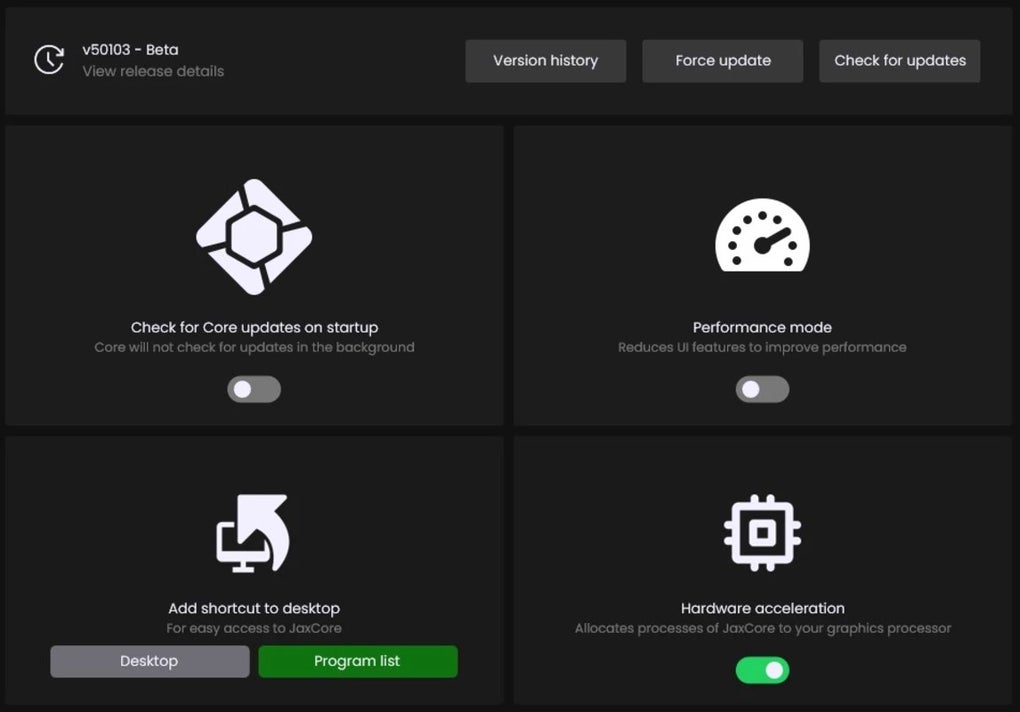
File Information
- License: “Free”
- Version: “v50410”
- Latest update: “June 13, 2024”
- Platform: “Windows”
- OS: “Windows 11”
- Downloads: “5.9K”
- Size: “9.19 MB”


