
JCreator, a Java Integrated Development Environment (IDE), offers a compelling blend of simplicity and functionality for Java programmers of all skill levels. While not as feature-rich as some heavyweight competitors, its streamlined interface and ease of use make it a popular choice, particularly for beginners and those seeking a less overwhelming development experience. This review will delve into the strengths and weaknesses of JCreator, examining its features, usability, and overall effectiveness as a Java IDE.
JCreator’s Strengths: User-Friendly Design and Efficient Development
One of JCreator’s most significant advantages lies in its intuitive and user-friendly interface. Designed to resemble the familiar layout of Microsoft Visual Studio, it presents a comfortable and approachable workspace for programmers accustomed to similar IDEs. This familiarity reduces the learning curve, allowing users to focus on coding rather than navigating a complex interface.
The ease of project management is another notable strength. JCreator simplifies the process of creating, organizing, and managing Java projects, minimizing the overhead associated with project setup. The integrated project templates further streamline development, providing pre-configured project structures for various common Java applications. This is particularly beneficial for beginners who may be unfamiliar with the intricacies of project configuration.
JCreator’s speed and efficiency are also noteworthy. Compared to some more resource-intensive IDEs, JCreator boasts a faster startup time and generally consumes fewer system resources. This makes it suitable for use on machines with less powerful hardware, a significant advantage for users with older systems or limited computing resources. This efficiency translates to a more responsive development experience, minimizing delays and interruptions during the coding process.
The ability to customize the IDE’s appearance and behavior is another valuable asset. Users can define their own color schemes using XML, enabling a highly personalized coding environment that enhances readability and reduces eye strain. This level of customization caters to individual preferences and coding styles, promoting a more comfortable and productive workflow.
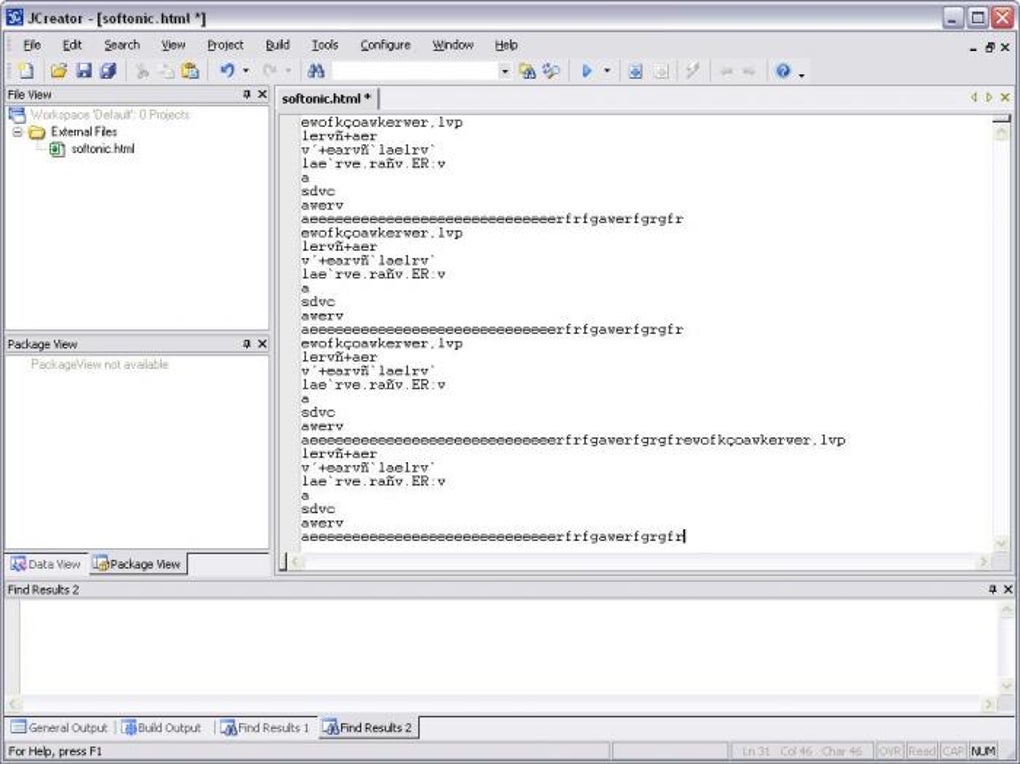
Furthermore, JCreator’s built-in class browser offers a convenient way to navigate and explore the structure of Java projects. This tool significantly improves code understanding and maintainability, particularly in larger and more complex projects. The ease of navigating through classes and their methods facilitates efficient code modification and debugging.
JCreator’s Limitations: A Simplistic Debugger and Basic Aesthetics
Despite its numerous strengths, JCreator also has some limitations. The most significant drawback is its relatively simplistic debugger. Compared to the sophisticated debugging capabilities offered by more advanced IDEs, JCreator’s debugger lacks some essential features and may prove insufficient for complex debugging tasks. This can be a major impediment for experienced programmers accustomed to more robust debugging tools. Users may find themselves frequently resorting to other debugging methods or switching to alternative IDEs for more intensive debugging sessions.
Another area where JCreator falls short is its visual appeal. The overall aesthetic of the IDE is rather basic and lacks the polished look and feel of some competing IDEs. While functionality is prioritized over aesthetics, a more modern and visually appealing interface could enhance the user experience and broaden its appeal to a wider range of programmers. The lack of visual sophistication might deter some programmers who prioritize a visually stimulating and modern-looking IDE.
The limited extensibility is another point worth considering. Unlike some IDEs that support a vast array of plugins and extensions, JCreator offers limited opportunities to extend its functionality. This can be a significant constraint for programmers who rely on specific plugins or extensions to enhance their productivity or integrate with other development tools.
Finally, while JCreator excels in ease of use, this simplicity may become a limitation for advanced programmers who need more advanced features. The lack of highly specialized features common in more advanced IDEs might make it unsuitable for complex or specialized projects. Programmers who require highly advanced features may find it necessary to use more powerful and feature-rich IDEs.
JCreator’s Target Audience: Beginners and Users Prioritizing Simplicity
Given its strengths and weaknesses, JCreator’s ideal user base comprises beginners and those prioritizing ease of use and simplicity over an abundance of advanced features. Its intuitive interface and straightforward project management make it an excellent choice for individuals new to Java programming. The relatively low system requirements and faster startup time are also significant advantages for those working with less powerful hardware.
Experienced programmers who are comfortable with more basic debugging tools and prioritize speed and efficiency over an extensive range of features might also find JCreator to be a suitable IDE. The streamlined interface can significantly enhance productivity for users who prefer a minimalist and uncluttered workspace. However, for programmers needing sophisticated debugging capabilities, extensive plugin support, or advanced code analysis tools, other IDEs might be more appropriate.
Comparing JCreator to Other Java IDEs
To fully appreciate JCreator’s position in the Java IDE landscape, it’s essential to compare it to its competitors. Heavyweight IDEs like Eclipse and IntelliJ IDEA offer vastly superior debugging capabilities, extensive plugin support, advanced code refactoring tools, and a wealth of other features. However, these come at the cost of increased complexity and higher system resource consumption.
NetBeans, another popular Java IDE, provides a good balance between functionality and ease of use, offering a more feature-rich experience than JCreator but remaining relatively accessible to beginners. It bridges the gap between JCreator’s simplicity and the power of Eclipse or IntelliJ IDEA.
In contrast to these more comprehensive IDEs, JCreator positions itself as a lightweight and user-friendly alternative. It sacrifices some advanced features for simplicity and efficiency, making it a viable option for programmers who prioritize ease of use and a streamlined development experience.
Conclusion: A Solid Choice for Specific Needs
JCreator is a capable Java IDE that caters to a specific niche within the Java development community. Its user-friendly interface, straightforward project management, and efficient performance make it an excellent choice for beginners and programmers prioritizing simplicity and speed. However, its limitations in debugging capabilities, aesthetics, and extensibility might deter experienced programmers seeking more advanced features. Ultimately, the suitability of JCreator depends on individual needs and priorities. If ease of use and a streamlined development experience are paramount, JCreator offers a solid and efficient solution. However, programmers requiring advanced debugging tools, extensive plugin support, and a wealth of other features should consider more comprehensive IDEs.
File Information
- License: “Trial version”
- Latest update: “May 24, 2023”
- Platform: “Windows”
- OS: “Windows XP”
- Language: “English”
- Downloads: “318.4K”
- Size: “5.30 MB”


