
JetAudio is a free, feature-rich multimedia player that goes beyond the basic functionalities of playing audio and video files. It offers a robust suite of tools designed to significantly enhance the user’s multimedia experience, acting as a central hub for various media-related needs. This review delves into its capabilities, strengths, weaknesses, and overall suitability for different users.
Core Functionalities: High-Quality Playback and Beyond
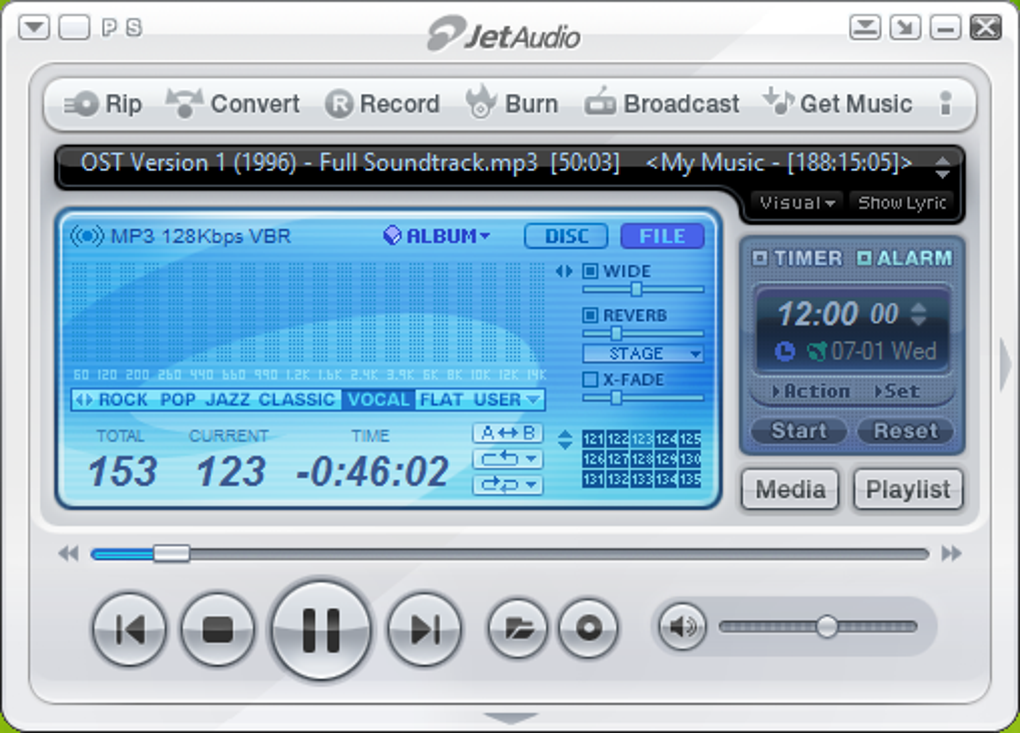
JetAudio’s primary strength lies in its ability to provide seamless and high-quality audio and video playback. It supports a wide array of popular formats, ensuring compatibility with a diverse range of media files. This broad support is a significant advantage, eliminating the need for users to rely on multiple players for different file types. Beyond simple playback, JetAudio incorporates several features designed to improve the listening and viewing experience. These include:
-
Customizable Sound Effects: Users can fine-tune their audio experience through various customizable sound effects, allowing for personalized adjustments to match individual preferences. This level of control is a significant advantage over simpler media players that offer limited audio adjustments. The options are extensive enough to cater to audiophiles and casual listeners alike, letting users fine-tune the bass, treble, and other audio aspects to their liking.
-
Smooth Cross-Fading: The smooth transition between tracks eliminates the abrupt pauses often experienced with other players, creating a more immersive and uninterrupted listening experience. This feature is particularly valuable for users who prefer continuous playback of playlists or radio streams. The cross-fade functionality is seamlessly integrated, avoiding any jarring shifts in volume or audio quality.
-
Integrated Lyrics Support: For music enthusiasts, the integrated lyrics support is a welcome addition. This eliminates the need for users to search for lyrics separately, providing a more convenient and integrated listening experience. The feature is well-implemented, syncing lyrics accurately with the audio playback.
-
Dynamic Visualizations: JetAudio offers dynamic visualizations, adding a captivating visual element to music listening. These visualizations respond to the music, creating a more engaging experience. The options for customization are plentiful, allowing users to choose from a range of styles and effects.
-
CD Ripping and Burning: JetAudio extends its capabilities beyond simple playback by including CD ripping and burning functionality. This allows users to easily transfer music from CDs to their digital library and create their own custom CDs. The process is straightforward and efficient, making it an extremely convenient tool for those who wish to manage their physical music collections.
-
Audio Conversion: The software includes a built-in audio converter, enabling users to transform their music files between different formats. This is invaluable for ensuring compatibility across various devices and platforms. The conversion options are varied and robust, supporting most commonly used audio file formats.
-
Online Radio Streaming: Users can access and listen to a wide range of online radio stations directly through JetAudio, expanding its functionality beyond a simple local media player. The integration is seamless, providing a convenient way to discover and enjoy internet radio.
-
Taskbar Toolbar Minimization: For enhanced efficiency, JetAudio can be minimized to the taskbar, allowing users quick control of the player without interrupting their workflow. This streamlined approach enhances productivity by allowing users to effortlessly switch between applications without disruption.
Interface and Customization: A Personalizable Experience
JetAudio boasts a highly customizable interface, allowing users to personalize its appearance through a selection of skins. While the range of skins might not be as extensive as some competing players, the available options provide sufficient variety to cater to different aesthetic preferences. This customizable aspect is crucial, allowing users to tailor the player’s look and feel to match their personal style and preferences. The customization options aren’t just skin-deep; users can also modify various aspects of the interface layout and functionality, ensuring a truly personalized media experience.
Advanced Features and Recent Updates
JetAudio’s functionality extends beyond basic playback and customization. Recent updates have significantly enhanced the application, addressing several user-reported issues and adding new features. These updates include:
-
Expanded File Support: Recent versions have expanded support for various file extensions, including TAK and W64, enhancing compatibility with a wider range of audio files. This continued development shows JetAudio’s commitment to staying up-to-date and meeting the evolving needs of its users.
-
Improved Context Menu and File Associations: Enhancements to context menu functionality and file associations improve the user experience by streamlining access to JetAudio’s features directly from the file explorer. This integration enhances usability, enabling quicker access to media files through the application.
-
Bug Fixes and Stability Improvements: Numerous minor bugs have been addressed in recent updates, resulting in a smoother and more stable user experience. These behind-the-scenes enhancements are equally crucial for a positive user experience, as stability and performance greatly affect overall satisfaction.
-
Resolved Issues with OGV and MKV Formats: Previous issues with OGV and MKV video formats have been rectified, ensuring wider video compatibility. This addresses a key concern for users who rely on these formats for their video content.
-
SPDIF Output Resolution for DTS Sound: Problems with SPDIF output for DTS sound have been solved, allowing users to enjoy DTS audio through compatible systems. This is a significant improvement for users with surround sound setups.
-
Added M3U8 File Extension Support: Support for the M3U8 file extension has been added, broadening compatibility with online streaming services. This reflects JetAudio’s efforts to adapt to the growing popularity of online streaming services.
Compatibility and System Requirements: A Consideration for Older Systems
JetAudio boasts a wide range of compatibility, running on Windows systems from Windows Vista to Windows 11. However, this broad compatibility comes with a caveat: some features might malfunction depending on the specific Windows version used. Users with older systems might encounter issues with certain advanced features, but basic playback remains functional, making JetAudio a suitable option for users who prioritize compatibility with older systems. This aspect is particularly valuable, as many modern media players may not support older operating systems.
Strengths and Weaknesses: A Balanced Perspective
JetAudio’s strengths lie in its comprehensive feature set, wide format compatibility, and customization options. It caters to users who need more than just a basic media player, offering CD ripping, audio conversion, and online radio access. However, its limitations include potential compatibility issues with certain Windows versions, and a somewhat limited selection of skins and visual effects.
Alternatives to JetAudio
While JetAudio offers a robust feature set, several alternative media players cater to different needs and preferences. These include:
-
AIMP: A lightweight and efficient audio player known for its clean interface and customization options.
-
Spider Player: A simple, user-friendly alternative offering basic playback functionalities without the advanced features of JetAudio.
-
JetVideo: A stylish multimedia player supporting a wide range of formats, complementing JetAudio’s audio-centric focus.
-
MusicBee: A more comprehensive music manager and player that also incorporates features such as format conversion and tag editing.
-
ZPlayer: A cross-platform music player written in Java, offering a unique visual style.
Conclusion: A Solid Choice for Multifaceted Media Needs
JetAudio presents a mature and feature-rich multimedia experience, appealing to users who require more than just basic audio and video playback. Its extensive capabilities, including CD ripping, audio conversion, and online radio integration, make it a comprehensive solution for managing and enjoying multimedia content. While certain limitations exist concerning compatibility with some Windows versions and a comparatively limited selection of skins and visual effects, JetAudio remains a strong contender, particularly for users with older systems or those who prioritize functionality over a vast array of visual customization choices. Its overall performance and extensive features make it a valuable tool for those who demand a versatile and capable media player.
File Information
- License: “Free”
- Latest update: “June 12, 2025”
- Platform: “Windows”
- OS: “Windows NT”
- Language: “English”
- Downloads: “3.4M”
- Size: “36.81 MB”


