
JetPhoto Studio presents itself as a robust solution for managing and enhancing your digital photographs. While not a direct competitor to industry giants like Picasa, it carves a niche for itself by offering a unique blend of features and functionalities geared towards users seeking greater control over their image editing and sharing experiences. This review delves into the intricacies of JetPhoto Studio, exploring its strengths, weaknesses, and overall usability to provide a comprehensive assessment of its capabilities.
Importing, Organizing, and Browsing Your Photo Collection
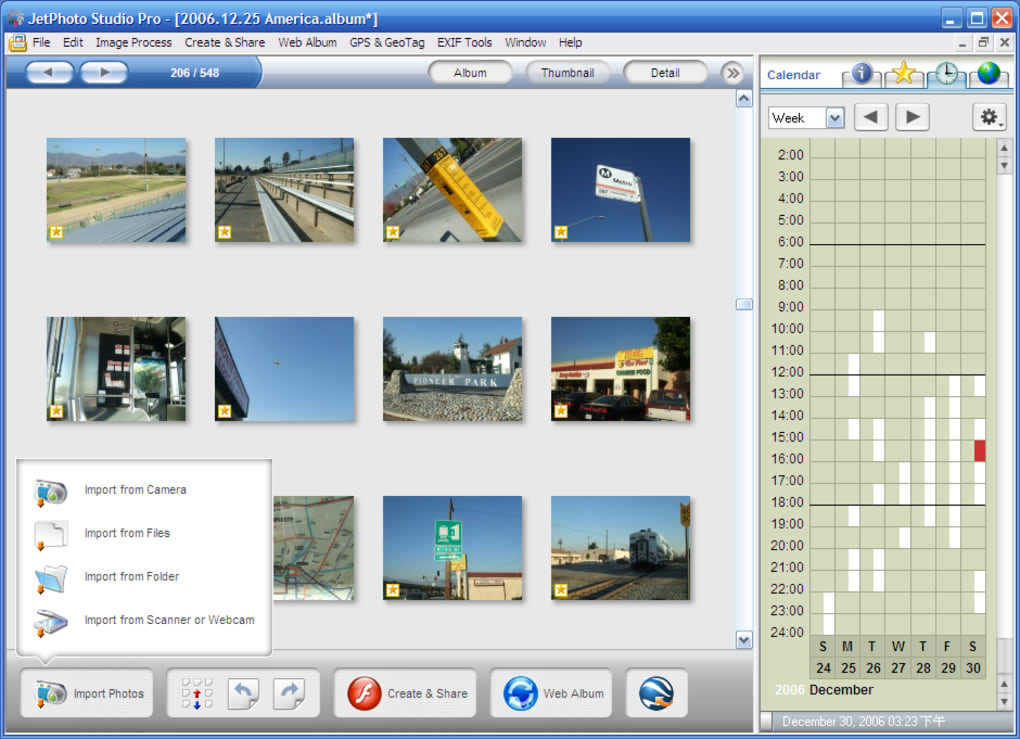
JetPhoto Studio distinguishes itself from the outset with its streamlined import process. Upon connecting your camera, the application readily imports your images, eliminating the need for manual intervention. Alternatively, users can manually browse their PC albums or opt for a full system scan, providing flexibility based on individual preferences and organizational habits. The application’s interface is intuitive and visually appealing, presenting a clear and organized view of your photos. A calendar view is a particularly useful feature, allowing users to browse their image library chronologically, quickly locating specific photos based on the date they were taken. This is particularly helpful for users with extensive photo collections spanning several years or events.
Beyond the basic browsing functionality, JetPhoto Studio allows for robust organization through a star rating system and tagging capabilities. While this feature aids in categorizing and retrieving specific images, a notable limitation is the inability to transfer tags between albums. This necessitates creating new tags for each album, which can become cumbersome for users managing a large number of albums. This oversight represents a missed opportunity to streamline the organization workflow. The lack of automatic import functionality is another area where the software falls short. Users are required to manually initiate the import process, adding an extra step to the workflow and potentially slowing down the overall image management process, especially for users with large collections.
Editing and Enhancing Your Images
JetPhoto Studio offers a suite of basic editing tools, enabling users to perform common image enhancements and adjustments. Functionality includes cropping, sepia toning, black and white conversion, contrast adjustment, and auto-enhancement. These tools are sufficient for basic edits, but users expecting advanced features such as selective adjustments, layer manipulation, or sophisticated filter options will find the application’s capabilities limited. The batch resizing functionality is a valuable addition for users needing to quickly adjust the size of multiple images for various purposes, such as web uploading or email sharing. Furthermore, the inclusion of watermarking allows users to protect their intellectual property by adding a personalized watermark to their images. This can be particularly useful for photographers or artists who share their work online. However, the lack of extensive customization options for the watermark itself (e.g., font, size, opacity) restricts its versatility.
Creating and Sharing Multimedia Content
One of JetPhoto Studio’s standout features is its ability to generate various multimedia outputs from your photo collection. Users can create screensavers, wallpapers, slideshows, and even Flash movies, allowing them to showcase their photography in dynamic and engaging ways. While the functionality for creating these outputs is a positive aspect of the software, a significant limitation lies in the lack of control over animation and transition speeds. This limits the level of customization and creative control users have over their final product. For those seeking a high degree of personalization in their multimedia creations, this may be a substantial drawback.
Sharing Your Photos Online and Via Mobile Devices
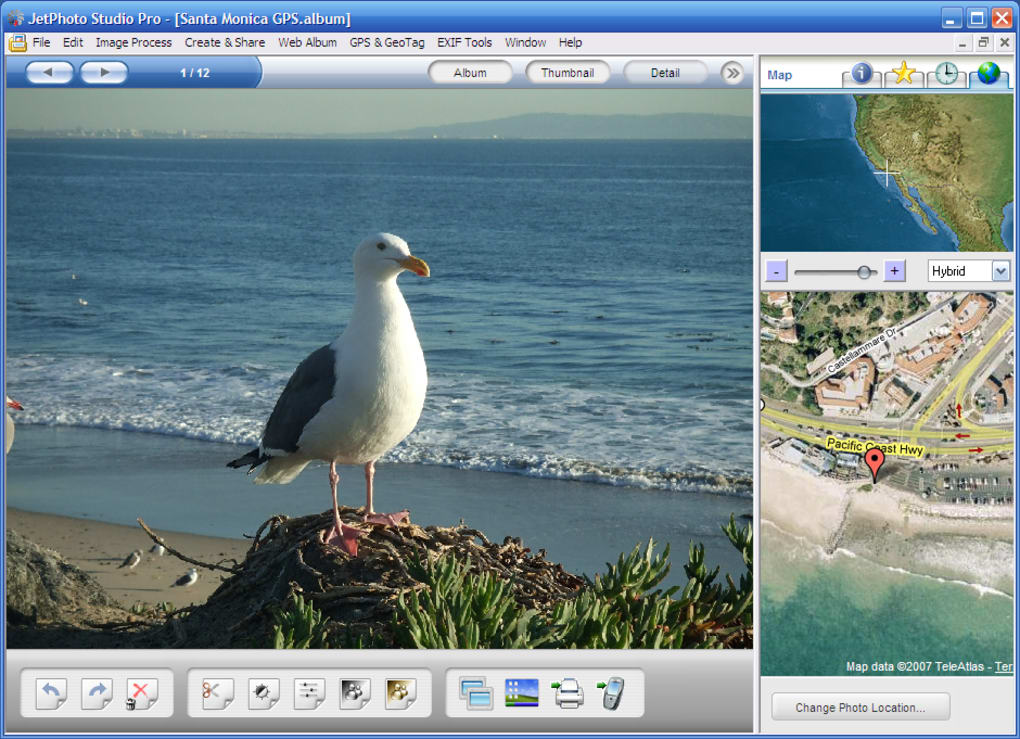
JetPhoto Studio simplifies the process of sharing photos online, offering direct integration with popular platforms like Flickr and its own dedicated server. This ease of sharing is valuable, especially for users who actively share their photos online. The inclusion of geo-tagging is also a beneficial feature, allowing users to tag their photos with location data for easy identification and mapping using services like Google Earth. This feature adds a layer of contextual information to images, enhancing their overall value and searchability.
However, the application’s mobile sharing capabilities are geographically restricted. The ability to send images via SMS or infrared is limited to the United States, significantly reducing the utility of this feature for a global user base. This limitation is a clear drawback for users outside of the US who may rely on alternative methods for sharing photos with friends and family on mobile devices. The lack of comprehensive support for diverse mobile platforms also detracts from the software’s overall utility, emphasizing the need for improved cross-platform compatibility.
Technical Specifications and System Requirements
JetPhoto Studio is available as a free download for Windows and Mac operating systems. The application is available in several languages, including English, German, and others. The software’s system requirements are generally modest, making it accessible to a wide range of users. Regular updates provide bug fixes and occasional new features, although the frequency of major updates may not be as consistent as some users might desire. The software’s relatively small file size minimizes the impact on storage space.
Strengths and Weaknesses Summarized
Strengths:
- Easy Import: Simple and efficient import process directly from connected cameras.
- Calendar View: Intuitive chronological browsing of photos.
- Basic Editing Tools: Sufficient for basic image adjustments and enhancements.
- Batch Resizing and Watermarking: Useful tools for efficient image preparation.
- Multimedia Creation: Ability to create slideshows, screensavers, wallpapers, and Flash movies.
- Online Sharing: Easy integration with Flickr and JetPhoto’s own server.
- Geo-tagging: Allows for location tagging of photos.
Weaknesses:
- Limited Tagging Functionality: Tags are not transferable between albums.
- No Auto-Import: Requires manual initiation of the import process.
- Limited Editing Capabilities: Lacks advanced editing features found in professional-grade software.
- Poor Multimedia Customization: Lack of control over animation and transitions in multimedia outputs.
- Restricted Mobile Sharing: Limited to SMS/infrared within the US.
- Lack of Advanced Features: Missing features common in competing photo management software.
Conclusion
JetPhoto Studio occupies a unique position in the photo management software landscape. While it lacks the breadth of features found in more comprehensive applications, its strengths lie in its ease of use, intuitive interface, and the useful functionality it provides for basic photo editing and sharing. Its multimedia creation tools add a layer of creative flexibility, despite the limitations in customization options. Ultimately, JetPhoto Studio best serves users who prioritize ease of use and basic functionality over advanced editing capabilities and extensive customization options. Users seeking advanced features or cross-platform compatibility should explore alternative solutions. While the free version offers a functional photo management experience, the limitations mentioned above warrant consideration before committing to using the software for extensive photo organization and editing needs.
File Information
- License: “Free”
- Latest update: “June 7, 2025”
- Platform: “Windows”
- OS: “Windows 8”
- Language: “English”
- Downloads: “43.6K”
- Size: “17.35 MB”


