
Jiggy Mod Menu for BO2 is a free, open-source utility program designed to enhance the PC version of Call of Duty: Black Ops II (BO2) by providing easy access to a wide range of mods and cheats. Developed by JiggyMods and published by CabConModding, this mod menu allows players to customize their gameplay experience in real-time, offering everything from minor tweaks to significant alterations. While the installation process might present a slight challenge for novice modders, the open-source nature of the program allows for community contributions and customizations, catering to diverse preferences.
Understanding the Appeal of BO2 Mods and Jiggy Mod Menu
Call of Duty: Black Ops II, released in 2012 by Treyarch and published by Activision, quickly gained immense popularity across various gaming platforms. Its innovative blend of classic Call of Duty gameplay with futuristic warfare elements and branching storylines captivated players worldwide. This popularity naturally led to a thriving modding community focused on enhancing the PC version, creating a vast array of modifications, including the Jiggy Mod Menu.
The game’s inherent replayability is further amplified by the capabilities offered by mod menus like Jiggy. The introduction of cheats and modifications adds another layer of enjoyment, particularly for players seeking to experiment with different gameplay styles or overcome specific challenges. Whether it’s achieving “god mode” invincibility, teleporting across the map, or simply experimenting with enhanced weaponry, these modifications provide an alternative experience that appeals to a wide range of players.
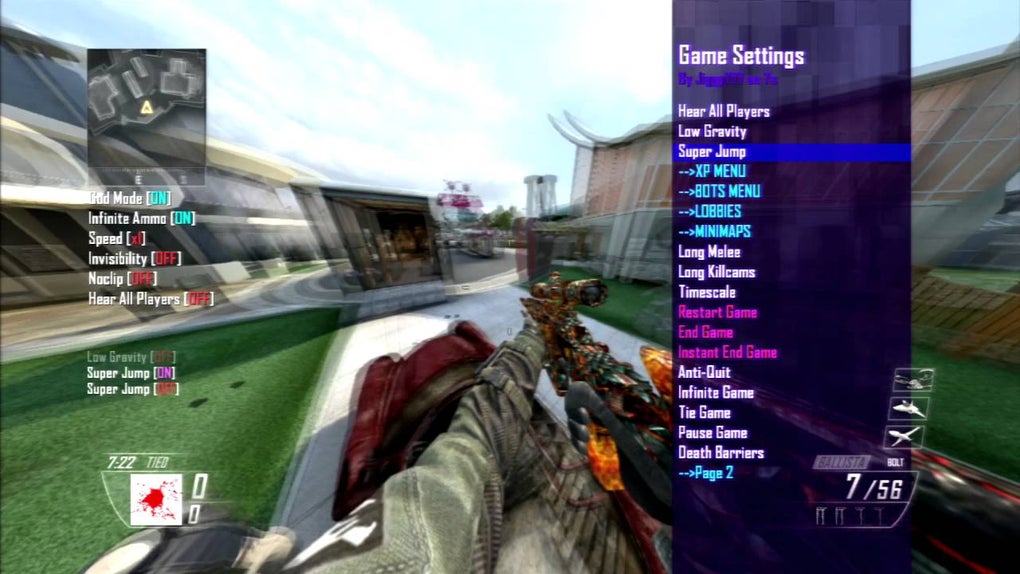
Jiggy Mod Menu, in particular, stands out due to its user-friendly interface and extensive library of available modifications. Unlike some mod menus that are complex and difficult to navigate, Jiggy offers a straightforward and intuitive experience. This accessibility makes it attractive to both seasoned modders and newcomers who want to easily explore the possibilities of modifying their BO2 gameplay.
Features and Functionality of the Jiggy Mod Menu
Jiggy Mod Menu offers a comprehensive suite of features, categorized for easy navigation within the in-game menu. This structured approach ensures a smooth user experience, even for users unfamiliar with mod menus. The main categories typically include:
-
Main Mods: This section often encompasses fundamental modifications that affect core aspects of gameplay, such as health, ammo, and overall player capabilities. This is where players can typically activate cheats such as unlimited ammo (“Infinite Ammo”), significantly increased movement speed (“Speed”), and instant transportation to various locations on the map (“Teleport”).
-
Gangsta Mods: While the exact definition of “Gangsta Mods” can vary depending on the specific version of the Jiggy Mod Menu, this category typically focuses on modifications that significantly alter the visual aspects of gameplay or provide exaggerated visual effects. This could involve changing player models, adding special effects, or creating a more visually distinct playing environment.
-
Maps: This category allows players to access and play different maps, both those officially included in the game and custom-created maps developed and shared by the community. Using this feature, players can explore new environments, alter game flow, and significantly modify their overall gameplay experience.
-
Visions: This section might include modifications that alter the player’s visual perspective within the game. Options such as thermal vision or enhanced visibility might be featured here. This can significantly improve tactical awareness or simply enhance the aesthetic experience of gameplay.
-
Weapons: The weapons category lets players modify weapon stats, unlock restricted weapons, or add entirely new weapons to the game. This allows for customization of combat strategy and can drastically alter the balance of gameplay. This can range from simple tweaks like increased damage or accuracy to much more significant alterations.
-
Player Effects: This category allows players to modify various aspects of their player character, ranging from visual effects such as trails behind the player to more game-altering effects.
Beyond these core categories, Jiggy Mod Menu often offers additional functionalities, such as:
-
EXP Point Manipulation: The ability to quickly increase experience points allows players to progress through levels and unlock new content faster than normal gameplay would allow.
-
Money Manipulation: Similar to EXP point manipulation, players can modify their in-game currency, allowing for access to more weapons, perks, or customization options.
-
Health Modification: In addition to “god mode,” players can also fine-tune their health levels, adjusting the level of damage they can sustain.
The sheer variety of modifications accessible through the Jiggy Mod Menu makes it a versatile tool for customizing the Black Ops 2 experience. However, it’s crucial to note that using these mods typically alters the standard gameplay balance.
Installation and Setup of the Jiggy Mod Menu
Installing and setting up Jiggy Mod Menu requires a bit more technical knowledge than installing a typical application. The process generally involves the following steps:
-
GSC Studio Installation: Before installing the Jiggy Mod Menu, players must have GSC Studio installed on their system. GSC Studio is a script editor specifically designed for Call of Duty games and is essential for working with mods that modify the game’s scripting.
-
Downloading the Mod Menu: The Jiggy Mod Menu is typically downloaded from a trusted source (preferably the official website or a well-reputed modding community). Always exercise caution when downloading mods from unknown sources to avoid potentially malicious software.
-
File Extraction and Placement: After downloading, the Jiggy Mod Menu files need to be extracted and placed in the correct directory within the BO2 game files. This typically requires navigating the game’s file system to find the appropriate location. Incorrect placement can lead to errors or the mod menu failing to function.
-
Configuration: The Mod Menu may require some configuration. Users need to adjust settings to suit their preferences and ensure compatibility with their specific version of the game.
-
Game Launch: Once the mod menu is correctly installed and configured, players can launch the game and access the menu within the game itself.
Given the technical nature of installation, following detailed instructions provided by the mod’s developers or reputable guides online is crucial to avoid any issues. Improper installation can lead to game crashes, errors, or even potential harm to the game files.
Ethical Considerations and Potential Risks
While Jiggy Mod Menu and similar mod menus offer significant opportunities for enhancing the Call of Duty: Black Ops II experience, using them carries several important ethical and practical considerations:
- Fair Play: Using cheats in online multiplayer modes can be considered unfair to other players who are playing without modifications. It disrupts the competitive balance and may negatively impact the overall gaming experience for others.
-
Banning Risks: Many online games, including Call of Duty titles, actively monitor for and ban players detected using cheats or unauthorized modifications. Using Jiggy Mod Menu in online multiplayer modes carries a risk of account suspension or permanent bans.
-
Software Compatibility: Mods may not always work seamlessly with all versions of the game or across all operating systems. Compatibility issues can lead to game instability or crashes.
-
Security Risks: Downloading mods from untrusted sources presents a significant security risk. Malicious software could be embedded within seemingly legitimate mods, compromising system security.
-
Legal Implications: The legal aspects of using game mods vary depending on the region and the specific terms of service of the game. Always check the game’s End User License Agreement (EULA) to understand the legal limitations on mod usage.
Therefore, while Jiggy Mod Menu offers exciting possibilities for customizing gameplay, players must be aware of the potential consequences and ethical implications before using it. Responsible use and awareness of the risks are paramount.
Conclusion: A Powerful Tool with Cautions
Jiggy Mod Menu provides a substantial tool for customizing the Black Ops 2 experience, offering a vast array of modifications that can drastically alter gameplay. Its user-friendly interface and extensive options make it a popular choice among modders. However, players must approach using such tools responsibly, considering the potential risks associated with cheating online and the potential for security vulnerabilities. Always prioritize downloading mods from trustworthy sources and understand the terms of service of the game before utilizing any mods. The open-source nature of Jiggy Mod Menu means it continues to evolve and improve through community contributions, guaranteeing the possibility of even more features and modifications in the future. However, this also highlights the ongoing need for players to remain informed and cautious about the mods they choose to incorporate into their gameplay.
File Information
- License: “Free”
- Version: “4.3”
- Latest update: “January 3, 2023”
- Platform: “Windows”
- OS: “Windows 8”
- Language: “English”
- Downloads: “20.9K”
- Size: “143.94 KB”


