
In the ever-evolving world of personal computing, the desktop background serves as more than just a static image; it’s a window into our digital lives, a reflection of our personality, and often, a subtle boost to our daily mood and productivity. Yet, for many, the default desktop experience can quickly become monotonous. Enter John’s Background Switcher, a venerable utility that has long provided a dynamic solution for those seeking to infuse their digital workspace with constant freshness and visual appeal. This free application, developed by John’s Adventures, stands out for its simplicity, robust feature set, and extensive customization options, allowing users to effortlessly rotate their desktop wallpaper from a multitude of sources.
At its core, John’s Background Switcher addresses a common user pain point: the boredom of a static desktop. It periodically changes the background image on your computer, ensuring that your workspace always presents a fresh face. The frequency of these changes is entirely within the user’s control, offering options such as every hour, every day, or any interval in between. This granular control means users can tailor the experience to their preference, whether they enjoy subtle shifts throughout the day or a complete refresh with each new morning.
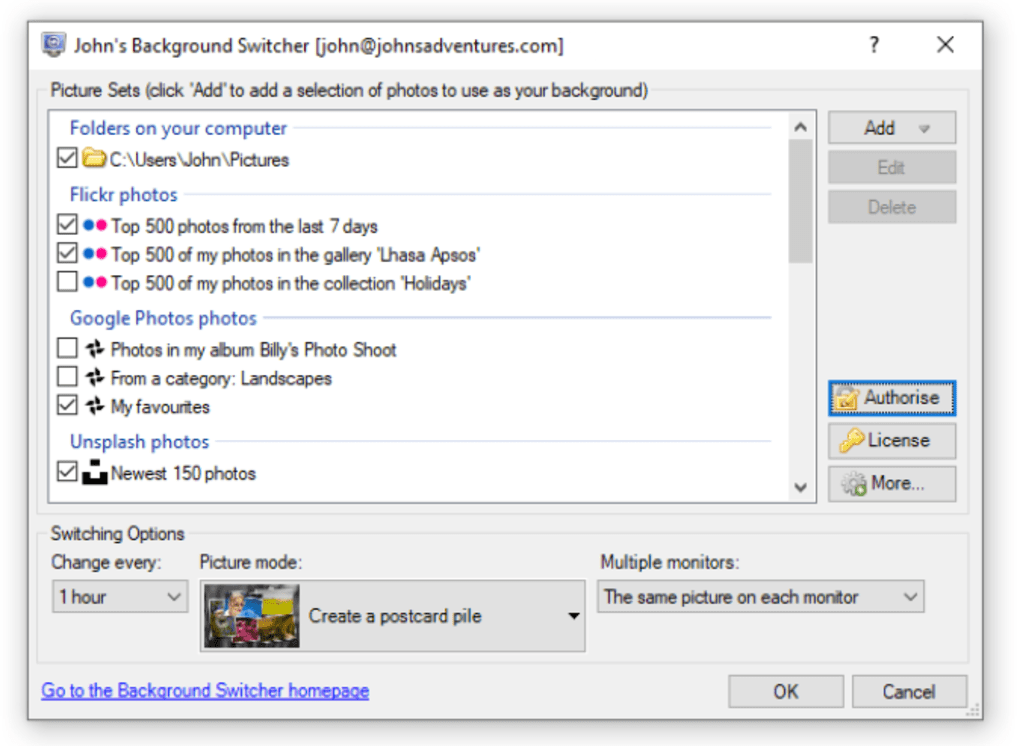
The true power of John’s Background Switcher lies in its versatile approach to image sourcing. Unlike basic wallpaper changers that might only pull from a single local folder, this application opens up a world of possibilities. Users can, of course, select a list of specific pictures stored on their computer, allowing for a curated collection of personal photographs or favorite digital art. Alternatively, for a broader and more diverse selection, one can direct John’s Background Switcher to point at a particular folder, such as ‘My Pictures’, and it will intelligently select random images from within that directory. This is particularly useful for users with large photo libraries who wish to rediscover forgotten memories or artistic pieces.
But the application’s capabilities don’t stop there. Embracing the interconnectedness of the modern web, John’s Background Switcher integrates seamlessly with popular online photo platforms. A standout feature is its ability to utilize Flickr, a vast repository of user-contributed photography. Through Flickr, users can choose pictures based on specific criteria: by a particular person, using specific tags, from curated sets, or simply by selecting random images from the entire Flickr public domain. This opens up an almost infinite source of high-quality, diverse imagery, catering to every taste and interest imaginable, from breathtaking landscapes to abstract art, historical photographs, or even specific themes like “vintage cars” or “coastal sunsets.” Furthermore, the application also supports Google Picasa web album feeds in its ‘RSS Feeds’ mode, providing another avenue for sourcing dynamic content, alongside general RSS feeds that might publish images.
Beyond simply rotating images, John’s Background Switcher offers a suite of customization options to fine-tune the appearance of the chosen backgrounds. Users can adjust how images are displayed, such as by narrowing down the pictures to fit certain dimensions or increasing the quality of those chosen to ensure crisp, vibrant visuals. The flexibility extends to aesthetic details, allowing for the customization of the calendar font, the font used for displaying picture information (often metadata from online sources), and even the fonts on postcard and polaroid piles – unique display modes that present multiple images in an artistic arrangement on the desktop. The option to not rotate postcards/polaroids further refines this visual presentation. For those who enjoy artistic touches, the application includes the ability to choose a random image effect, such as sepia tone or grayscale, adding an unexpected stylistic twist to each new background.
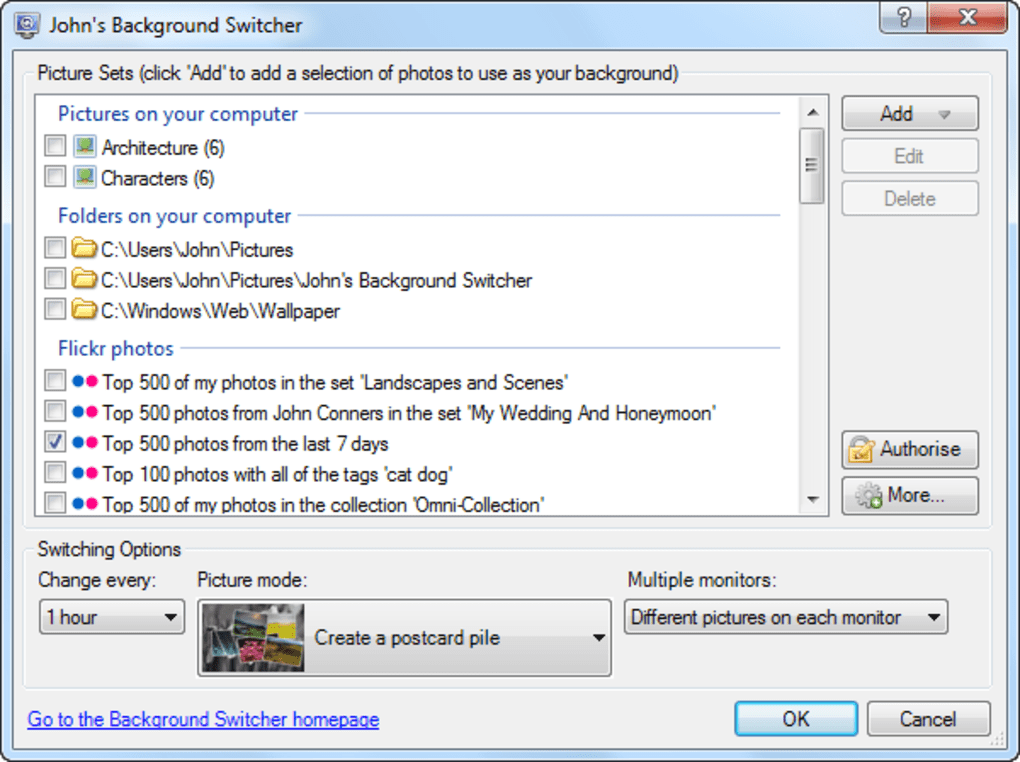
The developer has also consistently worked on enhancing the user experience, as evidenced by various updates. Notable changes include the addition of the option to override the logon screen for Windows 7, extending the personalized experience beyond the desktop itself. Translations into multiple languages, including Russian, Finnish, and Hungarian, have made the software accessible to a broader international audience. Technical improvements, such as lowering the minimum switching interval for Vista and Windows 7, ensure smoother and more frequent background changes on these operating systems. A practical addition for many users is the ‘View Previous Picture’ keyboard shortcut, allowing for quick navigation back to a recently displayed background, which is invaluable if a particularly appealing image flashes by.
In summary, John’s Background Switcher is a simple yet profoundly effective way to breathe life into your desktop, drawing from a vast array of local and online sources. It’s a testament to how a well-designed utility can significantly enhance the daily computing experience.
The Evolving Landscape of Desktop Personalization
Desktop personalization has evolved dramatically since the early days of computing. What once started with simple color schemes and static bitmap images has now blossomed into a rich ecosystem of tools and utilities designed to make the digital workspace truly reflective of the individual. John’s Background Switcher sits squarely within this trend, offering a sophisticated yet user-friendly approach to one of the most visible aspects of desktop customization: the wallpaper.
The desire to personalize our environments is deeply human, and this extends to our digital spaces. A well-chosen wallpaper can do more than just look good; it can influence mood, provide inspiration, or even act as a subtle reminder of goals and aspirations. For instance, a serene landscape might evoke calm, while a vibrant abstract piece could stimulate creativity. The static nature of traditional wallpapers, however, means that their impact can wane over time. This is where dynamic solutions like John’s Background Switcher truly shine. By continuously rotating images, the application ensures that the visual stimulus remains fresh and engaging, preventing familiarity from breeding indifference.
The concept of personalization extends beyond mere aesthetics. It’s about control, choice, and creating an environment that feels uniquely yours. John’s Background Switcher empowers users with an unprecedented level of control over their desktop backgrounds. Whether you prefer a highly curated selection of personal photos, a broad spectrum of images from a local folder, or the vast, ever-changing content available online, the application accommodates diverse preferences. This flexibility is crucial in an age where digital identity and personal expression are increasingly intertwined with our online and computing habits.
The integration with online services like Flickr is a prime example of how modern personalization tools leverage the power of the internet. It transforms the desktop from a solitary entity into a dynamic canvas connected to a global pool of creativity. This not only provides an endless supply of high-quality imagery but also exposes users to new artists, photographers, and visual themes they might not have otherwise encountered. This constant influx of new visual content keeps the desktop experience from stagnating and offers a perpetual source of visual delight.
Furthermore, the subtle yet impactful features like customizing fonts for calendars or picture information, or applying random image effects, demonstrate a deep understanding of user needs for granular control. These aren’t just superficial additions; they contribute to a cohesive and polished look, allowing the user to match their wallpaper display with their overall desktop theme and personal aesthetic. The ability to override the logon screen on Windows 7, for example, extends this personalized touch to the very first moment a user interacts with their system, creating a seamless and immersive experience from startup to shutdown.
The continued development and multilingual support for John’s Background Switcher, as highlighted by its version 5.7 and broad language availability (German, English, Spanish, French, Italian, Japanese, Dutch, Chinese, and more), underscore its status as a widely recognized and appreciated tool within the personalization category. Its free license makes it accessible to everyone, further democratizing the ability to create a truly personalized and dynamic desktop experience.
Leveraging Internet & Network Resources for Dynamic Backgrounds
In today’s interconnected world, the internet offers an unparalleled reservoir of content, and John’s Background Switcher masterfully taps into this to provide truly dynamic desktop backgrounds. The ability to pull images directly from online sources is a cornerstone of its advanced functionality, moving beyond the limitations of locally stored files.
The integration with Flickr is arguably one of the most compelling aspects of John’s Background Switcher’s online capabilities. Flickr, a community-driven platform, hosts billions of photos uploaded by amateur and professional photographers alike. By allowing users to specify sources by person, tags, or sets, the application provides powerful filtering options. Imagine being able to set your desktop to display only photos tagged “Paris street art,” or images uploaded by your favorite wildlife photographer, or perhaps a curated set of vacation photos shared by a friend. This level of specificity ensures that the dynamic backgrounds are not just random, but highly relevant and engaging to the individual user. The random selection option from Flickr’s vast public domain, on the other hand, offers a delightful element of surprise, continually bringing new and unexpected visuals to the fore.
Beyond Flickr, the support for RSS feeds, including those from Google Picasa web albums, further expands the horizons of online content. Many websites and blogs, especially those focused on photography, art, or daily news, publish their content via RSS feeds, often including images. By configuring John’s Background Switcher to monitor these feeds, users can effectively subscribe their desktop to a never-ending stream of fresh, thematic wallpapers. This is particularly beneficial for those who follow specific interests or news cycles and wish for their desktop to reflect these current trends or visual narratives.
The reliance on internet and network resources for wallpaper sourcing highlights a broader trend in software development: the shift towards cloud-integrated and service-oriented applications. No longer are applications isolated silos; instead, they are designed to interact with and leverage the vast data and services available online. For John’s Background Switcher, this means that the user’s desktop is not limited by the storage capacity of their local hard drive or the size of their personal photo collection. Instead, it becomes a dynamic portal to a virtually limitless library of images, updated in real-time as new content becomes available online.
This feature also brings with it considerations for network usage and data consumption. While image files are typically not excessively large, frequent downloads from online sources can add up, especially for users with limited bandwidth or data caps. However, John’s Background Switcher is designed to be efficient, and most users will find its impact on network resources negligible. The benefits of a continually refreshed and diverse desktop background, sourced from the boundless internet, far outweigh these minor considerations for the majority of users.
Beyond Aesthetics: Utilities & Tools for Enhanced User Experience
While John’s Background Switcher is primarily celebrated for its aesthetic contributions to desktop personalization, it also functions as a highly effective utility. Its design principles – ease of use, robust functionality, and consistent performance – align perfectly with what users expect from beneficial software tools. It streamlines a process that would otherwise be manual and tedious, transforming a chore into an automated delight.
From a utilitarian perspective, the program eliminates the need for users to manually browse for new wallpapers, download them, and then navigate through system settings to apply them. This automation saves considerable time and effort, especially for those who enjoy frequent changes. The ability to set specific intervals for wallpaper changes, ranging from minutes to days, showcases its utility as a set-it-and-forget-it tool. Once configured, John’s Background Switcher operates quietly in the background, consuming minimal system resources while consistently refreshing the desktop environment.
The various options for image manipulation and display also elevate it beyond a simple image rotator. Features like the ability to apply random image effects (sepia, grayscale, etc.) add an artistic utility, allowing users to experiment with different moods and styles without needing separate image editing software. The display modes, such as the “postcard” or “polaroid” piles, aren’t just visually appealing; they offer a unique way to showcase multiple images simultaneously, effectively turning the desktop into a dynamic photo gallery or a mood board.
User feedback consistently praises the application for its reliability and feature-rich nature. Users report that it “works perfect” across different Windows versions (XP, Win 7, Vista, and implicitly Windows 10, given its recent update), and “syncs well with various services.” This reliability is crucial for any utility tool; users expect it to perform its function consistently without crashes or errors. While some users have reported occasional instability or issues with randomization, the overwhelming sentiment is positive, highlighting its general robustness.
The inclusion of practical features like a ‘View Previous Picture’ keyboard shortcut further underscores its utility. This seemingly small addition can be incredibly useful for quickly revisiting an appealing image or for navigating through recent backgrounds. Similarly, the ability to override the logon screen for Windows 7 ensures that the personalized experience is maintained even before the full desktop loads, offering a consistent visual theme from the moment of system access.
John’s Background Switcher, therefore, is more than just a personalization gadget; it’s a productivity utility in its own right. By automating the management of desktop backgrounds, it frees up user attention and time, allowing them to focus on their primary tasks while benefiting from a continually engaging and aesthetically pleasing workspace. Its continuous improvement and development, noted by users, further cement its status as a valuable, long-standing tool in the Windows utility landscape.
ARTICLES on the Impact of Digital Workspace Customization
In an increasingly digital world, the design and customization of our personal computing environments are subjects worthy of extensive discussion. Numerous articles, research papers, and opinion pieces delve into the psychological, emotional, and even productivity-related impacts of how we tailor our digital workspaces. John’s Background Switcher, by offering advanced desktop customization, directly contributes to these broader conversations.
One key area of discussion in such articles often revolves around psychological well-being. A static, uninspiring desktop can contribute to digital fatigue or a sense of detachment. Conversely, a visually appealing and dynamic background, such as those provided by John’s Background Switcher, can inject vitality into the computing experience. Research suggests that exposure to nature scenes can reduce stress and improve cognitive function. By enabling users to rotate through calming landscapes or inspiring art, the application can subtly contribute to a more positive emotional state throughout the workday. Users who “love this utility” and find that it “makes me smile all day” (as noted in PhanMemFree.org reviews) are experiencing this direct psychological benefit.
Another significant topic is productivity and focus. While some argue that too much personalization can be distracting, many articles highlight that a comfortable and aesthetically pleasing workspace, digital or physical, can actually enhance focus. When users feel a sense of ownership and control over their environment, they tend to be more engaged. A constantly changing background, especially one curated from sources that align with personal interests, can provide micro-breaks that refresh the mind without requiring a complete disengagement from work. For example, an article might discuss how switching to a new, inspiring image every hour could serve as a mental reset, preventing mental blocks and boosting creativity. The complaints about “poor quality pictures” leading to a “crappy user experience” and irritation, as mentioned in a user review on PhanMemFree.org, underscore how the quality of personalization directly impacts user sentiment and, implicitly, their ability to remain calm and focused.
Digital identity and self-expression also form a crucial part of these discussions. Our digital devices are extensions of ourselves, and customizing them is a form of self-expression. Articles explore how users convey their personality, interests, and values through their choice of wallpapers, icons, and themes. John’s Background Switcher’s ability to pull from diverse online sources, from Flickr tags to personal photo albums, allows for an incredibly rich and nuanced expression of this digital identity. It moves beyond a simple choice of wallpaper to a continuous narrative of visual preference.
Moreover, articles frequently touch upon the technical aspects and evolution of desktop environments. The shift from basic static images to animated wallpapers, interactive desktops, and highly integrated background switchers like John’s is a testament to technological progress and evolving user expectations. Discussions might compare the resource efficiency of various wallpaper solutions, the security implications of sourcing images online, or the user interface design philosophies behind such tools. John’s Background Switcher’s small size (29.92 MB) and generally low system impact (though some users report it being “a little slow at times” or “spotty on some systems”) would be relevant points in such technical analyses.
Finally, the open-source and freeware ecosystems are often celebrated in articles discussing valuable utilities. John’s Background Switcher, being a free application from an independent developer (“John’s Adventures”), perfectly exemplifies how community-driven efforts and passion projects can yield extremely high-quality and impactful software. Such articles often encourage users to support these initiatives, highlighting their role in diversifying the software landscape beyond large corporate offerings. PhanMemFree.org, as a platform that features such applications, plays a crucial role in making these valuable tools accessible to a wider audience. The overwhelmingly positive reviews (“feature packed, lots of options,” “continuous improvement and development,” “fantastic program”) reflect the appreciation users have for such well-maintained freeware.
In conclusion, John’s Background Switcher is not merely a tool for changing wallpapers; it’s a significant player in the broader discourse surrounding digital workspace customization. It empowers users to create a desktop environment that is not only visually appealing but also conducive to psychological well-being, enhanced productivity, and authentic self-expression. Its features and user experiences provide rich material for articles exploring the profound impact of personalization in our digital lives.
FOR BUSINESS
While John’s Background Switcher is primarily positioned as a personal personalization tool, its underlying benefits and functionalities can surprisingly extend into the business environment. In a corporate or professional context, the impact of desktop customization, particularly dynamic backgrounds, might not be immediately obvious, but it can play a subtle yet significant role in employee morale, productivity, and even brand reinforcement.
One area where dynamic wallpapers can benefit FOR BUSINESS is in employee well-being and morale. A sterile, uniform corporate desktop can contribute to a dull work environment. Allowing employees a degree of personalization, such as using John’s Background Switcher to rotate through appealing, non-distracting images, can foster a sense of individual ownership and comfort in their workspace. This can subtly boost morale, reduce stress, and prevent digital fatigue. Imagine a break-room, for instance, where a shared screen rotates inspirational quotes or serene landscapes, subtly impacting the mood of employees during their downtime. While strict corporate policies might limit personal photo use, curated sets of abstract art, company values visuals, or calming nature scenes could be approved.
Another application FOR BUSINESS lies in brand reinforcement and internal communication. Companies could leverage John’s Background Switcher to periodically display branded wallpapers, showcasing company milestones, new product launches, corporate values, or team achievements. This constant, yet unobtrusive, visual presence keeps employees aligned with the company’s mission and current initiatives. For instance, an internal design team might use it to rotate through mock-ups of upcoming campaigns, or a sales team to display motivational quotes or sales targets in an engaging format. The RSS feed functionality could even be used to pull images from an internal company blog or news feed, turning every employee’s desktop into a dynamic internal communication channel.
Furthermore, FOR BUSINESS settings that involve public-facing screens, such as lobbies, waiting areas, or digital signage, John’s Background Switcher can be an invaluable tool. Instead of a static company logo, these screens could dynamically rotate through high-quality brand imagery, product showcases, or engaging visuals related to the company’s services. This creates a more dynamic and professional impression, captivating visitors and reinforcing the brand message in a subtle yet effective manner. The ability to manage image quality and apply effects ensures that the visual presentation is always polished and professional.
For developers and IT professionals within a business context, the utility’s reliability and minimal resource consumption (as observed by many users) make it a viable option for deployment. Its free license also translates to zero software acquisition costs, making it an attractive solution for businesses looking to enhance their digital environments without incurring additional expenses. While “spotty” performance or crashes have been reported on some isolated systems by individual users, the overall consensus points to a robust and stable application, suitable for controlled deployment within an enterprise.
In summary, while John’s Background Switcher might appear to be a simple personal utility, its robust features for image sourcing, customization, and dynamic display offer compelling advantages FOR BUSINESS in areas such as employee well-being, internal communication, brand reinforcement, and public display management. It provides a cost-effective and engaging way to animate digital screens across an organization, contributing to a more dynamic, positive, and brand-aligned professional environment.
App Specifications and User Insights
John’s Background Switcher, currently at Version 5.7, received its latest update on January 10, 2024, demonstrating ongoing commitment from its developer, John’s Adventures. It is distributed under a Free License, making it accessible to a wide audience without any cost barrier. The primary platform for the application is Windows, with comprehensive support across various versions, including Windows XP, Vista, 7, and Windows 10. There’s also a version available for Mac, catering to users on Apple’s ecosystem, further expanding its reach.
The software is available in English, but also supports a wide array of other languages, including German, Spanish, French, Italian, Japanese, Dutch, and Chinese, among others. This multilingual support makes it a globally friendly utility. In terms of footprint, the application has a modest size of 29.92 MB, ensuring it doesn’t consume excessive disk space. As of recent statistics, John’s Background Switcher has seen significant traction, with 27K downloads in the last month alone, highlighting its continued popularity and utility in the desktop customization space.
User reviews on PhanMemFree.org offer a comprehensive look at the real-world experience with John’s Background Switcher. Many users express strong satisfaction, with comments like “Love it, has every feature I need” and “feature packed, lots of options. Periodically adds new features and continuous improvement and development. Great program.” Users frequently praise its flexibility, its numerous image source options, and the extensive customizable settings, noting that “my desktop is always fun to look at.” The ability to “syncs well with various services” is also a highlighted pro.
However, the feedback isn’t entirely without constructive criticism. Some users have reported issues such as “the services it integrates with produce poor quality pictures,” leading to a “crappy user experience” and irritation. Another recurring comment pertains to the randomization algorithm for locally stored images, where “Same images keep appearing others never appear from the same folder,” despite a large pool of images. Occasional instability has also been noted, with one user stating, “I have had it tend to crash on some systems,” though this was described as a rare occurrence. Some users also mentioned it “can be a little slow at times” or “Has been spotty on some systems (seizes up).” A specific request for “sequential wallpaper changing for locally stored wallpaper” points to a desired feature not yet implemented.
Despite these minor drawbacks, the overall sentiment remains overwhelmingly positive, with users frequently rating it highly and recommending it for its robust features and ability to keep the desktop visually engaging. PhanMemFree.org also lists John’s Background Switcher alongside other top downloads in the wallpaper category, such as “Lively Wallpaper” and “Desktop Mate,” and relates it to topics like “Collage,” “Wallpaper Changer For Windows,” “Desktop Personalization,” and “Flickr,” underscoring its relevance in the broader ecosystem of desktop enhancement tools.
Alternative apps and related topics on PhanMemFree.org reinforce the utility’s position in the market. Beyond the Windows version, the availability of John’s Background Switcher for Mac indicates its cross-platform appeal. Related topics like “Wallpaper Changer For Windows 10,” “Multiple Wallpaper,” and “Desktop Wallpaper For Windows” show that it addresses fundamental needs for a significant segment of PC users, making it a staple in the realm of personalization utilities.
File Information
- License: “Free”
- Latest update: “January 10, 2024”
- Platform: “Windows”
- OS: “Windows 10”
- Language: “English”
- Downloads: “27K”
- Size: “29.92 MB”


