
Joypad is a software application that cleverly repurposes your iPhone as a wireless game controller for your PC or Mac. This innovative approach offers a convenient and surprisingly effective alternative to traditional input methods, particularly for those seeking a more comfortable or intuitive gaming experience. The application’s simplicity and configurability make it a compelling option for a range of users, from casual gamers to those enjoying retro emulation. However, certain limitations, primarily its reliance on Wi-Fi connectivity and lack of Bluetooth support, temper its overall appeal.
Setting Up and Connecting Your Joypad
The process of setting up and connecting Joypad is relatively straightforward. It requires the installation of both a desktop client (on your Mac or PC) and a mobile application (on your iPhone). Crucially, both devices must be connected to the same Wi-Fi network to facilitate seamless communication.
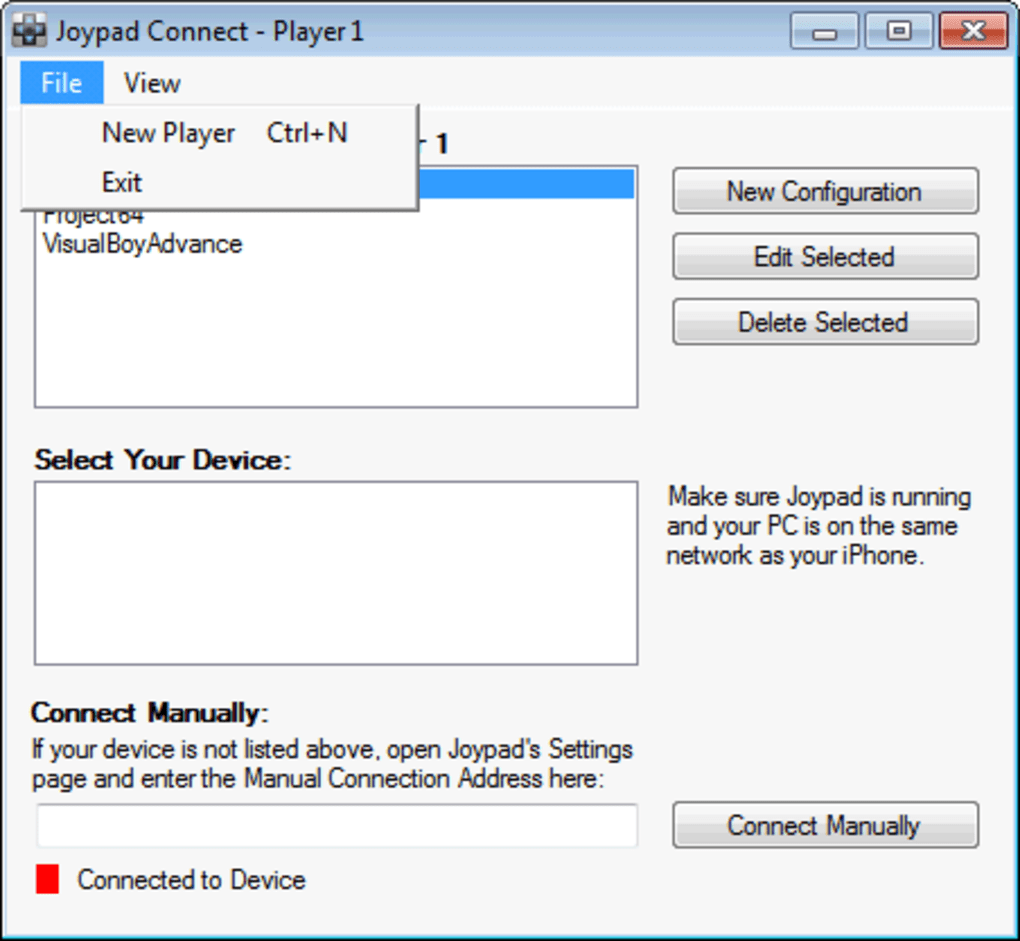
Once both the desktop client and the iPhone app are running, the desktop client typically automatically detects the iPhone. This automated discovery greatly streamlines the initial setup. However, if the automatic detection fails, users can manually input their iPhone’s MAC address into the desktop client’s settings. This MAC address is conveniently provided within the iPhone application itself. This manual input option provides a reliable fallback for situations where automatic detection might encounter issues.
Upon successful connection, a visual indicator on the desktop client, usually a change in color (often from red to green), confirms that the Joypad is ready for use. This simple visual cue allows for immediate feedback on the connection status, eliminating ambiguity and frustration.
Customizable Controls and Configuration Options
One of Joypad’s strengths lies in its extensive customization options. While the free version offers a basic controller layout reminiscent of the classic Nintendo Entertainment System, the paid version unlocks a wider array of more modern controller styles, catering to a broader range of gaming preferences and providing a more versatile input experience.
The ability to remap each button to a corresponding key on your computer is a significant advantage. This granular control allows users to tailor the controller to specific game requirements or personal preferences. This flexibility proves especially beneficial for games with unique control schemes or for those seeking enhanced ergonomics. The saved configurations can be recalled quickly, saving users time and effort when switching between different games or control profiles.
This adaptability means that Joypad isn’t limited to a single type of gaming experience. The configurability extends to a wide range of applications. From playing flash arcade games to emulating classic titles, Joypad adapts well. The level of accuracy and responsiveness is generally commendable, especially considering the use of a touch-based controller.
Performance and Connectivity Considerations
As Joypad relies on a Wi-Fi connection for communication between the iPhone and the computer, the stability and performance of the Wi-Fi network significantly impacts the gaming experience. A robust, uncongested Wi-Fi connection is essential to ensure minimal lag and a smooth, responsive gameplay experience. Any network congestion or instability can lead to noticeable input lag, significantly hindering the overall enjoyment and performance.
The absence of Bluetooth support is a notable drawback. Given the prevalence of Bluetooth connectivity in both iPhones and most modern PCs and Macs, the lack of this alternative connection method limits Joypad’s usability in situations where a reliable Wi-Fi connection might not be available or desirable. The use of Bluetooth would have significantly enhanced the application’s versatility and broadened its appeal to a wider range of users.
Despite this limitation, Joypad’s performance under ideal network conditions is generally positive. The responsiveness of the controller is generally good, allowing for a reasonably smooth and accurate gaming experience.
Comparison with Alternative Solutions
Joypad faces competition from various other game controllers and emulation software. While other applications might offer Bluetooth connectivity, superior precision, or more advanced features, Joypad’s simplicity and accessibility make it a viable option for users seeking a readily available and easy-to-use solution.
Several alternative applications provide similar functionalities, some offering Bluetooth support, advanced mapping features, or a broader selection of controller profiles. Direct comparison depends heavily on individual needs and preferences. Users should weigh the pros and cons of each application carefully based on their priorities.
The advantages of Joypad’s intuitive design and straightforward setup process should not be discounted, particularly for users less comfortable with the more complex interfaces or configuration processes of some competing applications.

Overall Assessment and User Experience
Joypad offers a unique and surprisingly effective solution for those seeking a convenient and readily available wireless game controller. Its ease of use and customizable controls make it accessible to a broad range of users. However, the reliance on Wi-Fi connectivity and lack of Bluetooth support limit its versatility and could prove frustrating under less-than-ideal network conditions.
For users with a stable Wi-Fi network and a preference for simplicity, Joypad can provide a satisfactory gaming experience, particularly for casual gaming or retro emulation. The application’s ability to adapt to different game types and control schemes through its flexible configuration options adds significantly to its overall usability.
The overall user experience is largely positive, provided users are aware of and prepared for the potential limitations. The initial setup is generally smooth and the interface is intuitive, allowing users to quickly configure the controller and start playing. The responsiveness of the controller is good under optimal conditions, and the customizable button mapping adds significantly to the overall versatility of the application. However, users should be mindful of the Wi-Fi dependency and lack of Bluetooth support and consider alternative solutions if these limitations pose a significant concern. The convenience of using a familiar device like an iPhone as a controller offsets some of these limitations, particularly for casual users who may not prioritize advanced features or Bluetooth connectivity.
File Information
- License: “Full”
- Version: “1.2”
- Latest update: “February 16, 2011”
- Platform: “Windows”
- OS: “Windows 8”
- Language: “English”
- Downloads: “25.7K”
- Size: “860.16 KB”


