
JPEGsnoop is a powerful, free, and portable application designed for detailed analysis of digital images. It goes beyond the surface level of a photograph, delving into the underlying data structure to reveal a wealth of hidden information. This information can be invaluable for various purposes, from determining the origin of an image to assessing whether it has been manipulated. Unlike simple image viewers, JPEGsnoop provides a comprehensive technical report, revealing details often unseen by casual users. While the technical depth might appear daunting at first glance, the core conclusions are presented in a clear and understandable manner.
Unveiling Hidden Secrets Within Digital Photographs
Digital photographs, seemingly simple snapshots of reality, are far more complex than they appear. They store metadata, compression details, and processing history – all crucial elements that JPEGsnoop expertly dissects. The software excels at extracting this hidden information, offering a detailed report that can shed light on the image’s origin, processing, and potential manipulations. This capability makes JPEGsnoop a valuable tool for anyone seeking to understand the history and authenticity of a digital image.
The software’s primary function is to analyze JPEG compressed images, but its capabilities extend to various file formats, including .JPG, .THM, .AVI, .DNG, and .PDF, extracting embedded JPEGs from within these containers. This versatility allows JPEGsnoop to examine images from a variety of sources and contexts, providing a consistent level of analysis regardless of the file format.
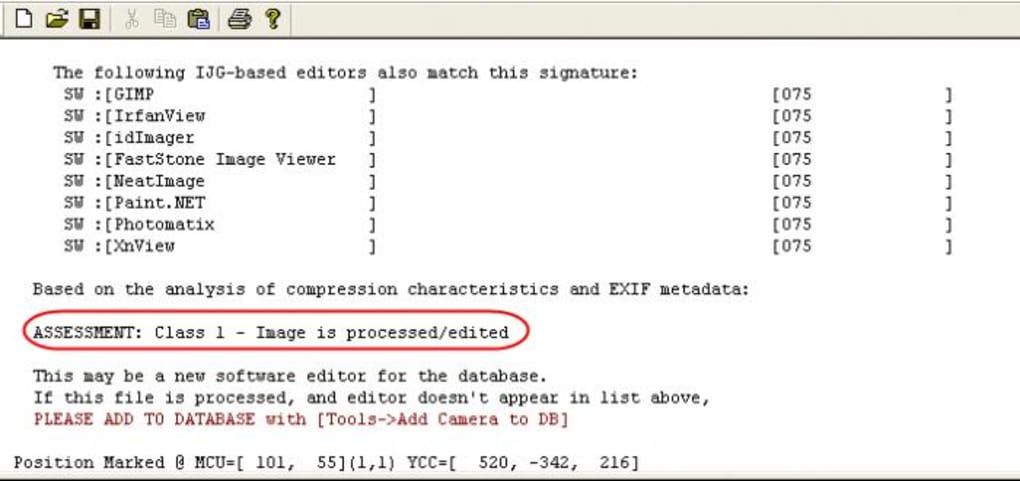
The detailed reports generated by JPEGsnoop cover a vast array of aspects, including:
- Image Quality: JPEGsnoop assesses the image quality based on various factors, including compression levels and the presence of artifacts. This information provides insights into the level of processing the image has undergone.
- EXIF/IPTC Metadata: The software extracts and presents Exchangeable Image File Format (EXIF) and International Press Telecommunications Council (IPTC) metadata. This data often includes crucial details such as camera model, date and time of capture, GPS coordinates, and copyright information. This can be especially important for verifying the authenticity and origin of an image.
- Huffman Table Decode: JPEGsnoop analyzes the Huffman tables used in the JPEG compression process. These tables provide information about the frequency of different pixel values within the image. Deviations from standard Huffman tables can indicate potential manipulations.
- Processing History: By examining various aspects of the image data, JPEGsnoop can often identify signs of editing or manipulation. This might include evidence of cloning, resizing, sharpening, or other image enhancement techniques.
This comprehensive analysis empowers users to assess the integrity and potential alterations of their digital images, addressing concerns of authenticity and manipulation. The software’s ability to reveal subtle clues about an image’s past makes it a powerful tool for investigative purposes, verification, and educational explorations of digital image technology.
Interpreting the Analysis: From Class 1 to Class 4
JPEGsnoop presents its analysis results using a classification system ranging from Class 1 to Class 4, providing a clear assessment of the likelihood of image manipulation:
- Class 1 (Definitely Processed/Edited): Images classified as Class 1 show clear and unambiguous signs of significant processing or editing. Multiple indicators point toward alterations, leaving little doubt about the image’s lack of originality.
- Class 2 (Likely Processed/Edited): Class 2 images exhibit a strong probability of processing or editing. Although not as conclusive as Class 1, the evidence strongly suggests the image has undergone manipulation.
- Class 3 (Possibly Processed/Edited): In Class 3, the possibility of editing is present, but the evidence is less conclusive. The software may have detected some suspicious patterns, but these are not sufficiently definitive to declare with certainty whether editing has occurred.
- Class 4 (Uncertain if Edited or Original): Class 4 signifies that JPEGsnoop couldn’t definitively determine if the image was originally processed or remains in its unaltered state. This could be due to minimal processing, the absence of clear indicators, or the sophistication of any manipulation.
It’s crucial to remember that determining the absolute “originality” of a digital photograph is challenging. Even images that have not undergone deliberate edits will generally display some level of processing due to compression, camera settings, and other factors inherent in the digital imaging process. Therefore, JPEGsnoop’s classification focuses on identifying significant manipulations rather than establishing absolute originality.
User-Friendliness and Limitations
JPEGsnoop boasts a straightforward interface, making it relatively user-friendly despite its technical complexity. The process is as simple as selecting the image file, initiating the analysis, and reviewing the detailed report. However, the depth of technical information provided in the report might overwhelm users without a technical background in image processing or data analysis.
One notable limitation is that JPEGsnoop analyzes only one image at a time. This can be time-consuming when analyzing multiple images. Although this limitation exists, it does not detract from the software’s accuracy and depth of analysis for individual images. The focus on detailed, in-depth analysis of a single image ensures a high degree of accuracy in each assessment.
While the software excels at identifying signs of manipulation, its inability to pinpoint specific editing techniques is a further consideration. The report highlights the presence of potential alterations, but it doesn’t typically identify the specific tools or methods used. This is because image editing software often leaves behind various subtle traces within the image data that JPEGsnoop can detect, but the exact process remains elusive. The software’s strength lies in identifying that manipulation has occurred, rather than identifying how the manipulation took place.
Practical Applications and Conclusion
JPEGsnoop finds applications in diverse contexts:
- Forensic Investigations: Law enforcement agencies and investigators can utilize JPEGsnoop to analyze images as part of their investigations. The software’s ability to detect image manipulation can be crucial in determining the authenticity of evidence.
- Journalism and Media: Journalists and media professionals can leverage JPEGsnoop to verify the authenticity of images used in news reports and publications. The software aids in detecting potentially fabricated or manipulated images.
- Digital Asset Management: JPEGsnoop is valuable for managing and archiving large collections of digital images. The software helps identify potential duplicates, manipulated images, or images of questionable authenticity.
- Education and Research: JPEGsnoop serves as a valuable educational tool, illustrating the inner workings of digital images and the potential for manipulation. Researchers can use it to explore image forensics and digital image analysis techniques.
In conclusion, JPEGsnoop is a valuable tool for anyone needing to analyze the intricacies of digital images. While its technical details might appear initially complex, the clear classification system and the significance of the findings make it accessible and useful for a broad range of users. Its ability to reveal hidden information and assess the potential for manipulation makes it a powerful tool for investigative purposes, educational endeavors, and professional applications across multiple fields. The limitations regarding batch processing and the specific identification of editing methods do not overshadow the software’s overall strengths, making JPEGsnoop a highly valuable resource in the world of digital image analysis.
File Information
- License: “Free”
- Latest update: “May 23, 2023”
- Platform: “Windows”
- OS: “Windows 8”
- Language: “English”
- Downloads: “50.2K”
- Size: “1.50 MB”


