
JSONEditor is a free, user-friendly Windows application designed for efficient viewing and editing of JSON (JavaScript Object Notation) files. Its intuitive interface and powerful features make it an ideal tool for developers, data analysts, and anyone regularly working with JSON data. Developed as a Windows counterpart to a popular iOS JSON editor, JSONEditor allows seamless file sharing across platforms, enhancing collaborative workflows. This detailed guide explores the application’s functionality, benefits, and how it simplifies JSON manipulation for Windows users.
Understanding JSONEditor’s Core Functionality
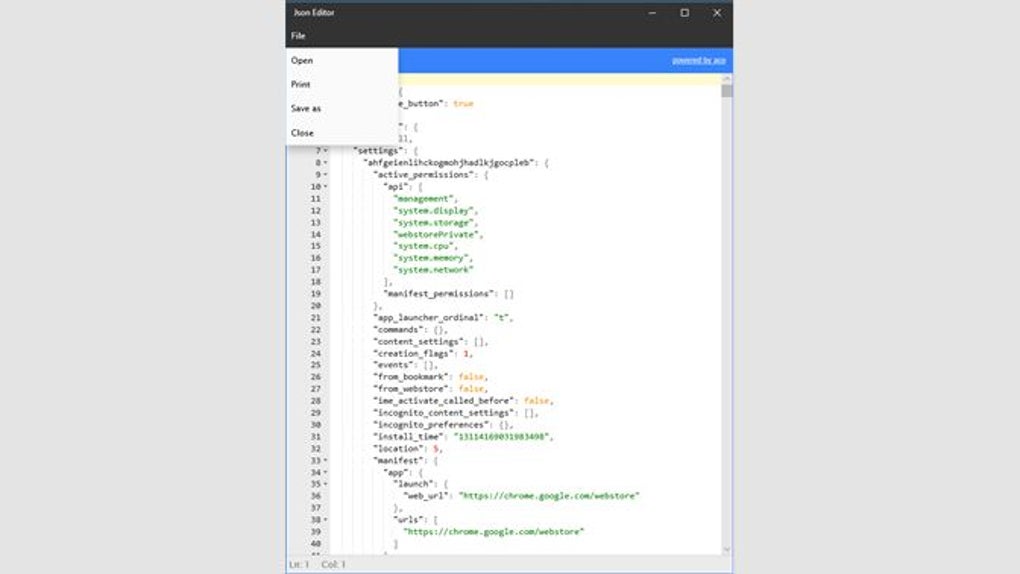
At its core, JSONEditor provides a streamlined environment for interacting with JSON files. This involves not only viewing the structured data within a JSON file but also enabling users to make modifications directly within the application. The editor’s strength lies in its ability to handle both simple and complex JSON structures with ease. Users can navigate through nested objects and arrays intuitively, making edits and observing immediate changes reflected in the structured view.
The application’s design prioritizes simplicity and clarity. The interface avoids unnecessary complexities, making it accessible to both novice and experienced users. This ease of use significantly reduces the learning curve associated with JSON editing, enabling users to focus on the data itself rather than grappling with a complicated user interface. This straightforward approach contrasts with some other JSON editors that might overwhelm users with extensive features or a cluttered interface.
Beyond basic editing, JSONEditor boasts a robust search functionality. Quickly locating specific data points within large JSON files is crucial for productivity, and JSONEditor’s search function streamlines this process. This allows users to efficiently find and modify specific elements, even in deeply nested structures. The search feature significantly accelerates the editing process, saving users valuable time and effort.
Key Features and Advantages of JSONEditor
Several key features contribute to JSONEditor’s effectiveness as a JSON manipulation tool. These features are carefully integrated to provide a smooth and efficient user experience. Below we detail some of the most noteworthy aspects:
-
Intuitive Interface: The user interface is deliberately designed for simplicity and clarity. This makes it easy to navigate and use, even for users with limited experience in JSON editing. The clean design promotes focus on the task at hand – managing JSON data – rather than navigating a confusing interface.
-
Cross-Platform Compatibility (through file sharing): While JSONEditor is a Windows application, its design philosophy mirrors a popular iOS counterpart. This allows for easier collaboration and data transfer between users on different operating systems. The ability to share files seamlessly fosters teamwork and streamlines project workflows.
-
Powerful Search Functionality: The integrated search feature allows for quick and efficient locating of specific data elements within JSON files. This significantly improves productivity, particularly when working with large and complex JSON structures. The search function is optimized for speed, making it efficient even with extensive datasets.
-
Real-time Editing: Changes made in the editor are reflected immediately in the structured view, providing users with immediate visual feedback. This eliminates the need for constant saving and reloading, resulting in a more fluid and efficient editing process.
-
Free and Open (implied): The software’s availability as a free download makes it accessible to a broad audience. This removes financial barriers to entry, allowing anyone to benefit from the application’s capabilities. The free nature enhances inclusivity and lowers the cost of JSON management for individuals and organizations.
Comparing JSONEditor to Alternative JSON Editors
While numerous JSON editors exist, JSONEditor distinguishes itself through a combination of features and a focus on ease of use. Some alternative editors may offer more advanced features, such as syntax highlighting or validation, but often come at the cost of a more complex and less intuitive interface. JSONEditor prioritizes simplicity and usability, making it a more accessible option for users who value straightforwardness over extensive advanced features.
Other editors might require a subscription or purchase, whereas JSONEditor remains free to download and use. This makes it an attractive option for individuals and smaller organizations with limited budgets. The free nature of JSONEditor does not compromise its functionality, providing a robust and effective JSON editing experience without any associated cost.
The direct competitor comparison often depends on specific needs. For users requiring sophisticated features like schema validation or visual representations of JSON data, other editors might be a better fit. However, for users prioritizing a clean, intuitive, and free editor for basic to intermediate JSON manipulation, JSONEditor remains a compelling choice.
JSONEditor’s Use Cases and Target Audience
JSONEditor caters to a broad range of users and applications. Its simplicity and functionality make it suitable for various tasks and skill levels. Here are some example use cases:
-
Web Developers: Web developers frequently interact with JSON data for API calls and data transfer. JSONEditor can simplify the process of inspecting and modifying JSON responses.
-
Data Analysts: Analyzing large JSON datasets is often a key task for data analysts. The efficient search functionality of JSONEditor significantly aids in this process.
-
Students and Educators: For educational purposes, JSONEditor provides a clear and easy-to-understand environment to learn about and work with JSON data.
-
General Users: Even individuals with limited programming experience can use JSONEditor to manage and edit JSON files associated with various applications or settings.
Essentially, anyone requiring a simple yet effective method of managing JSON data on their Windows machine will find JSONEditor a valuable tool. Its ease of use, combined with its core functionalities, makes it an excellent solution for diverse users and tasks.
The future of JSONEditor could include the addition of features such as syntax highlighting, improved validation capabilities, and perhaps even integration with other development tools. These enhancements could further enhance its functionality and broaden its appeal to an even wider user base. However, the current version maintains a robust and efficient core experience focused on simplicity and usability. This approach is likely to continue to attract users who prioritize a clean and easy-to-use JSON editor for their Windows systems.
File Information
- License: “Free”
- Version: “3.2.3.0”
- Latest update: “February 6, 2024”
- Platform: “Windows”
- OS: “Windows 11”
- Language: “English”
- Downloads: “6.9K”


