
Just Color Picker is a free, portable application designed to identify and provide detailed information about the color of any pixel on your computer screen. Its straightforward interface and diverse color system support make it a valuable tool for graphic designers, web developers, and anyone who needs precise color information. This review delves into the functionality, features, pros and cons, and alternatives to this handy color-picking utility.
Ease of Use and Functionality
Just Color Picker stands out for its exceptional simplicity. Unlike many other color picker tools, it requires no installation. Simply download the executable file and run it. The program immediately starts working, minimizing the setup process and getting you to the core functionality instantly. This portability is a significant advantage, making it ideal for users who prefer not to clutter their systems with installations or those working on multiple machines.
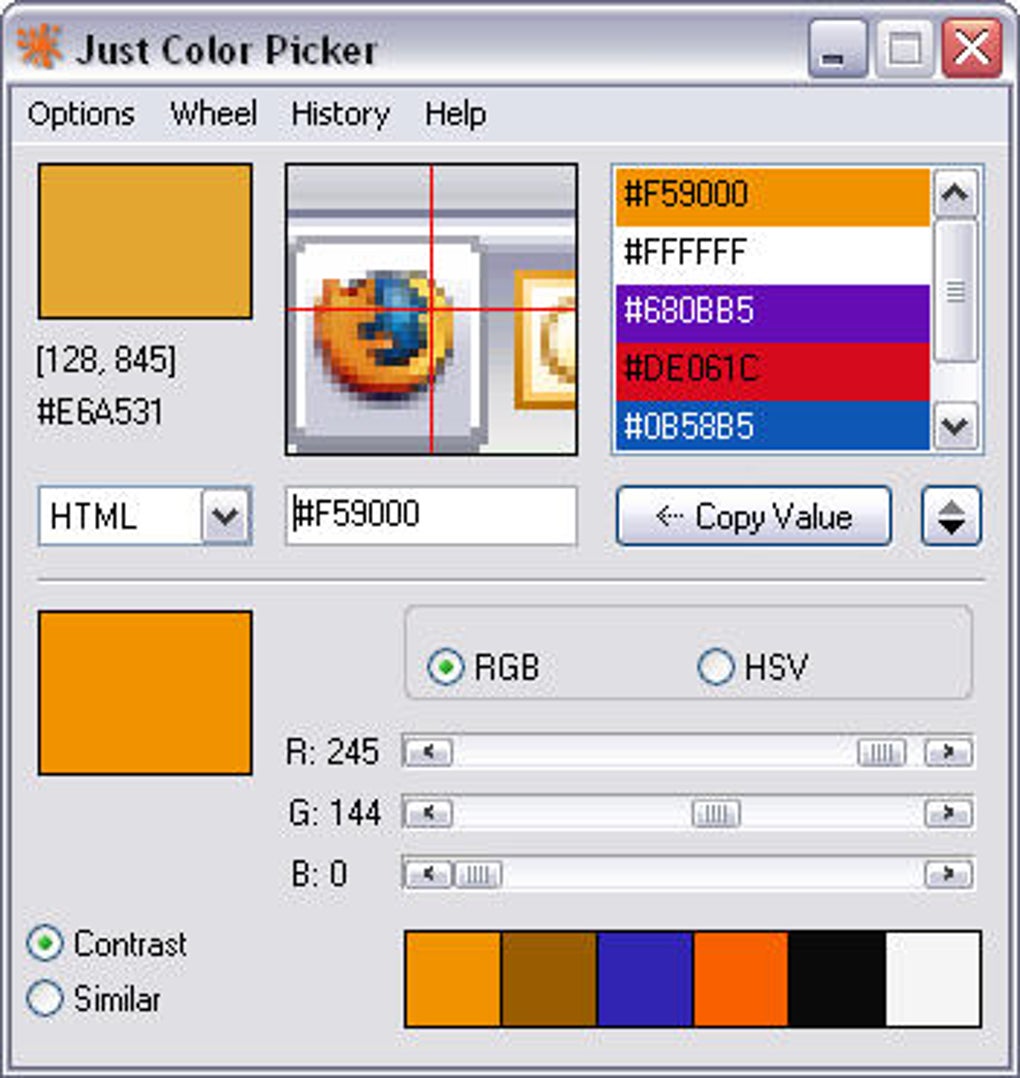
Once running, the process is intuitive. Move your cursor over any point on the screen, and Just Color Picker instantly displays the color value in several different formats. This eliminates the need to painstakingly select an area or take a screenshot; the program continuously updates the color information as you move your mouse, providing real-time feedback. This real-time feedback is particularly useful when working on projects requiring precise color matching.
Supported Color Systems and Features
Just Color Picker provides a comprehensive range of color system representations, ensuring compatibility with various design and development environments. The program supports the following color models:
- HTML: This is crucial for web developers, allowing direct integration of color values into HTML code.
- RGB: The Red-Green-Blue model is a fundamental color system used widely in digital imaging and graphics. Just Color Picker displays the RGB values numerically, making it easy to understand the intensity of each color channel.
- HEX: Hexadecimal color codes (e.g., #FF0000 for red) are commonly used in web design and CSS for concise color representation. Just Color Picker provides these codes directly, saving you the step of conversion.
- HSV/HSB: The Hue-Saturation-Brightness (HSB) or Hue-Saturation-Value (HSV) model is often preferred by artists and designers because it offers a more intuitive representation of color, focusing on hue, saturation, and brightness rather than the individual red, green, and blue components.
- And more: While the documentation doesn’t explicitly list every supported format, user reviews suggest the availability of additional formats, further emphasizing the program’s versatility.
Beyond basic color picking, Just Color Picker offers several advanced features:
- Color History: The program maintains a history of previously selected colors, allowing for quick access to previously used colors. However, it’s important to note that this history is not persistent between sessions. You need to manually save the color history before closing the application. This is a minor inconvenience but an important limitation to remember.
- Color Combination Generation: Based on a selected color, Just Color Picker can generate complementary and analogous color schemes. This feature is extremely helpful for designers creating color palettes for various projects. It simplifies the process of creating harmonious and aesthetically pleasing color combinations.
- Color Wheels: Just Color Picker provides interactive color wheels, offering a visual representation of the color spectrum and allowing for exploration of color relationships. These wheels are particularly useful for understanding color harmonies and creating visually balanced color schemes.
Comparison with Similar Applications
Just Color Picker isn’t the only color picker available. Several alternatives provide similar functionalities, but Just Color Picker distinguishes itself through its unique combination of features:
- Simplicity: Its ease of use surpasses many competitors. The lack of installation requirements and the intuitive interface make it accessible to users of all technical skill levels.
- Portability: Unlike many applications requiring installation, Just Color Picker’s portability makes it ideal for use on multiple computers without the need for repeated installations.
- Comprehensive Color System Support: The wide range of supported color systems caters to a broader audience, encompassing web developers, graphic designers, and other professionals needing precise color information.
- Color Combination Generation: While other color picker tools may offer this feature, Just Color Picker’s implementation is streamlined and easily accessible within the main interface.
Competitor applications often focus on specific aspects, such as advanced color manipulation or integration with design software. While these features might be advantageous for specific workflows, Just Color Picker prioritizes ease of use and broad compatibility. This makes it an excellent choice for those who need a quick, efficient, and reliable color picker without the complexities of advanced features they may not need.
Strengths and Weaknesses
Strengths:
- Ease of use: The program is extremely user-friendly, requiring minimal technical expertise.
- Portability: No installation is required, making it easily accessible on any computer.
- Comprehensive color system support: It offers a wide range of color models for diverse applications.
- Color history and combination generation: Helpful features for streamlining the color selection process.
- Free: The program is available at no cost.
Weaknesses:
- Non-persistent color history: The color history is not saved between sessions, requiring manual saving.
- Limited advanced features: It lacks the advanced color manipulation tools found in some competitor applications.
- No automatic color palette saving: While color history is available, there’s no option to save custom color palettes for later use.
Conclusion
Just Color Picker is a highly effective and user-friendly color picker tool. Its simplicity, portability, and comprehensive color system support make it an excellent choice for a wide range of users. While the lack of persistent color history and limited advanced features may be drawbacks for some users, its ease of use and immediate functionality outweigh these limitations for many. The program excels in its core function: providing accurate and readily accessible color information. If you need a simple, reliable, and portable color picker, Just Color Picker is a strong contender. The program’s strengths clearly outweigh its weaknesses, making it a valuable asset for anyone working with colors on a daily basis.
File Information
- License: “Free”
- Latest update: “July 11, 2023”
- Platform: “Windows”
- OS: “Windows 2003”
- Language: “English”
- Downloads: “68.8K”
- Size: “2.32 MB”


