
Kahoot! Create is a versatile and engaging application designed for Windows users to craft interactive quizzes, captivating riddles, and stimulating games. This powerful tool transcends the limitations of traditional learning, fostering a dynamic and collaborative environment for students and educators alike. Beyond its core functionality, Kahoot! Create offers a social component, enabling users to connect with friends, classmates, and colleagues to participate in jointly created challenges and friendly competitions. This guide delves into the multifaceted features of Kahoot! Create, exploring its capabilities for both individual learning and collaborative classroom experiences.
Creating Engaging Quizzes and Games
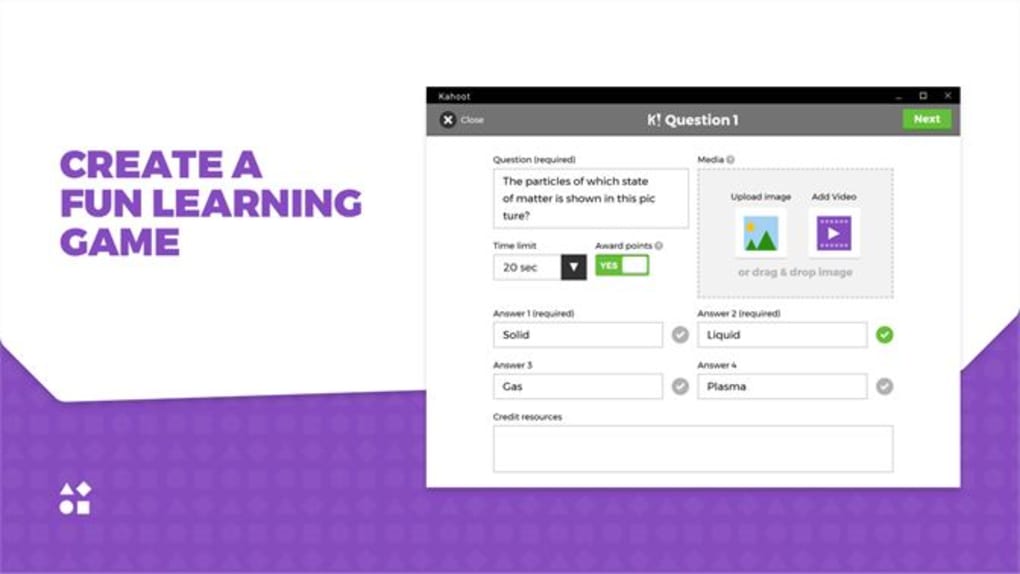
The heart of Kahoot! Create lies in its intuitive quiz-creation interface. Users can effortlessly design a variety of question formats, catering to diverse learning styles and subject matter. The process is streamlined, guiding users through the steps of crafting questions, selecting answer choices, and setting difficulty levels.
Beyond simple multiple-choice quizzes, Kahoot! Create allows for the creation of more complex question types, including:
- True or False: A straightforward assessment of knowledge, ideal for testing factual recall.
- Open-Ended Questions: These encourage critical thinking and allow for more nuanced responses, promoting deeper engagement with the material. While automated grading isn’t available for these types, they foster valuable discussion and personalized feedback.
- Image-Based Questions: Visual learners thrive with questions incorporating pictures, diagrams, or other visual aids. This diverse approach caters to different learning preferences, ensuring inclusivity and effectiveness.
- Video-Based Questions: Integrating short videos into questions allows for dynamic and engaging assessments, ideal for subjects benefiting from visual demonstrations or real-world examples.
The platform’s versatility allows educators to align their quizzes directly with curriculum objectives, transforming learning into a dynamic and interactive experience. Students are actively involved, not passively absorbing information. This active participation enhances understanding and retention.
The Social Aspect of Learning with Kahoot! Create
Kahoot! Create’s strength lies not solely in its robust quiz-creation capabilities but also in its social features. It fosters a sense of community, transforming the learning experience from an individual endeavor into a collaborative one.
The app allows users to share their created quizzes with others, building a shared repository of learning materials. This opens possibilities for peer-to-peer learning and collaborative assessment. Students can learn from each other, sharing their insights and understanding of the material.
Furthermore, the competitive aspect inherent in the platform enhances motivation and engagement. The leaderboard functionality encourages students to strive for improvement, promoting a friendly competition that boosts overall participation.
The ability to play quizzes simultaneously with friends or classmates encourages interaction and a sense of shared accomplishment. This real-time engagement can significantly impact knowledge retention and overall learning experience, fostering a supportive and competitive environment that benefits all participants.
Utilizing Kahoot! Create in Educational Settings
Kahoot! Create’s applications within educational contexts are vast and diverse. Its impact extends far beyond the simple quiz format, creating versatile opportunities for engaging students of all ages and learning styles:
- Formative Assessments: Teachers can use Kahoot! Create to conduct short, informal assessments throughout a lesson to gauge student understanding. This allows for immediate feedback and course correction, optimizing teaching strategies in real-time.
- Summative Assessments: The platform can also be used for more comprehensive, end-of-unit or end-of-term evaluations, providing valuable data on student learning outcomes. The structured format ensures a fair and consistent evaluation process.
- Review and Reinforcement: Kahoot! Create is an exceptional tool for reviewing previously learned material. The interactive nature of the quizzes transforms rote learning into an engaging activity.
- Enhancing Engagement: The gamified nature of Kahoot! Create significantly increases student engagement, particularly for those who may struggle with traditional learning methods. The competitive and collaborative elements boost motivation and create a positive learning environment.
- Differentiated Instruction: Teachers can easily modify the difficulty levels and question types to accommodate the diverse needs of their students. This targeted approach ensures that all students are challenged appropriately, maximizing their learning potential.
- Collaborative Projects: Students can work together to create quizzes, fostering teamwork and shared responsibility for the learning process. This collaborative approach enhances communication and problem-solving skills, crucial for success in various fields.
Kahoot! Create provides educators with a user-friendly platform for seamless integration into their teaching methodologies. Its adaptability and diverse functionalities make it a versatile asset for enhancing classroom engagement and fostering a dynamic learning experience.
Beyond the Classroom: Utilizing Kahoot! Create for Personal Enrichment
While Kahoot! Create excels in educational settings, its versatility extends beyond the classroom. Its intuitive interface and engaging features make it a suitable tool for personal learning and development. Individuals can:
- Test Knowledge: Use Kahoot! Create to self-assess understanding on any topic. It’s a fun and efficient method to identify areas needing further study.
- Review for Exams: Creating quizzes based on exam material enhances retention and allows for focused study. The immediate feedback strengthens understanding and identifies knowledge gaps.
- Learn New Skills: Kahoot! Create can facilitate self-directed learning. Crafting quizzes on a new skill reinforces learning and provides a measure of progress.
- Gamify Learning: Turning personal learning goals into interactive quizzes adds an element of fun and motivation, combating the potential monotony of self-study.
- Enhance Productivity: Kahoot! Create can boost productivity by making learning more engaging and less tedious. The interactive approach promotes focused attention and improved retention.
By tapping into the platform’s inherent gamification, users can transform the often-arduous task of self-learning into a motivating and rewarding experience. The flexibility of Kahoot! Create makes it an invaluable tool for lifelong learning and personal growth.
In conclusion, Kahoot! Create is far more than just a quiz-making app. It’s a dynamic and engaging platform that empowers users to craft interactive learning experiences, fostering collaboration, enhancing knowledge retention, and promoting a positive learning environment, both in educational and personal contexts. Its versatile features and intuitive interface make it an invaluable resource for educators and learners alike, transforming the way we approach learning and knowledge acquisition.
File Information
- License: “Free”
- Version: “2.0.0.0”
- Latest update: “February 12, 2024”
- Platform: “Windows”
- OS: “Windows 11”
- Language: “English”
- Downloads: “3.2K”


