
In an increasingly digital world, the need for efficient and collaborative document management tools has never been greater. Among the myriad of solutions available, Kami - PDF and Document Annotation stands out as a pioneering force, particularly within the educational sector. This powerful online PDF tool has transcended its origins as a simple annotation utility to become a comprehensive educational program, fostering real-time collaboration between teachers and students and seamlessly integrating with a multitude of learning management systems (LMS). Beyond its functional prowess, Kami also champions environmental responsibility by significantly reducing paper consumption, making it an eco-friendly choice for schools and businesses alike.
With over 27 million students and educators globally utilizing the Kami app daily for collaboration, learning, and engagement, its impact is undeniable. Available as a versatile web application and a browser extension, Kami ensures accessibility across various operating systems, including the latest Windows 11. Its robust feature set and user-friendly interface have positioned it favorably against competitors such such as Inky, Microsoft Whiteboard, and Qlearly. While offering a robust free version, Kami also provides three distinct pricing plans to cater to diverse organizational and individual needs, solidifying its place as a cornerstone of modern digital productivity and learning.
The Evolution of Kami: From Annotation Tool to Educational Powerhouse
The name “Kami” itself holds a profound significance, echoing the very essence of the application’s mission. In Japanese, “Kami” can mean “God,” “Paper,” or “Hair,” depending on context and intonation. For the dedicated development team behind this innovative platform, the term unequivocally signifies “Paper.” This linguistic connection has not only inspired but also deeply influenced the application’s vision, driving its evolution from a basic utility to a sophisticated educational ecosystem.
Initially conceived as an intuitive PDF annotation tool, Kami’s early design principles centered on providing users with a straightforward way to interact with digital documents. The goal was to replicate the tactile experience of marking up physical paper, but with the added advantages of digital flexibility and sharing. However, the developers soon recognized a burgeoning need within the education sector for tools that could facilitate dynamic learning experiences. This realization marked a pivotal shift in Kami’s trajectory.
Over time, Kami’s focus sharpened, pivoting significantly towards children’s education. This strategic reorientation led to a comprehensive revamp, transforming the application into a powerful online education platform. It moved beyond mere annotation, incorporating features that actively promote engagement, interactivity, and collaborative learning environments. This evolution was not just about adding more tools; it was about fundamentally reimagining how students and teachers could interact with educational content in a digital space. The vision of “Paper” evolved to mean “digital paper” – a flexible, interactive, and shareable medium that could enhance, rather than simply replace, traditional learning methods.
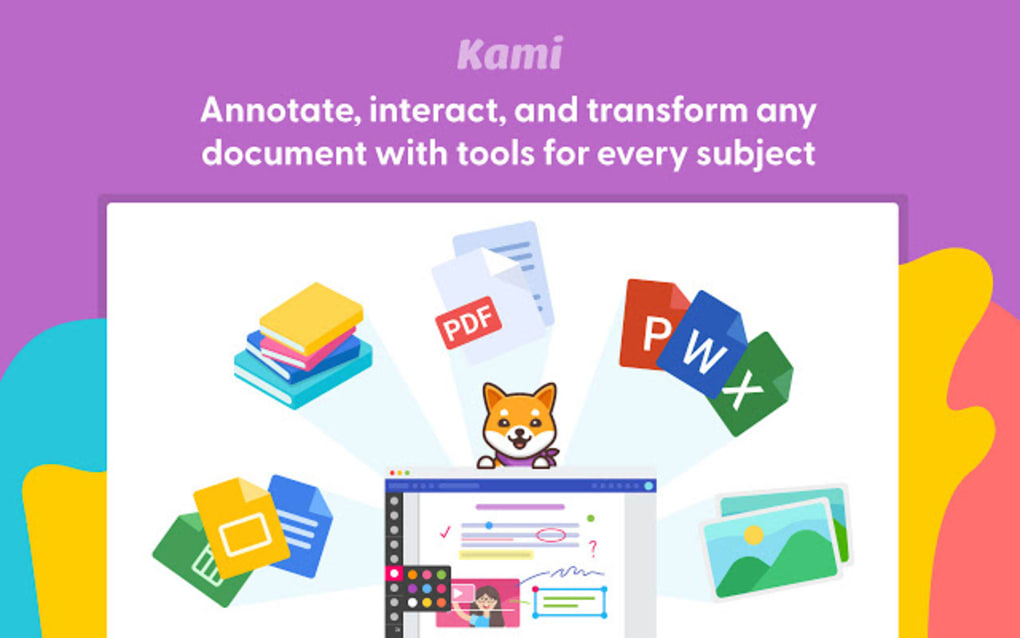
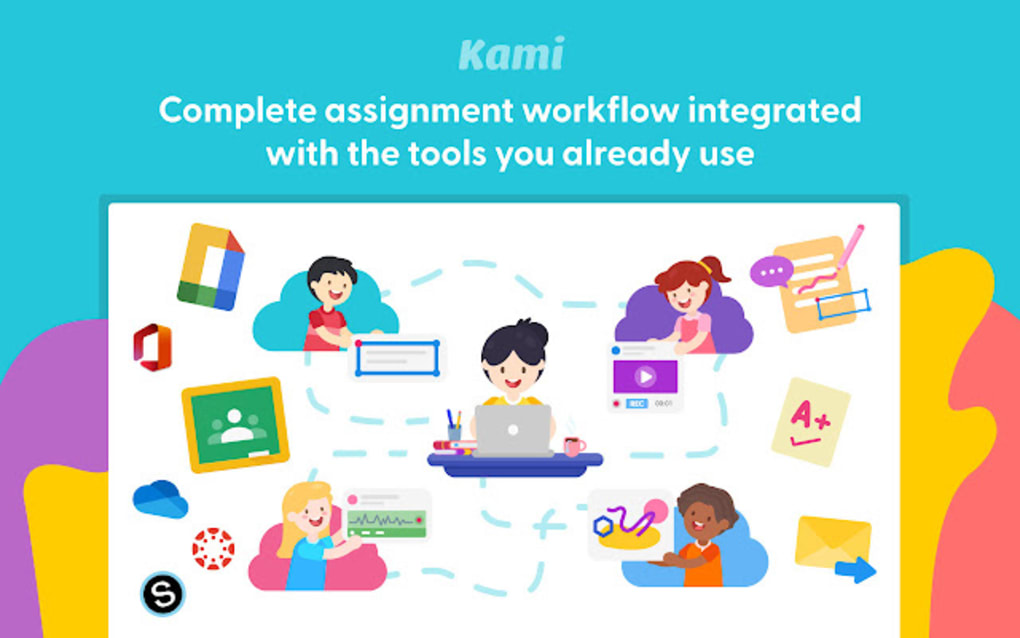
The developers meticulously engineered Kami to address the specific challenges and opportunities presented by modern classrooms. They understood that effective learning in the digital age required more than just static content; it demanded active participation, immediate feedback, and seamless interaction. By integrating with leading Learning Management Systems (LMS) like Canvas, Schoology, and Google Classroom, Kami embedded itself directly into the existing digital infrastructure of schools, making adoption easier and functionality more powerful. This strategic integration underscored Kami’s commitment to being an indispensable part of the digital classroom, an instrument designed to make learning more accessible, engaging, and efficient for everyone involved. Its journey from a simple PDF annotator to a holistic educational platform is a testament to its adaptive design and its unwavering commitment to improving learning outcomes.
Unlocking the Benefits: How Kami Enhances Learning and Productivity
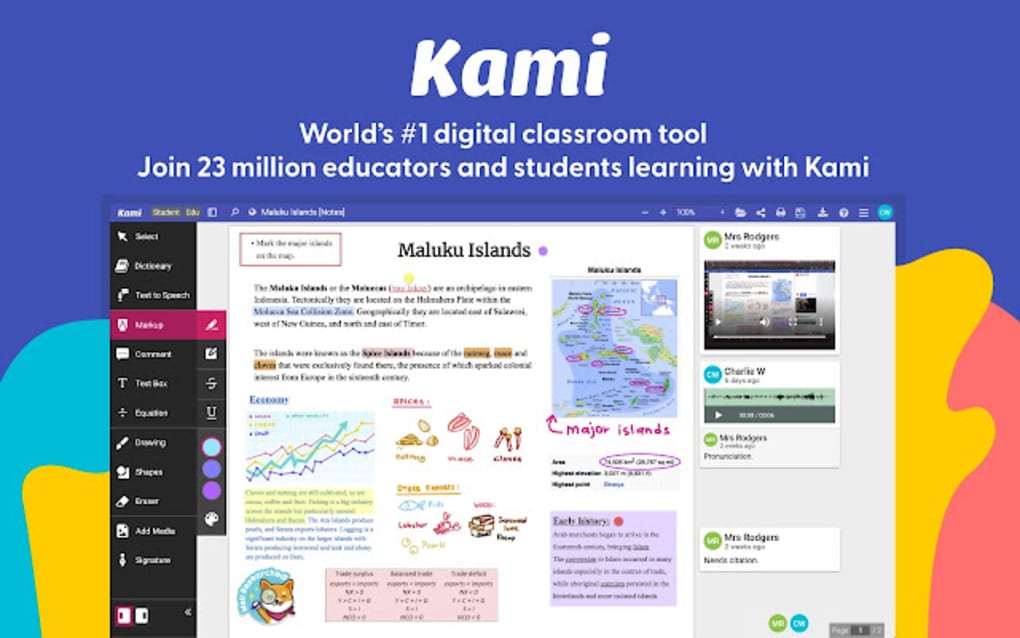
Kami - PDF and Document Annotation functions as a truly versatile digital classroom program, offering a myriad of benefits that extend far beyond simple document markup. It is an excellent catalyst for institutions and individuals looking to embrace a paperless future, streamlining operations and reducing environmental impact. Whether the need is for meticulously organized reading materials, the ability to make multiple copies of work without physical effort, or the dynamic enhancement of instructional content, Kami proves exceptionally effective. The program is equipped with a comprehensive suite of functions, empowering users to annotate, write, comment, draw, augment, type, and enhance documents with unparalleled ease and flexibility.
Streamlined Annotation for Students
For students, Kami transforms the often-cumbersome process of editing documents and annotating text into a hassle-free and intuitive experience. This kid-friendly application is designed with accessibility in mind, allowing students of all ages to effortlessly annotate on a wide variety of digital materials. This includes worksheets, publisher-supplied PDFs, e-books, and other educational resources, breaking down barriers that might exist with traditional, static documents. The ability to directly interact with their learning materials fosters a more engaging and active learning process, moving away from passive consumption of information.
The range of tools available within the Kami extension or web app is specifically crafted to boost creativity and personal expression among students. They can choose from a variety of text sizes, shapes, and colors for their annotations, allowing them to highlight, emphasize, and categorize information in a way that resonates with their individual learning styles. The freehand drawing functionality further enhances this creative freedom, enabling students to sketch diagrams, illustrate concepts, or simply express themselves visually directly onto their documents. This visual engagement can significantly improve comprehension and retention. Crucially, Kami’s deep integration with popular Learning Management Systems ensures that students can complete tasks faster and that all their work is saved automatically. This eliminates the stress of losing progress and allows them to focus solely on their learning and creative output, knowing their efforts are securely preserved.
Empowering Educators with Advanced Feedback Tools
Kami is equally transformative for educators, providing them with a powerful arsenal of tools to discuss, markup, and offer rich, constructive feedback. Moving beyond traditional red pen corrections, teachers can leverage multiple annotation tools, including video, audio, and text comments. This multi-modal feedback approach caters to diverse student needs and learning preferences, allowing for more nuanced and personalized instruction. A quick audio note can explain a complex concept more effectively than a written comment, while a short video can demonstrate a process or offer encouragement with a personal touch.
These advanced tools are meticulously designed to foster collaboration and actively encourage real-time participation within a digital classroom environment. Teachers can engage with student work dynamically, providing immediate feedback that guides learning in the moment. Group projects become more manageable as multiple students can annotate a shared document simultaneously, and teachers can observe and facilitate their collaborative process. The ability to share comments via videos and voice recordings adds a layer of warmth and human connection to online interactions, making the digital classroom feel less isolated and more akin to a physical learning space. It’s evident that both teachers and students derive immense benefit from Kami, experiencing enhanced engagement, improved communication, and a more productive, interactive learning journey. The platform not only simplifies administrative tasks but fundamentally enriches the pedagogical experience, making education more accessible, dynamic, and effective for everyone involved.
Navigating Kami: Features, Pricing, and Integration
The journey of adopting the Kami app is designed to be a hassle-free experience from the outset, reflecting its commitment to user-friendliness. The first step involves selecting a license that best aligns with an individual’s or institution’s specific needs, ensuring that users only pay for the features they require.
Understanding Kami’s Licensing Tiers
Kami offers a flexible licensing structure, starting with a robust free option and scaling up to comprehensive organizational plans.
- The Free ‘Basic’ Plan: This entry-level option provides foundational annotation capabilities, making it an excellent starting point for new users or those with minimal needs. It includes essential features such as basic annotation tools, freehand drawing functionality, and some fundamental formatting options. This allows users to mark up documents, sketch ideas, and organize information without any financial commitment, serving as a powerful introduction to the Kami ecosystem.
-
The Annual Payment ‘Teacher’ Plan: Designed specifically for individual educators, this plan unlocks a significantly expanded suite of features. Beyond the basics, teachers gain the ability to insert signatures and images directly into documents, crucial for personalizing feedback or completing official forms. A standout benefit of this plan is the integration with popular Learning Management Systems (LMS) such as Canvas, Schoology, and Google Classroom. This seamless connectivity streamlines assignment distribution, collection, and grading processes. Furthermore, the Teacher plan empowers educators to provide rich, multimedia feedback by sharing comments via videos and voice recordings, adding a personal and engaging dimension to student interactions.
-
The Customizable ‘School and District’ Plan: For larger educational institutions, this plan offers the most comprehensive and tailored solution. It encompasses all the features of the Teacher plan and adds advanced administrative capabilities, centralized management tools, and often, priority support. This customizable option ensures that entire schools or districts can implement Kami uniformly, managing licenses, user accounts, and data across their entire ecosystem. It’s built for scale, facilitating widespread adoption and consistent integration across all classrooms and departments.
Seamless Integration and Advanced Functionality
Beyond its tiered feature sets, Kami boasts impressive integration capabilities and advanced functionalities that enhance its utility. A significant advantage is its seamless compatibility with Google Drive. All versions of the program work effortlessly with Google Drive, allowing users to open, edit, and save documents directly from their cloud storage. This integration also leverages Google Drive’s auto-save function, providing a layer of security and convenience by automatically saving changes as they are made. However, prudent users are still advised to manually save the file at the end of a session to circumvent any potential errors or discrepancies, ensuring all work is securely finalized.
Kami for Windows further extends its capabilities with a built-in OCR (Optical Character Recognition) functionality specifically designed for scanned documents. This feature is invaluable for converting images of text into editable and searchable data, transforming previously inaccessible content into workable digital documents. It dramatically enhances productivity when dealing with legacy documents or physical handouts that need to be digitized. Moreover, for users who upgrade their plan, Kami offers the ability to convert various file formats directly to PDF, adding another layer of document management flexibility and ensuring compatibility across platforms.
For students and educators planning to fully integrate Kami - PDF and Document Annotation into their schoolwork, the application’s interoperability with a range of other educational tools is a significant asset. This allows users to construct a highly personalized and optimized learning environment. For example, documents annotated in Kami can be seamlessly presented on a digital whiteboard via screencast, turning static materials into dynamic instructional aids during live lessons or virtual presentations. This capability transforms how content is shared and interacted with, pushing the boundaries of traditional teaching and learning methods and truly optimizing the digital classroom experience. The strategic combination of robust features, flexible pricing, and extensive integration makes Kami a powerful and adaptable tool for any educational setting.
The Impact of Kami on Modern Education and Beyond
The Kami app unequivocally stands as an exceptional choice for both students and educators, particularly those engaged with K-12 education and higher grades. Its design philosophy centers around accessibility and effectiveness, making the PDF and document annotation tool remarkably easy to use while offering a rich array of features. Its capacity to integrate seamlessly with a broad spectrum of learning management systems is a critical advantage, solidifying its role as an indispensable component of the modern digital learning ecosystem. This versatility ensures that Kami is not just another standalone application but a powerful extension of existing educational frameworks, enhancing their functionality and collaborative potential.
Kami functions as a highly versatile PDF annotation program, distinguished by its ability to work synergistically with other tools and applications. This interoperability is key to maximizing learning efficiency and fostering a holistic digital workspace. For instance, students can use Kami to annotate research papers, then transfer their insights to a presentation tool, or integrate their annotated assignments directly into their LMS for submission. Educators can grade, provide detailed feedback using multimedia, and then easily share these enriched documents with students through established institutional channels. This streamlined workflow reduces administrative burdens and allows more time for meaningful teaching and learning interactions.
The platform’s impact is not limited to mere functionality; it extends to the very culture of education. Kami actively promotes a more interactive and engaged learning environment. By allowing students to directly manipulate and respond to digital content, it shifts the learning paradigm from passive reception to active construction of knowledge. The collaborative features, such as real-time annotation and multi-modal feedback, foster a sense of community and shared discovery, breaking down the isolation that can sometimes accompany digital learning. This emphasis on interaction and creativity is crucial for developing critical thinking skills and encouraging deeper understanding.
While Kami offers a wealth of benefits, it is important to address its primary limitation: somewhat restricted functionality on mobile devices. For users who primarily rely on smartphones or tablets for extensive document work, this might be a consideration. However, this drawback needs to be weighed against the application’s superior performance and comprehensive features on desktop and laptop platforms, where the majority of in-depth academic and professional work typically occurs. For the vast majority of users within an educational context, where access to computers is prevalent, this mobile limitation is often a minor inconvenience rather than a significant impediment.
In essence, Kami - PDF and Document Annotation emerges as a simple yet profoundly powerful PDF application. It excels in delivering a hassle-free annotation experience, seamless integration with popular LMS, and robust support for real-time collaboration. Its dedication to empowering both students and teachers with intuitive, effective tools positions it as a leader in digital productivity and educational technology. Despite its minor mobile limitations, Kami’s overall utility and transformative impact on how we interact with documents and foster learning are undeniable. It represents a significant step forward in optimizing the digital classroom and beyond.
Conclusion: The Future of Collaborative Document Work
Kami - PDF and Document Annotation has firmly established itself as more than just a software utility; it is a foundational component of the modern digital classroom and a robust solution for collaborative document work across various sectors. Its journey from a dedicated PDF annotator to an expansive educational platform reflects a keen understanding of evolving user needs and a commitment to innovation. By embracing the ethos of “digital paper,” Kami has successfully translated the tactile, interactive experience of physical documents into a dynamic, interconnected digital environment.
The platform’s core strengths lie in its unparalleled ease of use, making sophisticated annotation accessible to users from K-12 students to seasoned professionals. The diverse array of tools—from basic freehand drawing to advanced video and audio feedback—caters to a spectrum of learning styles and pedagogical approaches. Its deep, seamless integration with leading Learning Management Systems stands as a testament to its practical design, ensuring that Kami not only fits into existing workflows but actively enhances them. This interoperability fosters real-time collaboration, transforming solitary document work into an engaging, collective experience that mirrors the collaborative nature of real-world projects.
For educators, Kami liberates them from the constraints of traditional grading, enabling richer, more personalized feedback that fosters deeper student understanding and engagement. For students, it provides a canvas for creativity, allowing them to interact with learning materials in ways that are intuitive, expressive, and ultimately, more effective. The automatic saving features and Google Drive integration add layers of convenience and reliability, ensuring that valuable work is always secure. While the current limitations on mobile device usage are a point to consider for specific user scenarios, they do not detract from Kami’s overwhelming value and efficacy on desktop and web platforms, where its power is fully realized.
In conclusion, Kami - PDF and Document Annotation is a testament to what well-designed software can achieve when it focuses on real-world needs. It’s a tool that not only digitizes traditional processes but fundamentally reimagines them, offering a glimpse into the future of interactive learning and productive collaboration. For anyone seeking a powerful, versatile, and eco-friendly solution for managing and interacting with digital documents, Kami stands as an exemplary choice, continually pushing the boundaries of what is possible in the digital workspace. It is a vital asset for any individual or institution committed to fostering a more engaging, efficient, and collaborative digital experience.
File Information
- License: “Free”
- Version: “2.8”
- Latest update: “May 22, 2023”
- Platform: “Windows”
- OS: “Windows 7”
- Language: “English”
- Downloads: “21.1K”


