
Karaoke, the beloved pastime of singing along to your favorite tunes, has found a powerful ally in Karaoke 5. This software, honed over nearly two decades of development, offers a robust and surprisingly versatile karaoke experience for both casual users and seasoned performers. More than just a simple player, Karaoke 5 boasts a comprehensive feature set designed to enhance the karaoke journey from start to finish, making it a compelling option in a crowded market. This in-depth review will explore its strengths, weaknesses, and overall place within the world of digital karaoke.
A Powerful Player for All Skill Levels
Karaoke 5 presents itself as a free and powerful karaoke player catering to a broad audience. Its long development history, spanning close to twenty years, speaks to a commitment to refinement and stability. The program focuses on delivering maximum performance with minimal fuss, a balance that is crucial for a user-friendly experience. Whether you are a novice just starting to explore your vocal talents or a seasoned karaoke enthusiast seeking refined control over your performances, Karaoke 5 aims to provide the tools you need to elevate your singing experience. The software’s primary focus is on enhancing karaoke performances through features like real-time playlist management, smooth cross-fading between tracks, and comprehensive mixing capabilities, all designed to facilitate a seamless and polished presentation.
The software’s flexibility extends to its handling of music files. Users can effortlessly select songs from the default Karaoke 5 playlist, a curated selection of tracks ready to be enjoyed. Alternatively, leveraging the user-friendly drag-and-drop functionality, users can easily incorporate their own music files from their computer’s hard drive, offering maximum versatility in curating one’s personal karaoke collection. This flexibility is extended further by its broad compatibility. Karaoke 5 can handle a wide range of audio formats, ensuring compatibility with most personal music libraries, offering a high level of convenience and eliminating the need for tedious format conversions. Beyond typical audio formats, the software also boasts compatibility with MIDI files, leveraging its built-in K5 Instrument sound bank to provide high-quality audio without requiring additional sound libraries, minimizing the need for external add-ons and maintaining a streamlined workflow. This commitment to broad format compatibility ensures users can easily integrate their pre-existing collections into the software, fostering a rapid transition into the Karaoke 5 experience.
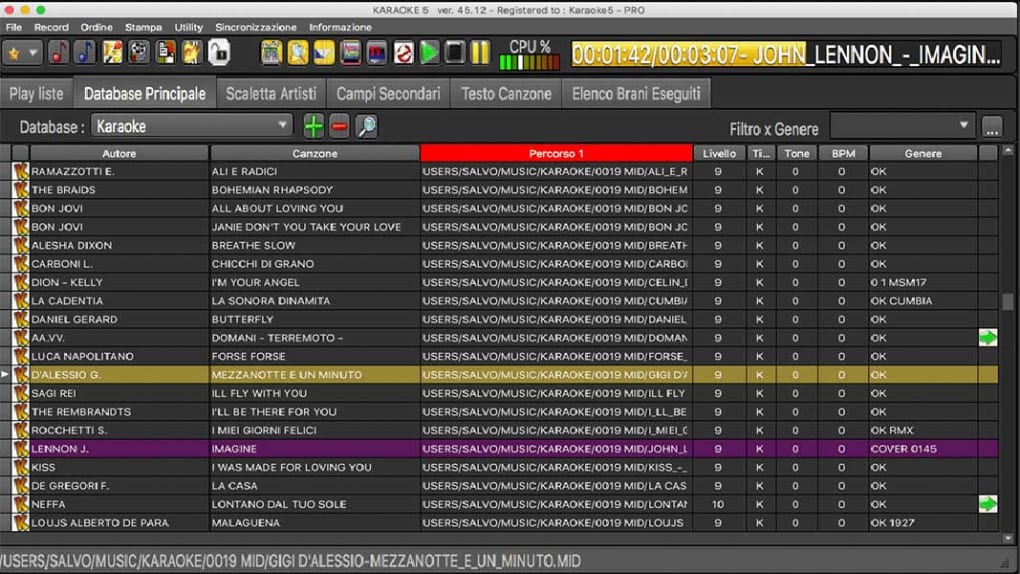
User Interface and Functionality: A Seamless Karaoke Experience
Karaoke 5 presents a thoughtfully designed user interface, aiming for a balance between intuitiveness and comprehensive control. The main window acts as the central hub, providing access to crucial features and functions. From here, users can seamlessly synchronize lyrics with their audio files, ensuring perfect timing during performances. This is further enhanced by access to the Mix Control, providing fine-grained adjustments to the audio, and the K5 Virtual Instruments, expanding the creative possibilities for those seeking a more customized sonic experience. This integrated approach, minimizing the need to navigate multiple windows or menus, contributes significantly to a smooth and efficient workflow.
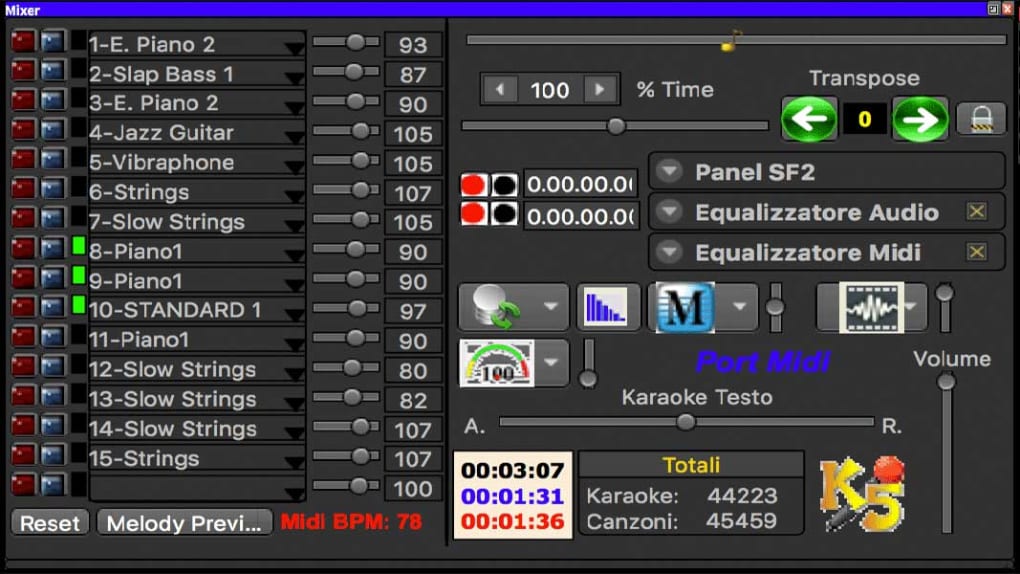
The Mixer section, a dedicated audio control panel, provides a wealth of options for shaping and refining the sound. Equipped with a comprehensive range of knobs, switches, and equalizers, the mixer allows users to fine-tune their audio to achieve the desired sound. This level of granular control is especially valuable for more advanced users seeking precise adjustments to achieve a professional-sounding performance. The mixer is not just focused on sound quality; it also integrates an instant messaging feature, providing an avenue for real-time communication with others during performances, expanding the software’s social engagement features.
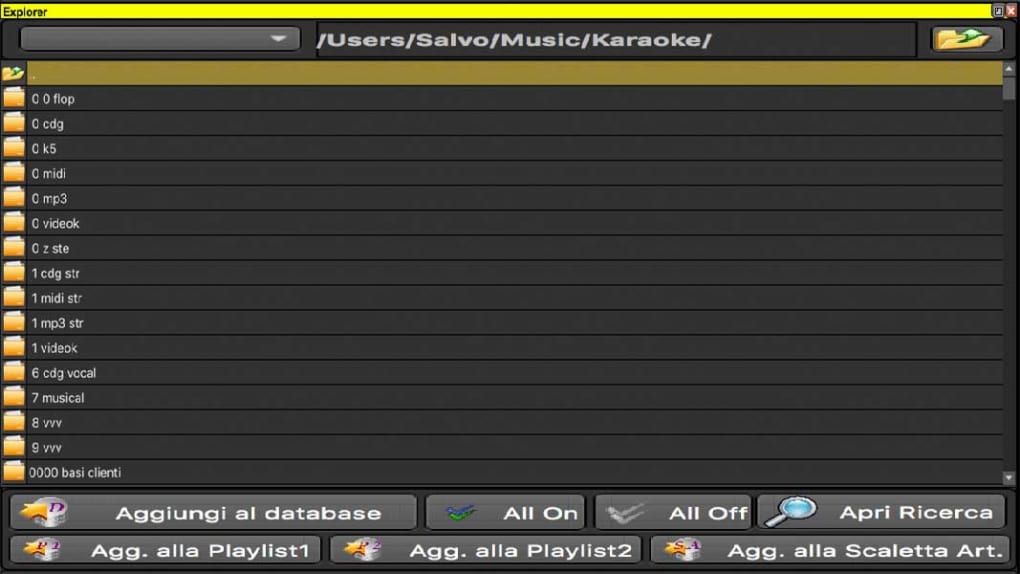
The Explorer Window serves as a bridge between the user’s local directories and online libraries, acting as a centralized location for managing and updating music files. This integration simplifies the process of importing new tracks and maintaining an up-to-date karaoke library, fostering a streamlined experience focused on enjoying the music rather than technical management.
Finally, the Karaoke Window provides a clear and visually engaging display of the current song. Featuring animated lyrics, it provides visual cues to assist with timing and performance, ensuring that even first-time users can confidently follow along. This visual aid is particularly beneficial for those new to karaoke, improving their comfort levels and reducing the pressure of memorizing lyrics.
Strengths and Weaknesses: A Balanced Perspective
Karaoke 5 boasts several noteworthy strengths. Its robust karaoke playback capabilities, including seamless transitions and accurate lyric synchronization, are undeniable assets. The built-in song bank and broad file format compatibility offer exceptional convenience, eliminating the need for external resources. The software’s availability for both Windows and Mac further extends its appeal to a wider user base. The inclusion of a comprehensive mixer with equalization and other advanced audio controls caters to both casual and advanced users.
However, Karaoke 5 is not without its drawbacks. While advertised as “free,” certain aspects of the software may require purchases or subscriptions, leading to potential costs that are not immediately obvious. Some files may be compressed, potentially affecting audio quality for some users. The uninstallation process has been reported to be cumbersome, a minor inconvenience but still a point worth noting. Finally, the absence of an online interface limits access to online karaoke libraries and the potential for community interaction. These limitations, while not deal-breakers for many, should be considered when weighing the software’s overall value.
Alternatives and the Competitive Landscape
The karaoke software market is competitive, with numerous options vying for users’ attention. While Karaoke 5 holds its own with its robust features, other contenders offer unique advantages. Some alternatives provide access to vast online karaoke libraries, offering a wider selection of songs. Others may excel in specific areas such as advanced audio editing or social features. Ultimately, the best choice depends on individual needs and priorities. A thorough comparison of available options is recommended to find the perfect fit for your karaoke experience. This competitive landscape highlights the importance of considering not only the features of Karaoke 5 but also the alternatives to make an informed decision.
Conclusion: A Solid, if Not Perfect, Choice
Karaoke 5 presents a compelling option for users seeking a powerful and versatile karaoke player. Its mature development and feature-rich interface cater to a wide range of users, from beginners to seasoned performers. While certain limitations exist, notably the potential costs beyond the initial free download and the lack of online integration, these drawbacks are somewhat offset by its robust core functionality and excellent audio handling. Ultimately, Karaoke 5 provides a solid and enjoyable karaoke experience, making it a worthy consideration for anyone looking to enhance their singing adventures. Its long-standing presence in the market and continued development suggest a dedication to improvement and longevity, promising a reliable and enjoyable karaoke experience for years to come. However, potential users should carefully weigh the pros and cons in the context of their own specific needs and preferences before making a final decision.
File Information
- License: “Free”
- Latest update: “July 4, 2023”
- Platform: “Windows”
- OS: “Windows 7”
- Language: “English”
- Downloads: “26.9K”
- Size: “137.44 MB”


