
Kaspersky Security Cloud Free, formerly known as Kaspersky Free Antivirus, is a free antivirus program designed to protect your Windows computer from various online threats. Developed by Kaspersky Lab, a well-respected name in cybersecurity, this software offers a robust suite of features without the hefty price tag associated with many commercial antivirus solutions. This review will delve into its capabilities, strengths, weaknesses, and overall value proposition.
Core Features and Functionality
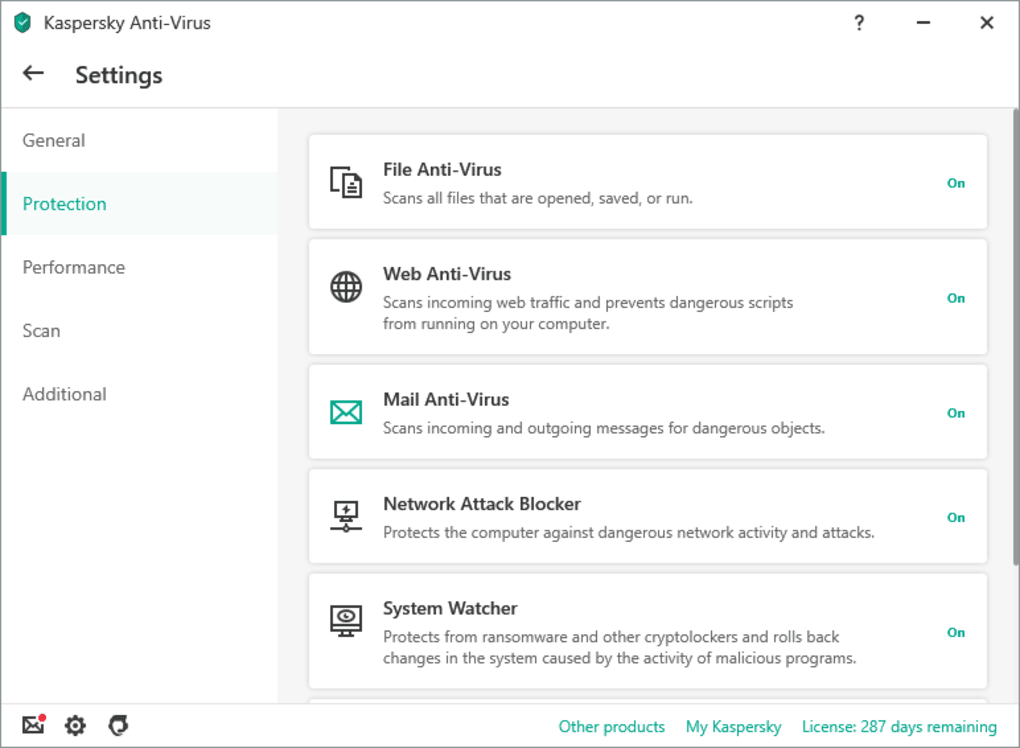
At its heart, Kaspersky Security Cloud Free provides comprehensive protection against malware. This includes real-time scanning for viruses, Trojans, worms, ransomware, and other malicious software. The program utilizes Kaspersky’s award-winning security technologies, leveraging cloud-based threat intelligence to identify both known and emerging threats. This cloud integration allows for quick identification of new malware strains without requiring large, resource-intensive updates on your computer.
This real-time protection operates seamlessly in the background, monitoring your system’s activity for suspicious behavior and automatically blocking or quarantining threats. The software also incorporates proactive technologies, designed to detect and neutralize even previously unknown threats based on their behavior patterns. This is particularly important in today’s ever-evolving threat landscape, where new malware is constantly emerging.
Beyond its core antivirus capabilities, Kaspersky Security Cloud Free also includes several crucial additional features:
-
Anti-Phishing Protection: This feature safeguards against phishing attacks, which attempt to steal your personal information (like usernames, passwords, and credit card details) by mimicking legitimate websites or email communications. Kaspersky Security Cloud Free proactively analyzes websites and emails for suspicious elements, preventing you from inadvertently accessing or interacting with malicious content.
-
Anti-Blocker Technology: This addresses a more advanced threat: malware that locks your computer, demanding a ransom for access. Kaspersky Security Cloud Free actively works to identify and neutralize such attacks, allowing you to regain control of your system without paying the ransom.
-
Website and File Protection: The software scans all downloaded files and websites you visit for malware. It employs several detection methods, ensuring even cleverly disguised threats are identified and neutralized. This prevents infections through various common vectors, such as downloading infected files or visiting compromised websites.
-
Automatic Updates: Staying current with the latest security definitions is critical for effective antivirus protection. Kaspersky Security Cloud Free handles this automatically, ensuring you are constantly protected against the newest malware strains. The updates happen seamlessly in the background, minimizing disruption to your computer’s operation.
-
Self-Defense: This crucial feature protects the antivirus software itself from malicious attacks, preventing tampering or disabling of its core functionality. It ensures Kaspersky Security Cloud Free remains operational even if malware attempts to compromise your system.
-
Quarantine: The software isolates detected threats in a secure quarantine zone, preventing them from harming your system. This quarantine area provides a safe holding place for the malware while you decide whether to delete it or take other necessary actions.
Performance and System Impact
One common concern with antivirus software is its impact on system performance. However, Kaspersky Security Cloud Free is specifically designed to be lightweight and efficient. While it does require some system resources, the impact is often minimal, with many users reporting no noticeable slowdown in their computers’ performance. In fact, some users have even anecdotally observed improved system speed after installing the program, possibly due to the removal of malware that might have been slowing down their machine previously.
This performance optimization comes from a carefully balanced approach, integrating powerful security features without excessively demanding system resources. The cloud-based aspects of the software also contribute to this efficiency, reducing the need for large, local databases of malware definitions.
Limitations of the Free Version
While Kaspersky Security Cloud Free offers considerable value, it does have certain limitations compared to its paid counterparts:
-
Limited Suite Features: The free version focuses primarily on antivirus protection. The paid versions of Kaspersky Security Cloud offer additional features like a VPN for secure online browsing, parental controls, and advanced protection against identity theft. These extra layers of security are valuable for users seeking more comprehensive protection.
-
No Technical Support: Kaspersky Security Cloud Free users do not have access to dedicated technical support. If you encounter any issues or need assistance with the software, you are left to your own resources to find solutions, such as online tutorials or community forums. Paid versions usually offer phone or chat support.
Alternatives and Comparison
The market for free antivirus software is competitive. Popular alternatives include Avast Free Antivirus, AVG AntiVirus Free, and Bitdefender Antivirus Free Edition. These options offer similar basic antivirus functionality. However, a direct comparison highlights some key differences: Kaspersky’s reputation for robust malware detection and its lightweight design often place it favorably among users. The choice ultimately depends on individual preferences and system requirements. Some users might find one program’s interface more intuitive, while others value a specific feature not available in competing products.
User Reviews and Overall Impression
User reviews for Kaspersky Security Cloud Free are generally positive, with many users praising its effectiveness in protecting their systems from malware and its minimal impact on system performance. The consistently high scores in independent antivirus tests further support the software’s reputation for reliability.
However, the lack of technical support is a recurring criticism. For less tech-savvy users, troubleshooting problems independently can be challenging. The absence of additional suite features, as mentioned earlier, is also a limitation for those seeking more comprehensive protection beyond basic antivirus functionality.
Conclusion
Kaspersky Security Cloud Free provides surprisingly robust and reliable antivirus protection for free. Its lightweight design, coupled with effective malware detection and removal capabilities, makes it a strong contender in the crowded free antivirus market. While the absence of technical support and limited features compared to the paid versions are notable drawbacks, the core antivirus functionality is powerful and easily justifies the software’s placement among the top free antivirus options. Users seeking a simple, effective, and resource-light antivirus solution will likely find Kaspersky Security Cloud Free a valuable addition to their computer security arsenal.
File Information
- License: “Free”
- Latest update: “May 24, 2023”
- Platform: “Windows”
- OS: “Windows 8.1”
- Language: “English”
- Downloads: “45.3K”
- Size: “2.81 MB”


