
KeyBlaze Free Typing Tutor is an interactive software program designed to help users improve their typing skills. Developed by NCH Software, it offers a multifaceted approach to typing instruction, encompassing lessons, games, and audio exercises to cater to various learning styles and skill levels. This review delves into the features, strengths, and weaknesses of KeyBlaze, comparing it to alternatives and assessing its overall effectiveness as a typing tutor.
KeyBlaze: A Deep Dive into its Features
KeyBlaze’s primary function is to enhance typing speed and accuracy. Unlike simply providing typing practice, it employs a structured approach, beginning with an assessment to determine the user’s current typing proficiency. This initial evaluation serves as a baseline, allowing the program to tailor subsequent lessons and exercises to individual needs. The program doesn’t merely focus on speed; it emphasizes proper technique, encouraging the use of all ten fingers for touch typing.
The software’s interactive nature is a key strength. Instead of monotonous drills, KeyBlaze incorporates various learning modules:
-
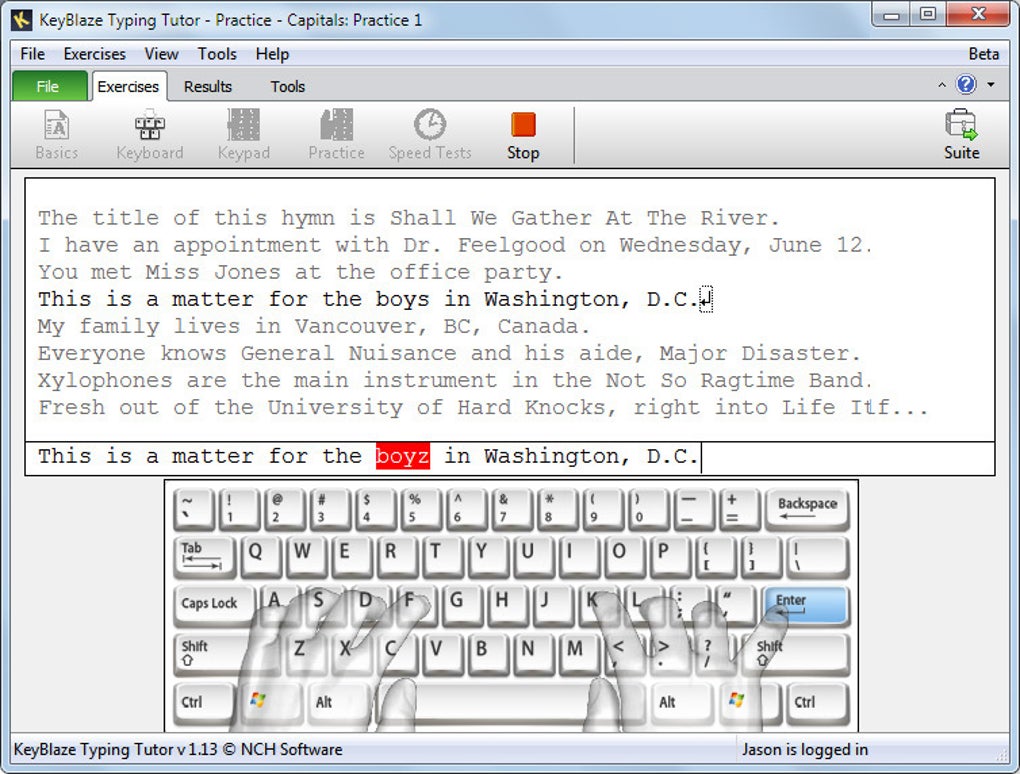
Visual Keyboard Guide: A virtual keyboard displays on-screen, providing visual feedback on finger placement. Transparent hands overlay the keyboard, highlighting the correct position of each finger for optimal typing posture and technique. This visual aid is particularly beneficial for beginners who are learning to touch type, providing immediate correction and guidance.
-
Comprehensive Lessons: The program offers a range of lessons, progressing from foundational concepts to advanced techniques. Basic lessons focus on home keys, proper finger positioning, and the efficient use of all ten fingers. As users progress, lessons incorporate more complex elements such as capitalization, punctuation, number keys, and the efficient use of neighboring keys. This systematic progression ensures that users build a solid foundation before tackling more advanced challenges.
-
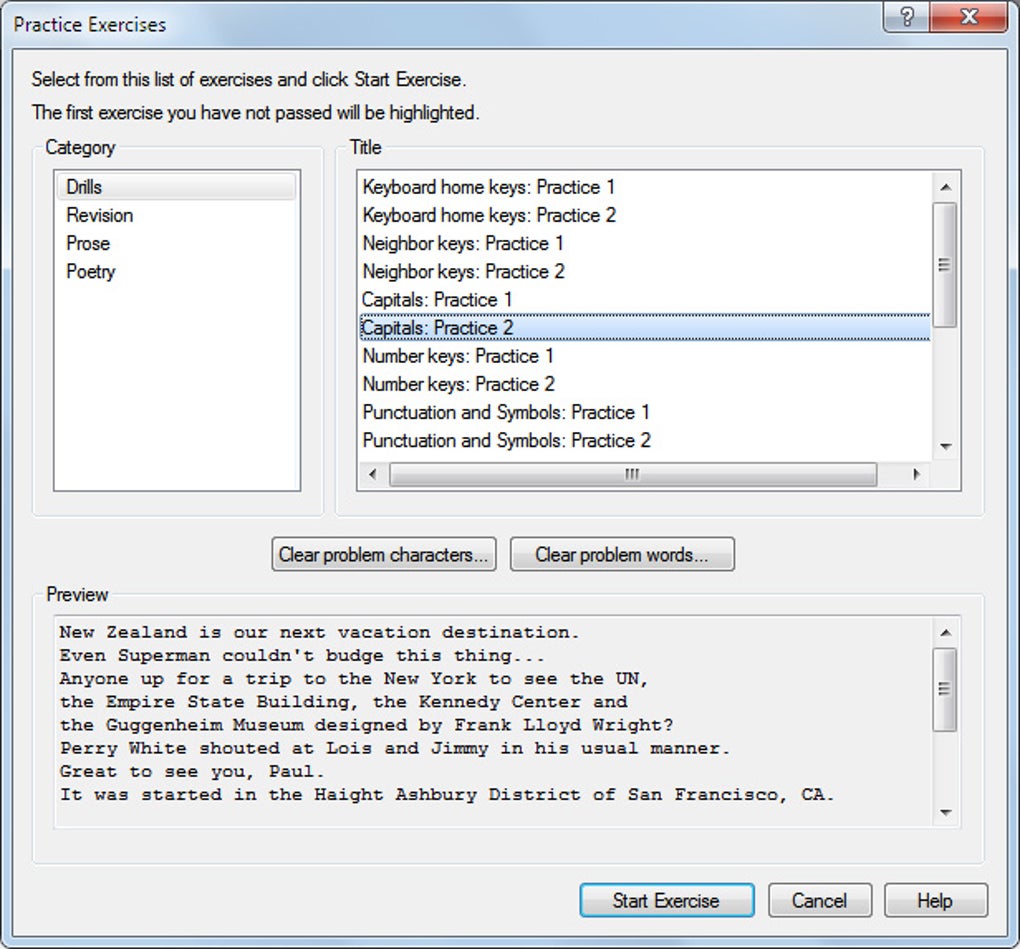
Engaging Practice Exercises: To avoid monotony, KeyBlaze incorporates diverse practice exercises. These exercises move beyond simple letter and word repetition, including typing poems, prose passages, and even song lyrics. This variety keeps users engaged and prevents boredom, promoting consistent practice and sustained improvement. The inclusion of different text types also improves typing adaptability, allowing users to comfortably tackle various writing styles.
-
Audio Exercises for Transcription: KeyBlaze goes beyond standard typing practice by including audio exercises designed to enhance transcription skills. This feature is a valuable addition, particularly for students, professionals, or anyone who needs to transcribe audio recordings accurately and efficiently. These exercises combine listening and typing, mirroring real-world scenarios and improving overall typing proficiency in diverse settings.
-
Personalized Goals and Progress Tracking: Users can set personal goals, such as aiming for a specific words-per-minute (WPM) target. The program tracks progress, providing regular feedback and highlighting areas for improvement. This feature boosts motivation and provides tangible evidence of progress, encouraging users to continue practicing. Upon achieving the set goal, the program even provides a printable certificate of completion.
KeyBlaze’s Strengths and Weaknesses
KeyBlaze offers several advantages, but it also has some limitations.
Strengths:
-
Free and Accessible: The core functionality of KeyBlaze is entirely free, making it accessible to a broad audience. This removes financial barriers, allowing anyone to improve their typing skills without any cost.
-
Interactive and Engaging: The program’s interactive design, with its games and varied exercises, keeps users motivated and prevents the learning process from becoming tedious.
-
Comprehensive Curriculum: The curriculum encompasses everything from fundamental typing techniques to more advanced aspects such as transcription practice. The structured progression ensures a well-rounded learning experience.
-
Suitable for All Skill Levels: Whether a complete beginner or an experienced typist seeking to refine their technique, KeyBlaze provides features and lessons that cater to all skill levels.
-
Personalized Learning Path: The initial skill assessment and goal-setting features allow for a personalized learning experience, adjusting the difficulty and focus to the individual’s needs.
Weaknesses:
-
In-App Purchases: While the core program is free, some additional games and features require in-app purchases. While the free content is substantial, this aspect may limit the overall experience for some users.
-
Limited Customization Options: While the program adapts to individual skill levels, some users may desire more extensive customization options, such as the ability to create custom lessons or import their own texts.
-
Potential for Distractions: The visual elements and interactive games, while engaging, might sometimes distract users from focusing on proper technique. Maintaining focus on correct finger placement remains crucial for optimal learning.
KeyBlaze Compared to Alternatives
KeyBlaze faces competition from other typing tutor software. Some notable alternatives include:
-
TypingMaster: A popular and comprehensive typing tutor with a focus on personalized lessons and detailed progress tracking. It generally has a more extensive range of features and customization options but often comes with a price tag.
-
Typing Trainer: Known for its simplicity and ease of use, it provides basic typing practice but may lack the advanced features and engaging elements of KeyBlaze.
-
Klavaro Touch Typing Tutor: A free open-source program, Klavaro offers a different approach, focusing on systematic practice and progressive skill development. However, its interface might not be as intuitive or engaging as KeyBlaze.
The choice between these programs largely depends on individual preferences and learning styles. KeyBlaze strikes a good balance between comprehensive instruction and engaging interactivity. Its free core functionality makes it a particularly appealing option compared to paid alternatives, though users needing advanced features may prefer alternatives like TypingMaster.
Is Typing 40 WPM Good? Setting Realistic Expectations
The average typing speed is generally around 35-40 words per minute (WPM). However, this average shouldn’t be considered the benchmark for good typing speed. Professionals often achieve speeds of 60-70 WPM or higher. Therefore, while 40 WPM is acceptable for many, it’s not necessarily indicative of highly efficient typing.
KeyBlaze aims to help users significantly improve their typing speed and accuracy, moving beyond the average. Regular practice using KeyBlaze’s structured lessons and engaging exercises is likely to result in a noticeable improvement in WPM, contributing to greater efficiency and productivity. The program’s focus on proper technique is key to achieving sustainable improvements in typing speed.
Conclusion: Is KeyBlaze Right for You?
KeyBlaze Free Typing Tutor presents a compelling option for users looking to improve their typing skills. Its free availability, engaging design, and comprehensive curriculum make it highly accessible and effective. While some paid features are available, the core functionality is more than sufficient for many users. If you’re seeking a free, fun, and effective way to boost your typing speed and accuracy, KeyBlaze is certainly worth trying. However, users requiring extensive customization or highly advanced features might find more suitable alternatives in paid software options. The software’s strength lies in its balance of effective instruction and enjoyable interaction, making it a valuable tool for improving typing proficiency at all skill levels.
File Information
- License: “Free”
- Latest update: “May 24, 2023”
- Platform: “Windows”
- OS: “Windows 8.1”
- Language: “English”
- Downloads: “283.4K”
- Size: “2.61 MB”


