
KeyMaker is a standalone, offline password and key generator for Windows. It offers a straightforward solution for creating secure keys for various purposes, from computer access to file encryption, without the vulnerabilities associated with online services. This review delves into its functionality, security features, and overall user experience.
Functionality and Ease of Use
KeyMaker’s primary function is the generation of strong, random passwords and keys. Its interface, while basic, is intuitive and easy to navigate. The program presents a simple input field where users can optionally add a description to aid in recalling the generated key’s purpose. This description is only stored locally and is not transmitted online, enhancing security. The generation process itself is quick and efficient, providing the user with a randomly generated alphanumeric string of customizable length, which is crucial for creating passwords that are difficult to crack. The program doesn’t impose restrictions on the types of passwords it can generate; it’s just a simple, powerful random number generator.
The strength of the generated keys lies in their randomness. KeyMaker utilizes robust cryptographic algorithms (though the specifics aren’t explicitly stated) to ensure that the generated passwords are highly unpredictable and resistant to brute-force attacks. The lack of an online component means there’s no central database of passwords that could be compromised by hackers. This feature significantly mitigates security risks associated with cloud-based password managers.
Furthermore, KeyMaker’s simplicity is its strength. It doesn’t incorporate any fancy features or additional functionalities, focusing solely on the core task of password generation. This minimalistic approach avoids unnecessary complexities that might introduce vulnerabilities or slow down the process.
The program’s offline nature is a significant advantage, offering users complete control and privacy over their generated keys. The keys are stored only on the user’s computer, eliminating the risk of data breaches resulting from server vulnerabilities or data thefts. This aspect is particularly appealing to users who prioritize privacy and data security.
Security and Privacy Considerations
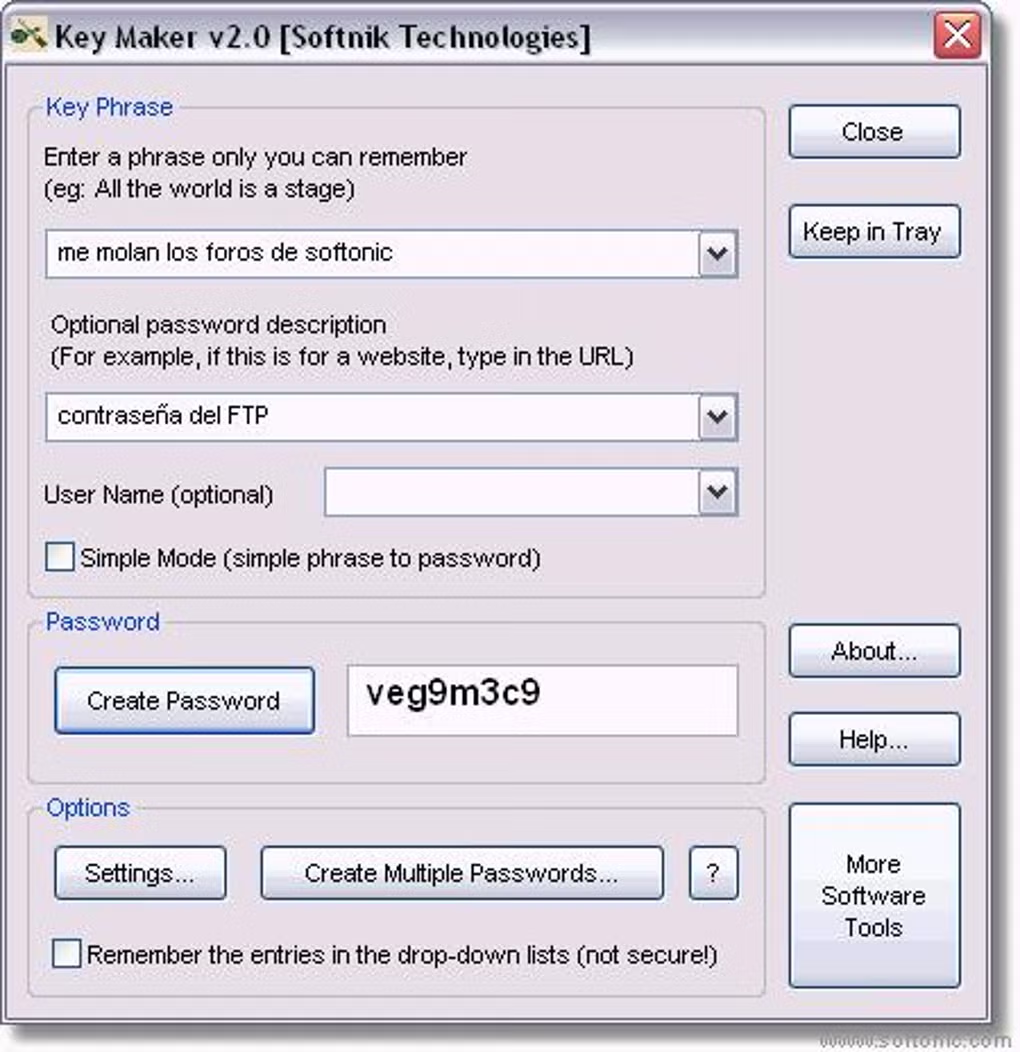
KeyMaker’s greatest strength lies in its robust security features. The fact that it’s a completely offline application is a major boon. Unlike online password managers, KeyMaker doesn’t rely on cloud servers or external connections, making it immune to online attacks. This eliminates the risk of data breaches and unauthorized access to the generated passwords.
The program’s algorithm is designed to produce cryptographically secure random numbers, which is essential for generating strong and unpredictable passwords. While the exact algorithms used are not publicly disclosed, the effectiveness is evident in the random nature of the generated keys.
However, it’s crucial to acknowledge that the security of KeyMaker also relies on the user’s security practices. While the program itself is secure, users should practice good password management habits. Adding descriptive labels to generated keys is helpful for retrieval, but these descriptions should be carefully crafted to avoid any compromising information. For instance, instead of labeling a password as “My Bank Account Password,” a more secure label might be “Financial Institution Access.”
The absence of a customer support option might be seen as a drawback. However, given the program’s simplicity and the low likelihood of technical issues, this omission might not be a significant concern for many users.
The program’s security is predicated on the security of the user’s system itself. If the computer is compromised by malware or other threats, the passwords stored could potentially be accessed. This emphasizes the importance of maintaining a secure and up-to-date operating system, and using robust antivirus and anti-malware software.
Comparison with Alternative Password Management Solutions
KeyMaker distinguishes itself from other password management solutions in its singular focus and its offline functionality. Many password managers offer cloud syncing, which, while convenient, introduces vulnerabilities. KeyMaker avoids this entirely. However, this offline-only nature means that users cannot access their passwords from multiple devices.
Other password managers offer features like password auditing, security alerts, and multi-factor authentication. KeyMaker’s simplicity means it lacks these sophisticated features, but this also contributes to its security by reducing attack surfaces.
Compared to online password generators, KeyMaker’s advantage is its privacy. Online generators transmit user data across networks, introducing potential interception points. KeyMaker keeps all operations local, preventing such risks.
While other password management software may offer more user-friendly interfaces or additional features like password strength indicators, KeyMaker’s focus remains on generating secure, offline passwords, making it a compelling choice for users concerned about data privacy and online security threats.
Advantages and Disadvantages of KeyMaker
Advantages:
- Offline Functionality: The program operates entirely offline, eliminating online vulnerabilities.
- Strong Password Generation: Employs robust cryptographic algorithms to generate secure, random passwords.
- Simplicity and Ease of Use: User-friendly interface with straightforward functionality.
- Enhanced Privacy: No user data is transmitted or stored online.
- Standalone Application: No external dependencies or integrations.
Disadvantages:
- Limited Features: Lacks advanced features found in more comprehensive password managers (e.g., password auditing, multi-factor authentication).
- No Customer Support: The absence of readily available support might be inconvenient for some users.
- Offline Access Only: Passwords are only accessible from the machine where the program is installed.
- Basic Interface: The interface could benefit from aesthetic improvements.
Conclusion
KeyMaker effectively fills a niche in password management software. Its simplicity and strong emphasis on security and privacy make it a worthwhile tool for users who prioritize offline functionality and want complete control over their password generation and storage. While it lacks the advanced features of comprehensive password managers, its core functionality delivers on its promise of generating secure, offline passwords, making it a strong option for those highly concerned about online security and data breaches. The program’s small size and minimal system resource consumption are further advantages. Ultimately, whether KeyMaker is the right choice depends on individual user needs and priorities; however, for users seeking a secure and private password generation solution without the complexities of online systems, KeyMaker represents a viable and effective option.
File Information
- License: “Free”
- Version: “2.0”
- Latest update: “August 6, 2018”
- Platform: “Windows”
- OS: “Windows 2000”
- Language: “English”
- Downloads: “104.8K”
- Size: “311.30 KB”


