
KeyMapper is a free, open-source utility for Windows PCs that allows users to remap keyboard keys and create custom macros. Developed by indie developer Stuart Dunkeld, this lightweight program offers a straightforward approach to customizing your keyboard experience, making it ideal for both casual users and power users alike. This guide delves into the features, functionality, and advantages of using KeyMapper, comparing it to alternative solutions and exploring its potential applications.
Understanding KeyMapper’s Functionality
At its core, KeyMapper provides a simple yet powerful way to modify the behavior of individual keys on your keyboard. Instead of being limited by the pre-defined functions of each key, KeyMapper lets you reassign them to virtually any other key, function, or macro. This opens up a world of possibilities for customizing your workflow and improving your productivity.
The program presents a virtual keyboard interface upon launch. This intuitive visual representation allows you to easily identify and select the key you want to remap. Double-clicking a key opens a menu offering a wide range of options categorized for easy navigation. These categories include commonly used keys, media controls, modifier keys (like Shift, Ctrl, Alt), and more.
One of KeyMapper’s standout features is its ability to create custom actions. This transcends simple key reassignments; you can design complex macros that automate sequences of keystrokes, launching applications, or triggering specific actions within other programs. For instance, you could create a macro that opens a specific document, types a pre-defined message, and then sends an email – all with a single keypress. This level of automation can significantly streamline repetitive tasks, boosting efficiency and reducing manual input.
The process of remapping is straightforward. Select the key you wish to change, choose the desired new function or macro from the provided list, and save your configuration. Importantly, KeyMapper requires a PC restart to apply the changes, ensuring the new key mappings take effect system-wide. This ensures consistency across all applications and prevents conflicts that might arise from immediate application of changes.
A User-Friendly Interface and Workflow
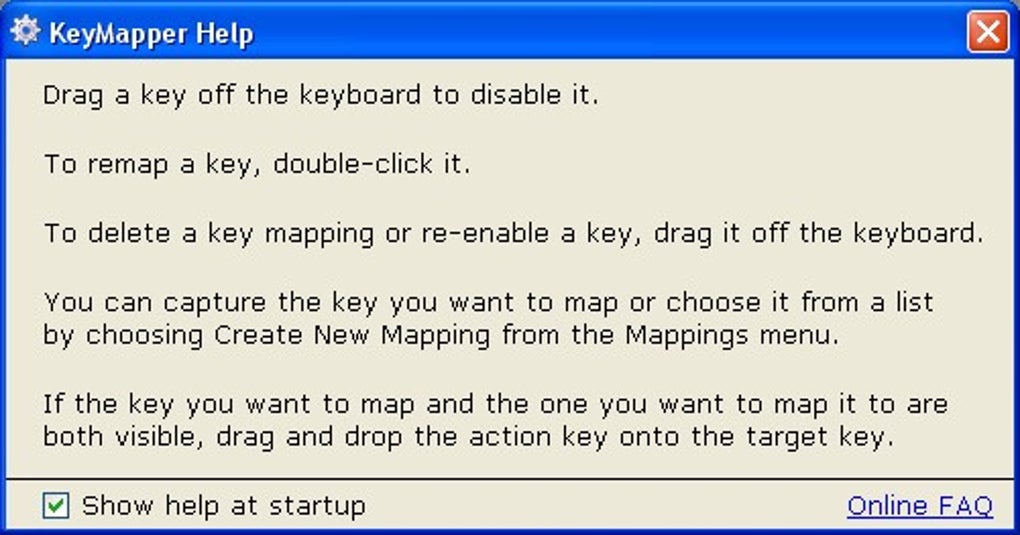
KeyMapper prioritizes ease of use. The virtual keyboard interface is highly intuitive, even for those unfamiliar with keyboard remapping software. The clear categorization of functions within the menu ensures that locating the desired action is quick and simple. The process of creating macros is also well-designed, with a straightforward interface that minimizes the learning curve.
While the developers acknowledge that the User Interface (UI) could benefit from a visual refresh, the functionality far outweighs any aesthetic shortcomings. The focus remains squarely on functionality and ease of use, making the program accessible to a wide range of users, regardless of their technical expertise. The uncluttered interface ensures that the user isn’t distracted by unnecessary elements, maintaining a clean and efficient workflow.
Advantages of Using KeyMapper
KeyMapper’s strengths lie in its simplicity, flexibility, and open-source nature. These aspects combine to create a compelling alternative to more complex and often proprietary keyboard remapping solutions.
-
Open-Source and Lightweight: KeyMapper’s open-source nature allows for community contributions and ensures transparency. Its lightweight design minimizes resource consumption, preventing performance issues or conflicts with other applications. This is a significant advantage, especially for users with older or less powerful systems.
-
Intuitive and Easy to Use: The program’s straightforward interface makes it accessible to users of all technical skill levels. The clear visual representation of the keyboard and the well-organized menu of options simplify the entire remapping process.
-
Macro Creation Capabilities: The ability to create custom macros drastically expands the program’s functionality. This feature alone elevates KeyMapper beyond a simple key remapper, transforming it into a powerful automation tool.
-
Free to Use: KeyMapper is completely free of charge, making it an accessible option for users who may be hesitant to invest in commercial keyboard remapping software. This accessibility makes it an excellent choice for experimenting with keyboard customization without any financial commitment.
Comparing KeyMapper to Alternative Solutions
Several alternative keyboard remapping tools exist, each with its own strengths and weaknesses. Comparing KeyMapper to these alternatives helps illustrate its unique position in the market. While programs like KeyTweak and SharpKeys offer basic key remapping, they lack the advanced macro creation capabilities of KeyMapper. Other, more feature-rich options often come with a price tag or a steeper learning curve. KeyMapper strikes a balance, providing sufficient functionality for most users without the complexity or cost of premium solutions.
KeyMapper’s open-source nature also sets it apart. While many commercial alternatives offer robust features, their closed-source nature limits customization and community involvement. KeyMapper benefits from community support and contributions, potentially leading to faster updates, bug fixes, and feature enhancements.
Several alternative programs have been mentioned:
- KeyTweak: Offers basic key remapping but lacks macro functionality.
- SharpKeys: A simple key remapper with a limited feature set compared to KeyMapper.
- Key Remapper: A more advanced option, but often comes with a price tag or trial period.
- MapKeyboard: Another free option, but potentially less feature-rich than KeyMapper.
- Key Manager: A more comprehensive solution with advanced features, but typically not free.
The choice between KeyMapper and these alternatives depends largely on individual needs and preferences. For users seeking a simple, free, and open-source solution with basic macro capabilities, KeyMapper is an excellent choice. For those requiring more extensive advanced features or extensive customization, a more feature-rich (and possibly paid) alternative might be more suitable.
Conclusion: KeyMapper – A Powerful and Accessible Tool
KeyMapper is a valuable tool for anyone seeking to customize their keyboard experience. Its open-source nature, intuitive interface, and robust macro creation capabilities make it a compelling option for both novice and experienced users. While the UI could benefit from a visual update, its straightforward functionality and ease of use outweigh any aesthetic shortcomings.
Whether you’re seeking to improve your gaming performance, streamline your workflow, or simply customize your keyboard layout, KeyMapper provides a powerful and accessible solution. Its free and open-source nature further enhances its appeal, making it an invaluable resource for users seeking a flexible and customizable keyboard remapping experience without the need for financial investment. Give KeyMapper a try – you might be surprised at how much it can enhance your interaction with your computer.
File Information
- License: “Free”
- Version: “1.0”
- Latest update: “June 3, 2025”
- Platform: “Windows”
- OS: “Windows 2000”
- Language: “English”
- Downloads: “57.9K”
- Size: “630.27 KB”


