
KickAssist is a free Chrome extension developed by MiahFuta designed to significantly enhance the user experience on Kick.com, a live streaming platform. This comprehensive add-on offers a suite of features that streamline chat interactions, improve stream viewing, and provide superior control over Video on Demand (VOD) playback. Whether you’re a casual viewer, a dedicated streamer, or a moderator, KickAssist provides tools to optimize your time on Kick.com. This detailed review explores the key functionalities and benefits of this popular Chrome extension.
Apps and Enhancements: KickAssist’s Core Features
KickAssist’s primary function is to augment the existing features of Kick.com, addressing common user pain points and adding a layer of convenience and control. The add-on focuses on three core areas: chat enhancement, stream optimization, and VOD improvements.
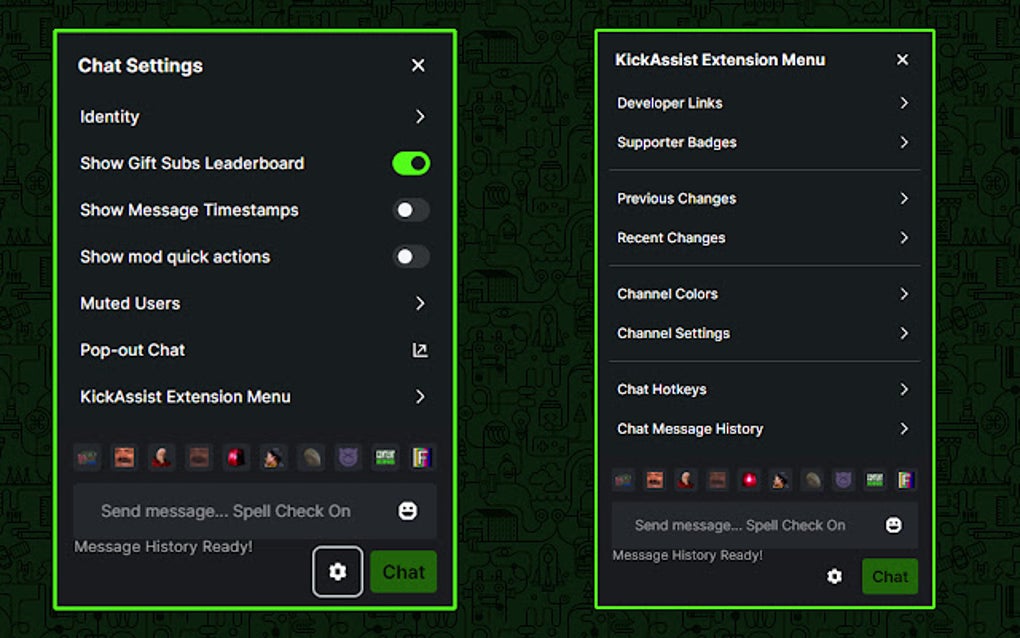
Chat Enhancements: The chat function is arguably the most crucial element of the Kick.com experience, fostering community and interaction between streamers and viewers. KickAssist dramatically improves this aspect by implementing several key features:
-
Spellcheck: Eliminate embarrassing typos and maintain a professional image with built-in spellchecking functionality. This simple yet effective feature prevents accidental miscommunications and allows for clearer, more concise messaging.
-
Sent Message History: Quickly resend messages without having to manually retype them. This is particularly useful for frequently used commands, emotes, or important information that might need to be reiterated.
-
Autofocus on Input Field: After sending a message or emote, the cursor automatically returns to the input field, allowing for seamless and rapid response to chat conversations. This streamlined workflow prevents delays and improves overall chat responsiveness.
-
Customizable Auto-Scrolling: Toggle auto-scrolling with the ALT key, providing users with granular control over their chat experience. This feature is beneficial for users who prefer to manually scroll through the chat or those who find constant auto-scrolling distracting.
-
Visibility of Banned/Deleted/Timed-Out Messages: View messages that have been banned, deleted, or resulted in timeouts. This feature provides added transparency and context, particularly helpful for moderators managing the chat environment.
- Message Outlines: Easily identify messages from staff, moderators, streamers, and verified users through distinct message outlines. This clear visual distinction simplifies navigation within busy chat threads and helps users quickly identify important announcements or communications.
Stream Optimization: For both streamers and viewers, KickAssist offers features designed to enhance the streaming experience:
-
Auto Theater Mode: Seamlessly transition into theater mode for an immersive and distraction-free viewing experience. This feature is perfect for viewers who want to focus solely on the stream content without the interference of other website elements.
-
Replay Buffer: Rewind the stream to catch any missed moments or replay exciting highlights. This incredibly useful function prevents viewers from missing crucial parts of the stream and provides a more flexible viewing experience.
-
Custom Playback Speed: Adjust the playback speed to suit individual preferences or needs. This feature allows for faster viewing when catching up or slower playback for detailed analysis of gameplay or content.
VOD Improvements: KickAssist extends its enhancement capabilities to Video on Demand content, providing users with more comprehensive control and a smoother playback experience:
-
Improved Time Stamps: Access more precise and user-friendly time stamps for easy navigation within lengthy VODs. This feature makes finding specific sections within a VOD much easier and more efficient.
-
Custom Playback Speed (VOD): Similar to stream playback, users can adjust the playback speed of VODs to suit their viewing preferences.
-
Space Bar Pause/Play: Conveniently pause and resume VOD playback using the space bar, a standard and intuitive control method for many media players.
The latest version, 1.2.5, further refines the user experience by incorporating client-side chat clear prevention and the option to manually clear the chat client-side, providing users with even greater control over their viewing environment. Bug fixes have been implemented to ensure optimal performance and stability.
Games and Integrations: KickAssist’s Applicability
While KickAssist doesn’t directly integrate with games, its impact on the streaming experience makes it a valuable tool for gamers who stream on Kick.com. The improved chat features enhance interaction with viewers during gameplay, and the replay buffer allows for highlighting key moments or mistakes for review and learning. Streamers can leverage the custom playback speed to create engaging content that caters to different viewing preferences.
The absence of direct game integration doesn’t diminish the value of KickAssist; instead, it focuses on optimizing the platform’s existing functionalities to benefit both streamers and viewers regardless of the content being streamed.
News and Updates: Staying Informed
While there isn’t a dedicated news section within the KickAssist extension itself, keeping track of updates is essential to leverage the latest features and bug fixes. The developer, MiahFuta, typically releases updates on various platforms. Monitoring the extension’s page on the Chrome Web Store is the most reliable way to find out about new versions and any critical changes or improvements. Checking for updates periodically ensures that users are always utilizing the most current and efficient version of the add-on.
For Business: Potential Applications
For businesses using Kick.com for live streaming events, product demonstrations, or marketing campaigns, KickAssist offers several potential benefits. The enhanced chat features facilitate direct interaction with potential customers, providing a channel for Q&A sessions, addressing concerns, and building community around the brand. The improved playback control features on VODs allow for better engagement post-stream, enabling viewers to review specific sections of the presentation or demonstration.
Furthermore, the ability to easily manage and monitor the chat environment through features such as viewing banned or deleted messages can be critical for businesses maintaining a positive and professional online presence. The improved overall user experience can lead to increased audience engagement and stronger brand loyalty.
Browsers and Compatibility: Google Chrome Focus
Currently, KickAssist is exclusively designed for Google Chrome. While this limits its availability to users of other browsers, the focus on a single platform allows the developers to optimize performance and maintain consistency across features. Given its popularity and widespread use, Chrome’s dominance in the browser market makes KickAssist readily accessible to a substantial portion of online users. The future might see expansion to other browsers, but for now, Google Chrome remains the primary and sole platform for this extension.
The decision to concentrate development on a single browser allows for more focused and efficient development, ensuring that the extension is highly optimized for that particular platform.
Google Chrome and KickAssist: A Synergistic Partnership
KickAssist’s integration with Google Chrome is seamless and intuitive. Installation is straightforward, and the extension seamlessly integrates with the Kick.com website without disrupting the overall user experience. The Chrome Web Store listing provides clear and concise information, allowing users to readily assess the features and functionality before downloading. The high user rating (4.7 stars) reflects the positive experiences of users who have found KickAssist to be a valuable enhancement to their Kick.com experience. The ‘Trusted Program’ designation adds an extra layer of assurance, assuring users of its safety and reliability.
Conclusion: A Must-Have for Kick.com Users
KickAssist emerges as a powerful and versatile Chrome extension, transforming the Kick.com experience from the ordinary to the extraordinary. Its comprehensive suite of features caters to diverse user needs, enhancing both chat interactions and content consumption, streamlining workflows and improving overall platform engagement. Whether you’re a dedicated streamer, a regular viewer, or a moderator, KickAssist offers a range of tools designed to optimize your time and enhance your enjoyment on Kick.com. The extension’s ease of use, robust functionality, and consistently positive user reviews solidify its position as a must-have addition for any serious Kick.com user. The ongoing development and regular updates suggest a commitment to continuous improvement, ensuring that KickAssist remains a valuable asset for the platform’s community.
File Information
- License: “Free”
- Version: “1.2.5”
- Latest update: “January 30, 2025”
- Platform: “chrome”
- Downloads: “223”


