
Kindle Previewer is a free desktop application developed by Amazon that allows authors and publishers to preview how their ebooks will appear on Kindle devices before publication. This invaluable tool provides a crucial final check on formatting, ensuring a professional and visually appealing reading experience for potential buyers. This guide delves into the features, functionality, and benefits of Kindle Previewer, offering a comprehensive understanding for anyone preparing to self-publish or launch an ebook on the Amazon Kindle platform.
Getting Started with Kindle Previewer: A User-Friendly Experience
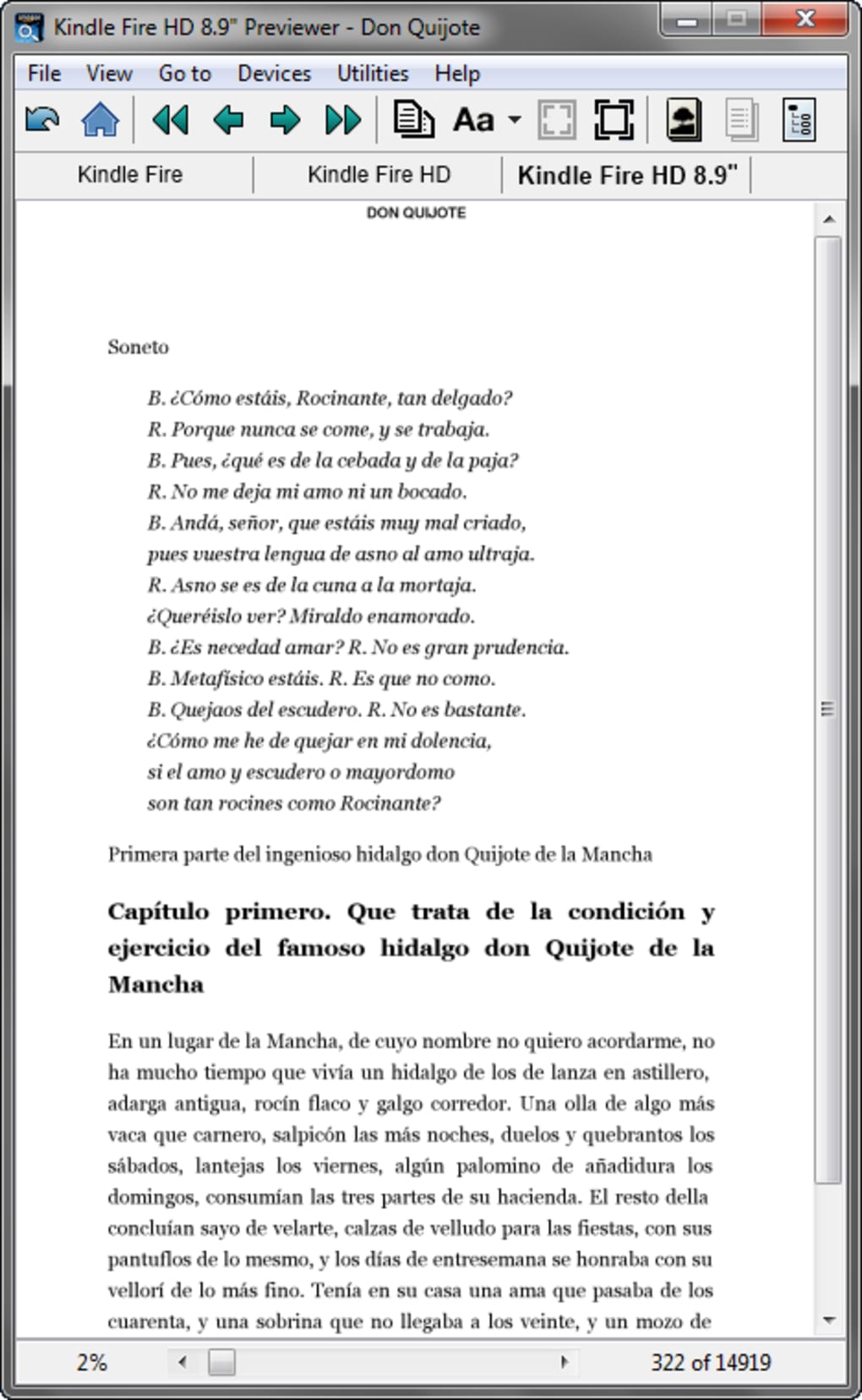
The beauty of Kindle Previewer lies in its simplicity. The installation process is straightforward, and the user interface is intuitive, even for those with limited technical experience. Once installed, users can seamlessly upload their ebook files (typically in .mobi or .azw format) and instantly view a preview of how the content will render on a Kindle e-reader. This immediate feedback loop is critical for identifying and correcting potential formatting issues before the book goes live. The application supports a range of file formats, ensuring compatibility with various ebook creation methods and software. Authors can upload their work directly from their computer, eliminating the need for complex file conversion processes or intermediary steps.

Exploring the Features: Fine-Tuning Your eBook’s Appearance
Kindle Previewer goes beyond basic preview functionality, offering several tools to aid in refining the ebook’s visual presentation. While the core functionality is free, some advanced features might require additional tools or services, potentially adding a small cost to the overall publishing process. These supplementary tools often cater to more sophisticated formatting needs or allow for more granular control over aspects like font sizes, margins, and image placement.
However, the core application provides a sufficient level of control for most authors. Users can easily zoom in and out, navigate through pages, and examine the text layout, image placement, and overall visual appeal to ensure everything aligns with their vision. This allows authors to address any visual inconsistencies or errors that may have inadvertently crept in during the ebook creation phase. The preview closely mimics the Kindle reading experience, providing an accurate representation of how the final product will appear to readers.
Ensuring Consistent Formatting Across Devices
While Kindle Previewer excels at displaying how an ebook will appear on a Kindle, it’s crucial to remember that formatting might differ slightly across other devices, including tablets or smartphones. The application is optimized for Kindle’s proprietary e-reader software and display characteristics. Therefore, while the preview provides a reliable representation for Kindle users, authors should also consider testing the ebook on other e-readers or using additional tools that support cross-platform compatibility testing. This ensures the overall reading experience remains consistent and enjoyable, regardless of the device used. The focus on Kindle formatting is intentional, aiming to provide the most accurate representation for the primary target audience.
Advantages and Limitations: A Balanced Perspective
Kindle Previewer offers several distinct advantages, significantly streamlining the ebook publishing process. Its ease of use and intuitive interface make it accessible to a broad range of authors, regardless of their technical skills. The ability to preview the final product before publication eliminates costly and time-consuming revisions after the ebook is live. The accuracy of the preview in replicating the Kindle reading experience provides authors with a high level of confidence in the final product’s visual presentation.
However, Kindle Previewer also has some limitations. The somewhat basic interface, while user-friendly, might lack the advanced features found in professional layout software. Some authors might find the limited customization options restrictive. Furthermore, the application’s exclusive focus on Kindle devices means authors seeking cross-platform compatibility must supplement it with additional tools. The lack of certain features might necessitate using other applications for comprehensive ebook design and formatting.
Alternative Tools and Resources for Enhanced eBook Formatting
While Kindle Previewer serves as a powerful tool for Kindle-specific formatting, authors might also benefit from exploring complementary software and resources. Dedicated ebook creation tools often provide a broader range of formatting options, detailed layout customization, and support for multiple output formats. These programs can significantly enhance the overall quality and consistency of the ebook across different devices. Professional typesetting software can ensure accurate text flow and consistent font rendering, further improving the readability of the final product.
Furthermore, online resources and tutorials offer valuable guidance on best practices for ebook formatting and design. These resources cover topics like appropriate font choices, image optimization techniques, and efficient navigation design. Utilizing these resources in conjunction with Kindle Previewer can help authors create ebooks that are both visually appealing and easy to navigate. Authors can leverage the strengths of various tools and resources to achieve professional results.
Beyond the Preview: A Holistic Approach to eBook Publication
Kindle Previewer plays a vital role in the ebook publishing process, but it’s just one piece of the puzzle. Authors should consider a holistic approach that encompasses various stages, from initial manuscript creation to final publication and promotion. Effective planning and organization are paramount, ensuring a smooth and efficient workflow. Careful attention to detail throughout the process, including writing, editing, formatting, cover design, and marketing, contributes significantly to the success of an ebook. By combining Kindle Previewer with a strategic approach to publishing, authors can maximize their chances of creating a successful and well-received ebook.
Furthermore, authors should not solely rely on automated tools for all formatting needs. Human review remains essential in detecting nuances and ensuring the book’s presentation meets the highest standards. Thorough proofreading and quality assurance are crucial stages to catch potential errors overlooked by software.
The success of an ebook depends on various factors, including the quality of the writing, compelling storytelling, professional presentation, and effective marketing. Authors who combine thoughtful planning, meticulous execution, and effective utilization of tools like Kindle Previewer will improve the likelihood of producing an ebook that is both aesthetically pleasing and successful in the marketplace.
Conclusion: Mastering the Kindle Previewer for Success
Kindle Previewer provides an invaluable service to authors and publishers. Its user-friendly interface and accurate preview of Kindle ebook rendering makes it an indispensable tool for ensuring a high-quality reading experience. While it has its limitations, primarily its focus on Kindle devices and somewhat basic interface, these can be easily mitigated by using complementary software and resources. By strategically integrating Kindle Previewer into their overall ebook publishing workflow, authors can ensure their work is presented professionally, enhancing their chances of success in the competitive world of ebook publishing. Mastering this tool, combined with a broader understanding of ebook publishing best practices, empowers authors to create ebooks that stand out for their quality and appeal to a wider audience.
File Information
- License: “Free”
- Latest update: “June 11, 2025”
- Platform: “Windows”
- OS: “Windows 8”
- Language: “English”
- Downloads: “40.5K”
- Size: “367.15 MB”


